
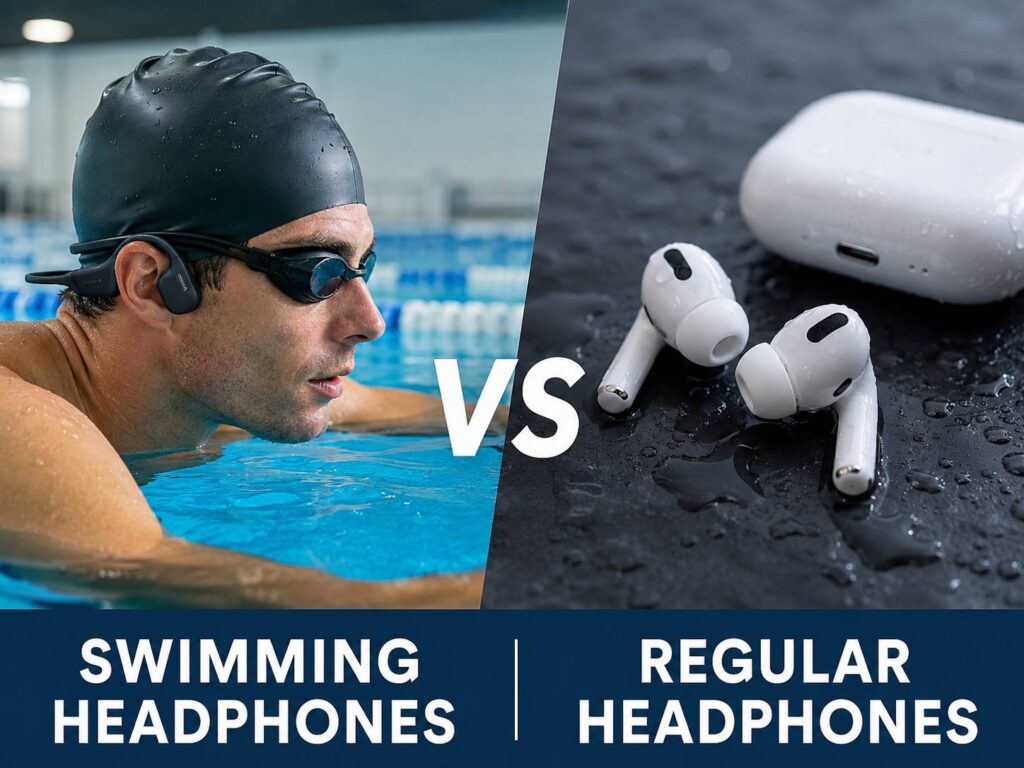
Swimming with music sounds simple. Put on your headphones, start a playlist, and enter the pool. In practice, regular earbuds rarely handle underwater use well.
Swimming headphones use a different design. They can resist full submersion, stay secure during turns, and play audio without relying on a steady Bluetooth connection. Regular headphones focus more on sound quality, phone calls, streaming, and daily comfort.
So, which type should you buy? This guide compares swimming headphones vs regular headphones in real-world use. It covers waterproof ratings, sound, fit, Bluetooth limits, battery life, safety, maintenance, and common problems swimmers face.
What Makes Swimming Headphones Different?
Swimming headphones are built for repeated use in water. Most models use sealed housings, physical buttons, firm headbands, and internal music storage.
Regular sports earbuds often include sweat or splash protection. Still, that does not mean they can survive a full swimming session. Sweat resistance protects headphones during running or gym workouts. Pool use places the entire device underwater for long periods.
True swimming headphones should list clear limits for:
- Maximum water depth
- Maximum underwater time
- Pool water use
- Freshwater use
- Saltwater use
- Required cleaning after swimming
A vague waterproof claim is not enough. Check whether the manufacturer clearly approves the product for swimming.
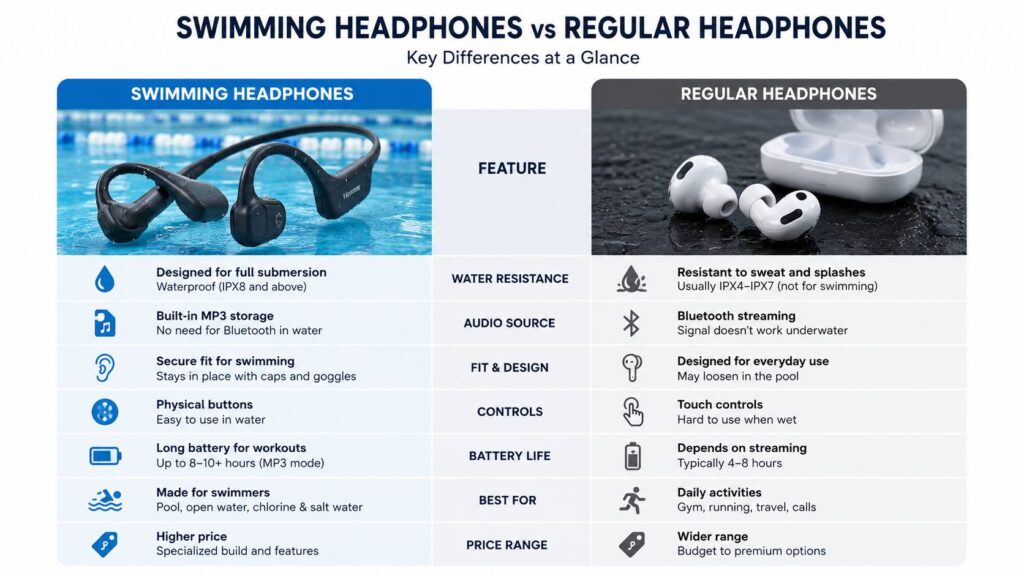
Swimming Headphones vs Regular Headphones at a Glance
The biggest difference is not sound quality. It is how each type handles water and audio playback.
Swimming headphones usually offer:
- Full submersion protection
- Built-in MP3 storage
- Physical buttons
- A secure wraparound fit
- Pool-friendly materials
- Simple controls
Regular headphones usually offer:
- Bluetooth streaming
- Better call quality
- Active noise cancellation
- Touch controls
- Voice assistants
- Richer sound on dry land
For daily use, regular headphones are easier to live with. For lap swimming, dedicated swimming headphones make far more sense.
Why Regular Bluetooth Headphones Fail Underwater
Bluetooth works well through air. Water creates a much bigger problem.
Once your head goes underwater, the signal between your phone and headphones weakens almost at once. Audio may stutter, pause, or disappear completely. Placing your phone close to the pool does not fix the issue.
A smartwatch can reduce the distance between the source and the headphones. Yet the connection can still drop each time both devices pass under the surface.
For that reason, most good swimming headphones include internal storage. You copy music files onto the headset and play them directly. No live wireless connection is needed.
Some products still include Bluetooth mode. This feature works well before swimming, during gym sessions, or while running. Once you enter the water, you switch to MP3 mode.
Waterproof Ratings Can Be Misleading
Many shoppers see an IP rating and assume the headphones are safe for swimming. That assumption can ruin an expensive pair.
An IPX4 rating usually covers splashes and sweat. IPX5 or IPX6 models can resist stronger water jets. IPX7 products can often survive temporary immersion under test conditions. IPX8 models are tested for deeper or longer submersion based on the manufacturer’s stated limits.
Still, the rating alone does not tell the full story.
The manufacturer may exclude:
- Swimming
- Diving
- Showering
- Saltwater
- Chlorinated water
- High-pressure water
- Hot water
- Steam
So, read the approved-use section before buying. A pair of earbuds can carry a strong water-resistance rating and still lack swimming approval.
Bone Conduction Swimming Headphones
Bone conduction headphones rest against the area near your cheekbones. Instead of placing a speaker inside the ear canal, they send vibrations through the bones around the ear.
This design has become popular with swimmers. The wraparound frame usually stays stable during laps, flip turns, and push-offs.
Bone conduction models offer several practical benefits:
- The ear canal stays open
- Swim earplugs can still be used
- The headset works well under a cap
- Voice tracks remain clear
- The frame feels secure during fast movement
At the same time, bone conduction sound is different from normal earbud sound. Bass often feels weaker on land. At high volume, some users notice a mild buzzing sensation against the skin.
Underwater, the sound can feel fuller. Swim earplugs often make it clearer too.
My honest opinion is that bone conduction suits most lap swimmers. It is not the best choice for deep bass, yet it works reliably and stays in place.
In-Ear Swimming Headphones
In-ear swimming headphones use sealed ear tips designed for water. They can offer stronger bass and better sound isolation than bone conduction models.
Still, the fit needs to be nearly perfect.
A loose ear tip can let water enter the ear canal. Once that happens, the sound may become dull or uneven. One side may sound quieter than the other until the water drains.
In-ear swim headphones work best for people who prefer:
- Stronger bass
- A more familiar earbud feel
- Better sound isolation
- Less vibration against the cheekbones
They can feel uncomfortable during long sessions, especially for swimmers who dislike pressure inside the ears. Ear-tip size matters too. A poor seal can ruin both comfort and sound.
For short pool workouts, they can work very well. For long lap sessions, many people find bone conduction easier to wear.
Sound Quality in and Out of the Water
Regular headphones almost always sound better on dry land. They often have larger drivers, stronger bass, better tuning, and active noise cancellation.
Swimming headphones focus on reliability. Their main job is to keep playing in water.
Underwater sound can change in several ways:
- Bass may feel stronger
- Spoken audio may sound less sharp
- Water around the ears can alter balance
- A swim cap can press the headset closer
- Earplugs can improve bone conduction sound
Do not expect studio-level audio in the pool. Music remains clear enough for training, pacing, and motivation, but detail is not the main strength.
In my experience, a stable track with average sound feels better than premium audio that drops out every few seconds.
Fit Matters More Than Weight
A lightweight headset can still feel awkward if the frame clashes with your goggles or swim cap.
Before buying, check the headband shape and control placement. Some frames sit high on the back of the head. Others sit closer to the neck.
A practical fitting order is:
- Place the swimming headphones on your head.
- Put the goggle strap in position.
- Check that the strap does not press the controls.
- Add the swim cap.
- Turn your head from side to side.
- Test the fit during a gentle push-off.
At first, the setup can feel crowded. After a few sessions, most swimmers find a placement that works.
Thick caps can create more pressure. Large goggle straps can push the headset out of position. A quick dry test can prevent a frustrating pool session.
Built-In Storage and Music Files
Most swimming headphones use internal storage. Common capacities range from a few gigabytes to much more.
Even a small amount of storage can hold many hours of MP3 audio. So, storage size should not be the first buying factor.
File support matters more. Check whether the headset accepts:
- MP3
- AAC
- WAV
- WMA
- FLAC
Streaming service downloads often use protected formats. That means you usually cannot drag downloaded Spotify or Apple Music tracks onto a basic swim player.
Instead, use audio files that you own. Podcasts, audiobooks, and downloaded training tracks can work well too.
For swimmers who save training ideas, drills, or pool plans as screenshots, this pool app that turns screenshot clutter into searchable collections you can use again can make those saved notes easier to organize before a session.
Playlist Organization Can Be Annoying
File management is one of the least polished parts of many swimming headphones.
Some models sort tracks by filename. Others use folder order or the date files were copied. Album information does not always control playback.
That can create odd track sequences.
A simple naming system works well:
- 01 Warm-Up
- 02 Technique Set
- 03 Main Workout
- 04 Recovery
- 05 Cool-Down
Next, place each workout in a separate folder. This makes it easier to switch between music, podcasts, and coaching tracks.
Test the order before entering the pool. Fixing a playlist with wet hands is not fun.
Physical Buttons Beat Touch Controls
Touch controls work well on dry earbuds. In water, they often become unreliable.
Splashes can trigger accidental taps. Wet fingers may not register at all. A swim cap can press against the control surface too.
Swimming headphones usually use physical buttons for:
- Play and pause
- Volume
- Track changes
- Folder changes
- Bluetooth mode
- MP3 mode
Raised buttons are easier to find without looking. Still, small controls can feel confusing during the first few sessions.
Learn the button layout at home. Then practice changing volume and tracks with your eyes closed.
Battery Life for Swimming
Swimming headphones often provide several hours of local playback. That is enough for many pool sessions before charging.
Bluetooth mode may use power differently from MP3 mode. Volume level can affect battery life too.
Before a longer session:
- Charge the headset fully
- Check that the cable connects correctly
- Confirm the battery indicator
- Start playback before entering the pool
Low-battery voice alerts can be difficult to hear in water. A regular charging routine prevents surprises.
Also, never charge wet headphones. Water on charging contacts can cause corrosion and connection problems.
Common Problems Swimmers Encounter
Even good swimming headphones can have a few irritating issues.
Muffled sound
Water trapped near the ear can reduce clarity. Remove the headset, clear the water, and refit it.
One side sounds quieter
This often happens with in-ear models. A broken seal or trapped water may affect one channel.
Music plays in the wrong order
Rename files with numbers and sort them into folders.
Buttons feel hard to use
Practice on land and learn the control positions before swimming.
The headset moves during flip turns
Adjust the goggle strap and cap placement. A tighter frame may be needed.
Charging does not start
Dry the contacts fully. Then clean away chlorine or salt residue with a soft cloth.
These problems are common, but most have simple fixes.
Can You Swim With AirPods or Regular Earbuds?
Regular wireless earbuds should stay out of the pool unless the manufacturer clearly approves swimming.
Sweat resistance does not mean full waterproofing. A short accidental drop is different from repeated underwater exposure.
Pool chemicals can affect seals and metal contacts. Water pressure can enter speaker openings. Charging wet earbuds can create more damage.
A waterproof phone case does not solve the Bluetooth issue either. Once the headphones move underwater, the signal can still fail.
The safer choice is simple. Use a dedicated pair of waterproof swimming headphones.
How to Clean Swimming Headphones
Rinse the headset with clean fresh water after every pool session. This removes chlorine, salt, sunscreen, and other residue.
Then follow these steps:
- Shake off excess water gently.
- Wipe the headset with a soft cloth.
- Remove detachable ear tips.
- Clean the tips separately.
- Leave all parts to dry at room temperature.
- Keep charging contacts exposed to air.
- Charge only after everything is dry.
Avoid hair dryers, heaters, compressed air, and strong cleaning products. Heat can damage batteries and waterproof seals.
Saltwater use needs extra care. Check the manufacturer’s instructions, since some models need a longer freshwater rinse.
Safe Listening During Swimming
Water changes the way sound feels. A comfortable volume on land can seem different underwater.
Start at a low level. Then increase it only enough to hear the audio clearly.
Keep the sound moderate during long sessions. Stop using the headphones if you notice ringing, pressure, pain, or dull hearing after swimming.
Stay aware of:
- Lifeguard instructions
- Other swimmers
- Lane changes
- Boats
- Open-water hazards
- Emergency signals
Bone conduction models leave the ear canal open. Still, loud audio can reduce awareness. Swim earplugs can reduce it further.
Safety matters more than finishing a playlist.
Which Type Should You Buy?
Choose swimming headphones if you train in a pool, swim in open water, or want music during aqua fitness.
Bone conduction models are a strong choice for most swimmers. They stay secure, work well with earplugs, and reduce the need for a perfect ear seal.
Choose sealed in-ear swim headphones if bass and isolation matter more. Take extra time to find the right ear-tip size.
Stick with regular headphones for:
- Running
- Gym workouts
- Commuting
- Phone calls
- Streaming
- Office use
- Travel
Trying to use one pair for every activity sounds convenient. In reality, a dedicated swim headset works better and protects your regular earbuds from unnecessary damage.
Final Verdict
Swimming headphones and regular headphones solve different problems.
Regular headphones offer better sound, easier streaming, stronger microphones, and more smart features. Swimming headphones focus on underwater durability, stable fit, physical controls, and local playback.
For frequent pool use, buy a model with clear swimming approval, built-in storage, and a secure frame. Check the tested depth, supported water type, battery life, and file formats before ordering.
Bone conduction headphones offer the best all-round choice for many swimmers. In-ear swim models can provide fuller sound, but their fit needs more care.
Most importantly, do not rely on a high IP rating alone. Read the approved-use details. A true swimming headset will state exactly where and how it can be used.