Screenshots feel useful the second you take them. You save a recipe, a product, a travel idea, a quote, a restaurant, or a post you plan to read later. Then the camera roll swallows it. A few days later, that helpful screenshot sits between pet photos, receipts, memes, and random images you no longer remember.
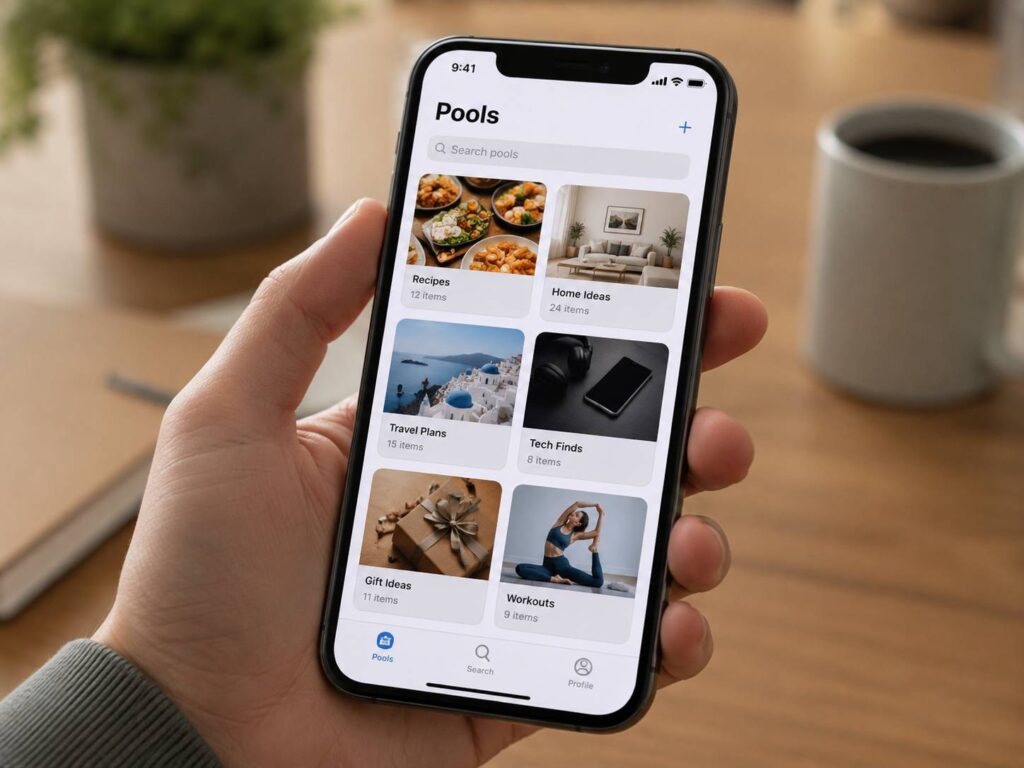
Pool wants to fix that everyday mess. The app turns screenshots into organized collections called pools, so saved ideas do not just sit there and fade into the background. Instead of asking users to build folders by hand, Pool reads the content, groups related screenshots, and makes them easier to find later.
That idea feels simple, but it solves a real problem. People no longer save only web pages. They save ideas from apps, chats, social feeds, videos, maps, stores, and product pages. Screenshots became the new bookmark button, yet most phones still treat them like normal photos.
Why Screenshots Became So Hard to Manage
A screenshot is a quick way to remember something. The trouble starts after the capture. A screenshot saves the visual moment, but it often loses the useful context around it.
A product screenshot may not show the store page. A recipe screenshot may miss the creator’s notes. A travel screenshot may not show the full location. A quote may sit in the camera roll with no source, no tag, and no reminder.
So the gallery becomes a weak search tool. You scroll. You zoom. You guess. Then you give up.
Pool fits that gap. It acts more like an AI screenshot organizer than a basic photo album. It helps turn saved images into something closer to a personal search tool. The official Pool website presents the app as a place to save screenshots, organize them into pools, and share collections with other people.
What Pool Does Differently
Pool focuses on screenshots first. That gives it a clearer purpose than a broad notes app or a standard photo manager.
The app can organize screenshots into pools, sort saved content, search through items, and help connect screenshots to the things they came from. It works well for common saved items such as recipes, products, places, podcasts, articles, and visual ideas.
That matters. A screenshot of a chair should not sit as a flat image forever. It belongs in a home ideas pool. A screenshot of a dinner recipe should sit with other meals. A screenshot of a hotel or cafe should fit into a trip plan.
Sharing gives Pool another useful angle. Couples can collect home ideas in one place. Friends can plan a trip without sending screenshots across ten chat threads. Roommates can save furniture options, grocery ideas, or decor picks without losing them in messages.
The Best Ways to Use Pool
Pool fits people who save a lot and rarely return to what they saved. It works best for users who already treat screenshots as a personal memory bank.
Useful Pool collections can include:
- Dinner recipes from social apps
- Products to compare before buying
- Gift ideas and wishlists
- Home design inspiration
- Travel plans and places to visit
- Workout routines
- Books, podcasts, and articles
- Outfit ideas
- Quotes and notes
- Work references and app ideas
The real benefit is retrieval. A screenshot only has value once you can find it again. Pool gives saved moments a better chance of turning into action.
Why Pool Feels Better Than Manual Albums
Manual albums work if you sort screenshots every day. If you save fast, move on, and forget the image exists, they do not.
Pool matches the real habit better. Take the screenshot first. Let the app help with the sorting later.
That flow feels natural. It matches how people already use phones. Stopping to open a notes app, paste a link, add tags, and write extra context takes far longer. A screenshot takes one second.
Pool keeps that speed, then adds structure after the capture. For many users, that makes it more useful than a plain camera roll and less demanding than a classic bookmarking app.
This shift connects with a wider trend in apps. Tools now try to turn messy inputs into useful actions. DoorDash is testing a similar idea in food ordering, where prompts, photos, and recipe links can help users find meals and groceries faster. You can see that trend in this related article about DoorDash Ask AI and how it lets users order food and groceries with prompts, photos, and recipe links.
The Privacy Question Matters
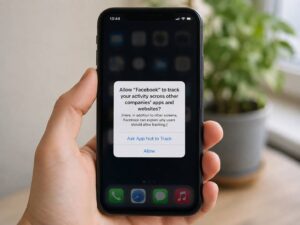
Pool handles personal content by nature. Screenshots can include messages, faces, names, addresses, receipts, calendars, payment pages, private photos, work notes, and health details.
That makes privacy a serious part of the story. A screenshot organizer needs access to personal content to work well. Still, users should think carefully before giving broad photo access to any app.
My view is simple. Pool looks useful, but users should start with limited access where possible. Test it with screenshots you feel comfortable sharing with an online service. Keep passports, banking screens, legal papers, medical records, and private work files out of it.
A screenshot app can save time. It should not become a place where every sensitive part of your life lands by accident.
Pool Points to a Bigger Change
Pool shows where personal organization is heading. Search is no longer only about typed keywords. It is becoming more visual and more personal.
People now save ideas as images. Later, they do not always remember the exact words. A search like “blue chair from Instagram” or “pasta recipe with lemon” feels more useful than scrolling through hundreds of thumbnails.
AI can help here. It can read text inside images, detect categories, understand rough meaning, and group related items. That turns a screenshot folder into something closer to a visual search engine.
For users, the value is clear. Less scrolling. Less forgetting. More saved ideas that become useful later.
Who Should Try Pool
Pool makes sense for iPhone users who take screenshots every day and feel buried by them. It suits people who plan trips, shop from social apps, collect design ideas, save recipes, or keep visual notes.
It works for people who dislike complex systems too. You do not need a perfect folder structure to start. The best version of Pool feels like a cleaner camera roll with memory, search, and context added.
It may not suit users who take only a few screenshots each month. It may also feel too broad for people who keep sensitive documents inside their photo library and do not want another service processing them.
What Pool Still Needs to Prove
Pool has a strong idea, but the app must feel reliable day after day. Screenshot organization only works once search feels fast, categories make sense, links point to the right place, and users do not get stuck cleaning up mistakes.
Trust matters just as much. Users will not give deep photo access to a tool that feels unclear or careless with data. Pool needs simple controls, clear permissions, stable performance, and plain privacy choices.
My opinion: the concept has real value, but Pool should stay simple. The best screenshot manager should not feel like another inbox. It should quietly help users find what they saved and get back to what they were doing.
Why Pool Could Become a Daily Habit
Pool works since it starts with something people already do. They already take screenshots. They already use them as reminders. They already lose them.
The app does not ask users to change much. It gives structure to a messy habit and turns saved images into collections with real purpose.
That is the main reason Pool stands out. It treats screenshots as unfinished tasks, not just images. A product screenshot becomes a buying decision. A recipe becomes dinner. A travel post becomes a plan. A design idea becomes part of a room.
For anyone with thousands of screenshots sitting in the camera roll, that shift feels practical. Pool turns screenshot clutter into searchable collections that people can use again.