
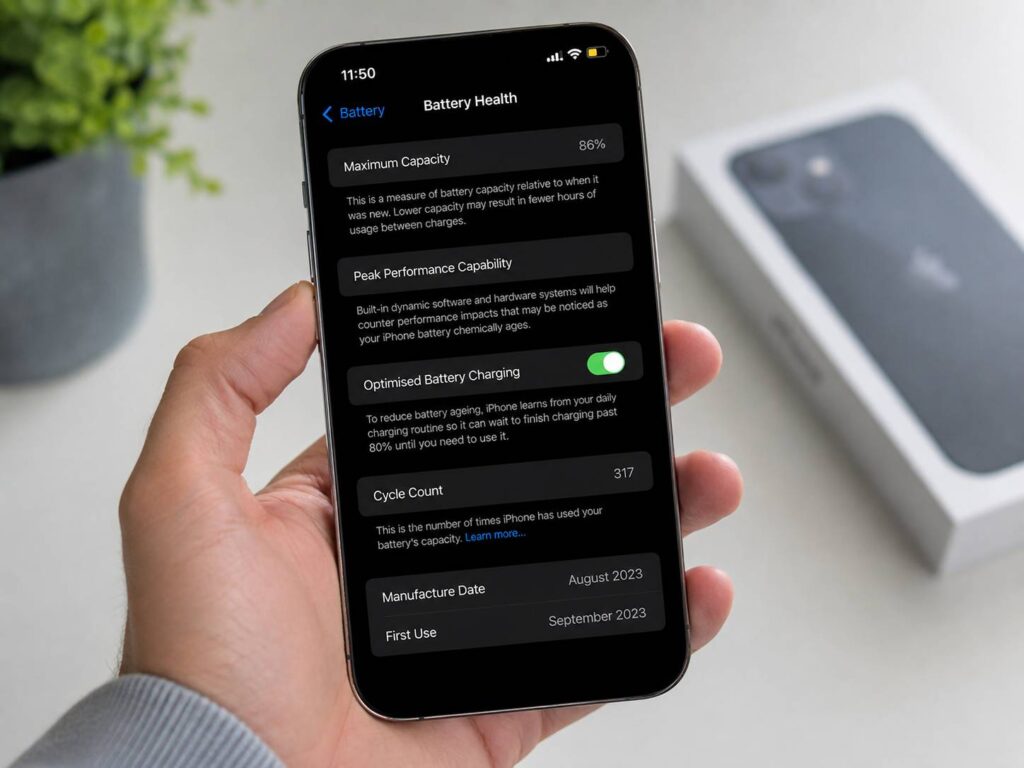
Checking iPhone Battery Health can become strangely addictive. You open Settings, see 92%, then check again a few weeks later and discover it has dropped to 90%. Suddenly, that tiny number feels much more serious than it probably is.
The good news is that a lower Battery Health percentage does not mean your iPhone is about to fail. Lithium-ion batteries wear down over time. That is normal, and Apple designs the iPhone around this gradual ageing process.
Still, Battery Health is only one part of the story. Cycle count, charging habits, heat, daily runtime, and unexpected shutdowns can tell you much more about whether a battery needs replacing.
This guide explains what the numbers mean, how many cycles an iPhone battery can handle, what happens near 80% Battery Health, and when paying for a new battery actually makes sense.
What Does iPhone Battery Health Mean?
Battery Health shows how much charge your battery can store compared with when it was new.
A fresh battery normally starts close to 100% Maximum Capacity. Over time, that figure falls as the battery chemically ages.
For example, an iPhone showing 88% Battery Health has lost some of the capacity it had when new. That does not mean the phone will last exactly 12% less on every charge. Screen brightness, apps, mobile signal, temperature, background activity, and processor load all affect real battery life.
Think of Maximum Capacity as a useful estimate rather than an exact prediction of how many hours you have left.
You can check it in Settings.
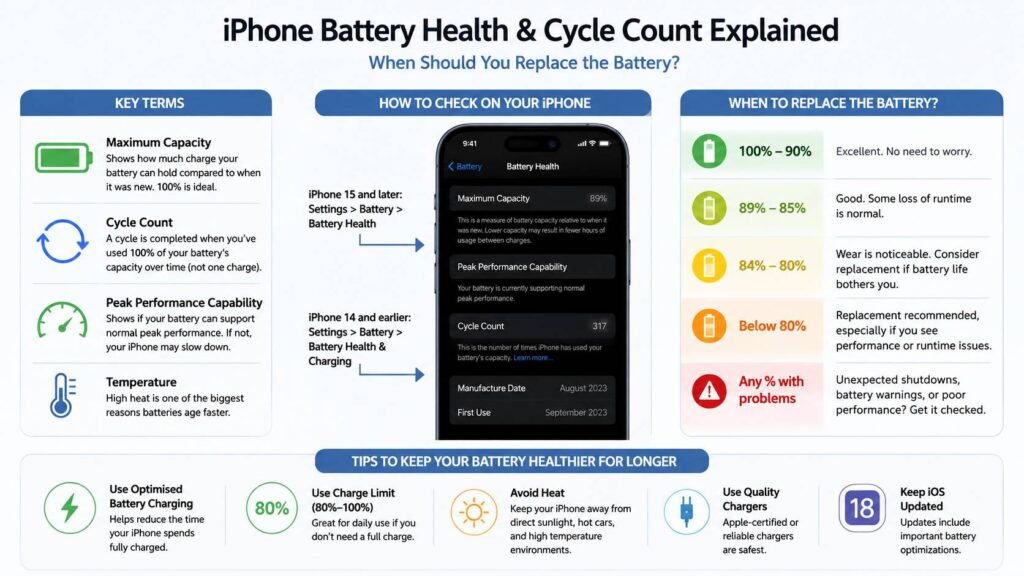
For iPhone 15 models and newer:
Settings > Battery > Battery Health
For iPhone 14 models and older:
Settings > Battery > Battery Health & Charging
Newer iPhones provide more battery details on this page, including the cycle count.
What Is an iPhone Battery Cycle?
A battery cycle is not the same thing as plugging your phone into a charger.
One complete cycle happens after you use a total amount equal to 100% of the battery’s capacity.
For example:
- You use 60% of your battery today.
- You charge the phone back up.
- Tomorrow, you use another 40%.
- The combined usage adds up to one complete battery cycle.
So, charging your iPhone several times per day does not automatically create several cycles.
This is useful to know if you prefer short top-ups. Plugging the phone in at 60% and removing it at 85% is not the same as using a full cycle.
Cycle count measures accumulated battery use over time.
How Many Battery Cycles Can an iPhone Handle?
Apple uses different battery targets for older and newer models.
For iPhone 14 and earlier, Apple designed the battery to retain around 80% of its original capacity after 500 complete charge cycles under ideal conditions.
For iPhone 15 and later, that target increased to 1,000 complete cycles under ideal conditions.
That is a large difference, especially for people who keep an iPhone for four or five years.
Reaching 500 or 1,000 cycles does not mean your phone stops working. The figure is a design benchmark, not a shutdown counter.
Some batteries stay above 80% beyond that point. Others lose capacity more quickly, especially after repeated heat exposure.
Your own usage matters more than reaching an exact cycle number.
Is 95% Battery Health Good?
Yes. There is normally no reason to think about replacing a battery at 95%.
A small drop from 100% is normal. In fact, some iPhones stay at 100% for many months, then appear to lose several percentage points over a shorter period.
That does not automatically indicate sudden damage. Battery Health is an estimate, and the displayed value can change as iOS updates its assessment of the battery.
At 95%, most users will notice little difference from a new battery.
Is 90% Battery Health Still Good?
A battery at 90% Maximum Capacity is still in good condition for normal use.
You may notice slightly shorter battery life than when the phone was new. The difference often remains minor.
For someone who finishes the day with 30% remaining, losing a little battery capacity probably changes nothing.
A heavier user may notice the loss sooner. Gaming, 5G, video recording, navigation, hotspot use, and high screen brightness can make reduced capacity easier to notice.
Even then, replacing a battery at 90% rarely makes sense unless another problem is present.
Is 85% iPhone Battery Health Bad?
This is where things become more personal.
An iPhone at 85% is clearly more worn than a new one, yet many phones remain perfectly usable at this level.
The deciding factor is daily runtime.
You may start thinking about battery service if:
- You charge again before dinner.
- Navigation drains the battery much faster than it used to.
- Camera use causes large percentage drops.
- Heavy apps make the phone shut down unexpectedly.
- Low Power Mode has become part of your daily routine.
- You carry a power bank everywhere.
If the phone still gets through your day, keep using it.
There is no prize for replacing a working battery early.
What Happens at 80% Battery Health?
The 80% figure gets a lot of attention, and that can make it sound like a hard deadline.
It is not.
An iPhone does not suddenly become unusable at 80%. Calls still work. Apps still run. Charging still works.
The difference is that Apple uses 80% as an important battery-service benchmark.
At this point, you may notice shorter runtime more often. Heavy workloads can put greater strain on an ageing battery too.
For many users, this is the range where replacing the battery starts to make practical sense.
Still, look at how the phone behaves.
A device at 79% that lasts through your entire day is less urgent than one at 83% that repeatedly dies during navigation.
When Should You Replace an iPhone Battery?
There is no perfect percentage for every person.
In practice, battery replacement makes the most sense once degraded battery life starts interfering with normal use.
Watch for these signs:
- Maximum Capacity is near or below 80%.
- iOS reports that the battery is degraded.
- Your phone no longer lasts through a normal day.
- The iPhone shuts down unexpectedly.
- Battery percentage drops sharply under load.
- You need to charge far more often than before.
- Performance feels less consistent during heavy use.
- You plan to keep the phone for another year or two.
Sometimes battery drain comes from something other than battery wear. Background activity, poor network signal, software bugs, location services, or an app can increase power use.
Drain can appear even when the phone is not actively being used. If that sounds familiar, this guide on why your phone battery drains while turned off explains several causes that are easy to miss.
So, check the wider picture before paying for a battery replacement.
Battery Health vs Cycle Count: Which One Matters More?
Both numbers are useful, but neither should make the decision by itself.
Battery Health tells you how much capacity remains.
Cycle count tells you how much accumulated battery use the phone has seen.
Your daily experience tells you whether either number matters yet.
Imagine two phones.
iPhone A
- 86% Maximum Capacity
- High cycle count
- Lasts all day
- No shutdowns
iPhone B
- 84% Maximum Capacity
- Lower cycle count
- Needs charging every afternoon
- Used heavily for work and navigation
The second phone has a stronger case for battery replacement.
That is why focusing on one number can be misleading.
How to Check iPhone Cycle Count
On iPhone 15 and newer models, Apple shows cycle count directly in Battery settings.
Open:
Settings > Battery > Battery Health
Depending on the model and iOS version, you can see information such as:
- Maximum Capacity
- Cycle Count
- Manufacture Date
- First Use Date
This makes it much easier to understand how heavily a newer iPhone battery has been used.
Older iPhones do not show cycle count in the same simple Battery Health screen.
That is not a major problem. Maximum Capacity, battery warnings, real runtime, and shutdown behaviour still give you enough information to make a sensible replacement decision.
Why Does iPhone Battery Health Drop So Fast?
Battery Health does not fall at a perfectly steady rate.
You might see 100% for six months, then 97% a few months later. Another iPhone may drop slowly from the beginning.
Several factors affect battery ageing:
- Heat
- Charging habits
- Heavy workloads
- Time spent at a very high charge level
- Battery age
- Usage frequency
- Environmental conditions
Heat deserves extra attention.
A phone that spends hours in a hot car or mounted on a dashboard in direct sunlight can experience more battery stress than one used indoors.
So, two people can buy the same iPhone on the same day and end up with different Battery Health readings a year later.
Does Charging to 100% Damage the Battery?
Charging your iPhone to 100% is normal.
You do not need to unplug the charger the second it reaches full capacity.
Apple includes charging features designed to limit unnecessary battery stress. Optimized Battery Charging can delay charging beyond 80% until closer to the time you usually disconnect the phone.
This reduces the amount of time the battery spends sitting fully charged.
For most people, leaving that feature turned on is far easier than constantly watching the battery percentage.
There is little reason to treat 100% as a dangerous number.
Should You Use an 80% Charge Limit?
Recent iPhones give you more control over charging.
On supported models, you can set a lower charge limit instead of charging to 100% every time.
An 80% or 85% limit works well for people who:
- Work near a charger.
- Finish most days with plenty of battery remaining.
- Keep the phone connected to power for long periods.
- Plan to keep the same iPhone for several years.
Still, there is a trade-off.
You bought the battery to use it. If limiting charging to 80% means carrying a power bank everywhere, the setting becomes more annoying than useful.
For travel days, long drives, outdoor trips, and heavy camera use, charging to 100% is perfectly reasonable.
Battery care should fit around your life, not control it.
Does Overnight Charging Hurt iPhone Battery Health?
Overnight charging is not automatically bad for an iPhone.
Modern iPhones manage the charging process internally. Once the battery reaches the target level, the phone controls further charging rather than continuously forcing power into a full battery.
Optimized Battery Charging can reduce the time spent at 100% too.
So, there is no need to wake up at 3 a.m. just to unplug the phone.
A more practical concern is heat.
If your iPhone becomes very warm every night, check where and how you charge it. Avoid placing it under pillows, blankets, or other materials that trap heat.
Does Fast Charging Wear Out an iPhone Battery?
Fast charging can produce more heat, yet that does not mean you need to stop using it.
The iPhone manages charging speed as the battery fills. Charging usually slows as the battery approaches its upper limit.
A fast charger is useful when you need power quickly.
Try to avoid adding extra heat at the same time.
For example, fast charging on a desk in a cool room is very different from fast charging in direct sunlight during a summer afternoon.
If the phone gets unusually hot, giving it time to cool is sensible.
Does Wireless Charging Affect Battery Health?
Wireless charging is convenient, but it can generate more heat than a wired connection in some situations.
That does not mean wireless charging is bad.
Watch the phone’s temperature instead of worrying about the charging method itself.
A thick case, hot room, misaligned charging pad, or demanding app can add more heat during charging.
If your phone regularly feels very hot on a wireless charger, try removing the case or using a wired charger for a few days.
The goal is simple. Keep unnecessary heat down.
Can a New Battery Make an Old iPhone Feel Better?
Yes, especially when battery life is the main problem.
A fresh battery can turn an otherwise frustrating iPhone into a much easier phone to live with.
It can make sense when:
- Performance still feels fast.
- Storage is large enough.
- The cameras still meet your needs.
- The display is in good shape.
- The phone still gets the software support you need.
- Battery life is the main reason you are considering an upgrade.
Replacing a battery costs far less than replacing an entire iPhone.
That is one reason it makes sense to separate battery wear from the overall condition of the phone.
A weak battery does not automatically mean the device is finished.
When Is It Better to Replace the Phone Instead?
Battery replacement is less attractive once several problems appear at the same time.
For example:
- The display is badly damaged.
- Storage is constantly full.
- The charging port is unreliable.
- Cameras no longer meet your needs.
- Performance feels too slow.
- The phone has other expensive hardware faults.
- You need features available only on newer models.
At that point, putting money into a battery may not be the best use of your repair budget.
Yet if the phone works well apart from battery life, replacing only the battery can extend its useful life.
Quick iPhone Battery Health Guide
Here is a simple way to interpret the numbers.
100% to 90%
Keep using the phone. Battery service is rarely needed.
89% to 85%
Some loss of runtime is normal. Replacement usually depends on your daily use.
84% to 80%
Pay closer attention to real battery life. Heavy users may start finding a replacement worthwhile.
Below 80%
Battery service becomes easier to justify, especially if runtime has become frustrating.
Unexpected shutdowns at any percentage
Do not focus only on Maximum Capacity. Battery performance or another hardware issue may need attention.
How to Make an iPhone Battery Last Longer
You do not need complicated charging rules.
A few habits can help reduce avoidable wear:
- Keep Optimized Battery Charging turned on.
- Use a lower Charge Limit when it suits your routine.
- Avoid leaving the phone in a hot car.
- Keep it out of direct sunlight during charging.
- Remove a case if the phone becomes unusually hot.
- Keep iOS updated.
- Avoid worrying about every short charging session.
- Charge to 100% when you actually need the extra runtime.
Battery ageing cannot be stopped.
The best goal is to reduce unnecessary stress without making the phone harder to use.
So, When Should You Actually Replace the Battery?
For most people, around 80% Battery Health is a sensible point to start thinking seriously about replacement.
That does not make 80% a deadline.
Your phone may still work well below that number. Another iPhone can become irritating before it reaches 80%.
Look at three things together:
- Maximum Capacity
- Cycle count, where available
- Real daily battery life
Then pay attention to unexpected shutdowns, heavy battery drain, and how often you need a charger.
If the phone still lasts through your day, keep using it.
If you have started planning your entire routine around finding the next outlet, a fresh battery probably makes more sense than obsessing over another percentage point.