You switch your phone off with 70% battery left. The next morning, it shows 58%. Sometimes, it will not start until you connect a charger. That can feel strange. After all, a turned-off phone should not be doing anything.
In reality, a phone does not become completely inactive the moment the screen goes black. A few internal parts still receive a tiny amount of power. On top of that, an old battery, low temperatures, inaccurate charge readings, or a hardware fault can make the drop far more noticeable.
A small loss over several days is often normal. Still, losing a large part of the battery overnight needs attention. This guide explains why your phone battery drains when turned off, how to test it, and which fixes are most likely to help.
A Turned-Off Phone Still Uses a Small Amount of Power
Turning off your phone stops most normal activity. The display turns off, apps close, network connections stop, and the main processor enters a low-power state.
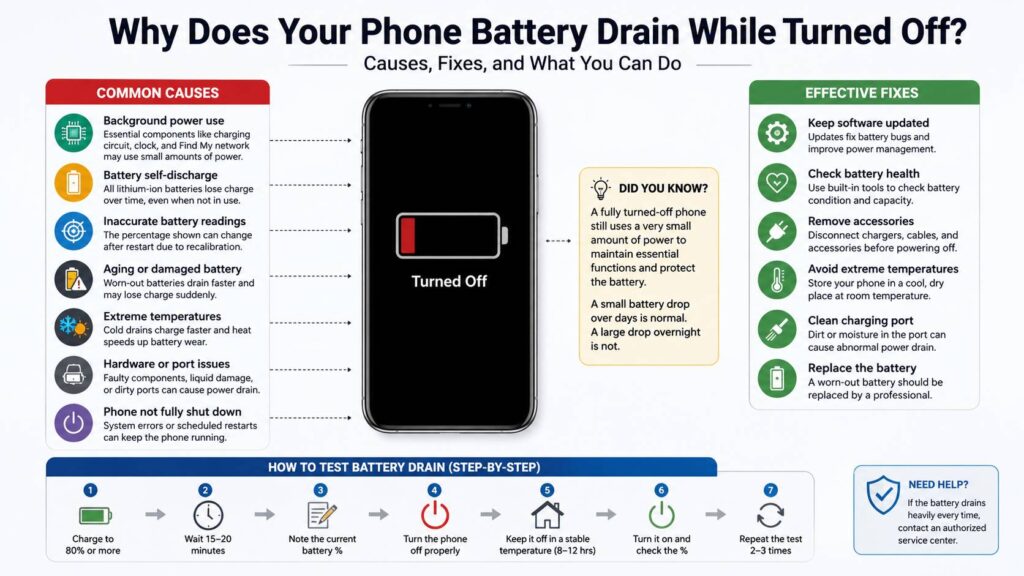
Still, the battery remains connected to several basic components. The phone needs power for its charging system, battery protection circuits, internal clock, and power button detection. These parts use very little energy, but the amount is not always zero.
Some modern phones keep selected security features active after shutdown. For example, certain iPhones can remain detectable through Apple’s Find My network for a limited period after being switched off. That feature relies on a small reserve of battery power.
For most users, this background use should cause only a tiny drop. Yet an older battery can make that small drain appear much larger.
Lithium-Ion Batteries Lose Charge Naturally
Every rechargeable battery loses some energy over time, even when it is not powering a device. This process is called self-discharge.
At first, you may not notice it. If a phone stays off for a week or two, the change becomes easier to see. The battery’s internal chemistry continues to shift slowly, and the phone’s low-power circuits add a little extra drain.
For that reason, a phone stored at 80% may not show the same number when you turn it on several days later.
Battery age makes a real difference here. As a lithium-ion battery gets older, it stores less energy and loses voltage more easily. So a small amount of real energy loss can create a larger percentage change on the screen.
In my experience, people often notice this issue first with an older spare phone. They charge it, place it in a drawer, and expect it to stay near the same level for months. In practice, an unused phone still needs occasional charging.
The Battery Percentage Can Change After Restarting
The battery number on your screen is an estimate. Your phone calculates it from voltage, temperature, battery age, recent use, and other measurements.
That estimate is not always perfect.
For example, your phone may show 64% before shutdown and 59% after startup. It does not always mean the battery used five full percentage points overnight. Instead, the phone may have corrected an inaccurate reading during the restart.
This often happens with worn batteries. Their voltage can rise and fall less predictably, so the phone has a harder time estimating the real amount of charge left.
Cold weather can create the same effect. The battery may struggle to deliver stable power, and the phone may report a lower percentage. After the device warms up, the number can change again.
So one unusual reading does not prove that something is broken. A repeated drop across several tests gives you a much clearer answer.
An Old Battery Can Drain Faster While the Phone Is Off
Battery wear is one of the most common causes of heavy shutdown drain.
As batteries age, they lose capacity. They can also develop higher internal resistance. That means the battery has more trouble delivering stable power when the phone starts.
You may notice one or more of these warning signs:
- The battery percentage falls in large jumps.
- The phone shuts down at 20%, 30%, or even 40%.
- Battery life changes sharply from one day to the next.
- The phone only starts after you connect a charger.
- The battery drains fast during normal use and shutdown.
- The phone becomes warm during light use.
- The rear cover begins to lift.
A swollen battery needs immediate action. Stop using and charging the phone. Do not press the cover back into place. Do not puncture the battery or place the device near heat.
At that point, take the phone to a trusted repair center. A swollen battery is not a software issue.
The Phone May Not Have Shut Down Properly
A black screen does not always mean the phone completed a full shutdown.
In some cases, the device freezes during the power-off process. It may enter a restart loop or stay stuck in a low-power state. The screen remains dark, but internal parts can keep running.
That type of fault can drain the battery much faster than a normal shutdown.
To reduce the chance of this happening, use the phone’s power menu. Do not simply hold the buttons until the screen goes dark. After you select Power Off, wait until the device stops vibrating, making sounds, or showing logos.
Next, disconnect all accessories. Remove USB cables, wired headphones, card readers, battery cases, and charging adapters. A damaged accessory can interfere with the phone’s power system.
Some Android phones have scheduled restart features too. If that setting is active, the phone may turn on during the night and begin normal background activity.
Heat and Cold Can Affect Battery Readings
Temperature has a strong effect on phone batteries.
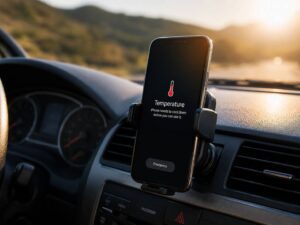
Cold conditions reduce the battery’s ability to release energy. So a phone left in a cold car, garage, or unheated room may show a much lower percentage when it starts.
Heat creates a different problem. High temperatures speed up battery wear and can cause permanent capacity loss. A phone left in direct sunlight or inside a hot vehicle can suffer damage, even when it is turned off.
For this reason, test the phone indoors at a stable room temperature. Let a hot or cold device return to normal temperature before you charge it or judge its battery level.
Do not place a cold phone on a radiator or use a hair dryer. Rapid heating can damage the battery and create condensation inside the device.
Outdoor gear faces similar storage and temperature concerns. Our Joolca HOTTAP Go guide covers another portable device where power use, heat, and storage conditions matter during travel and camping.
A Charging Port Fault Can Cause Power Loss
Sometimes, the battery itself is not the main problem. The charging port or another internal component can draw power after shutdown.
Common causes include:
- Dirt or lint inside the charging port
- Moisture or corrosion
- Bent charging contacts
- Liquid damage
- A faulty charging board
- A damaged battery connector
- A poor-quality replacement battery
- A failing power-management chip
A phone with an electrical fault may feel warm in one area after shutdown. That is not normal. A fully powered-off phone should slowly return to room temperature.
If the phone stays warm, stop repeated charging tests. A repair technician can measure the current draw and locate the faulty part.
How Much Battery Drain Is Normal?
There is no single percentage that applies to every phone. Battery size, device age, temperature, software design, and shutdown features all affect the result.
Still, a rough pattern can help.
A drop of one or two percentage points over several hours may come from normal self-discharge or a corrected battery reading. A loss of 20%, 30%, or more overnight is not normal for a healthy phone.
The key word is repeated. One test can mislead you. Two or three tests under the same conditions give you better evidence.
Personally, I would not worry about a tiny change after a single night. I would start testing more carefully once the phone loses around 10% or more during every shutdown.
How to Test Battery Drain While the Phone Is Off
Use a simple test so you can compare results fairly:
- Install any pending system updates.
- Charge the phone to at least 80%.
- Disconnect the charger.
- Leave the phone on for 15 minutes.
- Write down the battery percentage.
- Turn the phone off through the normal power menu.
- Remove all cables and accessories.
- Keep it indoors at a stable temperature.
- Leave it off for 8 to 12 hours.
- Turn it on and record the new percentage.
Then repeat the test on another night.
If the first test shows a large drop but the next two look normal, the battery gauge may have corrected itself. If every test shows heavy loss, the battery or internal hardware probably needs attention.
Fixes for a Phone Battery That Drains When Turned Off
Start with the easiest checks first.
Install the latest system update
Phone makers often release fixes for charging control, battery reporting, and power management. Install the latest stable update, then restart the phone.
An update will not stop natural self-discharge. Still, it can fix incorrect battery readings or shutdown problems.
Check battery health
On an iPhone, open Settings, select Battery, then Battery Health and Charging.
On many Android phones, open Settings and search for Battery Health, Battery Diagnostics, or Device Care. Samsung users can run a battery test through the Samsung Members app.
A Service, Weak, Poor, or Replace warning usually points to a worn battery.
Remove connected accessories
Disconnect chargers, USB adapters, wired headphones, hubs, and battery cases before shutdown.
Then repeat the overnight test. If the drain stops, one of the accessories or the charging port may be causing the problem.
Inspect the charging port
Use a bright light to check for lint, dirt, moisture, or corrosion.
Do not insert needles, pins, paper clips, or other metal objects. Metal tools can damage the contacts or cause a short circuit.
Test the phone at room temperature
Leave the phone indoors for several hours. Then charge it and repeat the shutdown test.
This step matters more than it seems. A cold battery can produce dramatic percentage changes without permanent damage.
Replace the battery
A new battery can fix heavy drain, sudden percentage jumps, early shutdowns, and poor startup performance.
Use a trusted repair shop or an approved service provider. Very cheap replacement batteries often have lower real capacity than the label claims.
How to Store a Phone You Rarely Use
Do not store a phone with an empty battery. A fully discharged battery can enter a deep-discharge state and stop accepting a normal charge.
For long storage, charge the phone to around 50% or 60%. Then turn it off and keep it in a cool, dry place.
Check it every few months. Recharge it if the battery level becomes low.
Avoid storing the phone at 100% for many months too. A partial charge places less stress on the battery during long storage.
When You Should Get the Phone Repaired
Book a repair inspection if:
- The phone loses a large amount of charge every night.
- It remains warm after shutdown.
- It shuts down with plenty of battery left.
- The percentage drops in sudden jumps.
- The battery has swollen.
- The charging port shows corrosion.
- A replacement battery did not fix the drain.
- The phone needs a charger before every startup.
A factory reset should not be your first step. Normal apps do not keep running after a complete shutdown. Battery wear, temperature, accessories, and hardware faults deserve attention first.
A small battery drop after shutdown is often normal. A large and repeated loss is not. In most cases, the cause is a worn battery, an inaccurate charge estimate, extreme temperature, an incomplete shutdown, or an internal electrical fault.
Test the phone more than once. Keep the conditions the same. Then act on the pattern instead of a single reading.