
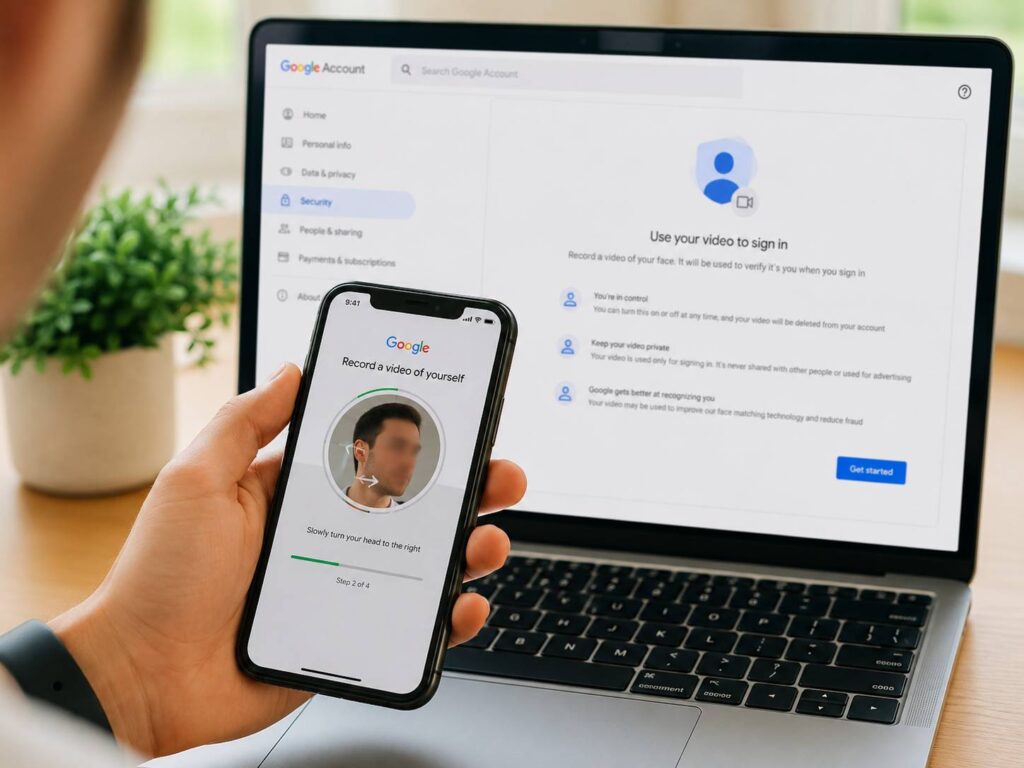
Google is adding a new way to recover access to a locked account. Eligible users can now record a short selfie video and save it as a future identity check.
At first, the idea sounds similar to Face Unlock on a phone. Still, Google selfie video sign-in works in a different way. It does not replace your password, passkey, or regular two-step verification method. Instead, it gives you another recovery option if you lose access to your usual devices.
For example, you could lose the phone that receives Google prompts. Your recovery email might no longer work, and your backup codes could be sitting in a drawer at home. In that situation, a previously recorded selfie video can help Google confirm that you own the account.
The feature brings clear benefits. At the same time, it asks users to trust Google with facial data. So, it is worth understanding how the system works before you turn it on.
What Is Google Selfie Video Sign-In?
Google selfie video sign-in is an optional account recovery tool. It lets you record a short video of your face and store it with your Google Account.
Later, Google can ask you to record another video during an account recovery attempt. The company then compares the new recording with the saved version.
In practice, the feature works more like an identity check than a normal login method. You will not need to record a video each time you open Gmail, YouTube, Google Drive, or Google Photos.
Instead, Google can offer the option during unusual sign-in situations. For example, the system can appear after you lose a trusted phone, replace a computer, forget a password, or lose access to your recovery email.
At the moment, Google is rolling out the feature to eligible accounts. That means you might not see the setting right away.
How Google Selfie Video Sign-In Works
The setup starts inside your Google Account security settings. From there, Google asks for permission to record and store a selfie video.
Next, the front-facing camera opens. You then place your face inside the frame and follow a set of movement instructions.
For example, Google can ask you to turn your head slightly, look in another direction, or move at a steady pace. These actions help the system capture your face from several angles.
A short video gives Google more detail than a single photo. In fact, the movement prompts can help the system check that a live person is standing in front of the camera.
The setup process usually follows these steps:
- Open your Google Account settings.
- Go to the security or sign-in section.
- Choose the selfie video option.
- Read the consent information.
- Allow camera access.
- Position your face inside the frame.
- Follow the movement prompts.
- Save the recording as a recovery method.
For better results, record the video in a bright room. Keep your face clear, hold the phone steady, and avoid strong light behind your head.
Then, review your other account recovery options. A selfie video works best as one extra layer, not as your only backup.
What Happens During Account Recovery?
Suppose your phone goes missing during a trip. You try to sign in from a new computer, but Google does not recognize the device.
First, Google can ask for your password or another recovery method. If those checks fail, the selfie video option can appear.
Next, you record a fresh video and follow the requested head movements. Google then compares the new video with the one you saved earlier.
At the same time, Google checks other account signals. These can include the device, location, browser, recent account activity, and previous sign-in patterns.
That means a matching face does not automatically unlock the account. Google still reviews the wider sign-in attempt.
For this reason, the feature should create more friction for attackers. Someone would need more than a stolen password. They would need to pass the facial check and avoid triggering Google’s other security warnings.
Is Selfie Video Sign-In the Same as a Passkey?
No. A passkey and a selfie video serve different purposes.
A passkey is built for everyday sign-ins. It stays on a trusted phone, computer, password manager, or physical security key. You confirm access through a fingerprint, face scan, screen lock, or device PIN.
By comparison, a selfie video is mainly a recovery option. It becomes useful after you lose access to your trusted devices.
Passkeys still offer stronger protection for normal logins. They resist common phishing attacks and remove the need to type a password on a fake page.
Meanwhile, selfie video sign-in gives you another path back into the account. That makes it useful in emergencies, but it should not replace your passkey.
A strong setup includes both. Use passkeys for normal access, then keep selfie verification as a backup.
How Google Protects the Saved Video
Google says it stores the selfie video only after you give consent. The company encrypts the recording during storage and limits its use to identity verification.
You can remove the saved video from your Google Account settings. After deletion, Google can no longer use that recording as a reference for future recovery checks.
Still, users should understand one key detail. Encryption during storage is not the same as end-to-end encryption.
With end-to-end encryption, only the user controls the keys needed to read the data. Google has not described selfie video sign-in in those terms.
At the same time, Google says the feature includes checks for manipulated media, printed photos, prerecorded videos, and deepfakes. The guided movements form part of those checks.
In practice, this should stop basic attacks. A flat photo of your face will not respond naturally to changing movement prompts.
Even so, no facial recognition system offers perfect protection. Attackers keep improving deepfake tools, and identity fraud methods continue to change.
Can a Deepfake Fool Google Selfie Verification?
Google says its system checks for fake images and manipulated video. It can look at movement, facial depth, timing, and other signs that separate a live person from a recording.
For example, a deepfake clip might show unnatural motion around the eyes, mouth, jawline, or background. A prerecorded video can fail when the requested movements change during the verification process.
Still, Google has not published full technical test results for this feature. The company has not shared public figures for false matches, rejected users, or deepfake detection accuracy.
So, no outside source can confirm how the feature performs across every phone, lighting condition, camera type, or face shape.
That does not make the feature unsafe. It means you should treat it as one security layer rather than a perfect barrier.
A reused password can still expose your account. A hacked recovery email can still cause trouble. An unlocked stolen phone can still give an attacker access to personal data.
For this reason, selfie verification should support your wider account security setup.
What Are the Main Privacy Risks?
A selfie video contains more personal information than a password. You can replace a stolen password in a few minutes. You cannot replace your face.
That fact makes storage, access, and deletion controls very relevant.
Google says users can delete the saved recording. Still, the company has not published every technical detail about data retention, internal access, or model training limits for this feature.
Privacy-focused users can decide not to set it up. Google still offers other recovery methods, including passkeys, backup codes, trusted devices, recovery phone numbers, and recovery email addresses.
At the same time, many users will accept the privacy trade-off. A Google Account can contain years of photos, documents, purchases, contacts, emails, and personal files.
Losing access to that account can cause a serious problem. For some people, one more recovery method is worth the extra stored data.
Why Google Is Adding More AI-Based Identity Checks
Google keeps adding AI features across its products. The company now uses machine learning for spam filtering, fraud checks, photo tools, search features, and account security.
At the same time, Google is bringing Gemini into more consumer devices. That includes connected-home products such as the upcoming Google Home speaker with Gemini.
Selfie video sign-in fits into that wider direction. Google can use automated checks to compare faces, detect fake media, and review suspicious login attempts.
Still, account security requires more than AI. Clear recovery options, strong encryption, passkeys, and user control matter just as much.
Benefits of Google Selfie Video Sign-In
The main benefit is simple. It gives you one more way to recover an account.
For example, phone verification can fail after theft, damage, number changes, or a lost SIM card. Recovery emails can become inactive. Backup codes can disappear.
A saved selfie video does not rely on your usual phone number or computer. That makes it useful during a difficult recovery situation.
Other benefits include:
- It captures several facial angles.
- It asks for live movements.
- It can reduce reliance on text message codes.
- It works beside passkeys and recovery contacts.
- It gives users another option after device loss.
- It can be removed from the account later.
In my view, the feature makes the most sense for accounts that store valuable personal data. A second recovery route can save a lot of stress after a phone loss or device failure.
Drawbacks You Should Know About
The feature will not suit everyone.
First, some users will not feel comfortable storing a facial reference video with Google. That concern is fair, even with encryption and deletion controls.
Next, the verification process can become harder in poor lighting. Low-quality cameras, facial injuries, major appearance changes, and movement limits can create problems too.
At the same time, users can place too much trust in the feature. A selfie video does not fix weak passwords, unsafe recovery emails, or careless device security.
For example, leaving a phone unlocked creates a direct risk. Reusing the same password across several websites creates another one.
So, selfie verification should remain a backup. It should never become your whole security plan.
Should You Use Google Selfie Video Sign-In?
For most eligible users, the feature offers a useful extra recovery option.
I would use it on a personal Google Account that stores photos, documents, emails, purchases, or other valuable data. Still, I would keep a passkey, backup codes, recovery contact, and current recovery email at the same time.
Privacy-focused users have a clear reason to skip it. Google stores a facial video, and the company has not released every technical detail about matching accuracy or long-term data handling.
The choice comes down to what matters more to you. Selfie video gives you more recovery flexibility. At the same time, it creates another piece of personal data stored with Google.
How to Protect Your Google Account More Fully
Selfie video sign-in works best inside a wider security setup.
Use these steps:
- Create a passkey on at least one trusted device.
- Turn on two-step verification.
- Add an active recovery email.
- Keep your recovery phone number current.
- Save backup codes in a secure offline location.
- Add a recovery contact.
- Review recent account activity.
- Remove old phones and computers.
- Use a unique password.
- Never record a selfie through an unexpected email link.
Then, check your account security page every few months. Remove devices you no longer own and update old recovery details.
Is Google Selfie Video Sign-In Safe?
Google selfie video sign-in appears safe enough to use as an extra account recovery layer.
Google encrypts the saved recording, asks for consent, supports deletion, requests live movement, and checks for fake media. At the same time, the system still reviews the wider sign-in attempt.
Still, the feature carries a privacy trade-off. Google stores facial data, and the company has not released full public test results for the technology.
The best setup combines several protections. Use a passkey for normal sign-ins. Keep your recovery details current. Store backup codes safely. Then, add selfie video verification as another route back into your account.