
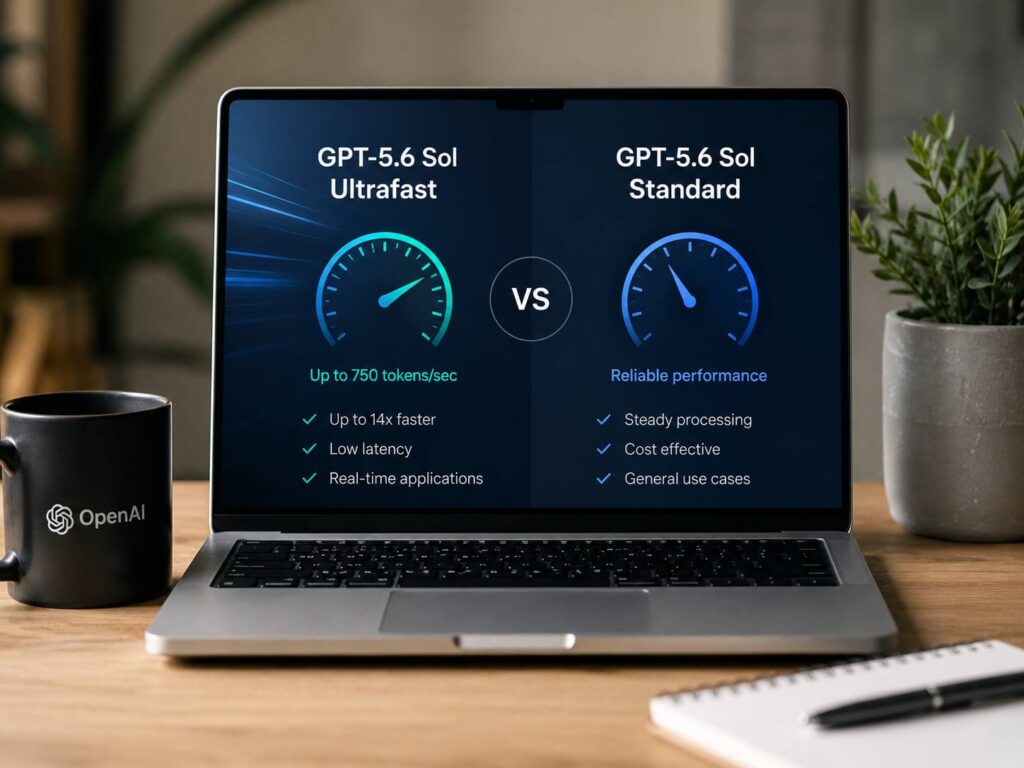
GPT-5.6 Sol Ultrafast and Standard use the same GPT-5.6 Sol model, but they serve it at very different speeds. That sounds like a small technical detail. In practice, it can change how an AI product feels to use.
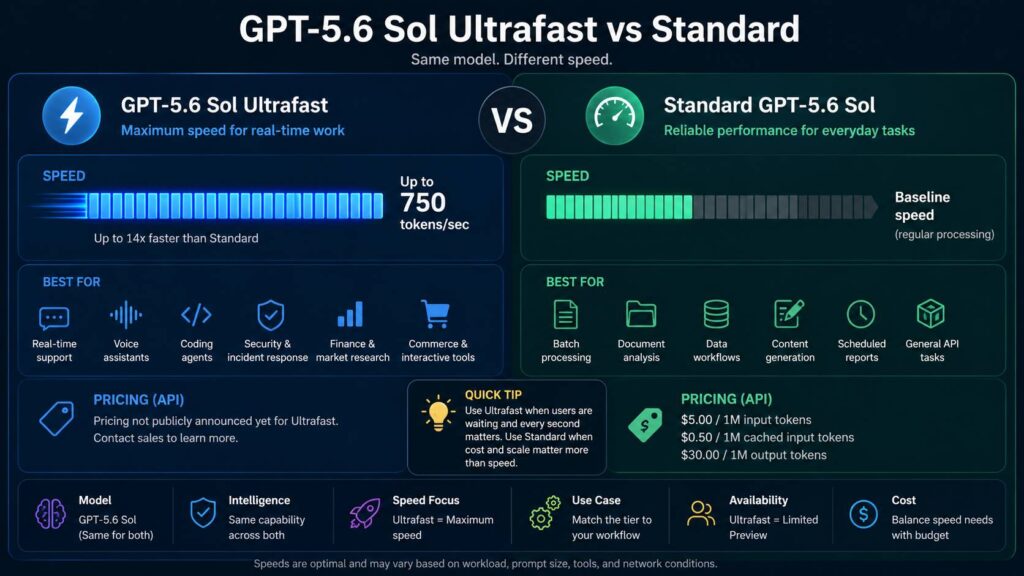
Standard is the regular API processing tier. Ultrafast is a much faster service tier aimed at workloads where response time matters. OpenAI says Ultrafast can generate up to 750 output tokens per second and run up to 14 times faster than Standard processing.
So, the choice is less about intelligence and more about timing. A background research task probably does not need extreme speed. A live coding assistant, voice agent, customer support system, or incident-response tool has a much stronger reason to reduce latency.
This guide explains GPT-5.6 Sol Ultrafast vs Standard in practical terms. It covers speed, pricing, availability, ideal workloads, common problems, Fast mode, and the differences that actually matter when choosing a tier.
What is GPT-5.6 Sol Ultrafast?
GPT-5.6 Sol Ultrafast is a high-speed API service tier for GPT-5.6 Sol.
The key point is simple. Ultrafast is not a smaller or weaker GPT model. Instead, OpenAI serves the same GPT-5.6 Sol model through infrastructure built for much faster token generation.
OpenAI states that Ultrafast can reach up to 750 output tokens per second. It can run up to 14 times faster than Standard processing under supported conditions.
For example, imagine an AI coding assistant writing a 1,500-token explanation. With a slow generation rate, you can clearly watch the response appear line by line. At hundreds of tokens per second, most of that answer can arrive almost immediately.
So, Ultrafast mainly targets situations where people are sitting in front of the application waiting for the result.
Current examples include:
- Real-time customer support
- AI voice assistants
- Interactive coding agents
- Security-response systems
- Financial research tools
- Incident-response platforms
- Commerce assistants
- Interactive research software
- Live troubleshooting tools
In these cases, a few seconds can feel surprisingly long.
What is Standard GPT-5.6 Sol?
Standard GPT-5.6 Sol is the regular API processing option.
You still get GPT-5.6 Sol. The difference is that OpenAI processes the request through the normal service tier rather than the high-speed Ultrafast tier.
For many workloads, that is completely fine.
For example, an overnight document analysis job gains little from finishing each answer several seconds earlier. The same applies to scheduled reports, bulk content processing, offline coding tasks, classification jobs, and many internal business workflows.
So, Standard remains a sensible starting point for most applications.
It is particularly useful when:
- Users are not waiting for the response
- Jobs run in the background
- Cost matters more than maximum speed
- The application processes large batches
- A queue already handles requests
- Results can arrive several seconds later without causing problems
In practice, developers should not pay for speed simply because a faster tier exists. Speed has value only when it improves the actual workflow.
GPT-5.6 Sol Ultrafast vs Standard at a glance
| Feature | GPT-5.6 Sol Ultrafast | Standard GPT-5.6 Sol |
|---|---|---|
| Model | GPT-5.6 Sol | GPT-5.6 Sol |
| Main goal | Maximum response speed | Regular API processing |
| Stated output speed | Up to 750 tokens per second | No fixed public rate |
| Speed difference | Up to 14× faster | Baseline |
| Availability | Limited preview | Regular API tier |
| Best use | Real-time AI products | Everyday and background workloads |
| Intelligence | Same underlying model | Same underlying model |
| Public token pricing | Not publicly listed in the preview announcement | Public pricing available |
So, this is not a typical model comparison. You are comparing two ways of serving the same model.
How much faster is GPT-5.6 Sol Ultrafast?
OpenAI gives Ultrafast two headline figures.
It can reach:
- Up to 750 output tokens per second
- Up to 14 times the speed of Standard processing
Those numbers are impressive, but they need some context.
First, “up to” describes peak performance. It does not promise exactly 750 tokens per second for every prompt.
Second, output generation is only one part of total application latency.
For example, an AI agent can spend time:
- Searching a database
- Calling an external API
- Reading files
- Running code
- Waiting for a website
- Executing tools
- Sending data across a network
So, a 14× improvement in model generation does not automatically make the entire workflow 14× faster.
Still, pure generation speed matters a lot in interactive products.
A user notices the difference between waiting 10 seconds and waiting one second. The gap becomes even more noticeable during repeated interactions.
This is similar to other technology where response delay affects perceived speed. If latency and responsiveness are topics you are comparing more broadly, this guide on monitor response time explained covers the same basic idea from the display side.
Does Ultrafast produce better answers?
No published information suggests that Ultrafast is intended to produce smarter answers than Standard.
Both use GPT-5.6 Sol.
So, Ultrafast should not be treated as a higher-quality model tier. Its main benefit is speed.
That distinction matters. Developers often assume a premium tier must mean better reasoning. Here, the premium feature is faster processing.
For example, a difficult coding problem does not become easier simply because the tokens arrive faster. The model still needs the right reasoning settings, tools, context, and prompt.
So, think of these as separate controls:
- Model choice affects capability.
- Reasoning settings affect how much work the model performs.
- Service tier affects how quickly the result arrives.
Keeping those ideas separate makes API configuration much easier.
Ultrafast is not the same as the “ultra” reasoning setting
The names are close enough to cause confusion.
Ultrafast refers to speed.
The “ultra” setting refers to a high-compute mode for demanding tasks.
So, they solve different problems.
Ultrafast asks: how quickly should GPT-5.6 Sol generate the answer?
Ultra reasoning asks: how much compute should the system spend solving the task?
For example, a difficult research problem can use more reasoning but still run through a normal processing tier. A simple interactive task can need very fast generation without needing extreme reasoning.
That means faster does not automatically mean deeper.
It also means deeper does not automatically mean faster.
Where does GPT-5.6 Sol Fast mode fit?
There is another tier between Standard and Ultrafast.
GPT-5.6 Sol Fast offers higher processing speed than Standard without reaching the extreme speeds advertised for Ultrafast.
OpenAI has stated that Fast can provide up to 2.5 times Standard speed at twice the price.
So, developers effectively have three performance levels to think about:
- Standard: regular processing
- Fast: faster processing at a higher price
- Ultrafast: the highest announced processing speed
For many developers, Fast is the more practical option right now.
Ultrafast remains a limited-preview product. So, not every API customer can simply enable it.
Fast can fill the gap for teams that need lower latency but do not have Ultrafast access.
GPT-5.6 Sol Standard pricing
Current Standard GPT-5.6 Sol API pricing is:
- $5 per 1 million input tokens
- $0.50 per 1 million cached input tokens
- $30 per 1 million output tokens
A simple example helps show what that means.
Imagine one request uses 10,000 uncached input tokens and generates 2,000 output tokens.
Input cost:
10,000 ÷ 1,000,000 × $5 = $0.05
Output cost:
2,000 ÷ 1,000,000 × $30 = $0.06
Total:
$0.11
That figure covers token usage in this example. Paid tools or other billable services can add separate charges.
At the moment, OpenAI has not published a public Ultrafast price in the preview announcement.
So, there is no verified public calculation showing exactly how much more Ultrafast costs than Standard.
That makes benchmarking important. Teams should compare the value of reduced latency against the real price once commercial terms are available to them.
When Ultrafast makes sense
Ultrafast becomes interesting when someone is actively waiting for the AI.
Consider a customer support system.
A customer asks a question. The assistant checks account data, looks through company information, reasons about the request, then writes an answer.
If the model spends too long generating the response, the conversation starts to feel slow.
Now consider an AI coding tool.
A developer asks the agent to inspect a function and suggest a fix. Then they ask a follow-up. Then another. Small delays stack up quickly.
So, faster inference has more value in repeated interactive sessions than in one-off jobs.
Ultrafast can make sense for:
- Coding copilots
- Live debugging
- Voice assistants
- Customer service
- Security operations
- Financial research
- Real-time analytics
- Interactive search
- Incident investigation
- Commerce assistants
In practice, the strongest use case is not simply “I want faster AI.” It is “users are waiting, and that waiting hurts the product.”
When Standard makes more sense
Standard is a better fit for plenty of real workloads.
Consider a system that analyzes 5,000 documents overnight.
Nobody is watching each response appear. The job simply needs to finish before morning.
In that situation, extreme token speed can have limited value.
Standard works well for:
- Batch processing
- Long-form writing
- Scheduled reports
- Internal research
- Document extraction
- Classification
- Offline coding agents
- Data cleanup
- Content processing
- Background workflows
So, Standard should usually be the first tier teams test.
Measure real application latency first. Then move the slow, user-facing parts to Fast or Ultrafast where it actually helps.
That strategy keeps the system easier to understand and avoids spending more on jobs that do not benefit from extra speed.
Real-world issues developers should watch
Ultrafast sounds simple on paper, but several practical issues matter.
Limited access
Ultrafast launched as a limited preview.
So, access is not available to every API customer.
OpenAI is selecting customers based on workload fit and available capacity. This alone makes Standard or Fast the realistic choice for many teams today.
No public Ultrafast price
Standard pricing is public.
Ultrafast pricing has not been publicly listed in the launch information.
So, any exact public comparison claiming that Ultrafast costs a certain amount per million tokens should be checked carefully.
Tool calls can still be slow
Fast generation cannot remove every source of latency.
For example, an agent that waits six seconds for an external API still waits six seconds for that API.
So, developers need to measure end-to-end task time, not just model token speed.
Long prompts still take work
A large context window can affect processing time.
So, sending huge amounts of unnecessary text can still hurt responsiveness.
Cleaner prompts, better context selection, caching, and sensible tool design still matter.
Users may not notice every speed increase
There is a point where extra speed gives smaller visible gains.
For example, dropping a response from 12 seconds to two seconds feels dramatic. Dropping it from 600 milliseconds to 300 milliseconds can be much harder for a typical user to notice.
So, teams should test real user-facing latency rather than chasing the largest benchmark number.
Is GPT-5.6 Sol Ultrafast available in ChatGPT?
Ultrafast was introduced as an OpenAI API service tier.
It should not be confused with the reasoning options shown inside ChatGPT.
ChatGPT can expose controls such as Instant, Medium, High, Extra High, or Pro depending on the account and model configuration.
Those controls relate to how ChatGPT runs the model.
Ultrafast refers to an API processing tier.
So, seeing an “Instant” option in ChatGPT does not mean the conversation is using the Ultrafast API tier.
This distinction matters for anyone comparing ChatGPT speed modes with OpenAI API service tiers.
Standard vs Fast vs Ultrafast
A simple way to choose is to match the tier to the workload.
Choose Standard if:
- The job runs in the background
- Cost has higher priority than latency
- Users are not staring at the screen waiting
- You process many requests in batches
- Normal API speed feels acceptable
Choose Fast if:
- Standard feels too slow
- Users interact with the AI directly
- You want a faster broadly available option
- Paying more for lower latency makes business sense
Choose Ultrafast if:
- Response time is a core product requirement
- Users interact with the system continuously
- You need GPT-5.6 Sol rather than a smaller model
- Your organization has preview access
- Very high token generation speed has measurable value
So, there is no reason to move every request to the fastest tier.
A mixed setup often makes more sense.
A practical way to configure a real application
Imagine an AI support platform with three stages.
The first stage classifies incoming tickets.
The second stage searches internal documents.
The third stage generates the response shown to the customer.
The classification job can run on Standard. Users do not see it directly.
The document search can use whatever infrastructure provides the right retrieval speed.
Then the final customer-facing generation step can use Fast or Ultrafast.
So, only the part where latency affects the user needs premium processing.
The same pattern works for coding agents.
Background repository indexing can use slower processing. Interactive code explanations can use a faster tier.
This is often a better design than putting every request on the most expensive service tier.
Is Ultrafast worth it?
For the right product, yes.
For every product, no.
Ultrafast has clear value in voice, coding, security, finance, support, and other interactive systems. In these areas, users make repeated requests and expect the software to react quickly.
Still, speed alone should not decide the architecture.
Teams should measure:
- Time to first useful output
- Total response time
- Tool-call latency
- Cost per completed task
- User abandonment
- Number of requests per session
- Server and network delays
Then they can see whether faster inference fixes a real problem.
That is far more useful than looking only at tokens per second.
GPT-5.6 Sol Ultrafast vs Standard: which should you pick?
For most API workloads, Standard is the sensible place to start.
It gives you GPT-5.6 Sol without requiring a special preview tier. It also works well for background jobs, batch tasks, long reports, and many everyday API requests.
Fast becomes attractive when Standard latency starts hurting the experience.
Ultrafast goes further. It targets applications where very fast generation is part of the product itself.
So, think less about which tier is technically faster. That answer is obvious.
Instead, ask whether the extra speed changes what your users can do.
If your AI assistant handles a few background reports each day, Standard is likely enough.
If users are talking to an AI agent, coding with it, debugging live systems, or making fast decisions from its output, Ultrafast becomes much more interesting.
For now, the main restriction is access. Ultrafast remains a limited-preview API tier, so many developers will still use Standard or Fast.
Still, its arrival shows where high-end AI inference is heading. Frontier-model intelligence no longer has to mean visibly slow output. For interactive AI software, that can make a real difference.