
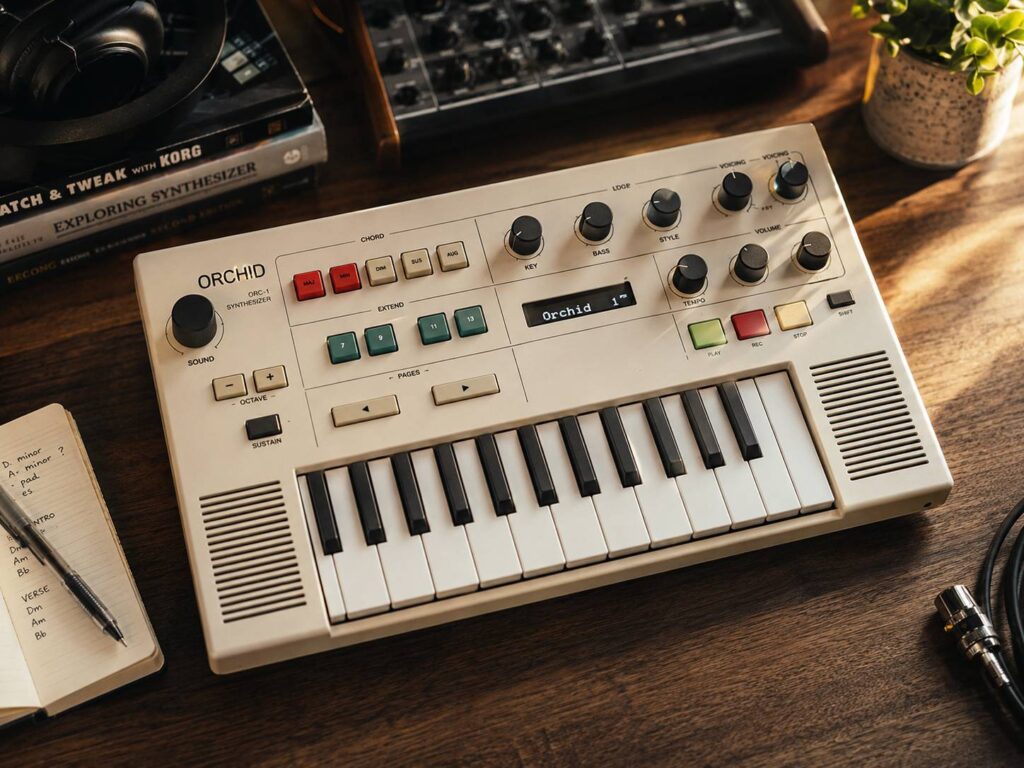
A good song idea can appear in seconds and disappear just as quickly. The Orchid ORC-1 tries to catch those moments before they fade. It gives musicians a direct way to build chords, change voicings, add rhythm, and record short loops without opening a laptop.
Telepathic Instruments developed Orchid with Kevin Parker, the musician and producer behind Tame Impala. Rather than building another full-size keyboard synth, the team focused on one part of songwriting that often slows people down. Finding the right chord progression.
At first glance, Orchid looks like a small electronic instrument from the 1970s. Its cream casing, coloured buttons, compact keys, and simple controls give it a retro feel. Under the surface, though, it uses modern digital synthesis, MIDI, loop storage, built-in speakers, and software editing.
The result is a chord synth made for quick ideas. It can help beginners explore harmony, but it can also give experienced musicians a fresh way to break out of familiar songwriting habits.
What Is the Orchid ORC-1?
Orchid is a 16-voice digital synthesizer built around chord generation. It has a one-octave velocity-sensitive keyboard, several chord buttons, two voicing controls, effects, bass tools, performance modes, beats, and a looper.
A user starts by pressing a note on the keyboard. Next, the chord buttons turn that root note into a major, minor, suspended, diminished, or extended chord. More than one chord option can be selected at the same time, which allows richer combinations such as major sevenths, minor ninths, and suspended shapes.
Then, the two Voicing Dials change how the notes sit across different octaves. A tight chord can become wide and airy with a quick turn. Likewise, a simple triad can take on a darker or more cinematic character after the notes move into a new order.
This setup removes much of the technical delay between hearing an idea and playing it. You still choose the chords, rhythm, sound, and structure. Orchid simply makes those choices quicker to test.
A Songwriting Tool Built Around Harmony
Most synthesizers begin with oscillators, filters, envelopes, and modulation controls. Orchid starts with harmony instead.
That change shapes the whole experience. Rather than building a sound first, the player can begin with a chord progression. The tone can come later.
Key Mode makes this process even easier. After choosing a musical key, the keyboard can produce chords that belong to that key. As a result, users can move between suitable major, minor, and diminished chords without working out every note by hand.
For a beginner, this creates a friendly way to hear how chords work together. For a more experienced musician, it speeds up experimentation. A familiar progression can quickly change through new inversions, added sevenths, suspended notes, or wider voicings.
There is still room for wrong turns, and that is a good thing. Songwriting often becomes interesting when a player chooses something unexpected. Orchid helps users reach those moments without placing a music theory lesson between them and the sound.
Three Sound Engines Cover Classic and Modern Tones
Orchid contains three digital sound engines. These include a polyphonic subtractive synth, an FM engine, and a vintage electric piano engine.
The subtractive engine handles familiar synth sounds such as pads, leads, keys, and warm sustained chords. Meanwhile, the FM engine moves into brighter digital tones, metallic textures, glassy keys, and sounds linked to classic 1980s production.
The electric piano engine gives Orchid a softer side. It can create mellow chord parts that sit well under vocals, bass, or drums. This makes the instrument useful for pop, indie, electronic music, ambient tracks, and home demos.
Users can select presets and change effects from the front panel. They can also save personal sound setups. Still, Orchid does not place every synth parameter directly on the hardware.
That limit will divide users. Deep sound designers may want more hands-on control. Songwriters who prefer to choose a tone and keep playing may welcome the simpler setup.
Performance Modes Add Rhythm to Static Chords
A held chord can sound flat after a few seconds. Orchid deals with that problem through performance modes that turn one chord into a moving pattern.
Some modes create strummed sounds. Others spread notes like a harp, repeat them in rhythmic patterns, or play them with a looser feel. As a result, a basic chord progression can quickly sound more like a finished musical phrase.
The velocity-sensitive keyboard adds extra expression. A harder press can produce a stronger response, depending on the selected preset and performance style.
These controls are useful during the early stages of a song. A writer can test whether a progression works better as a soft pad, a pulsing pattern, or a short rhythmic stab. Then, that idea can be recorded into the looper before the mood changes.
It is easy to see the appeal for musicians who enjoy unusual hardware. Readers following this type of instrument can also check the latest details on the Nopia MK1 synth nearing launch after years of viral music gear buzz.
Built-In Bass and Beats Create a Basic Song Framework
Orchid does more than play upper-register chords. It includes a separate bass engine that can follow the root note of each chord.
Bass Solo mode gives the player more control. Instead of following the chord automatically, the keyboard can play a separate bass part. This opens the door to bass lines that move away from the root and add more character to the progression.
A built-in beat section adds another layer. Users can select a rhythm, set the tempo, and play chord patterns over it. The beats are not meant to replace a full drum machine or a finished drum track. Instead, they give the song idea a pulse.
A basic writing session can look like this:
- Choose a key
- Find a chord progression
- Select a synth sound
- Change the chord voicing
- Add a bass part
- Pick a beat
- Set the tempo
- Record a loop
- Add another layer
- Send the idea to other music gear through MIDI
This process turns Orchid into more than a chord generator. It becomes a compact sketchpad for building the early shape of a song.
The Looper Helps Save Ideas Before They Disappear
The built-in looper records musical phrases directly on the instrument. Once the first part is captured, users can add more layers through overdubbing.
An undo control removes the latest layer after a mistake. That small feature matters during a fast writing session. Nobody wants to delete a good base loop after one bad note.
Recent firmware updates added tools for saving, loading, and deleting loops. In turn, Orchid became far more useful for ideas that need time to develop.
A player can create a progression in the evening, save it, and return the next day. The idea does not need to stay inside a voice memo or a half-finished computer project.
Loop saving gives Orchid a clear advantage over simpler jam devices. It lets the instrument hold several sketches, not just the sound currently playing.
MIDI Makes Orchid Useful in a Full Studio
Orchid includes MIDI, USB-C, and a 3.5 mm stereo output. These connections allow it to work with computers, software instruments, drum machines, and external synthesizers.
Its MIDI output can split chord information across several channels. This means a single chord can control more than one instrument. For example, one part could trigger a pad, another could play a bass sound, and a third could control a brighter synth layer.
MIDI clock support keeps connected equipment in time. So, a progression built on Orchid can move into a larger studio session without losing its rhythm.
Producers do not have to keep the built-in sound in the final track. They can use Orchid to create the notes and timing, record that MIDI data, and then replace the sound later.
That gives the instrument more value over time. It can remain useful even after a musician has explored every factory preset.
Pistil Adds Deeper Sound Editing
Telepathic Instruments created Pistil for musicians who want more control over Orchid’s sound engines.
Pistil works as a standalone application and as a plugin for macOS and Windows. It includes the three core sound engines, dozens of presets, and built-in effects such as reverb, chorus, and delay.
The software gives users access to settings that are not available from Orchid’s front panel. These include oscillators, filters, envelopes, LFOs, and modulation controls.
Custom sounds can move from Pistil to Orchid. After that, the user can take those presets away from the computer and play them directly on the hardware.
This setup keeps the physical instrument simple without locking advanced users out of deeper editing. The hardware handles fast songwriting. Pistil handles detailed sound creation.
Orchid ORC-1 Price and Availability
The Orchid ORC-1 is priced at $649 in North America. A package that includes a carry case costs $699.
At that price, Orchid sits above many MIDI chord tools, compact controllers, and songwriting apps. The cost will be the biggest issue for some buyers.
Still, the comparison is not completely equal. Orchid includes its own sound engines, speakers, beats, bass tools, effects, MIDI, a looper, physical controls, and battery-powered use.
Someone who only needs automatic chord generation can find cheaper software. A musician who wants a self-contained songwriting device may see more value in Orchid’s focused design.
Stock has been limited, so buyers may need to join the official waitlist. Regional pricing, delivery fees, and taxes can change the final cost.
Why Orchid Feels Different From a Regular Synth
Orchid stands out through its narrow purpose. It is not trying to replace a full studio keyboard or a large modular setup.
Instead, it focuses on the first few minutes of songwriting. Pick a note. Add a chord. Change the voicing. Choose a rhythm. Record the result.
That process feels more direct than clicking through a plugin menu. It can also feel more playful, which often helps when a song refuses to take shape.
The retro design gives Orchid personality, but the workflow is the real attraction. It invites constant changes without turning each choice into a technical task.
Beginners can use it to explore chord progressions and inversions. Experienced players can use it to find combinations they would not normally choose. Producers can use MIDI to move those ideas into a complete arrangement.
Orchid does not write songs on its own. It gives musicians a quicker way to reach the point where a song starts to feel real. For many writers, that is the hardest part.