
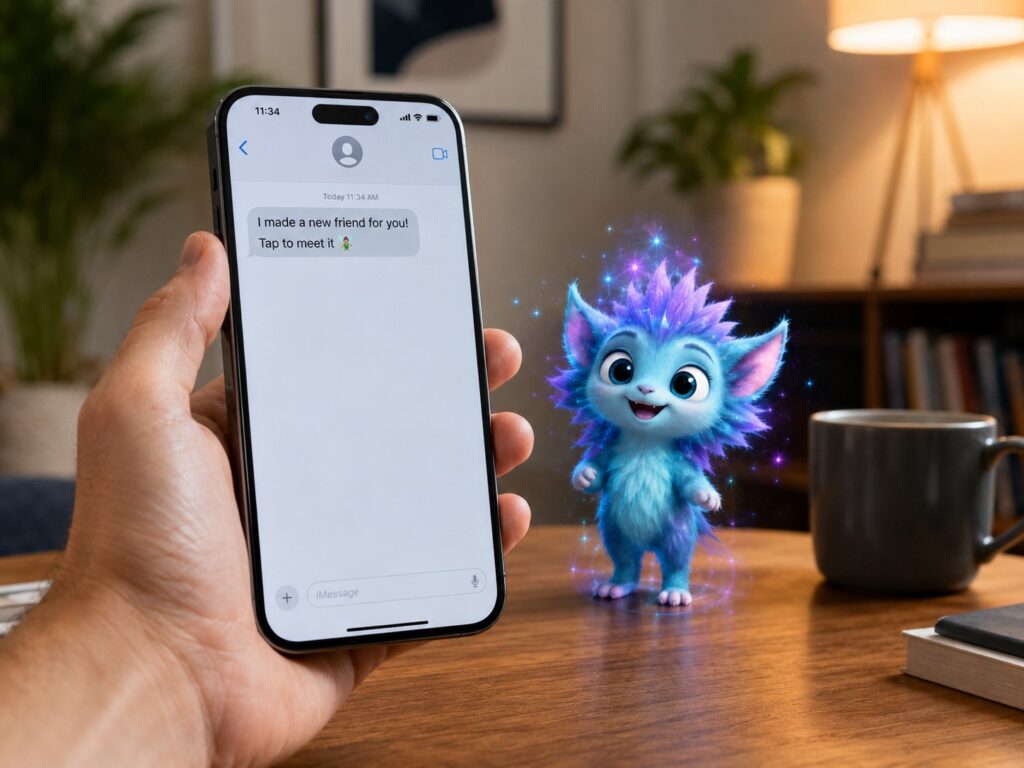
Text messages already carry a lot. We use them for birthday wishes, quick jokes, family updates, reminders, plans, and random thoughts that do not need a phone call. Pixi Garden adds a fresh twist to that routine. It turns normal iPhone messages into interactive AR experiences that feel more personal than a sticker, GIF, or emoji.
Pixi Garden is an app for iPhone, iPad, and iMessage from Pixi Platforms, Inc. It lets users create small augmented reality scenes with smart characters. These little characters can appear in the receiver’s room through the camera view, react to the space around them, and deliver a message in a more playful way.
That sounds simple at first, but it changes the feeling of a message. A flat text says something. A Pixi message performs it.
What Pixi Garden Actually Does
Pixi Garden lets you send a “pixi” through iMessage. A pixi is an interactive AR character. It is not just a sticker with motion or a short looping animation. It can appear in the real world through the camera, then react like a tiny digital character inside the room.
For example, a pixi can pop up on a table, move across the floor, respond to the viewer, or take part in a small game. The app has playful uses such as jokes, birthday greetings, mini-games, and short character scenes.
That makes the app feel less like another messaging add-on and more like a small personal show. The sender creates a moment. The receiver opens it, watches it, and takes part in it.
Why AR Messages Feel More Personal
Most messages stay inside the chat window. Pixi Garden breaks that pattern. The message moves into the receiver’s room, desk, couch, kitchen, or wherever they open it.
That small shift matters. A birthday wish can feel warmer. A joke can land better. A quick surprise can feel less generic. The room becomes part of the message, so the receiver does not just read it. They experience it.
This is where Pixi Garden stands apart from normal iMessage stickers. Stickers add personality, but they still sit on the screen. AR characters add space, movement, timing, and a bit of surprise.
Text will still win for speed. Nobody needs an AR scene for “I’m outside” or “pick up milk.” But Pixi Garden makes sense for moments that need more charm.
Pixi Garden Fits the Way People Already Message
The smart part of Pixi Garden is the iMessage connection. Users do not need to join a new social network or invite friends to a separate chat app. They can create a pixi and send it inside Apple’s messaging system.
That matters a lot. People already know how to send photos, voice notes, reactions, stickers, and links through iMessage. Pixi Garden adds another message type to a familiar place.
Messaging keeps getting richer across major platforms. Private chats now carry much more than short notes. They include videos, reactions, group plans, shopping links, and creator updates. That same shift explains why apps keep bringing back or testing social chat tools, including the return of YouTube DMs in 2026.
Pixi Garden follows that same direction, but it gives iPhone users a more visual and playful version of a private message.
The AI Side Makes the Characters Feel Less Flat
Pixi Platforms describes its characters as intelligent and context-aware. That is a big part of the appeal. A normal animation plays the same way every time. A smarter AR character can react to the person, the room, and the moment.
That does not mean every pixi will feel like a full digital assistant. The experience still works best as a short, fun message. But even small reactions can make the character feel more alive.
For AR to feel good, timing matters. Movement matters too. A character needs to land in the room in a believable way. It needs to react fast enough, then leave the user with a clear and pleasant moment. Pixi Garden has the right idea here. It keeps the experience short and easy to share.
Privacy Matters for AR Messaging
AR apps use the camera, and that makes privacy a serious part of the discussion. Users need to trust any app that places digital objects inside their real space.
Pixi Garden’s privacy pitch focuses on keeping personal data on the device and not using user data to train AI models. That is a strong point for people who like AI features but do not want every interaction sent away for training.
Users should still check the App Store privacy section before installing any social or camera-based app. That is a smart habit for every app in this category.
Where Pixi Garden Works Best
Pixi Garden works best for short emotional moments. It fits birthday wishes, inside jokes, congratulations, holiday greetings, party invites, family messages, and playful check-ins.
It can work well for parents too. A small AR character can make a message more fun for a child. Friends can use it for silly jokes. Couples can use it for cute notes. Creators and brands can use it for character-based fan moments.
The app does not need to replace normal texting. It only needs to give people one more way to say something with personality.
That is why the product feels promising. It does not try to make every message complex. It gives users a richer option for the messages that deserve a little extra effort.
What Pixi Garden Needs to Get Right
The idea is fun, but the app still needs strong basics. AR apps lose people fast when they feel slow, confusing, or heavy.
Pixi Garden needs quick loading, clear controls, stable camera use, and smooth iMessage sharing. The characters need to feel charming without getting annoying. The creation process needs to stay simple too. People will not build a full scene for every message, so the app has to make short messages easy.
Variety matters as well. Users need enough characters, reactions, games, and message styles to keep coming back. If every pixi feels too similar, the novelty wears off fast.
The strongest version of Pixi Garden is simple: open the app, pick a character, add a message, send it, and make someone smile.
My Honest Opinion on Pixi Garden
Pixi Garden feels like one of the more natural uses for mobile AR. Phone-based AR has often felt like a demo feature. You place a dinosaur on the floor, look at it for ten seconds, then close the app.
Pixi Garden gives AR a better reason to exist. It connects AR to messaging, and messaging is something people already do all day.
I like that it does not depend on a headset. The iPhone is enough. That makes the idea more practical and easier to share. The iMessage connection helps too, since users can send these experiences inside a chat they already use.
The app still needs polish, speed, and strong character design. But the core idea is clear. Pixi Garden turns a text into a small shared moment. That is more interesting than another sticker pack.
Why Pixi Garden Points to the Future of iPhone Messaging
Pixi Garden shows how iPhone messages can become more expressive without losing their personal feel. Text will stay fast. Emojis will stay useful. Stickers and GIFs will still have their place. AR messages can sit beside them as a richer option.
The best part is the human side. Pixi Garden is not about technology for its own sake. It works when it makes a message feel warmer, funnier, or more memorable.
That is the real value here. A good message does not need to be long. It needs to feel right. Pixi Garden gives iPhone users a new way to make that happen.