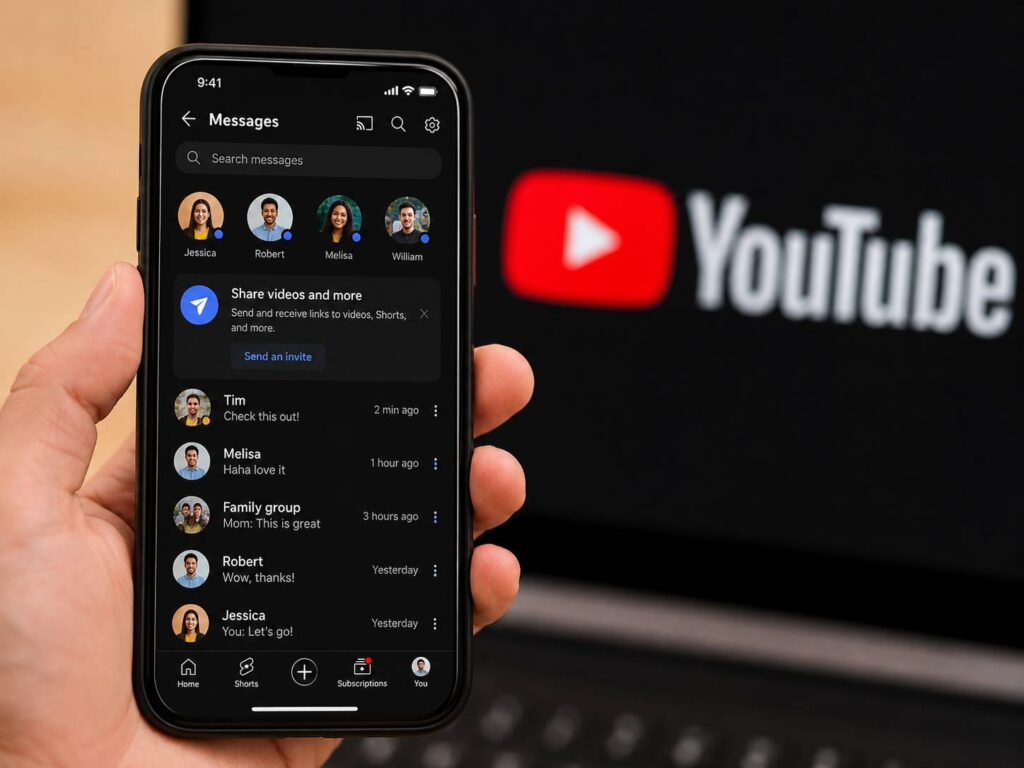
YouTube DMs are back, but this new version feels very different from the old inbox. It is not a wide-open private message system. Instead, YouTube now gives users a built-in way to share videos, Shorts, and live streams, then chat about them inside the app.
That change makes sense. People already send YouTube links through WhatsApp, Instagram, Messenger, Telegram, iMessage, and SMS every day. Now YouTube wants part of that conversation to stay inside its own app.
For viewers, the feature can save time. You no longer need to copy a link, switch apps, paste it, and then return to YouTube. You can share the video and talk about it in one place.
Still, this is not a full return of the old YouTube inbox. You cannot message any random channel with no limits. YouTube built this version around invites, age checks, mobile access, and safety controls. That makes the new YouTube messaging feature more controlled, but it may feel safer for regular users.
What Changed With YouTube DMs
The biggest change is the purpose of the feature. YouTube does not present it as a stand-alone chat app. It presents it as video sharing with messaging attached.
That detail matters. The video starts the conversation. Then the replies, reactions, and comments happen around that video.
Users can share:
- Regular YouTube videos
- YouTube Shorts
- Live streams
- Text replies
- Reactions inside the chat
This setup fits YouTube better than a normal inbox. A friend sends a funny Short. You react. Then you send another clip back. The full loop stays inside the YouTube app.
Plus, YouTube gets a clear benefit. More sharing inside the app means more time spent on YouTube. It also keeps users away from outside apps during the sharing process.
The second major change is access. You must be at least 18 years old. You need to sign in with a YouTube channel. You must use the YouTube mobile app. Your app should be updated too.
The third change is the invite system. You do not get an open inbox where anyone can message you. A person sends an invite, and the other user accepts or declines it. That one step makes the feature feel more private and less messy.
How to Message Someone on YouTube
Can you DM on YouTube now? Yes, but only eligible users can do it.
The process starts from the YouTube app:
- Open the YouTube app on your phone.
- Find a video, Short, or live stream.
- Tap Share.
- Pick a contact already available for YouTube messaging.
- Or tap Invite to message on YouTube.
- Send the invite through another app.
- The other person accepts the invite.
- The chat opens inside YouTube.
There is another simple path. Tap the Messages icon at the top right of the YouTube app. Then choose Invite to chat. YouTube creates an invite link that you can send to someone.
That invite link lasts 7 days. After it expires, you need to send a new one.
Once the other person accepts, both users can share videos and messages inside YouTube. If app notifications are turned on, YouTube can alert you after someone accepts your invite.
Who Can Use YouTube Messages Right Now
YouTube messaging is not open to every account yet. It is available in select countries and regions. The current list includes the United States, United Kingdom, Brazil, Singapore, Romania, and many European countries.
To use the feature, you need:
- A supported country or region
- An account holder aged 18 or older
- A signed-in YouTube channel
- A verified age status
- The latest YouTube mobile app
- On a Brand Account, the channel owner role, not moderator or delegate access
That last point matters for creators and publishers. Many professional YouTube channels use Brand Accounts. Brand Accounts were left out at launch. As of October 2026, YouTube’s help page says that on Brand Accounts the feature is available to channel owners, not to moderators or delegates.
So, a team member who helps run a business channel as a moderator or delegate may not see YouTube messages there. That can confuse teams that manage several channels from one account.
If the Messages icon does not show up, the account may not qualify yet. The app may need an update. Age verification may be missing too. In some cases, YouTube has simply not opened the feature for that account.
Why YouTube Brought Messaging Back
YouTube removed its older private messaging feature years ago. Since then, the platform has pushed public tools like comments, live chat, Community posts, and Shorts replies.
Now YouTube has a stronger reason to bring messages back: private sharing.
This is a smart move. YouTube is one of the most shared platforms online, but many of those shares happen outside YouTube. Every copied link sends the user into another app. That weakens YouTube’s control over the full viewing experience.
The new system fixes part of that problem. It keeps video discovery, sharing, replies, and reactions in one place. For users, it removes extra steps. For YouTube, it keeps attention inside the app.
My opinion: this version has a better chance than the old inbox. It does not try to replace WhatsApp or Instagram DMs. Instead, it solves one clear problem. People want to send a video and talk about it fast.
This matters for many types of content too. Tutorials, product guides, gaming clips, podcasts, livestreams, music videos, and creator updates can all spread faster through private shares. For example, a creator comparing a webcam vs mirrorless camera for streaming can benefit from viewers sending that guide directly to friends who record videos or stream online.
Privacy and Safety Are Different This Time
YouTube did not build this feature as a fully hidden private chat space. Messages and shared content must follow YouTube’s Community Guidelines. YouTube can review messages for safety checks and spam control.
That matters. A YouTube DM is not the same as a private encrypted chat app built only for personal messages. YouTube says messages are protected during sending and storage, but the platform can still check them for safety reasons.
There is one good privacy detail. YouTube says message content is not used for ad targeting. Private messages should not feed ads, and YouTube has made that point clear.
Users get basic controls too. You can unsend a message. You can block someone. You can delete a conversation from your side.
Still, deleting a conversation does not remove it for the other person. They can still see the chat on their account. So, users should treat YouTube messages like any other platform message and avoid sending anything too personal.
What This Means for Viewers
For everyday viewers, YouTube DMs make sharing easier. You can send a tutorial, song, podcast clip, gaming stream, product video, or funny Short without jumping between apps.
The feature works best for quick reactions. A friend sends a Short. You tap a reaction. Then you send another clip back. It feels natural, and it keeps the sharing inside YouTube.
Families can share helpful videos. Students can send lessons or explainers. Friends can trade live streams. Fans can pass around creator updates.
Still, there is one clear downside. Both people need access. If one person cannot use YouTube messaging, the invite link will not work. That will cause friction during the rollout.
Search terms like “how to message someone on YouTube,” “YouTube messaging icon missing,” “YouTube DM not showing,” and “can you DM on YouTube” will likely grow as more users notice the feature.
What This Means for Creators
Creators should pay attention to YouTube messaging. Private sharing can help videos spread, even when public comments stay quiet.
A viewer who sends a video to a friend gives that video a personal recommendation. That type of share can carry more trust than a public post. It feels direct. It also reaches someone who may already care about the topic.
Still, creators should not expect a new fan inbox. This feature does not open direct contact between creators and every viewer. It works through accepted invites.
For creators with personal accounts, the feature may help with closer contact. For teams using Brand Accounts, the owner-only rule still leaves out moderators and delegates.
My opinion: the biggest value sits in viewer-to-viewer sharing, not creator-to-fan messaging. YouTube DMs can help content move through smaller private circles. That can support discovery in a quieter but useful way.
Common YouTube DM Problems
Some users will not see YouTube messages right away. The most common reasons are simple:
- The feature is not active in their country.
- The app needs an update.
- The user has not verified age.
- The user does not have a YouTube channel.
- The user is a moderator or delegate on a Brand Account, not its owner.
- The invite link expired.
- YouTube blocked the message for spam or safety reasons.
- The internet connection was weak.
If the app says “Can’t access link,” the account likely fails one of the access rules. If it says “This feature isn’t available,” YouTube has not opened messaging for that user yet.
A quick app update can fix some problems. Age verification can fix others. On a Brand Account, only the channel owner can use the feature, so moderators and delegates cannot.
Is YouTube Messaging Worth Using?
Yes, YouTube messaging is worth using for quick video sharing. It is not the best place for long private chats.
That difference matters. YouTube DMs work best when the video starts the conversation. Send a Short. React to a clip. Share a live stream. Pass along a tutorial. That is where the feature feels useful.
For personal talks, work files, group planning, or sensitive topics, dedicated messaging apps still fit better. YouTube’s safety review system and account rules make it less private than a dedicated messaging app.
Still, this update gives YouTube something it has lacked for years: a simple way to share and talk without leaving the app. That makes YouTube DMs one of the more useful social features YouTube has added in 2026.