
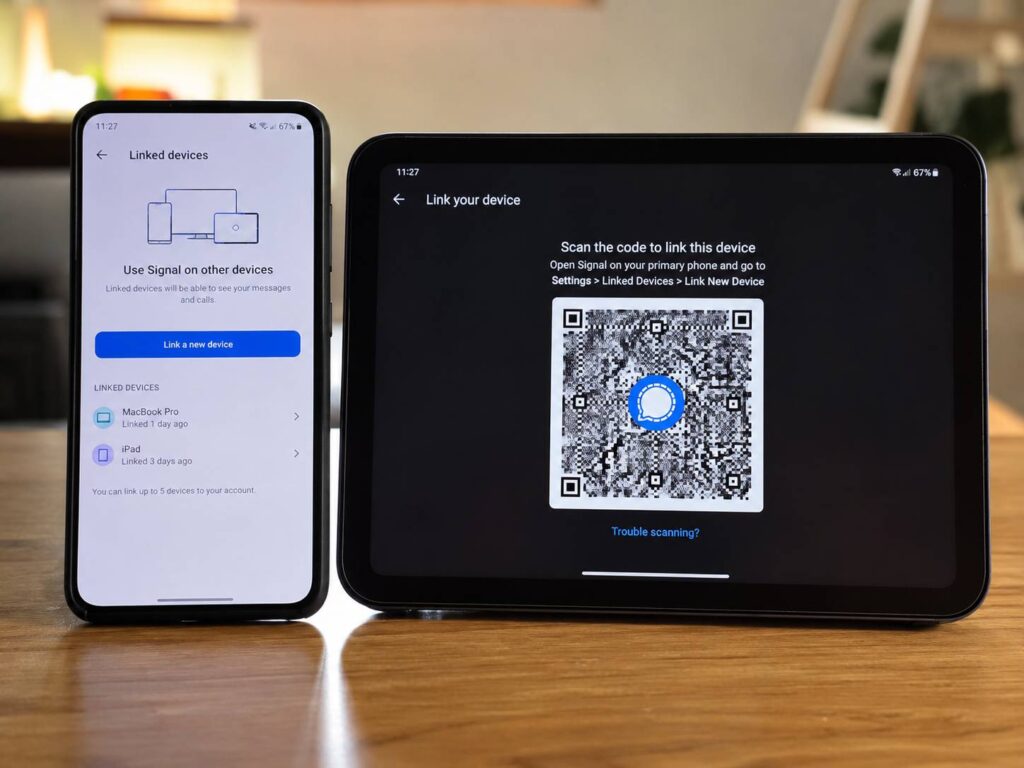
Signal is testing a feature that many Android users have requested for years. Android phones and tablets can now work as secondary devices linked to a primary Signal phone.
The change means one Signal account can stay active across more mobile screens. Better yet, users do not need to register a different phone number for every Android device they connect.
Until recently, Signal users could link desktop computers and iPads to their main phone. Android tablets were left out, and a second Android phone usually needed its own account registration. That setup felt restrictive for people who use a work phone, keep a spare handset for travel, or prefer messaging from a larger tablet at home.
Now, Signal is starting to close that gap. The new linked-device option brings chats to another Android phone or tablet through a familiar QR-code setup. At the same time, Signal keeps its encrypted device system in place.
Signal’s Android linked-device support fills a major gap
Many people no longer rely on a single phone throughout the day. For example, someone may carry one handset for personal use and another for work. Others keep an older Android phone nearby as a backup, media player, navigation device, or travel phone.
Android tablets have become more common too. Some users pair them with keyboards and use them almost like small laptops. Yet Signal’s old device rules made these setups harder than they needed to be.
Previously, registering Signal on a second Android phone could replace the original phone as the account’s main mobile device. Meanwhile, Android tablets had no proper linked-device option. That meant users could not treat them like Signal Desktop or Signal for iPad.
The new feature changes that. A secondary Android phone or tablet can connect to the existing Signal account without needing another phone number. Messages then appear on the linked device, giving users more freedom to move between screens.
This update feels overdue. Still, it is a meaningful improvement. Privacy matters, but convenience matters too. A private messaging app becomes easier to use when it fits naturally into everyday device habits.
How to link another Android phone or tablet to Signal
The setup follows the same basic method used for Signal Desktop. First, the secondary Android device shows a QR code. Next, the user scans that code with the primary phone and approves the connection.
The process should look like this:
- Install Signal on the Android phone or tablet you want to connect.
- Open the app and choose the option to link the device.
- On the primary phone, open Signal Settings.
- Select Linked devices.
- Tap Link a new device.
- Confirm the action with your fingerprint, face unlock, or device passcode.
- Scan the QR code shown on the secondary Android device.
- Choose whether to transfer message history.
- Finish setup and test the connection.
During setup, Signal may offer two history options: transfer message history or continue without transferring it. The transfer option brings existing chats to the new device.
According to Signal’s current linked-device rules, the first sync can include all chats and up to 45 days of media. That means recent photos, videos, voice notes, and files can appear on the secondary device. Older media may not transfer.
Text conversations can cover a much longer period. In practice, this gives most users enough recent content to continue chatting without feeling like they started with an empty account.
Users who skip the history transfer should choose carefully. If they change their mind later, they may need to reinstall Signal on the linked device and repeat the linking process.
Message history remains protected during transfer
Signal’s linked-device system does not work like a standard cloud archive. The service does not keep a readable copy of every conversation that users can download whenever they sign in.
Instead, the primary device prepares an encrypted history package during setup. The new linked device downloads that package and decrypts it locally.
This design keeps the transfer private. Signal does not need access to readable message content, contacts, group details, or profile information to complete the process.
For many users, this is the most important part of the upgrade. Signal gains the convenience of mobile multi-device access without turning private chats into an ordinary cloud inbox.
At the same time, every linked device becomes another place where messages are stored. Users should protect each phone, tablet, and computer with a secure screen lock.
What are the limits for Signal linked devices?
Signal’s Android secondary-device support still comes with several restrictions. These limits match the wider linked-device system used for computers and iPads.
Current rules include:
- One primary phone can support up to five linked devices.
- The primary phone must connect to Signal at least once every 30 days.
- A linked device may disconnect after 45 days without activity.
- A disconnected device must be linked again through the primary phone.
- Initial setup can transfer chats and up to 45 days of recent media.
The 30-day rule is easy to miss. A linked Android phone does not become an equal replacement for the registered primary phone. The main handset still acts as the account’s central device.
For that reason, users should not leave the primary phone switched off for months. A secondary Android device can handle everyday messaging, but the original phone still needs occasional access to Signal.
Even so, the five-device limit should cover most personal setups. A user could link a tablet, a second phone, a laptop, a desktop computer, and one extra device without creating separate Signal accounts.
Why Signal support for Android tablets matters
Android tablets are one of the clearest winners from this update. Many models offer large displays, long battery life, and comfortable keyboards, yet Signal support has remained limited compared with desktop and iPad devices.
A linked tablet can make long conversations easier to follow. For instance, users can read messages beside documents, browse shared photos on a larger screen, or type longer replies with a physical keyboard.
Video calls may feel more comfortable too. A tablet placed on a stand gives users a larger picture and frees their hands during calls.
The feature can be useful on Wi-Fi-only tablets as well. These devices often cannot receive regular SMS verification codes, but a linked-device setup does not require a separate Signal phone number.
Of course, Android tablets come in many shapes and sizes. Signal still needs to refine layouts, notifications, camera controls, and split-screen behavior across different brands. Beta testing gives the development team a chance to fix those issues before the feature reaches every stable user.
Linking a second Android phone may prove even more useful
Tablet support will attract attention, but secondary phone support may help a larger group of people.
Some users carry two phones every day. One handles personal calls, and the other handles work. Others keep a cheaper phone for travel so they do not risk losing an expensive flagship device.
With the new system, both phones can access the same Signal account. The user no longer needs to move account registration back and forth or create a second Signal identity.
This setup may help at home too. Someone can leave the primary phone charging in one room and continue messaging from a spare handset elsewhere.
A reliable network connection still matters across every device. Poor Wi-Fi can delay message syncing, calls, and media transfers. Users dealing with weak coverage may find this guide to the best router antenna position for stronger Wi-Fi in every room useful before adding more linked devices.
For now, the second phone remains a linked device rather than another primary phone. That distinction limits full independence, but it still gives Android users far more flexibility than before.
More linked devices mean more security responsibility
Signal protects messages with end-to-end encryption, yet encryption cannot protect an unlocked phone sitting on a public table. Every connected device needs basic physical security.
A forgotten tablet in a shared room may display private message previews. An old phone sold without a factory reset may still contain local data. A suspicious QR code could trick someone into approving an unknown linked device.
Users should follow a few simple safety steps:
- Check the Linked devices page regularly.
- Remove phones, tablets, and computers that are no longer used.
- Add a strong passcode or biometric lock to every device.
- Hide sensitive notification previews on lock screens.
- Never scan an unexpected device-linking QR code.
- Download Signal only from official app stores or Signal’s own channels.
- Keep Signal and Android updated.
That said, the feature itself does not weaken Signal’s encryption. The larger risk comes from poor device control or approving a connection without checking it.
Should you install the Signal beta to try the feature?
Signal’s Android beta gives users early access to features that are still being tested. Bugs, unfinished menus, notification problems, or temporary crashes can appear in beta releases.
People who depend on Signal for urgent work or family communication may prefer the stable version. Beta software suits users who accept occasional problems and want to test new features early.
Before joining, users should review their linked devices and check that their primary phone works normally. They should keep the app updated through the official store and avoid uninstalling it without understanding how local message history is handled.
The exact interface may change during testing. Button names, device limits, media-transfer behavior, or tablet layouts can still receive adjustments before the public rollout.
Signal is becoming much more practical across Android
Signal’s new Android linked-device support removes one of the app’s most frustrating platform limits. Users can connect a tablet or second phone, keep one account active across several screens, and avoid registering extra phone numbers.
There are still trade-offs. The primary phone remains the account’s anchor. Media history transfer has a time limit, and inactive linked devices can disconnect.
Even so, the update makes Signal easier to use in real life. A tablet can become a proper private messaging device. A spare Android phone can stay connected to the same conversations. People who switch between workspaces and screens gain more freedom without giving up Signal’s core privacy model.
For Signal, this is more than a minor convenience feature. It removes a practical reason some Android users may have avoided making Signal their main messaging app.