
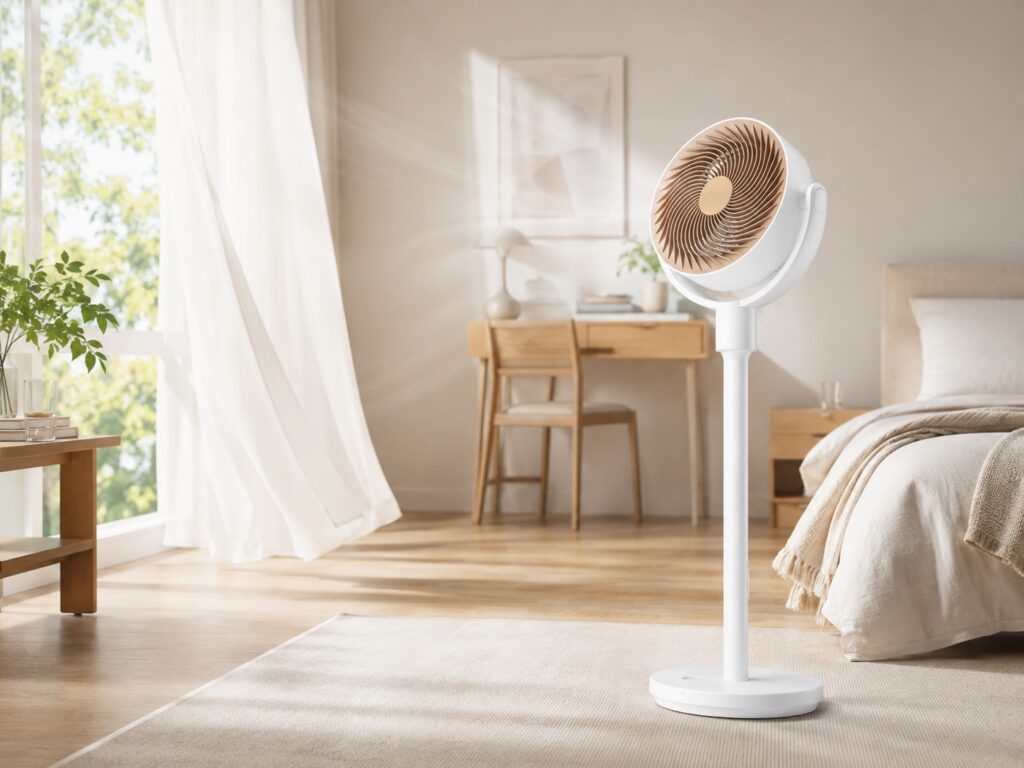
Smart fans often look better in product photos than they feel in daily use. Some models add app control, then leave the rest almost unchanged. SwitchBot’s Standing Circulator Fan feels more practical. It brings strong airflow, quiet running, app control, a remote, cordless use, and smart home support into one slim fan.
That mix feels right for modern homes. More people want simple ways to cool a bedroom, home office, nursery, or small apartment without running the air conditioner all day. A fan no longer has to sit in one corner and blow air in a straight line. A good air circulator fan should move air around the room, push warm air away from still spots, and stay quiet enough for work or sleep.
SwitchBot seems to understand that better than most. Its Standing Circulator Fan feels less like a basic pedestal fan and more like a useful home comfort tool.
Why a standing circulator fan makes more sense than a basic fan
A normal fan gives direct airflow. That feels nice for a short time, but it does not always make the whole room feel better. A circulator fan works in a wider way. It moves air across the space, so the room feels fresher and more balanced.
SwitchBot’s model pushes up to 9.15 m³/min of airflow. It reaches wind speeds up to 6.1 m/s, and the air can travel up to 27 m. Those numbers matter in a bedroom, living room, kitchen, or office. They show that this fan aims to move air through the room, not just cool one chair.
The swing range helps too. The fan has 90° automatic left-right swing and 100° vertical tilt. So it can send air low, high, or across the room. That makes it useful near an air conditioner, since it can spread cool air faster and reduce hot spots.
This is where the fan makes the most sense. Voice control sounds nice, but better air movement changes how a room feels.
Smart control fits a fan better than many other devices
The SwitchBot Standing Circulator Fan works through touch buttons, a remote, and the SwitchBot app. That gives you a few easy ways to control it. Use the remote from the sofa. Use the app from bed. Tap the base as you walk past it.
Smart home support gives it more value. With a compatible SwitchBot Hub Mini, the fan can connect to Alexa or Google Assistant through Matter. That lets you add it to simple daily routines.
You can use it to:
- Turn on the fan before sleep
- Start air circulation before a work call
- Pair the fan with an air conditioner
- Cool a home office during the afternoon
- Add airflow to a bedroom routine
- Control cooling by voice from the sofa or bed
This type of control makes sense on a fan. People adjust fans often during the day. Speed, direction, and placement all change from one room to another. So app and remote control save real effort, not just a few seconds.
For people comparing cooling options, it helps to know the difference between airflow and air cleaning. A fan moves air and helps comfort. An air purifier cleans particles from the air. This guide on air purifier vs fan explains that difference in a simple way.
The adjustable height makes it easier to use every day
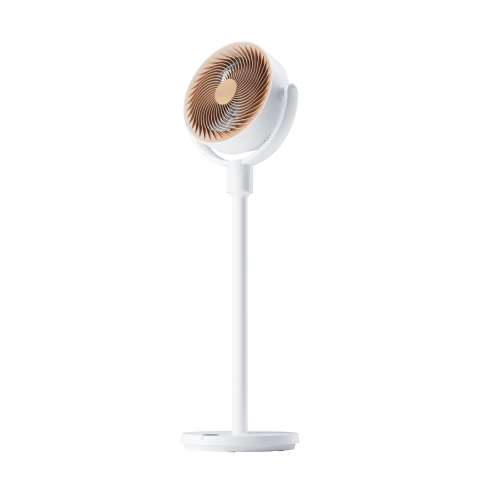
Many pedestal fans feel stuck in one role. They stand in a corner, take up space, and look awkward next to a desk. SwitchBot gives this model an adjustable height from 18.5 to 39.4 inches, or about 47 to 100 cm.
That range makes the fan more flexible. It can work as a standing fan near a sofa, then move closer to a desk as a lower fan. It can sit near a bed at night, then move into the kitchen during the day.
This helps a lot in smaller homes. Students, renters, and apartment users often need one product to do several jobs. A fan that moves from a home office to a bedroom feels more useful than a fixed fan that only fits one spot.
The detachable design helps with cleaning and setup too. That sounds like a small detail, but dust builds up fast on fan blades and grilles. Easier cleaning means the fan has a better chance of staying in regular use.
Quiet airflow matters more than raw power
Fan noise can ruin sleep, calls, and focus. SwitchBot rates this model as low as 22 dB on its quiet setting. That puts it in the quiet fan range for softer airflow.
That matters in a bedroom. It matters in a nursery. It matters near a desk during meetings. Nobody wants a fan that sounds like a small engine next to a laptop microphone.
The DC brushless motor helps here. It gives the fan smoother control and helps it run quietly at lower speeds. That suits the way most people use a fan at home. Full power has its place on very hot days, but low and medium speeds often matter more.
At night, gentle airflow feels better than a strong blast of cold air. During work, steady movement helps the room feel less stuffy. In the kitchen, stronger airflow can help for a short time, then you can turn it down again.
Rechargeable power makes placement less annoying
The rechargeable design may be one of the best parts of the SwitchBot Standing Circulator Fan. It supports plug-in use and USB Type-C charging. That means you do not need to place it beside a wall outlet all the time.
This changes how you use it. Put it near the kitchen counter during cooking. Move it beside a drying rack. Take it to the bedroom at night. Place it next to a desk during work. Then charge it later.
A cordless fan will not replace a large air conditioner or a heavy-duty floor fan. Still, it solves a common home problem. Outlets rarely sit in the perfect place for airflow. Battery power gives you more freedom, and that matters more than it sounds at first.
Matter support is useful, but not perfect
Matter support gives the fan better smart home reach. With the right SwitchBot hub, you can use it with wider smart home systems and voice assistants.
There is one detail worth knowing. App control for vertical oscillation has a limit on the standing model. The app can return the fan to a level center position, but it does not give full control over every upward or downward angle.
That will not bother every user. Most people will set the angle by hand and use the app for power, speed, and basic control. Still, full app control over vertical angle would make the smart side feel more complete.
This is not a deal breaker. The fan still gives strong airflow, wide swing, quiet running, and flexible placement. Yet smart home fans should keep getting better angle control, since direction matters as much as speed.
Who will get the most value from it?
The SwitchBot Standing Circulator Fan fits people who want comfort without a bulky fan. It works well for bedrooms, small apartments, home offices, and living rooms. It also makes sense for anyone who already uses SwitchBot products or wants a Matter compatible fan.
It suits these needs best:
- Smart fan for bedroom cooling
- Quiet fan for sleep
- Rechargeable standing fan
- Oscillating fan for home office use
- Air circulator for AC support
- Alexa fan control
- Google Assistant fan control
- Cordless fan for room-to-room use
It makes less sense for garages, large open spaces, or people who only care about maximum power. A larger floor fan will move more air. But that type of fan usually brings more noise, less control, and less comfort.
Final opinion
SwitchBot’s Standing Circulator Fan makes smart cooling feel more useful by solving real home problems. It moves air well, adjusts to different heights, runs quietly on lower settings, and works through app, remote, touch controls, and voice commands.
The best part is not one single feature. It is the full mix. This fan can sit beside a desk in the morning, help an air conditioner in the afternoon, and cool a bedroom at night. That gives it real daily value.
The app limit around vertical angle control deserves attention. Some buyers will expect more smart control at this price. Still, the core idea works well. SwitchBot built a fan that fits modern homes better than many older pedestal fans.
For people who want a quiet smart fan, a rechargeable standing fan, or a practical air circulator for summer, this model is easy to take seriously.