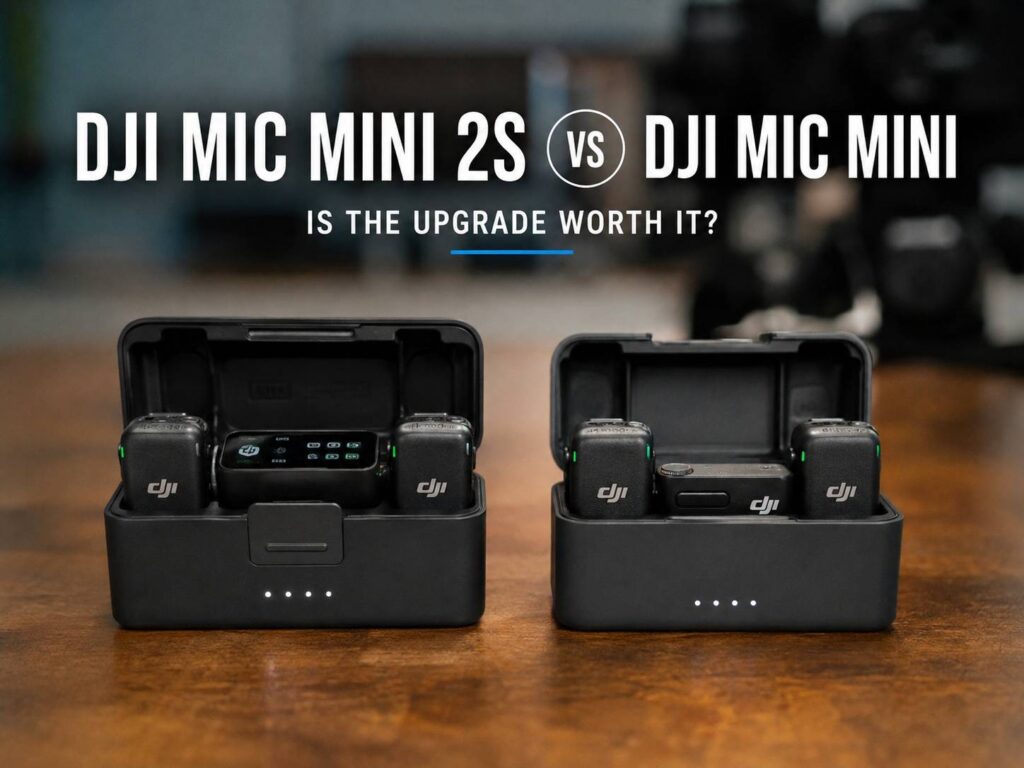
The DJI Mic Mini 2S looks very familiar at first. Put it next to the original DJI Mic Mini and the two wireless microphone systems share the same basic idea. Both focus on small transmitters, long wireless range, simple controls, phone compatibility, and easy recording for creators.
Still, the Mic Mini 2S is more than a minor refresh.
DJI added internal recording, 32-bit float audio, more storage, support for larger multi-person setups, and better handling of loud sound. For many creators, those changes solve the biggest weaknesses of the first Mic Mini.
So, is the DJI Mic Mini 2S worth upgrading to?
For casual videos, probably not. The original Mic Mini remains a strong little wireless microphone. For paid shoots, interviews, events, weddings, podcasts, or recordings that cannot be repeated, the Mic Mini 2S is much easier to recommend.
The biggest reason is simple. It can save audio inside the transmitter.
DJI Mic Mini 2S vs Mic Mini: Main Differences
Here is the quick comparison.
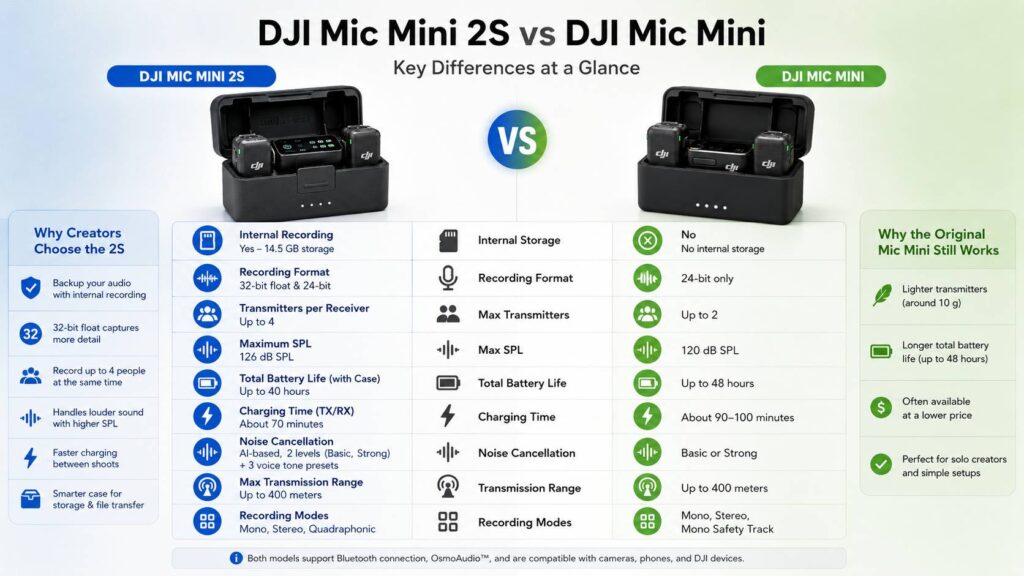
| Feature | DJI Mic Mini 2S | DJI Mic Mini |
|---|---|---|
| Transmitter weight | Around 12 g | Around 10 g |
| Internal recording | Yes | No |
| Internal storage | Around 14.5 GB | No internal storage |
| 32-bit float recording | Yes | No |
| 24-bit internal recording | Up to around 28 hours | No |
| 32-bit float internal recording | Up to around 22 hours | No |
| Transmitters per standard receiver | Up to 4 | Up to 2 |
| Maximum advertised range | Up to 400 m | Up to 400 m |
| Maximum SPL | 126 dB SPL | 120 dB SPL |
| Transmitter battery | Around 11 hours | Around 11.5 hours |
| Total runtime with charging case | Around 40 hours | Up to around 48 hours |
| OsmoAudio support | Yes | Yes |
| Bluetooth phone connection | Yes | Yes |
| Multi-person recording | Up to four transmitters | Up to two transmitters |
At first, the similar range and battery figures can make the upgrade look small. Once internal recording enters the picture, though, the difference becomes much more useful.
Internal Recording Is the Biggest Mic Mini 2S Upgrade
The original DJI Mic Mini does not record audio inside its transmitter.
That means the transmitter sends your voice to the receiver or a connected device. If the wireless signal drops at the wrong moment, there is no separate recording stored inside the microphone.
For quick social media clips, this is rarely a disaster. You can simply record again.
For a wedding speech, interview, live event, or client video, things are different.
You may only get one chance.
The DJI Mic Mini 2S fixes that problem by adding internal storage. Each transmitter has around 14.5 GB available for recordings.
As a result, the transmitter can create its own local audio file during a shoot.
Imagine recording an interview outdoors. A person walks between the subject and your receiver for a second. The wireless signal drops briefly.
With the original Mic Mini, that section can disappear from the camera recording.
With the Mic Mini 2S, you can still have the locally recorded version from the transmitter.
For that reason alone, the new model makes far more sense for professional work.
32-Bit Float Recording Adds a Useful Safety Net
Internal recording gets even better with 32-bit float support.
The DJI Mic Mini 2S can save 32-bit float audio directly on the transmitter. In simple terms, this format gives you much more room to correct recording levels later.
For example, someone might speak quietly for most of an interview and then suddenly laugh or shout.
Traditional recording levels can struggle with that jump.
With 32-bit float, editors have more room to bring quiet sections up or pull loud sections down without immediately ruining the recording.
That does not mean 32-bit float fixes bad microphone placement.
Wind can still ruin a clip. Clothing rubbing against the microphone can still sound terrible. A microphone placed too far from the speaker will still pick up more room noise.
Still, 32-bit float gives you more flexibility when volume changes unexpectedly.
It is especially useful for:
- Weddings
- Street interviews
- Events
- Sports content
- Documentary filming
- Travel videos
- Live presentations
- Unscripted YouTube videos
- Loud environments
- Client work
The Mic Mini 2S can store roughly 22 hours of 32-bit float audio. In 24-bit mode, storage capacity rises to around 28 hours.
For most people, either figure is more than enough for a normal recording day.
Up to Four Transmitters Changes Multi-Person Recording
The original DJI Mic Mini supports two transmitters through its standard receiver.
That setup works well for a host and one guest.
The Mic Mini 2S expands the system to as many as four compatible transmitters connected to one receiver.
So, creators can build much larger recording setups.
For example:
- One host and three guests
- Four-person podcast
- Group interview
- Wedding couple plus two speakers
- Small panel discussion
- Multi-person YouTube video
- Documentary interview with several participants
This is one of those features that you may not need today, yet it gives the system room to grow.
A solo creator probably will not care much about four transmitters.
A small production team certainly might.
The Mic Mini 2S supports recording modes designed for larger setups too. With the right hardware and software, four audio sources can stay separated for editing.
That makes post-production easier. Instead of every person being mixed into one track, you can adjust individual speakers.
Existing Mic Mini Owners Do Not Have to Start From Zero
One pleasant part of the Mic Mini 2S system is compatibility within DJI’s Mini microphone family.
Existing Mic Mini transmitters can work in supported Mic Mini 2S setups after the needed firmware updates.
So, owners of the original kit do not always need to replace every transmitter.
For example, someone who already owns two original Mic Mini transmitters may be able to build a larger system around newer hardware.
That makes upgrading easier to justify.
Still, do not assume every DJI microphone works with every DJI receiver.
The Mic Mini family, Mic 2, and Mic 3 have different compatibility rules depending on the receiver you use.
So, check the exact transmitter and receiver combination before buying extra units.
This matters most if you already own several generations of DJI audio gear.
Sound Handling Improves With a Higher Maximum SPL
The original Mic Mini has a maximum SPL rating of 120 dB.
The Mic Mini 2S increases that figure to 126 dB SPL.
For normal speech, you probably will not hear a dramatic difference.
Most conversations stay well below those limits.
Still, the higher SPL rating can help in louder situations.
Think about:
- Live music
- Sporting events
- Crowds
- Cars and motorcycles
- Stage performances
- Loud presenters
- Clubs
- Outdoor events
The combination of higher SPL handling and internal 32-bit float recording gives the Mic Mini 2S a better chance of coping with unpredictable sound levels.
Again, that matters more for event work than bedroom vlogging.
Noise Cancellation Is Better Suited to Difficult Locations
Both Mic Mini generations offer noise reduction.
The Mic Mini 2S adds a newer AI-based noise cancellation system with multiple processing levels.
That can help around steady background noise such as:
- Traffic
- Air conditioning
- Fans
- Crowds
- Office noise
- Street ambience
For example, Strong noise reduction can help when recording next to a busy road.
In a quiet room, though, heavy processing can make voices sound less natural.
So, stronger is not always better.
I would start with lighter noise reduction indoors. Then, move to the stronger setting only when the environment really needs it.
That small bit of testing can make a noticeable difference in voice quality.
DJI Mic Mini 2S Still Keeps the 400-Meter Range
One feature has barely changed.
Both systems advertise wireless transmission up to 400 meters under DJI’s test conditions.
So, buying the Mic Mini 2S does not give you twice the range.
In practice, 400 meters is an ideal-condition number.
Real recording locations have walls, people, cars, Wi-Fi networks, Bluetooth devices, and other sources of interference.
For that reason, real usable distance can be much shorter.
Still, the good news is that DJI did not reduce the range just to add internal recording and other features.
For normal interviews, vlogging, events, and camera work, both systems offer more distance than most creators need.
The Original Mic Mini Is Still Slightly Lighter
The original Mic Mini transmitter weighs around 10 grams.
The Mic Mini 2S sits closer to 12 grams depending on the accessory setup.
Two grams sounds tiny, and it is.
Still, ultra-light transmitters have one real advantage. Thin shirts sag less when the microphone clips onto them.
For fashion shoots or light summer clothing, every gram can help.
Even so, both transmitters remain very small.
I would not choose the original Mic Mini just to save two grams. The difference is too small compared with the benefits of internal recording.
Battery Life Is One Area Where the Older Model Still Looks Strong
Newer does not always mean longer battery life.
The original Mic Mini transmitter runs for around 11.5 hours per charge.
DJI rates the Mic Mini 2S transmitter at around 11 hours.
That half-hour difference is small.
The charging-case figures create a larger gap. The original Mic Mini kit can reach up to around 48 hours of total use under DJI’s test conditions. The Mic Mini 2S kit sits closer to 40 hours.
So, the original model still has an advantage for total battery endurance.
For most recording days, this probably will not matter.
Eleven hours from one transmitter is already a lot.
Still, creators who travel for several days and record short clips throughout the day may prefer the older model’s longer total case runtime.
Charging Gets Faster on the Mic Mini 2S
Battery endurance drops a little, but charging gets quicker.
The original Mic Mini takes roughly 90 minutes to recharge a transmitter. Receiver charging can take around 100 minutes through the case.
The Mic Mini 2S cuts charging time to roughly 70 minutes for its transmitter and receiver.
That can be surprisingly useful.
For example, imagine shooting an event in the morning and another one after lunch. Faster charging gives you a better chance of topping everything up between sessions.
So, there is a trade-off.
The original lasts longer overall. The Mic Mini 2S returns to full charge faster.
For regular production work, I prefer the faster turnaround.
The Charging Case Is More Useful Than Before
The Mic Mini 2S charging case does more than refill batteries.
It stores two transmitters, the receiver, magnetic accessories, windscreens, and other small parts.
More importantly, the case works with the new internal recording workflow.
After a shoot, you can transfer stored recordings and keep the system organized in one place.
That sounds like a small improvement until you start dealing with several microphones and many audio files.
Anything that cuts cable swapping and accessory hunting is welcome on a busy shoot.
The original Mic Mini case still wins in raw battery endurance.
The newer case, though, fits the wider role of the Mic Mini 2S better.
DJI Mic Mini 2S vs USB Microphones
The Mic Mini 2S is mainly designed for wireless recording.
A desktop USB or XLR microphone serves a different purpose.
For example, streamers and podcasters who sit at a desk usually care more about direct monitoring, desk mounting, gain controls, and XLR connectivity. A product such as the Razer Seiren V3 Pro gives streamers a smarter USB-C and XLR upgrade for that type of fixed setup.
The DJI Mic Mini 2S makes more sense once you need to move around.
It works better for cameras, phones, walking interviews, events, outdoor filming, travel content, and situations where a desk microphone would be impractical.
So, choosing between them comes down to the recording environment.
For a fixed desk setup, a larger USB or XLR microphone can give you more control.
For mobile video, the Mic Mini 2S is far easier to use.
Common DJI Mic Mini 2S Issues and Limitations
No wireless microphone system is perfect.
The Mic Mini 2S fixes several problems from the first generation, but buyers should still know about a few limitations.
- 32-bit float is not always active by default. Check the DJI Mimo settings before an important shoot.
- Internal recording uses storage space. Long recording sessions eventually need file management.
- Four-transmitter setups cost more. You need extra transmitters before you can use the full system.
- Four-channel workflows need compatible gear. Your camera or editing software must support the setup you want.
- The 400-meter range is an ideal-condition figure. Real-world range can be shorter.
- Strong noise reduction can sound processed. Test both levels before recording important dialogue.
- 32-bit float does not repair wind noise. Use a windscreen outdoors.
- Clothing noise is still a problem. Keep fabric away from the microphone capsule.
- Battery life can drop with extra features active. Internal recording and noise processing use more power.
- Compatibility differs across DJI microphone families. Check transmitter and receiver support before mixing models.
None of these problems are deal-breakers.
They simply mean the Mic Mini 2S still needs proper setup.
Who Should Upgrade From the Original DJI Mic Mini?
The Mic Mini 2S makes the most sense for people who record content that cannot easily be repeated.
Upgrade if you often record:
- Paid client projects
- Interviews
- Weddings
- Conferences
- Live events
- Documentaries
- Group discussions
- Podcasts with several speakers
- Loud environments
- Long-form YouTube content
For those users, internal recording is the main reason to switch.
A dropped wireless packet during a wedding speech can ruin an important moment.
A local transmitter recording gives you another copy.
That peace of mind matters far more than an extra feature buried inside an app.
Who Should Keep the Original DJI Mic Mini?
There is no need to replace a Mic Mini that already fits your workflow.
The original remains a good choice for:
- Solo vlogging
- TikTok and Instagram clips
- Family videos
- Travel videos
- Simple talking-head content
- One-person tutorials
- Basic two-person interviews
- Creators who rarely edit audio
- Buyers who want longer case battery life
- Users shopping at a heavy discount
It still offers long wireless range, strong battery life, small transmitters, phone support, and OsmoAudio compatibility.
So, the Mic Mini has not become obsolete.
It simply lacks the recording safety features that make the 2S more attractive for serious work.
Which DJI Mic Mini Should a New Buyer Get?
For a new buyer, I would choose the DJI Mic Mini 2S in most cases.
The internal recording alone makes the system more useful over the long term.
Then you get 32-bit float, support for more transmitters, faster charging, higher SPL handling, and newer noise cancellation on top.
The original Mic Mini still makes sense at a much lower price.
For example, a solo creator who only records short videos may never need four transmitters or internal backup files.
In that case, saving money is reasonable.
Still, if the price difference is modest, the Mic Mini 2S is the safer buy.
You are more likely to grow into its extra features later.

DJI Mic Mini (1 TX + 1 RX), Ultralight, Detail-Rich Audio | Noise Cancelling, Automatic Limiting, Wireless Microphone for Camera/iPhone/Android, Vlog,...

Is the DJI Mic Mini 2S Worth the Upgrade?
For casual creators, the answer is no in many cases.
The original DJI Mic Mini remains light, simple, reliable, and easy to use.
For people who record important or paid content, the answer is much closer to yes.
Internal recording changes the system in a practical way. 32-bit float gives you more room to fix difficult recording levels. Four-transmitter support makes larger productions possible. Faster charging and higher SPL handling add more value.
The original still wins on total battery life and slightly lower transmitter weight.
Yet those advantages matter less once a recording cannot be repeated.
If I already owned the original Mic Mini and only recorded short social clips, I would keep it.
If I recorded interviews, weddings, events, podcasts, or client work, I would move to the Mic Mini 2S.
For a first-time buyer, I would pick the Mic Mini 2S unless the original model is heavily discounted.
The best reason is not the newer name. It is the backup recording sitting safely inside the transmitter.