LG’s webOS does not only run on televisions. It also runs on LG smart monitors, the desk-sized screens that boot into an app launcher and stream without a computer attached. That matters this month, because a long technical investigation published on 7 September 2026 measured what webOS sends home, and LG answered it publicly a few days later. Below is what the researchers documented, what LG confirmed, what LG denied, and which settings on a webOS screen actually change the behaviour. The measurements are specific, so the advice can be specific too.
What was published, and on what date
The investigation came from Gamers Nexus, ran to roughly two hours and sixteen minutes, and went live on 7 September 2026 under the title 216,000,000 Spy TVs. Three independent researchers worked on the analysis, including Wendell of Level1 Techs, who built the traffic interception rig. The team said it spent more than a month and around 70,000 dollars on the work, and that it bought every screen at retail.
Four devices were tested: an LG G5, an LG G3, a 43-inch QNED 73B and an LG smart monitor. An earlier instalment covering LG monitors and their bundled software went out on 16 July 2026. Method matters here. The team mirrored a network port and captured packets with Wireshark, installed a man-in-the-middle certificate on the set, and decompiled firmware. Further vulnerabilities sit inside a responsible disclosure window and were not described.
Why a monitor belongs in this story
Buyers often treat a smart monitor as a plain panel with a few apps bolted on. The software underneath says otherwise. A screen such as the LG Smart Monitor AI U7s boots into webOS, ships with a remote, and runs streaming apps and LG’s own channel service with no PC attached. That is the same platform, the same account system and the same advertising stack that sit inside an LG television.
One capture makes the point sharply. When the researchers used a television purely as a display, fed over HDMI from a laptop, content recognition still ran. So the line between watching TV and using a screen as a monitor does not stop the collection. It only changes what the fingerprints describe.
What the packet captures measured
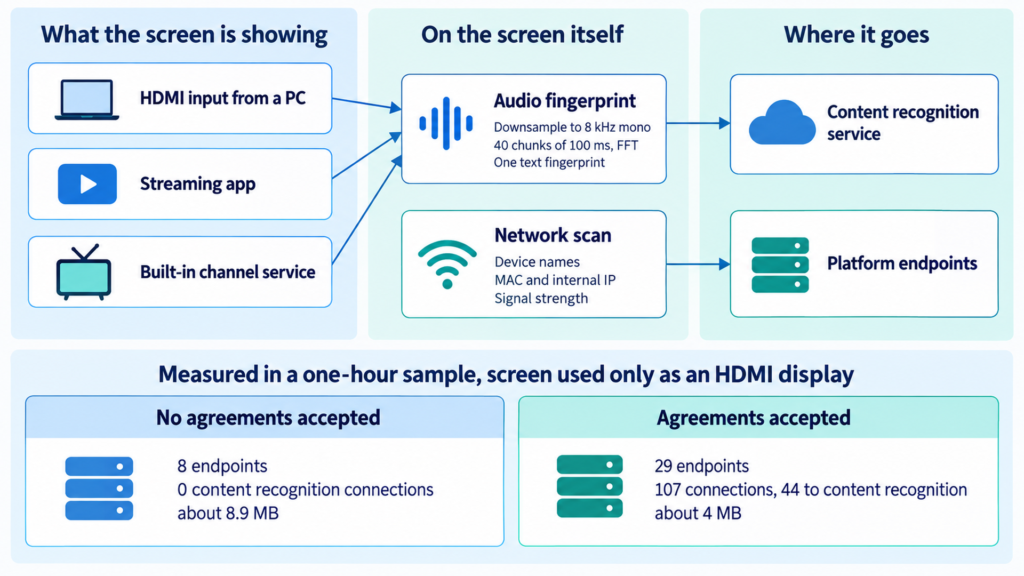
With no user agreements accepted at all, and the G3 used only as an HDMI display, the set still reached eight separate endpoints during a one-hour sample. It moved about 8.9 megabytes, sent 38 DNS queries to LG domains, and repeatedly probed for nearby devices. Extrapolated, that is roughly 6.4 gigabytes a month from a screen doing nothing but showing a laptop. No content recognition traffic appeared in that pre-consent sample.
After the agreements were accepted, the same screen behaved differently.
| Test condition | Endpoints contacted | Connections | Connections to the content recognition service | Data moved |
|---|---|---|---|---|
| G3, no agreements, HDMI display, 1 hour | 8 | not stated | 0 | about 8.9 MB |
| G3, agreements accepted, HDMI display | 29 | 107 | 44 | about 4 MB |
| QNED 73B, agreements accepted, HDMI display, about 50 min | 22 | 157 | 54 | about 5.2 MB |
| QNED 73B, running the built-in channel service, about 50 min | 60 | 847 | 618 | about 4.5 MB |
Across a month, the team estimated roughly 4 gigabytes of content recognition data per television. That figure describes text fingerprints rather than images or recordings.
How the fingerprinting actually works
The audio chain is simple and worth understanding, because it explains why the data volume stays small. The set downsamples audio to 8 kHz mono, runs a fast Fourier transform across 40 chunks of 100 milliseconds each, combines the results into a single fingerprint, and uploads that. Nothing leaves as a picture or as speech. A hash is enough to match against a reference database, and the set was seen downloading such a database so it could do the first step locally.
Sampling is short by design. Wendell described the implementation as taking roughly six seconds of audio or video, converting it, then going dormant before the next sample. He called the six-second limit the industry’s hedge against capturing continuous conversation, while noting how much can still be derived from it.
One side effect deserves attention. DNS queries made while running the built-in channel service carried readable channel identifiers. Anyone on the same local network, and the internet provider, could therefore see which channel was playing.
The network scan LG confirms
The screens scanned the local network continuously. The researchers counted at least 38 devices discovered on their network, capturing display names, MAC addresses, internal IP addresses and signal strengths. Among the items enumerated were staff phones and watches belonging to people not involved in the project, a 3D printer, an air purifier, network switches and thermostats.
LG confirmed this part. Its statement says LG TVs can scan for and connect to nearby devices on the same network, and calls that a standard function across smart TVs and smart home products. As a technical description, that is fair. Device discovery is how casting and smart home control work at all. The open question is what happens to the inventory afterwards, and LG Ad Solutions has been unusually candid with advertisers about the value of knowing which devices sit in a household. Its president, Serge Matta, is quoted in the investigation saying the company owns the glass.
The voice dispute, and the part LG did not answer
LG’s letter reached Tom’s Hardware on or about 9 September 2026 and was reproduced in full by other outlets on 11 September. It calls the central claims not true. According to LG, its TVs process voice data only when the remote control voice button is pressed and held, or when a wake word such as Hi LG is recognised after the user has switched on far-field voice recognition. Wake word detection runs locally, and the audio is deleted immediately unless the wake word fires.
The researchers reported something the letter does not address. They found recognised speech written as plain text into debug logs held on a RAM disk. Switching the set off did not clear those logs. Rebooting did not clear them either. Pulling the mains lead did. They also observed a capture window staying open for roughly ten to fifteen seconds after speech stopped. LG’s statement says nothing about plain text transcripts or on-device retention, so the two accounts disagree about what the device keeps rather than about whether a microphone exists.
What the offline claims do and do not show
Careful reading matters here, because secondary coverage has blurred two very different findings. Network enumeration and content recognition required no vulnerabilities at all. The demonstration in which a set recorded while disconnected and handed the audio over later did require them, on a device the researchers had already rooted. Gamers Nexus stated that distinction plainly.
On offline fingerprinting, the team was equally careful. It said it cannot test every LG model, display and firmware version, and that its account covers cases it verified or that third parties verified. The third party cited is a Center for Digital Democracy study, reported by the New York Times, which found content recognition continuing to run offline on the LG and Samsung sets tested.
What to change on a webOS screen today
Three steps cover most of it. First, open All Settings, then General, then System, then Additional Settings, and switch Live Plus off. Live Plus is LG’s name for content recognition. Second, open All Settings, then General, then About This TV, then User Agreements, and decline the viewing information, interest-based advertising and voice agreements. Third, check both screens again after a firmware update, because agreements can reappear with new terms.
Wording varies between webOS versions, so treat those paths as a guide rather than a fixed route. If you want the screen fully isolated, feed it from a separate streaming box and keep webOS off your network. Firmware can still be updated from a USB stick.
Does this change what you should buy?
A smart monitor earns its price through software, and that software is also an advertising platform. Both things are true at once. If the apps and the remote are the reason you want the screen, budget ten minutes in the agreements menu on the first day and accept that the platform keeps asking. If you only want glass for a PC, a plain monitor with a comparable panel usually costs less and has nothing to opt out of. That is an editorial judgement rather than a measurement, and the measurements above should let you make your own.