Nintendo switched on variable refresh rate in TV mode on 10 September 2026, more than a year after the Switch 2 shipped without it. The patch note is three lines long, and it hides a lot of work. The console update on its own changes nothing. Your dock needs separate firmware, the game has to support the feature, and almost no game does yet. So the question for anyone shopping for a gaming monitor is narrower than the headlines suggest. Below is what Nintendo actually published, what Switch 2 docked VRR does to the picture, which settings moved, and whether this should change the screen you buy.
What Nintendo published, and on what date
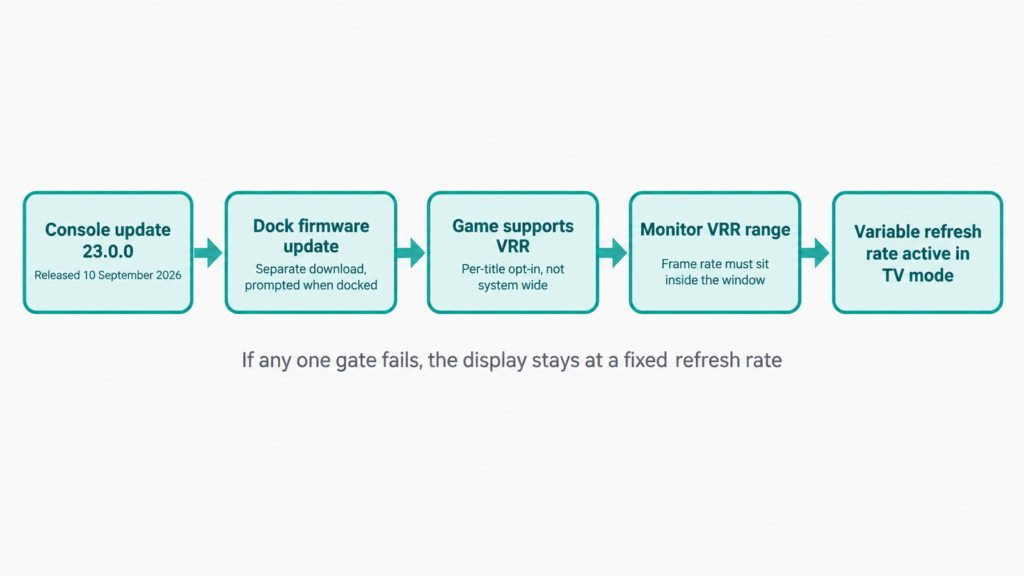
System update 23.0.0 went out on 10 September 2026 for both Switch 2 and the original Switch. The Switch 2 notes say the update “added support for VRR (Variable refresh rate) in TV mode” and that “when both the software and TV support it, video will be output at a refresh rate that matches the game’s processing.” The same entry adds one sentence that decides whether any of it works for you: “A Nintendo Switch 2 dock update is required to enable this feature.”
Two more display lines sit in the same release. Nintendo renamed the “Dock Output Information” screen to “Video Output Information” and says it now includes details about the signals your connected TV can display. Separately, the update adds settings for VRR under Display in System Settings. New firmware for the dock, the Joy-Con 2 controllers and the Switch 2 Pro Controller shipped at the same time.
Handheld VRR was never the missing piece. Nintendo’s own specification sheet lists the built-in 7.9-inch 1080p screen with HDR10 support and VRR up to 120 Hz. TV mode was the gap, and it stayed a gap from launch until this month.
Why the dock matters more than the console
A console update usually lands everywhere at once. This one does not, because the signal your monitor sees leaves the dock, not the handheld. The dock holds the HDMI transmitter, so the capability has to exist in dock firmware before the console can negotiate a variable refresh rate with your display.
That has a practical consequence. If you installed 23.0.0 and the VRR settings look inert, the dock is the first thing to check. Docking the console and leaving it connected to power is what triggers the accessory update, and the console prompts for it rather than applying it silently in sleep. Owners who play mostly in handheld mode and dock the console only occasionally may sit on old dock firmware for weeks without noticing.
What variable refresh rate actually fixes
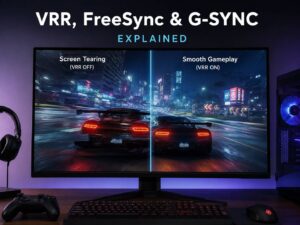
A normal display refreshes on a fixed clock. A 120 Hz panel starts a new refresh every 8.33 milliseconds whether or not the console has finished drawing a frame. When a frame arrives late, the panel either shows the previous one again, which reads as a stutter, or shows half of each, which reads as a tear across the middle of the screen.
VRR removes that mismatch. The display holds its current image until the next frame is ready, then refreshes. Frame pacing becomes smoother without the input lag that traditional v-sync adds. The effect is strongest when a game sits just under its target, say 52 to 58 frames per second against a 60 fps goal, because that is exactly where fixed-refresh stutter is most visible.
It is worth being clear about what VRR does not do. It adds no frames. A game that runs at 45 fps still runs at 45 fps, and it will still look less fluid than the same game at 60. VRR only makes the delivery of those frames consistent.
The detail most coverage skipped
Nintendo built this as an opt-in feature, not a system-wide one. Digital Foundry’s John Linneman reported on 10 September 2026 that Switch 2 games need their own update before docked VRR applies to them, and that only Nintendo Switch 2 Welcome Tour supported it at that point.
That is a real difference from how the PlayStation 5 handled the same feature, where Sony applied VRR to unpatched titles automatically. On Switch 2, a game your console already has installed will keep running at a fixed refresh rate until its developer ships a patch. So the honest answer to “will my library feel smoother tonight” is no, with one small exception.
Where the frame ceiling sits
Nintendo’s published video output specification caps TV mode at 3840 by 2160 at 60 fps. The console supports 120 fps only when you select 1920 by 1080 or 2560 by 1440. HDR10 is supported in TV mode as well.
Those numbers matter because they define the window VRR has to work inside. At 4K you are asking your monitor to track something at or below 60 Hz. At 1080p or 1440p the ceiling rises to 120 Hz. Either way, a Switch 2 never asks a display for the extreme refresh rates that dominate monitor marketing, so a 480 Hz panel buys you nothing here.
Reading your monitor’s VRR range
Every adaptive sync monitor has a published window, and it is the number to look up before you expect any benefit. A 31.6-inch 4K panel such as the Dell Alienware AW3225QF lists a VRR range of 48 to 240 Hz. Everything a Switch 2 can output in TV mode falls inside that window, which is the comfortable case.
The awkward case is a game that dips below the floor. When frame rate falls under the bottom of the range, many monitors use low framerate compensation, which draws each frame more than once to keep the panel inside its supported window. Support for that is not universal, and manufacturers do not always state it plainly. If a display’s range starts at 48 Hz and the title targets 30 fps, low framerate compensation is the mechanism doing the work, so check whether your model lists it.
One more caution. Nintendo’s notes do not name which VRR signalling method the dock uses. HDMI Forum VRR and AMD FreeSync over HDMI both exist and are not the same thing. Until Nintendo says more, treat any claim about which one your monitor needs as unconfirmed.
The new Video Output Information screen
The rename from “Dock Output Information” is more useful than it sounds. Nintendo says the screen now reports what the connected TV can display, not only what the dock is sending. That turns a diagnostic page into a compatibility check.
If VRR is not engaging, that screen is the fastest place to find out whether the console can even see the capability on your display. Cheap or short HDMI cables, HDMI switches and some AV receivers all sit in the path and any of them can drop the feature without an error message.
Should this change the monitor you buy?
Not much, and that is a reasonable outcome. Adaptive sync is already standard on gaming monitors at every price, so you are unlikely to buy a new panel without it. What this update should change is how you read a specification sheet. The useful figures for a Switch 2 owner are the VRR floor, whether low framerate compensation is supported, and clean handling of 1440p at 120 Hz, not the headline refresh rate.
If you were holding off on a purchase because docked VRR was missing, that reason is gone. If you expected your existing library to transform on 10 September, wait for game patches instead. The feature is real, the plumbing is in place, and the content side is where the delay now lives.
What is still unknown
Nintendo has not said which titles will be updated, or whether first-party games will get patches on any schedule. The company has not published a supported VRR range for the dock either, so the lower bound of what it can negotiate is not documented. Both gaps matter for anyone trying to predict how a specific game will behave, and neither has a confirmed answer today.