Check your model’s storage instructions before deciding whether to leave an inkjet printer powered over the holidays. The advice differs: HP’s ink-tank maintenance article recommends leaving the printer on for automatic maintenance, while Epson’s ET-2800/ET-2803 manual says to unplug it during a long period of nonuse. Neither instruction should be applied to every inkjet.
Use the power button before unplugging
For the Canon GX7000 series, press the ON button and wait until its lamp goes out before disconnecting power. Canon explains that this lets the printer cap the print head to protect it from drying. Cutting power at a wall switch skips that shutdown process.
There is another reason to prepare a GX7000 before unplugging it: Canon warns that documents stored in the printer’s memory will be erased. Print, send or save anything you need first.
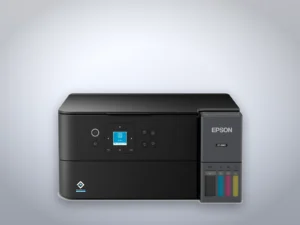
Epson also tells ET-2800/ET-2803 owners to use the power button and wait for its light to stop flashing before unplugging. Its manual warns against outlets controlled by wall switches or automatic timers.
A printing interval is not a storage guarantee
Canon recommends using the GX7000 series at least once a month. HP’s general ink-tank guidance suggests weekly printing and warns that heat and dry conditions increase drying risk. Those are maintenance recommendations, not a promise that a particular printer will survive a given trip without clogged nozzles.
For a longer absence, find the storage section in your own printer’s manual. Don’t choose a power setting solely from the length of the trip or another brand’s advice.
Check the ET-2800’s ink before you leave
Epson warns against leaving the ET-2800/ET-2803 with low ink for an extended period. Check the tanks against their marked levels and follow the manual’s refill procedure when needed. If a refill bottle has been stored somewhere cold, let it reach room temperature for at least three hours before using it.
Run a nozzle check when you return
If your Epson EcoTank prints lines, start with a nozzle check to see whether cleaning is needed. For the ET-2800/ET-2803, Epson says to clean only when print quality has declined, because cleaning consumes ink. If the pattern is complete, there is no reason to run cleaning cycles just because you’ve been away.
If the pattern has gaps, follow the model’s cleaning procedure and check again afterward. After up to three unsuccessful cleanings, Epson calls for at least 12 hours with the printer off before another check.