Is Logitech’s MX Keys Mini Worth It Without Home and End Keys?
Logitech's MX Keys Mini is the MX Keys with its number pad and page keys cut away, a compact board that pairs with three computers at once. The cheaper Pebble Keys 2 K380s pairs with three as well. The Mini adds a rechargeable battery, a backlight and, since April 2026, a mouse that can switch computers along with it.
Every figure in this review comes from Logitech: its US product page, its support center and its data sheet for the business version. The standard box holds the keyboard, a charging cable and no receiver, so a receiver-free setup uses Bluetooth. It also supports an optional Logi Bolt receiver; USB-C is for charging, not a wired keyboard connection.
Affiliate disclosure: the price links on this page may earn us a commission at no extra cost to you. Retailers cannot pay for placement or influence the score. How we stay independent
Quick verdict
RecommendationRecommended for laptop owners who switch between Bluetooth computers at one deskEvidence: maker figures only
The MX Keys Mini is a compact option for a desk shared by up to three Bluetooth devices. Its smaller footprint trades away the number pad and dedicated navigation keys; the standard package also omits a Bolt receiver.
Strengths
Three Easy-Switch channels
Moves a linked Logitech mouse to the same computer on Windows and macOS
Types while charging over USB-C
Weaknesses
Ships without a Logi Bolt receiver
No dedicated Home, End, Page Up or Page Down keys
Backlight stays off in bright light at default settings
Logitech MX Keys Mini, Y-R0084. US English: Graphite 920-010388, Pale Gray 920-010473, Rose 920-010474, Black 920-010475
Layout
79 keys, no number pad or navigation block, Windows and Mac legends
Keys
Scissor switches, 1.8 mm total travel, rated for 10 million presses (function keys 5 million)
Connection
Bluetooth Low Energy, 3 Easy-Switch channels, Logi Bolt compatible (receiver not included)
Battery
1,500 mAh Li-Po, up to 10 days with backlight or up to 5 months without, USB-C charging
Backlight
Proximity and ambient light sensors, off above 100 lux by default
Size and weight
295.99 x 131.95 x 20.97 mm, 506.4 g
Warranty
1-year limited (2 years on the MX Keys Mini for Business)
How we reviewed it
Basis
Research-based: assessed from the manufacturer’s published specifications, documentation and the independent sources listed at the end. We have not tested this unit ourselves; any measurement quoted belongs to the cited source.
Method
Logitech's US product page supplies the dimensions, battery ratings, connection options, warranty and part numbers used in the switching, battery and layout sections. Its support center supplies the pairing steps, the light-sensor cutoff, the low-battery behavior and the key ratings. Logitech's feature guide and its Options+ and firmware release notes date the April 2026 mouse switching and the December 2024 backlight settings. The receiver, the two-year warranty and the missing tilt legs come from the data sheet for the MX Keys Mini for Business, and the rival figures from Logitech's pages for the MX Keys S and the Pebble Keys 2 K380s.
Evidence
Every figure here is a Logitech statement, with ratings from its product page and data sheet and behavior from its setup guide and support notes. Our own contribution is the arithmetic on width and charging interval, and the reading of the light-sensor rule against the two battery ratings.
Limitations
We have no independent measurement of the battery life, the backlight or how the keys feel. Logitech hasn't said whether the manual brightness setting added in December 2024 keeps the light on in a room brighter than 100 lux.
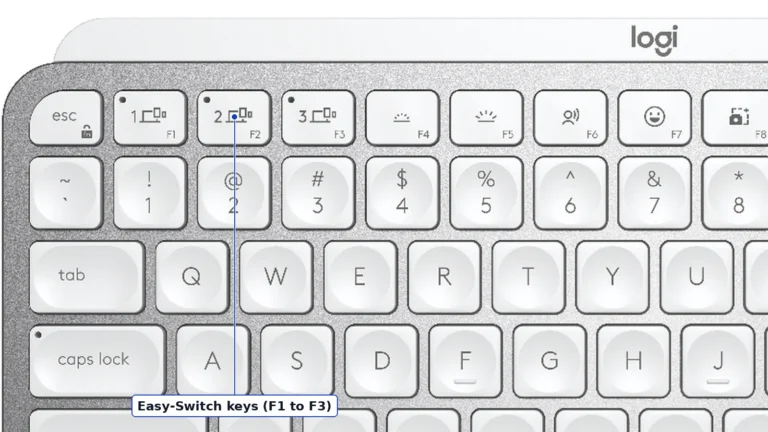
The top-left corner of the Pale Gray MX Keys Mini, where F1, F2 and F3 double as the three Easy-Switch keys. Product illustration based on manufacturer imagery: authentic crop of a Logitech render
Each of the F1, F2 and F3 keys holds one paired computer, tablet or phone. Hold one for three seconds and its light blinks fast while it waits to pair. After that, a short press jumps straight back to that device. Logitech lists Windows, macOS, ChromeOS, Linux, iPadOS, iOS and Android, though the full Logi Options+ app runs only on Windows and macOS.
Since Options+ 2.3 arrived in April 2026, an Easy-Switch key can also move a linked Logitech mouse to the same computer. Logitech calls this Enhanced Easy-Switch. It needs a mouse on Bolt or Bluetooth and Options+ running on every computer. So it works only after you pair the mouse and the keyboard with each computer, and only between Windows PCs and Macs. Logitech's feature guide doesn't list the Pebble Keys 2 K380s, and the one-key switch is the best reason to pay more for the Mini.
The full-size MX Keys S comes with a Logi Bolt receiver, and the standard Mini works with one bought on its own. A desktop tower without Bluetooth can't use the Mini until a receiver arrives. Logitech also warns that FileVault, the disk encryption on some Macs, can stop a Bluetooth keyboard from connecting before you log in. That's the moment you need it for the password.
The MX Keys Mini for Business ships with a Bolt receiver paired at the factory, according to Logitech's data sheet, and its warranty runs two years to the standard board's one. Beside a tower or a FileVault Mac, we'd buy that version.
Which battery rating applies to your desk
Not rated · Evidence: maker figures only
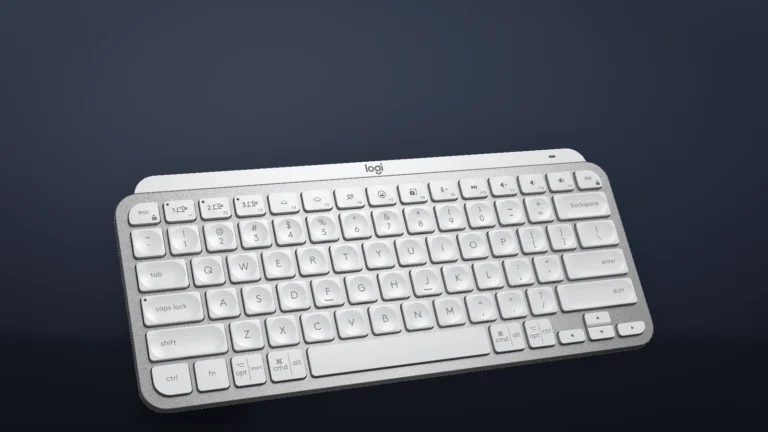
Logitech's three-quarter render of the Pale Gray MX Keys Mini, placed on a generated dark backdrop. Product illustration based on manufacturer imagery: Logitech render on a generated backdrop
Logitech rates the 1,500 mAh battery at up to 10 days with the backlight on and up to five months with it off. The two figures aren't modes you pick. Its setup guide says an ambient light sensor turns the backlight off whenever the room is brighter than 100 lux, and you can't turn it back on until the room gets darker.
In dimmer light the backlight comes on at level 4 of 8 as your hands approach. It stays on for five minutes after your last keystroke. By that rule, the shorter rating describes typing in a dim room. At a desk bright enough to trip the cutoff, the light stays off, so the longer rating is the better guide by day.
Logitech's shorter rating works out to a charge every week and a half. You can keep typing while it charges over USB-C. Low battery turns the status light by the power switch red and shuts the backlight off, though Logitech says the keys keep working for more than 500 hours after that.
A December 2024 firmware update, version 73.4.16, added backlight settings to Logi Options+: how long the light stays on, automatic brightness and a battery-saving mode. We'd keep automatic brightness on. Logitech's support note for the Pale Gray and Rose boards says the light shows no contrast in a bright room and would only drain the battery there.
The battery isn't user-replaceable, according to Logitech's specification sheet.
What the shorter layout leaves out
Not rated · Evidence: maker figures only
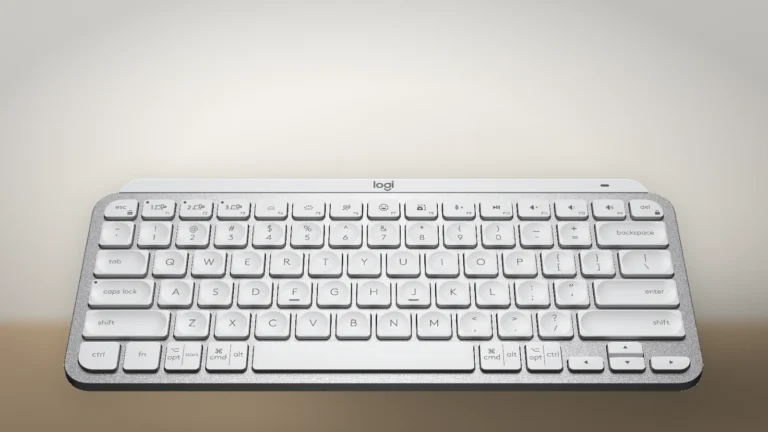
The whole US layout from the front, with the arrow keys at the bottom right and Delete at the top right. Product illustration based on manufacturer imagery: Logitech render on a generated backdrop
The Mini has 79 keys. It drops the number pad and the dedicated navigation block of the MX Keys S: there are no separate Home, End, Page Up or Page Down keys. Insert shares a key with volume up, and Delete is at the top right. That does not prevent document navigation through operating-system or app shortcuts, but it changes how often you need shortcuts.
The board is 11.65 inches wide, against 16.94 inches for the MX Keys S: about 5.3 inches less desk width. That can leave more room for the mouse beside it; the actual position depends on your setup.
Media keys are the top row’s default. Fn and Esc together swap the row to F1 through F12 and back. Some functions, including microphone mute, need Options+.
Choose the smaller board if mouse space matters more than a number pad and dedicated navigation keys. If you enter figures or use Home and End throughout the day, the full-size layout may save more effort than the smaller footprint.
Scissor keys and a fixed typing angle
Not rated · Evidence: maker figures only
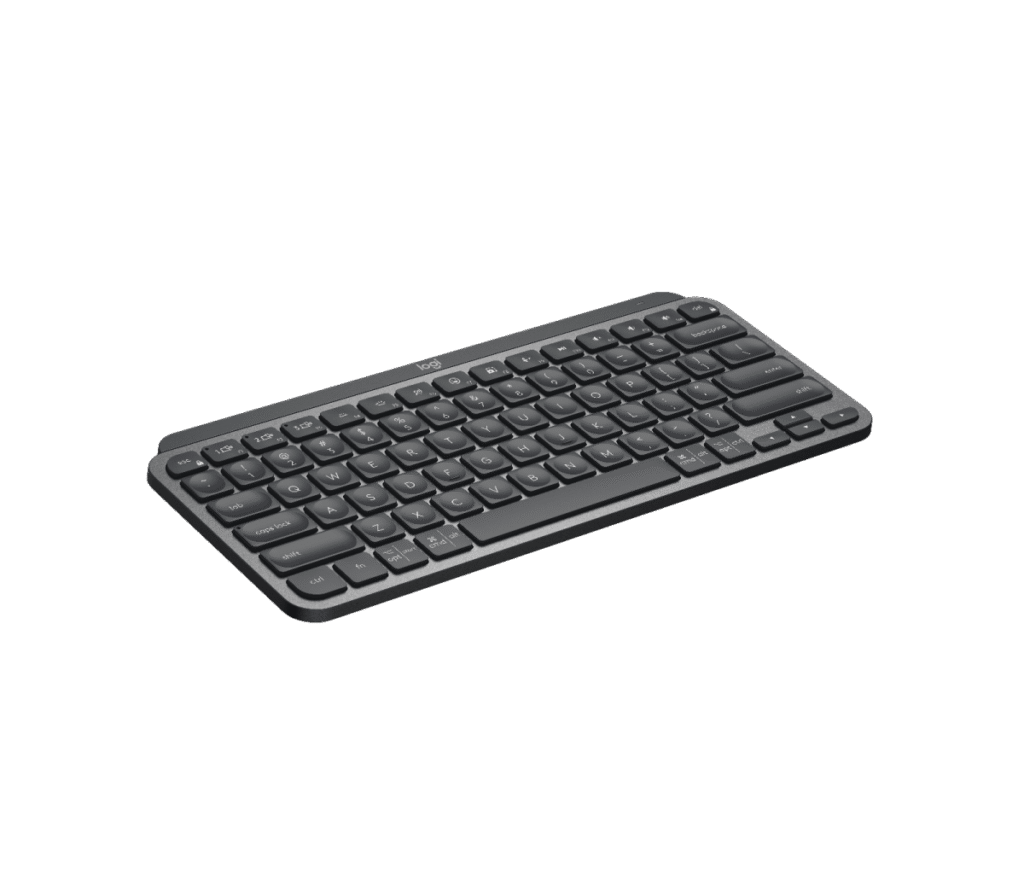
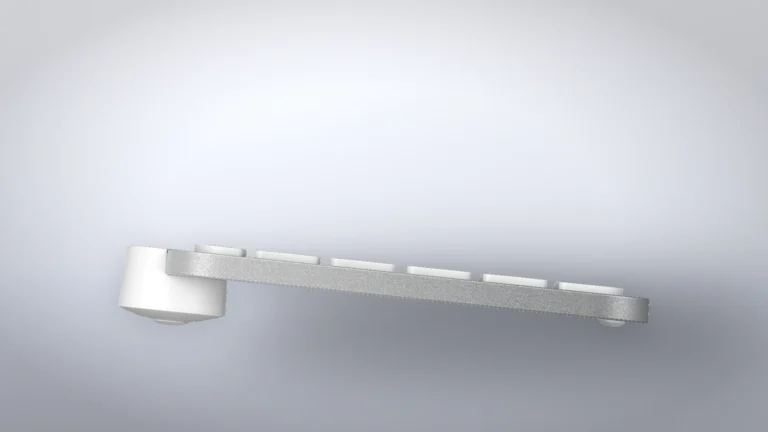
The MX Keys Mini from the side, with the rounded bar at the back that raises the rear edge. Product illustration based on manufacturer imagery: Logitech render on a generated backdrop
Logitech compares the Mini's scissor switches to the ones in laptops and gives them 1.8 mm of total travel. It calls the caps spherically dished, meaning each has a shallow bowl in the middle. The letter keys are rated for 10 million presses and the function keys for 5 million. Anyone who wants deeper keys in the same footprint should look at the MX Mechanical Mini, which Logitech gives 3.2 mm of travel.
Logitech's data sheet lists no tilt legs, and its side render shows the rounded bar along the back edge that sets one fixed angle. The board weighs 506.4 g, and the plate under the keys is aluminum.
Where to buy
In-stock offers for this exact model, sorted by item price in USD. Shipping is not included unless a retailer supplies it. Not every retailer is listed. Prices last checked 20 hours ago.
Retailer prices for the Logitech MX Keys Mini, model Y-R0084, US English (QWERTY). The bound offer is the Pale Gray unit, part 920-010473.
Prices and availability come from retailer feeds and change without notice; the retailer’s page is authoritative. We may earn a commission if you buy through these links.
✓
Final verdict
Logitech MX Keys Mini, model Y-R0084, US English (QWERTY). The bound offer is the Pale Gray unit, part 920-010473.
RecommendationRecommended for laptop owners who switch between Bluetooth computers at one desk
This review gives no score out of 10, because no section rests on a measurement by an independent body. The recommendation and the written verdict stand on their own.
Pros
Three Easy-Switch channels
Moves a linked Logitech mouse to the same computer on Windows and macOS
Types while charging over USB-C
Cons
Ships without a Logi Bolt receiver
No dedicated Home, End, Page Up or Page Down keys
Backlight stays off in bright light at default settings
Fixed typing angle with no tilt legs
One-year consumer warranty
Battery is not user-replaceable
Conclusion
The MX Keys Mini suits a compact desk shared by Bluetooth devices, especially when its linked-mouse switching is useful on Windows or macOS. The standard consumer package omits a Bolt receiver, which matters for a tower without Bluetooth. Choose a larger layout if you rely on a number pad or dedicated Home, End and page-navigation keys.
Our take
The Mini’s compact layout and three pairing channels make sense for a desk of Bluetooth laptops. Enhanced Easy-Switch adds linked mouse switching on supported Windows and macOS setups with Options+. The trade is less attractive if dedicated navigation keys or a number pad matter throughout the day.
Best for
Laptop owners who dock at a desk beside a second computer
Writers and programmers on a narrow desk
Consider an alternative if
You enter figures into spreadsheets every day
Your tower has no Bluetooth and you don't want to add a receiver
No. The standard MX Keys Mini connects over Bluetooth and works with a Logi Bolt receiver sold separately. The MX Keys Mini for Business ships with one already paired.
Can I use the MX Keys Mini with an iPad?
Logitech lists iPadOS 14 or later over Bluetooth, with the keyboard's basic functions. Logi Options+ and its key remapping run only on Windows and macOS.
Andreea reads BetterBuyBase’s articles, guides and reviews before they are published. When she has also checked a piece against its sources, the note at the end of it says so, with her name and the date.
This is a research-based assessment: the reviewer compiled it from published specifications, documentation and independent measurements rather than from testing the unit.
RecommendedLogitech MX Keys Mini, model Y-R0084, US English (QWERTY). The bound offer is the Pale Gray unit, part 920-010473.Compare prices
Cookies on BetterBuyBase
We keep cookies to a minimum. Without your consent, this site sets only the ones it needs to work: remembering your answer here and keeping the site secure. If you allow analytics cookies, Google Analytics counts visits and shows us which pages people read. If you allow functional cookies, embedded videos you choose to always show are remembered. The site is also set up for Google AdSense ads; the cookie policy explains how Google uses cookies once ads run. Cookie policy
Customise consent preferences
Each category below lists the exact cookies behind it, what they do and how long they last. Strictly necessary cookies cannot be switched off because the site would stop working without them. Anything else is yours to decline.
NecessaryAlways active
Strictly necessary cookies keep the site working and secure: they remember your choice here, help the security layer stop attacks and keep site accounts signed in to the admin area. The site cannot run without them.
Show the cookies in this category (7)
cmp_consent
BetterBuyBase · 1 year
Remembers your consent choice for each cookie category, so the banner does not ask again on every page.
wp-settings-(id), wp-settings-time-(id)
WordPress · 1 year
Remembers layout preferences inside the WordPress admin screens. Set only for accounts that sign in to run the site, never for ordinary visitors.
WordPress · Session, or 14 days if “Remember me” is ticked
Keeps a site account signed in to the WordPress admin, and checks that the browser accepts cookies at login. Set only for accounts that sign in to run the site, never for ordinary visitors.
wfwaf-authcookie-(hash)
Wordfence (Defiant, Inc.) · 12 hours
Lets the Wordfence firewall check a signed-in user’s access level before WordPress loads, so administrators are not blocked by firewall rules. Set only when you log in to the site.
wf_loginalerted_(hash)
Wordfence (Defiant, Inc.) · Persistent
Records that the administrator has already been alerted about a sign-in from this device. Only used if login alerts are enabled, and set only when you log in to the site.
wfCBLBypass
Wordfence (Defiant, Inc.) · Only if enabled
Allows a visitor who knows a hidden bypass address to pass country blocking. It is only used if country blocking is enabled, and we do not currently use it.
wfls-remembered-(hash)
Wordfence (Defiant, Inc.) · Up to 30 days
Remembers a trusted browser for two-factor login when a signed-in user chooses “remember this device”. Set only for site accounts that use two-factor authentication.
Functional
A functional cookie is set only when you tick “Always display content from …” on an embedded video or post. Decline and the rest of the site works exactly as before, and embedded videos still load one at a time when you click them.
Show the cookies in this category (1)
embed-privacy
BetterBuyBase · 1 year
Remembers the providers whose embedded content you chose to always display (for example YouTube), so their videos and posts load without a click. Set only when you tick “Always display content from …”, a box that appears only once functional cookies are allowed.
Analytics
Analytics cookies let Google Analytics count visits and show us which pages people read and how they found them, so we know what to improve. Google Analytics loads only after you switch this on. Google signals and ad personalization are turned off, and Google Analytics does not log or store IP addresses. Decline and the site works exactly the same.
Show the cookies in this category (2)
_ga
Google (Google Analytics) · 13 months
Gives your browser a random ID so Google Analytics can tell new visitors from returning ones. It holds no name, email address or account. Set only after you allow analytics cookies.
_ga_C026ZS2MGP
Google (Google Analytics) · 13 months
Keeps track of the current visit for this site’s Google Analytics property, such as when it started and how many pages it covered. Set only after you allow analytics cookies.
Advertising (Google AdSense)
This site is set up for Google AdSense. No ads are shown until Google approves the site. In the EEA, the UK and Switzerland, Google asks for your consent in its own message before it uses advertising cookies, and that message also decides Google Analytics there. Elsewhere, you can turn off personalized ads in Google’s ad settings.
Show the cookies in this category (2)
FCCDCF, FCNEC
Google (consent message) · Up to 13 months
Stores the choices you make in Google’s consent message, which visitors in the EEA, the UK and Switzerland see, so the message does not appear on every page.
__gads, __gpi, __eoi
Google (AdSense) · Up to 13 months
Used by Google AdSense to show ads, limit how often you see the same ad and detect fraud. Set only on pages that show an ad; no ads are shown until Google approves the site.
Set by other sites
These are set by another company, not by this site: a retailer, after you click through to its website, or a video or social-media provider, after you click to load its content here. That company’s own policy governs them, not this banner.
Show the cookies in this category (2)
Embedded video and social-media cookies
YouTube, Vimeo, TikTok, Instagram, Spotify, X, Reddit · Set by the provider
Articles can embed a video or post. Nothing loads from the provider until you click its placeholder; when you do, the provider may set or read its own cookies under its own policy. YouTube videos load in YouTube’s privacy-enhanced mode (youtube-nocookie.com).
Retailer / affiliate cookies
Amazon & affiliate networks · Set by the retailer
Set on the retailer’s own website after you click a “View deal” or “Check price” link, to attribute a purchase. We do not set or read these.