The Logitech MX Keys S is made for people who type every day. It suits office work, writing, coding, research, email, spreadsheets, and mixed-device desks. It is not a gaming keyboard, and it does not try to act like one. Instead, it focuses on comfort, quiet typing, smart lighting, and smooth switching between devices.
This Logitech MX Keys S review looks at the things buyers care about most: typing feel, build quality, battery life, software, comfort, and value. The keyboard has a full-size layout, so you get the number pad, arrow keys, function row, and Easy-Switch keys. For many work setups, that layout still makes the most sense.
The MX Keys S also fits well with other productivity gear. For example, it pairs well with a premium wireless mouse for long desk sessions. If you are building a cleaner work setup, this guide to the best wireless mouse for productivity can help you match the keyboard with the right mouse.
Design and Build Quality
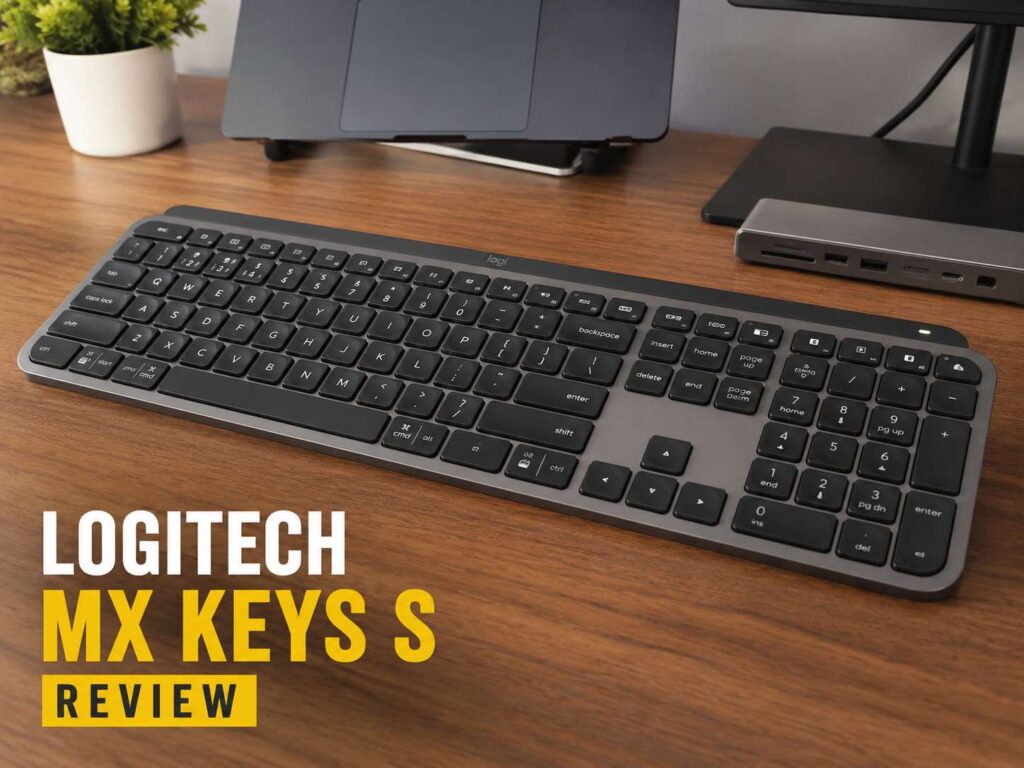
The Logitech MX Keys S has a slim, clean design that looks right at home on a modern desk. It uses a full-size layout, so it takes more space than a compact keyboard. Still, the extra width gives you a number pad, full arrow keys, and a proper function row.
That matters if you work with spreadsheets, invoices, reports, prices, or daily admin tasks. A compact keyboard saves space, but a full-size layout often feels faster for real work.
The body feels solid. It sits firmly on the desk and does not slide around during normal typing. Many thin keyboards feel light or hollow, but the MX Keys S feels more stable. That gives it a more premium desk feel.
The keyboard also has a low front edge. Your hands do not need to reach high, so the typing position feels natural. There are no flip-out feet, so you cannot raise the back. Some users will like the fixed angle. Others may prefer more adjustment.
The overall look is simple and professional. There are no loud colors, sharp gaming shapes, or distracting lights. It looks like a keyboard built for work, and that is exactly what it is.
Typing Feel
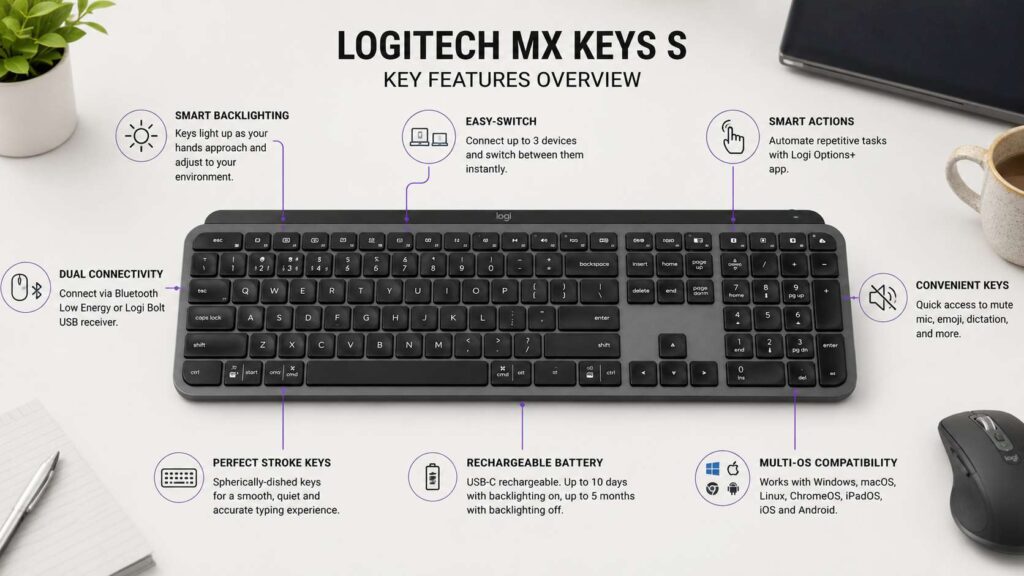
Typing is the main reason to buy the Logitech MX Keys S. The keys have a shallow, laptop-style feel, but the keyboard feels more stable than most laptop keyboards. Each key has a small dish in the center, so your fingertips settle into place.
That shape helps with accuracy. It also makes the keyboard feel more guided than flat keycaps. After a short adjustment period, the keys feel quick and easy to control.
The key travel is short. This helps you type fast with less finger movement. The feedback feels firm enough for daily work, but it does not feel heavy. If you like laptop keyboards, you will likely enjoy the MX Keys S. If you prefer deep mechanical switches, this keyboard will feel too shallow.
The keyboard is quiet. It still makes sound, of course, but the sound is soft and controlled. That makes it a good fit for shared offices, home offices, video calls, late-night writing, and rooms where loud mechanical switches would annoy people nearby.
For long typing sessions, the MX Keys S feels calm and predictable. It does not ask for much effort. You press, the key responds, and you keep moving. That simple feel is one of its biggest strengths.
Smart Backlighting
The backlighting is one of the standout features. The keys light up as your hands approach the keyboard. Then the brightness adapts to the room. In a dim room, the keys become easier to see. In a bright room, the lighting can stay lower.
This sounds like a small detail, but it helps in daily use. You do not need to tap a key first just to find your place. The keyboard wakes up before you start typing.
The lighting looks clean and practical. It does not feel like a gaming effect. It simply makes the key legends easier to read. For people who work early in the morning or late at night, this feature adds real value.
Battery life depends on the backlight. With lighting on, the keyboard needs charging more often. With lighting off, it lasts much longer. That is normal for backlit wireless keyboards.
The best setup is simple: keep smart lighting on if your room light changes often. Turn it off if you want the longest battery life.
Wireless Connection and Multi-Device Use
The MX Keys S supports Bluetooth Low Energy and Logi Bolt. This gives you two practical ways to connect. Bluetooth works well with laptops, tablets, and many desktops. Logi Bolt gives you a USB receiver option for a more direct wireless connection.
The keyboard also supports Easy-Switch keys. You can pair it with up to three devices and switch between them from the keyboard. This is one of the most useful parts of the MX Keys S.
For example, you can use one key for a Windows desktop, one for a MacBook, and one for a tablet. Then you can move between devices without changing keyboards. That keeps the desk cleaner and makes work feel less broken up.
This feature helps people who use separate personal and work devices. It also helps anyone who switches between a laptop and a desktop during the day.
The connection feels made for desk use. It is not meant for travel, but it works very well in a fixed setup.
Logi Options+ Software
Logi Options+ adds more control to the MX Keys S. You can change key actions, check battery status, adjust backlighting settings, and create Smart Actions.
Smart Actions let one key run several steps. For example, you can open work apps, launch a browser, start a playlist, or prepare a basic daily setup with one shortcut. It is not required, but it can save time if you repeat the same tasks every day.
The keyboard includes useful work keys too. You get controls for things like microphone mute, dictation, emoji, screen capture, and media. Some of these features need Logi Options+ and system support, mainly on Windows and macOS.
The MX Keys S still works without the software. You can connect it and type right away. Still, the software gives the keyboard more value. If you buy this keyboard, it makes sense to use Logi Options+.
This is where the MX Keys S feels different from a basic wireless keyboard. A cheap keyboard lets you type. The MX Keys S helps you build a cleaner work flow.
Battery Life and Charging
The Logitech MX Keys S uses a rechargeable battery and charges by USB-C. That is a welcome choice. You do not need to keep spare batteries in a drawer, and you can keep typing while it charges.
Battery life depends on lighting. Backlighting uses more power, so the keyboard drains faster with the lights on. Turn the lights off, and the battery lasts much longer.
For most people, charging will not feel like a burden. The keyboard gives you enough battery life for normal work, and USB-C charging makes top-ups easy. You can plug it in during a break or leave it connected for a short time.
The keyboard works during charging, so a low battery will not stop your work. That matters if you rely on it every day.
One long-term point is worth keeping in mind. Like any rechargeable device, the battery will age over time. The MX Keys S is built as a premium keyboard, but it still uses an internal rechargeable battery.
Comfort for Daily Work
The MX Keys S feels comfortable for long desk sessions. The low-profile shape keeps your wrists in a relaxed position, and the keys do not need much force. That makes it easier to type for long periods.
The keyboard does not include a built-in wrist rest in the standard keyboard-only package. Some users will not need one. Others may prefer to add a separate palm rest, mainly for full-day typing.
The quiet key sound also helps with comfort. Loud keyboards can feel tiring after hours of use. The MX Keys S stays soft and controlled, which makes it easier to use in shared spaces.
The full-size layout improves comfort for certain tasks too. Spreadsheet work feels better with a number pad. Editing documents feels easier with proper arrow keys. Daily work feels more natural when the layout does not force too many shortcuts.
For pure desk comfort, the MX Keys S is one of the better wireless keyboards in its class.
Performance for Office Work
The Logitech MX Keys S works best as a productivity keyboard. It suits office documents, spreadsheets, browser work, email, project tools, and long writing sessions.
The number pad gives it an advantage for business users. If you enter prices, quantities, dates, or invoice numbers, the full-size layout saves time. Compact keyboards look neat, but they can slow you down with number-heavy work.
The function row also helps. You can use shortcuts for media, brightness, dictation, microphone mute, and other tasks. With Logi Options+, those keys become more flexible.
For remote work, the microphone mute key is useful. Video calls are now part of daily work for many people, and quick mute access can prevent awkward moments.
The MX Keys S does not feel flashy. It feels practical. That is the point. It helps you work without drawing attention to itself.
Performance for Writing and Coding
For writing, the MX Keys S is excellent. The keys feel soft, fast, and accurate. Long articles, emails, reports, and notes feel comfortable on this keyboard.
The dished keys help your fingers land well. The short key travel keeps your pace quick. The quiet sound keeps the writing experience calm.
For coding, the MX Keys S is good, but it will not satisfy everyone. It gives you a full layout, stable keys, and useful software control. That works well for many developers.
Still, some coders prefer mechanical keyboards. They may want deeper travel, stronger tactile feedback, custom switches, or programmable layers. The MX Keys S does not focus on that type of control.
For general coding, web work, admin dashboards, and mixed office tasks, it works well. For keyboard hobbyists, it may feel too simple.
Gaming Use
The MX Keys S is not a gaming keyboard. It can handle casual games, but gaming is not its core purpose.
It does not offer mechanical switches, high-speed gaming software profiles, or gaming-focused features. The low-profile keys feel fine for light play, but serious gamers should look elsewhere.
That does not make the keyboard bad. It just means Logitech designed it for productivity. For office use, that focus helps. For competitive gaming, it limits the appeal.
MX Keys S vs MX Keys Mini
The MX Keys S and MX Keys Mini share the same general idea: quiet premium typing in a slim wireless body. The main difference is layout.
Choose the MX Keys S if you need:
- A number pad
- Full-size arrow keys
- More comfort for spreadsheets
- A traditional desk layout
- Better support for number-heavy work
Choose the MX Keys Mini if you need:
- More mouse space
- A smaller desk setup
- A keyboard for travel
- A cleaner compact look
- No number pad
The MX Keys S is better for fixed workstations. The MX Keys Mini is better for small desks and portable setups.
If you already use a larger mouse, the Mini may give you more room to move. If you use spreadsheets often, the full-size MX Keys S makes more sense.
MX Keys S vs Mechanical Keyboards
The MX Keys S often gets compared with mechanical keyboards, but it serves a different type of user.
Mechanical keyboards give deeper travel, stronger feedback, and more customization. They can feel more satisfying if you enjoy key feel above everything else. Many also let you change switches and keycaps.
The MX Keys S takes a quieter path. It gives you a low desk profile, soft typing, smart lighting, multi-device support, and clean software features. It works well for people who want less noise and fewer distractions.
Pick a mechanical keyboard if you want switch choice, deeper travel, and a more tactile feel. Pick the MX Keys S if you want quiet typing, smart features, and a polished office setup.
This same idea applies to mice too. Premium tools often feel better over long workdays, but they only make sense if they match your work style. If you are comparing premium and budget desk gear, this article on MX Master 4 vs cheap office mice gives a useful angle.
Pros
- Quiet, low-profile typing feel
- Stable full-size layout
- Number pad for spreadsheets and data entry
- Smart backlighting wakes as your hands approach
- Brightness adapts to the room
- Comfortable for long typing sessions
- Easy-Switch support for up to three devices
- Bluetooth Low Energy and Logi Bolt support
- USB-C rechargeable battery
- Works during charging
- Logi Options+ adds key mapping and Smart Actions
- Clean design for home office and work desks
Cons
- Costs more than basic office keyboards
- Full-size body takes more desk space
- No adjustable tilt feet
- No mechanical switch options
- Not ideal for serious gaming
- Backlighting reduces battery life
- Best software features focus on Windows and macOS
- No built-in wrist rest in the keyboard-only package
Price
Who Should Buy the Logitech MX Keys S?
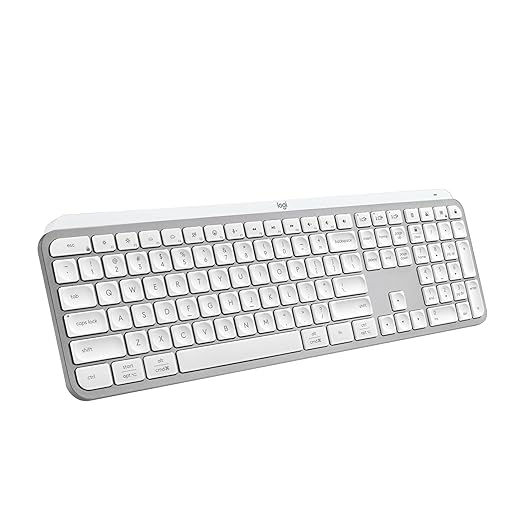
The Logitech MX Keys S is a strong choice for people who type every day. It fits writers, office workers, students, analysts, managers, developers, and remote workers.
It makes the most sense if you want a full-size wireless keyboard with quiet keys, smart backlighting, and multi-device support. The number pad also makes it a better fit for spreadsheets and data entry than compact models.
It is a strong match for home offices and clean desk setups. Pair it with a good productivity mouse, and you get a work setup that feels smooth without looking busy.
Skip it if you want a cheap keyboard, deep mechanical switches, or a compact travel layout. You should also skip it if gaming is your top priority.
Final Verdict
The Logitech MX Keys S is one of the best wireless keyboards for office work. It gives you quiet typing, a full-size layout, smart backlighting, strong multi-device support, USB-C charging, and useful software control.
The price is higher than many basic keyboards, but the typing experience feels better. The keyboard stays quiet, stable, and comfortable during long workdays. That is where it earns its value.
It is not a keyboard for everyone. Mechanical keyboard fans may want deeper travel and more customization. Gamers should choose a gaming keyboard. But for productivity, writing, spreadsheets, remote work, and clean desk setups, the MX Keys S is easy to recommend.