Should you avoid TP-Link routers after recent security warnings and government action? For most home users, the answer is no. Still, you should not buy or keep a TP-Link router without checking its exact model, hardware version, firmware status, and remaining support period.
TP-Link sells everything from low-cost Wi-Fi routers to advanced mesh systems and business networking equipment. For that reason, it makes little sense to treat every device from the brand as equally safe or equally risky. A recent router that receives regular security patches presents a very different case from a ten-year-old model with outdated software.
Recent events have raised fair concerns. US agencies have reported attacks that involved compromised TP-Link routers. At the same time, TP-Link has published several security advisories for affected products. The US government has introduced restrictions that affect new approvals for many foreign-produced consumer routers.
These developments deserve attention. Yet they do not prove that every TP-Link router contains a hidden backdoor. They do not mean every owner needs to replace a working router today.
Why Are People Concerned About TP-Link Routers?
Most of the recent concern comes from two separate events.
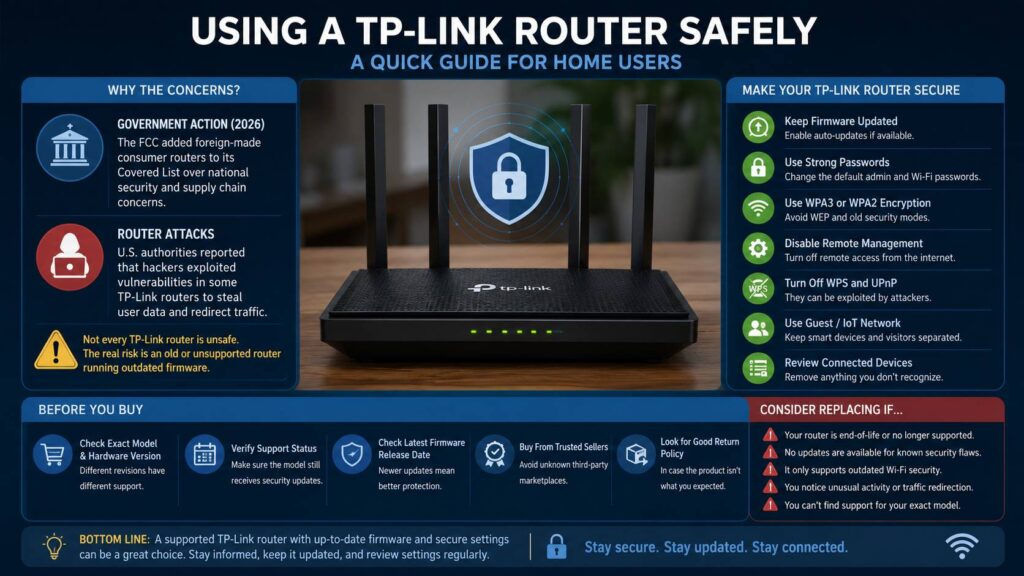
In March 2026, the US Federal Communications Commission added consumer routers produced in foreign countries to its Covered List. The decision focused on national security and supply chain risks linked to foreign-produced routers as a broad product category.
So, this was not a TP-Link-only ban. The rules affect whether covered equipment can receive authorization for sale as a new model in the United States. Existing routers do not suddenly become illegal, and the FCC did not tell households to disconnect devices they already own.
Next, an April 2026 US Justice Department announcement brought far more attention to TP-Link itself. Russian military intelligence actors had exploited known weaknesses and stolen credentials for thousands of TP-Link routers around the world. Attackers then changed settings on many compromised devices and redirected internet traffic through malicious DNS servers.
In practice, this type of attack can send a user to a fake version of a real website. It can expose passwords, login tokens, private messages, and other personal data.
Still, the case does not show that every TP-Link router had the same weakness. It does not show that TP-Link intentionally gave anyone access. Instead, it shows how dangerous routers can become after criminals gain control of them.
Are TP-Link Routers Safe to Use?
A current TP-Link router with recent firmware can still be a sensible choice for a normal home network.
My view is fairly straightforward. I would not reject a supported router only for the TP-Link name on the box. Yet I would avoid an old or unsupported model, even at a tempting price.
TP-Link maintains a public security advisory area that lists affected products, firmware versions, reported weaknesses, and available fixes. In many cases, the company releases patched firmware after researchers report a problem.
That public process matters. The existence of security advisories does not automatically prove that a brand is unsafe. Every major router maker deals with software flaws. Instead, buyers should look at how clearly the company identifies affected hardware, how quickly it publishes fixes, and how long it supports each product.
For example, TP-Link disclosed a high-severity command injection flaw in June 2026 that affected several router models. The weakness mainly placed devices at risk during their factory-default or unconfigured state. TP-Link then listed patched firmware versions for affected products.
The flaw was serious. Yet it applied to named models and hardware revisions, not every TP-Link router ever produced.
The Main Risk Is an Old or Unsupported Router
The least expensive TP-Link router is not always the best deal. Retailers often keep older hardware in stock long after newer revisions reach the market.
At first glance, two routers can look identical. They can share the same product name, case design, and advertised Wi-Fi speed. Inside, though, one unit can use completely different hardware.
TP-Link often sells models in several revisions, such as V1, V2, V3, or V4. Each revision can use its own firmware and receive a different level of support. So, checking the model name alone is not enough.
This creates a common buying problem. A shopper reads strong reviews for a router but receives an older revision from a marketplace seller. That earlier version can have fewer updates or no active support at all.
TP-Link maintains lists for products that have reached the end of their normal support period. In some cases, the company has released emergency fixes for old devices after researchers found serious flaws. Still, buyers should not expect regular security updates after a product reaches the end of service.
Avoid buying a TP-Link router in these situations:
- The model or hardware revision has reached the end of service.
- The seller cannot confirm which hardware version it will ship.
- The latest firmware is several years old.
- The router relies on outdated Wi-Fi security.
- The manufacturer no longer publishes security updates.
- The device comes from an unknown third-party seller.
- The listing combines several revisions under one product page.
- The product has no clear regional version.
- A newer supported router costs only slightly more.
For that reason, a supported budget router often makes a better purchase than a discounted premium model from many years ago.
Should You Replace a TP-Link Router You Already Own?
Do not replace a working TP-Link router based only on a dramatic headline. First, check its current support status.
Start by finding the label under or behind the router. Write down the full model number and hardware version. The revision often appears beside “Ver,” such as Ver: 2.0 or Ver: 3.6.
Next, visit the official TP-Link support page for your country or region. Search for the exact model and revision. Then compare your installed firmware version with the newest available release.
Many TP-Link Cloud-compatible routers can check for updates through the web dashboard or Tether mobile app. Older devices often require a manual firmware download. In that case, select the file for the exact model, revision, and region.
Regional firmware matters. A firmware file made for a US model can differ from one made for Europe. Installing the wrong file can damage the router or remove features.
Consider replacing your router soon when one or more of these points apply:
- It has reached the end of security support.
- No fix exists for a known weakness affecting your model.
- It supports only WEP or an old WPA standard.
- Remote management cannot be disabled.
- The router changes its DNS settings without your input.
- Websites redirect to unfamiliar pages.
- Unknown devices keep appearing on the network.
- The router restarts or resets itself repeatedly.
- You cannot find an official support page for the exact revision.
- TP-Link recommends moving to newer hardware instead of offering a patch.
A router with active support does not need replacement only for its age. By comparison, a router with no current patches should not protect online banking, remote work, home cameras, or sensitive family information.
How to Make a TP-Link Router Safer
First, install the latest firmware for the exact model and hardware revision. Next, turn on automatic updates when the router provides that setting.
After that, review the main security options:
- Replace the default administrator password.
- Use a different password for the Wi-Fi network.
- Select WPA3-Personal where available.
- Use WPA2-Personal when WPA3 is not supported.
- Disable remote administration from the internet.
- Turn off WPS.
- Disable UPnP when none of your devices need it.
- Delete old port-forwarding rules.
- Check the configured DNS server addresses.
- Create a separate guest network for visitors.
- Place smart home products on a guest or IoT network.
- Remove devices you no longer recognize or use.
- Review connected devices from time to time.
For example, a smart plug rarely needs access to personal laptops, network storage, or work computers. Placing it on a separate network limits what an attacker can reach after compromising that device.
A factory reset makes sense after suspicious activity. Then update the firmware, create new passwords, and review every setting before reconnecting personal devices.
What Should You Check Before Buying a New TP-Link Router?
Do not choose a router based only on numbers such as AX3000, BE5500, or BE9300. These labels describe a combined theoretical wireless class. They do not tell you the real speed in your home, the quality of the firmware, or the length of the support period.
Instead, check these details:
- Exact product name and hardware revision
- Current support status
- Date of the latest firmware release
- Automatic update support
- WPA3 support
- Ethernet port speeds
- Guest and IoT network controls
- Mesh compatibility
- Security advisory history
- Local warranty coverage
- Seller reputation
- Return policy
Buy from an authorized retailer where possible. Marketplace listings often combine reviews for several versions of the same router. So, a high rating can describe different hardware from the unit that arrives at your door.
For a new purchase, I would look for a recent Wi-Fi 6, Wi-Fi 6E, or Wi-Fi 7 model with automatic security updates. I would skip an old Wi-Fi 5 router sold on clearance, except for a temporary network that carries no private data.
Readers researching newer hardware can learn more in our coverage of the TP-Link Archer 8 Wi-Fi 8 router. Wi-Fi 8 products remain a future-facing category, so current buyers should still focus on support, firmware quality, port speeds, and features they can use today.
Does the US Router Restriction Mean TP-Link Is Banned?
Calling the 2026 FCC action a simple “TP-Link router ban” creates the wrong impression.
The official action covers consumer routers produced in foreign countries, subject to a conditional approval process. It applies to the authorization of new covered equipment. It does not order consumers to stop using current TP-Link routers.
So, existing TP-Link owners do not need to panic. At the same time, US buyers should watch how the rules affect future product launches, availability, and long-term support.
Buyers in Europe and other regions operate under different product approval rules. Still, the basic security issue remains the same in every country. Old firmware creates risk, and unsupported hardware becomes harder to trust over time.
For a home user, the exact model and its update status matter more than the political headline. For a government office, public institution, critical infrastructure site, or security-sensitive company, procurement rules and supply chain concerns can carry far more weight.
Are Other Router Brands Safer?
Switching brands does not remove every router security risk.
ASUS, Netgear, Linksys, D-Link, Synology, Eero, Google, and other router makers have all dealt with firmware flaws or vulnerable products. No consumer networking brand can promise that every device will remain free from software problems.
Instead, compare brands by looking at their update policies, support periods, security notices, automatic patching, and response to reported flaws.
A router that installs security patches automatically can offer a real advantage for less technical users. If nobody opens the router dashboard after the first setup, manual-only updates can stay uninstalled for years.
At the same time, advanced users can prefer routers that offer long support periods, open-source firmware options, detailed network controls, and clear security logs.
The brand still matters, but the exact product matters more.
Should You Avoid TP-Link Routers?
You should avoid unsupported TP-Link routers, old clearance models, and listings that hide the hardware revision. You do not need to avoid every current TP-Link router.
A recent model with active firmware support, strong Wi-Fi encryption, automatic updates, and sensible settings can work well in a home network. Still, even a good router becomes a risk after its security maintenance ends.
TP-Link remains attractive for buyers who want broad Wi-Fi coverage and useful features at a reasonable price. Yet low cost should not outweigh software support.
Before buying, check the exact revision. After setup, install every available update and turn on automatic patching. Then replace the router once the maker stops providing security fixes.
That balanced view makes more sense than either extreme. TP-Link routers are not automatically unsafe, but no router deserves blind trust.