Starlink Mini looks like a travel-focused version of Starlink at first. It is small, fairly light, easy to carry, and uses less power than larger Starlink hardware. That makes it a natural fit for campers, RV owners, remote workers, cabins, and off-grid setups.
Still, there is another use that makes a lot of sense. Starlink Mini can work as home internet.
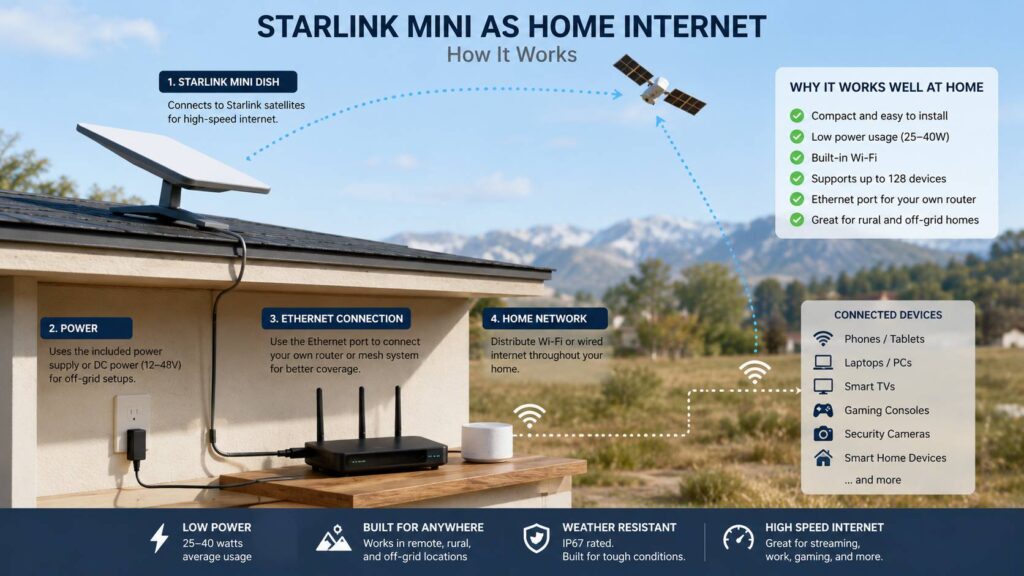
For the right household, it can be surprisingly practical. The dish combines the Starlink antenna and Wi-Fi hardware in one compact unit. You do not need a separate Starlink router for a basic setup. Power use is fairly low too, usually around 25 to 40 watts during normal operation.
So, can Starlink Mini replace cable, fiber, 5G, or a full-size Starlink system? Sometimes, yes. In other homes, it creates compromises that are hard to ignore.
This guide explains where Starlink Mini works well as home internet, what problems you can run into, and when a larger Starlink kit or wired connection is the smarter choice.
Can You Really Use Starlink Mini as Home Internet?
Yes. Starlink Mini can serve as the main internet connection in a house, apartment, cabin, tiny home, or other fixed property.
It can handle common home internet tasks such as:
- Web browsing
- Netflix, YouTube, and other streaming services
- Video meetings
- Remote work
- Cloud apps
- Online gaming
- Smart home devices
- Security cameras
- Phones and tablets
- Large file downloads
The built-in Wi-Fi covers up to about 112 square meters, or 1,200 square feet, under Starlink’s stated specifications. It can support up to 128 connected devices and includes an Ethernet LAN port.
Those numbers sound generous. In practice, device count is rarely the main problem.
For example, 30 smart bulbs and sensors use very little bandwidth. Three televisions streaming 4K video, two gaming PCs downloading updates, and several phones backing up photos can put much more pressure on the connection.
So the real question is not whether Starlink Mini can connect your devices. The better question is whether it can keep up with the way your household uses them.
Why Starlink Mini Can Make Sense at Home
Size is one of Mini’s biggest advantages.
The dish measures roughly 298.5 x 259 x 38.5 mm. It weighs a little over 1.1 kg depending on the stand and mounting setup. That makes it much easier to place, move, or store than traditional satellite equipment.
The Wi-Fi hardware is built into the dish too. As a result, a simple installation needs fewer separate components.
Power consumption is another reason people consider Mini for permanent use. Typical draw sits around 25 to 40 watts. Idle consumption can drop lower.
That matters in a normal house, but it matters even more in:
- Off-grid homes
- Solar-powered cabins
- Tiny houses
- RVs used as permanent accommodation
- Properties with battery backup
- Areas with frequent power cuts
- Emergency communication setups
Starlink’s hardware is becoming more compact across newer generations too. Anyone following those changes can read more about how Starlink V5 shrinks the hardware and what that means for future installations.
Mini takes that compact idea further by putting a lot of functionality into one small device.
Is Starlink Mini Fast Enough for Everyday Home Use?
For many homes, yes.
Starlink does not promise one fixed speed everywhere. Real performance changes from one location to another. Network demand, service plan, obstructions, weather, satellite visibility, and local capacity can all affect the connection.
Even so, typical Starlink speeds are more than enough for many everyday tasks.
A couple working from home can browse, join video calls, stream television, and use cloud services without needing gigabit internet. A small family can often do the same.
Problems are more likely to appear once several demanding activities happen at once.
For example, imagine this evening:
- One person watches a 4K movie
- Another downloads a 100 GB game
- Someone joins a video call
- Phones start uploading photos
- Security cameras send footage to the cloud
At that point, available bandwidth matters much more.
So Starlink Mini makes the most sense for small and medium households with moderate internet use. Heavy multi-user homes need a closer look before buying.
Starlink Mini Works Best in Smaller Homes
The built-in Wi-Fi system is convenient, but its coverage has limits.
Starlink rates Mini for up to about 112 m². That can work very well in an apartment, bungalow, cabin, or compact home.
A large two-story house is a different story.
Walls, floors, concrete, brick, insulation, metal, furniture, and the dish location can all weaken the Wi-Fi signal. Real coverage can end up smaller than the headline figure.
For example, you could have a strong signal in the living room and weak Wi-Fi in an upstairs bedroom on the opposite side of the house.
That does not mean Mini cannot work in a larger property. You just need extra networking equipment.
The Ethernet port gives you that option.
Can You Use Your Own Router With Starlink Mini?
Yes. This is one of the features that makes Mini much more practical as home internet.
The dish includes an Ethernet LAN port. You can connect compatible networking equipment and let another router handle Wi-Fi inside the house.
That opens several options:
- A stronger standalone router
- A mesh Wi-Fi system
- Ethernet switches
- Wired desktop computers
- Network storage
- Smart home hubs
- Additional access points
For example, Mini can sit in the best outdoor position for satellite reception. An Ethernet connection can then carry the internet connection to a mesh router inside the house.
That setup solves one of Mini’s main weaknesses, which is limited built-in Wi-Fi coverage compared with larger home-focused Starlink equipment.
There is a catch. Every extra device increases cost, power use, and setup complexity.
So, if you already know you need three mesh nodes and several wired connections, a more home-focused Starlink setup can make more sense from the start.
A Clear View of the Sky Matters More Than Almost Anything Else
Starlink needs a good view of the sky.
This sounds simple, but it is one of the biggest reasons people have a poor experience after installation.
Trees are a common problem. A rural house can have no fiber or cable service, yet still be a difficult Starlink location if tall trees surround the property.
Other common obstructions include:
- Chimneys
- Roof sections
- Nearby buildings
- Thick tree lines
- Mountains
- Covered balconies
- Walls
- Poorly positioned mounts
Brief interruptions often go unnoticed during web browsing. They become much easier to notice during real-time activities.
For example, a short interruption during Netflix playback may never reach your attention. The same interruption during a Teams meeting, online game, or remote desktop session can be annoying.
For that reason, check the installation area with the Starlink app before settling on a permanent mounting position.
Cable convenience should not decide where the dish goes. Sky visibility matters more.
Starlink Mini Makes the Most Sense in Rural Areas
This is where Mini becomes much more attractive.
If your home already has stable fiber, replacing it with satellite internet rarely gives you a clear benefit.
Rural households often face a very different situation.
Available options might include:
- Slow ADSL
- Weak 4G
- Congested 5G
- Fixed wireless internet
- Expensive wireless providers
- No fixed broadband at all
In those cases, Starlink Mini can change what is possible.
A small dish can provide modern broadband without waiting for a cable company to extend its network several kilometers down the road.
That makes Mini especially useful for:
- Remote houses
- Mountain cabins
- Farms
- Holiday homes
- Workshops
- Small rural businesses
- Temporary homes
In practice, this is where I find Mini most convincing. It solves a real problem instead of simply replacing a connection that already works well.
Starlink Mini Is a Strong Option for Off-Grid Homes
Power use can matter just as much as internet speed in an off-grid property.
A rough calculation shows why Mini gets so much attention.
At 30 watts:
30 W × 24 hours = 720 Wh per day
That equals 0.72 kWh per day.
At 40 watts:
40 W × 24 hours = 960 Wh per day
That equals 0.96 kWh per day.
Real consumption varies, and those numbers do not include losses from an inverter or power used by extra networking equipment.
Still, that is a manageable load for many solar and battery systems.
Compare it with a setup that includes a larger dish, router, Ethernet switch, access points, and other hardware. The total power draw can start to matter quite a bit over 24 hours.
Mini can work with supported DC power configurations too. That makes it easier to build into battery-based setups.
For a solar cabin, RV, or tiny home, lower energy use can matter more than having the fastest possible Starlink hardware.
Starlink Mini Can Be Excellent Backup Internet
Mini does not need to replace your existing connection.
In fact, backup internet is one of its best home uses.
A fiber outage can stop:
- Remote work
- Video meetings
- Cloud software
- Smart home controls
- Security cameras
- Online payments
- Home servers
Starlink gives you a completely different route to the internet. A damaged local fiber line does not automatically take the satellite connection down too.
That can be useful for remote workers or people who rely heavily on internet access for their job.
You can also move Mini between locations much more easily than a traditional fixed internet installation, subject to your Starlink service plan.
So a household can use it as backup internet at home, then take it on a trip later.
That flexibility is one of Mini’s strongest points.
Check the Starlink Plan Before You Buy the Hardware
This part is easy to overlook.
The dish is only one half of the purchase. Your service plan determines how you can use it.
Starlink offers different Residential and Roam options depending on the country and address. Pricing, data policies, speed tiers, hardware support, and availability can change.
For that reason, check your exact service address before ordering.
Pay attention to:
- Monthly price
- Available Residential plans
- Roam plan limits
- Data allowances
- Typical speeds
- Activation rules
- Hardware compatibility
- Service availability at your address
A Mini kit can look inexpensive at first. The value changes fast if the available plan does not match your household’s usage.
This matters even more for people who stream heavily or download large games.
A single modern game can exceed 100 GB. Add television streaming, cloud backups, phones, laptops, and cameras, and monthly data consumption climbs quickly.
When Starlink Mini Does Not Make Sense for Home Internet
Mini is useful, but it is not a universal replacement for normal broadband.
You Already Have Reliable Fiber
Keep the fiber connection as your main internet service.
Fiber usually offers lower latency, strong upload speeds, stable performance, and plenty of capacity for a busy household.
Starlink Mini can still make sense as backup internet.
Your House Is Very Large
The built-in Wi-Fi works best in smaller spaces.
A large home can need a mesh network or extra access points. That adds cost and power use.
At some point, the simplicity that makes Mini attractive starts disappearing.
You Have Lots of Trees
Obstructions can cause interruptions.
A heavily wooded property can be one of the hardest Starlink installations, especially if there is no practical place to mount the dish above the tree line.
Check this before spending money.
Your Household Downloads Huge Amounts of Data
Large games, 4K streaming, cloud backups, media work, and several active users can push a satellite connection harder.
Mini can still work, but a strong wired broadband connection remains the better choice where one exists.
You Care About Very Consistent Latency
Online games and real-time remote work can expose small connection changes much faster than ordinary browsing.
Starlink latency is good for satellite internet, but it still relies on a moving low-Earth-orbit satellite network.
Competitive players and users with latency-sensitive workloads should keep that in mind.
Starlink Mini vs Standard Starlink for Home Use
The right option becomes easier to pick once you know what matters most.
Starlink Mini is a strong choice if you want:
- Lower power consumption
- Small hardware
- Easy transport
- Built-in Wi-Fi
- A compact installation
- Internet for a cabin
- Off-grid connectivity
- Backup home internet
- A connection you can move
A larger Starlink home kit fits better if you want:
- Wider Wi-Fi coverage
- A permanent home-focused setup
- Better support for a large household
- Fewer compromises in a large property
- Less dependence on extra networking hardware
Price alone should not decide the purchase.
Think about the complete setup. That includes the dish, monthly plan, mounting hardware, router, mesh system, Ethernet cables, and power supply.
Sometimes Mini looks cheaper until those extras are added.
How to Decide Before Buying Starlink Mini
Ask yourself a few practical questions.
Do you already have fast and reliable fiber?
If yes, keep it. Mini is more useful as backup internet.
Is your current connection slow or unreliable?
If yes, Mini becomes much more interesting.
Is your home fairly small?
If yes, the built-in Wi-Fi can be enough on its own.
Do you have a clear view of the sky?
If no, solve that problem before ordering.
Are you living off-grid?
If yes, Mini’s low power draw is a major advantage.
Does your household have several heavy internet users?
If yes, compare the available service plan with a larger Starlink setup.
Will you travel with the dish too?
If yes, Mini becomes much more appealing.
These questions usually make the answer fairly clear.
Is Starlink Mini Worth Using as Your Main Home Internet?
Yes, in the right home.
Starlink Mini fits remote houses, cabins, tiny homes, off-grid properties, rural areas, and households that have poor wired broadband options. It can also serve as a very useful backup connection for homes that already have fiber or cable.
Its small size and low power draw are real advantages.
Still, Mini is not the best choice for every property.
A large family with gigabit fiber has little reason to replace it. A heavily wooded property can struggle with satellite visibility. A big house can need extra Wi-Fi hardware.
My view is simple. Starlink Mini makes the most sense when its size, power use, mobility, and satellite connection solve a real problem.
For a cabin running on solar power, it can be an excellent fit.
For a rural house stuck on slow DSL, it can feel like a major upgrade.
For a city home with reliable gigabit fiber, it makes more sense as emergency internet than as the main connection.
That is what makes Starlink Mini useful. It does not need to replace every type of home broadband. It just needs to work well in the places where normal broadband falls short.