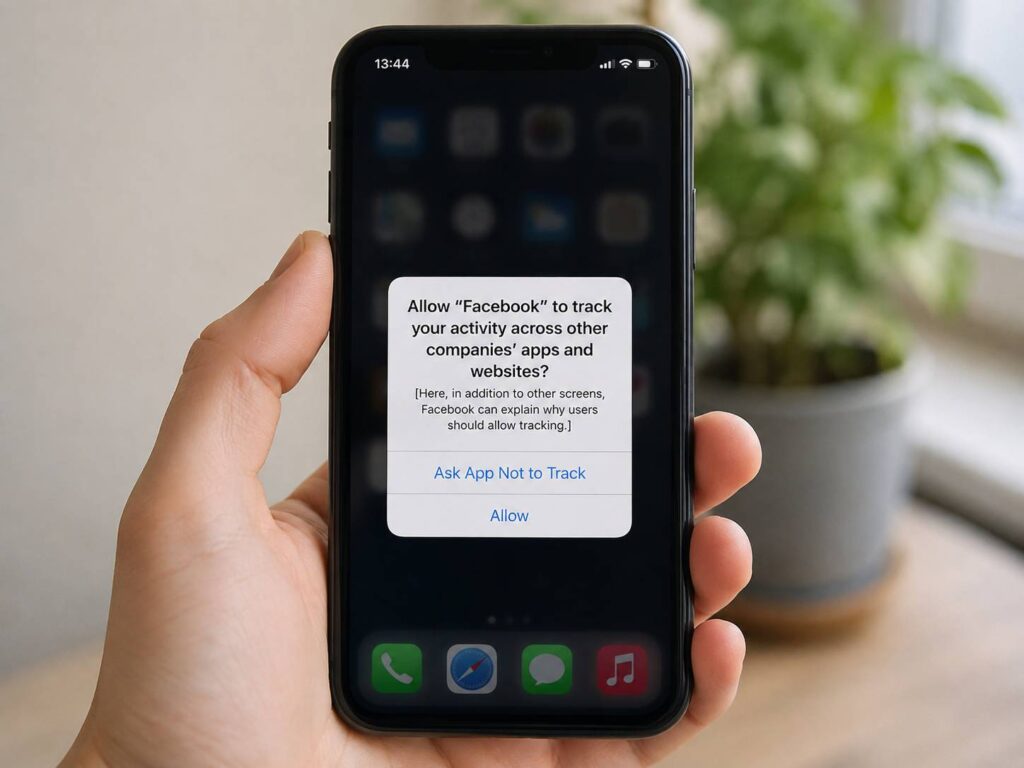
You install a new app on your iPhone, open it for the first time, and a familiar privacy message appears. The app wants permission to track your activity across other companies’ apps and websites.
Your choices are simple:
- Allow
- Ask App Not to Track
It is easy to tap Ask App Not to Track without thinking much about it. That is usually a sensible choice. Still, the wording can make the setting sound more powerful than it really is.
Does it stop the app from collecting your data? No.
Does it block location access? No.
Does it remove ads? No.
What it does is stop the app from using certain forms of cross-company tracking without your permission.
Apple calls the system App Tracking Transparency, or ATT. It gives iPhone users direct control over whether an app can track activity across apps and websites owned by other companies.
That distinction matters, and it clears up most of the confusion around the feature.
What Does Ask App Not to Track Mean?
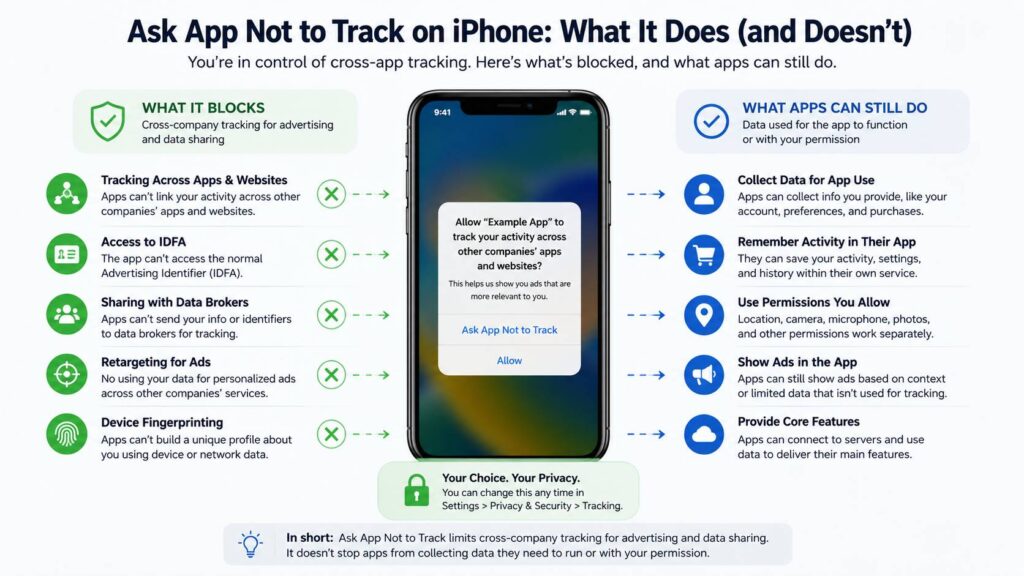
Tapping Ask App Not to Track tells the app that it cannot track your activity across other companies’ apps and websites for advertising or similar tracking purposes.
The app still works. It can still save information connected to its own service. What changes is its ability to link your activity with data from unrelated companies.
Imagine you use a shopping app and spend ten minutes looking at wireless headphones.
The shopping app can still remember what products you viewed inside its own service. It can save your shopping cart, purchase history, account details, and preferences.
The restriction starts when that company tries to connect your activity with information collected somewhere else.
For example, an advertising network cannot freely build a profile showing that you viewed headphones in one app, visited a technology website later, and then opened an unrelated game.
That type of connection is what Apple’s tracking permission is designed to restrict.
What Ask App Not to Track Blocks
The most important change involves advertising identifiers.
iPhones use an identifier called the IDFA, short for Identifier for Advertisers. Advertising networks have used it to recognize devices and measure ad activity.
Once you choose Ask App Not to Track, the app cannot access the normal advertising identifier for tracking.
There is more to it than IDFA.
Apple does not allow developers to deny tracking permission and then quietly recreate the same tracking system using another identifier.
For tracking covered by ATT, developers cannot simply replace the IDFA with things such as:
- A hashed email address
- A phone number
- Hardware characteristics
- Device configuration
- Network details
- Location patterns
- Other identifiers designed to recognize the same user across different companies
Apple prohibits device fingerprinting for this purpose too.
That part is easy to overlook. Ask App Not to Track is not just an IDFA switch. It covers the broader practice of identifying a user across unrelated services for tracking.
What Ask App Not to Track Does Not Block
This is where the setting gets confusing.
Ask App Not to Track does not tell an app to stop collecting all information about you.
An app can still collect data needed to run its service.
A shopping app can save your orders.
A music service can remember the songs you played.
A fitness app can store workouts tied to your account.
A game can save your progress.
A streaming app can remember what you watched.
Those activities do not automatically count as cross-company tracking.
The important difference is how the data gets used.
Information kept within one company’s service has a different purpose from information combined with data from unrelated companies for advertising, measurement, or data-broker activity.
So you can deny tracking and still see an app collecting plenty of data.
That does not mean the setting failed.
Does Ask App Not to Track Stop Apps From Collecting Personal Data?
No. This is probably the biggest misunderstanding about the feature.
ATT controls a particular type of tracking. It is not a master privacy switch.
An app can still receive information you provide directly, including:
- Your email address
- Your name
- Account details
- Searches inside the app
- Shopping activity
- Purchase history
- Messages sent to customer support
- Subscription details
- Content preferences
The App Store privacy section can help you see what an app says it collects.
Look for sections such as Data Linked to You and Data Used to Track You. They describe different uses.
An app can collect data linked to your account without having permission to track you across other companies’ services.
That distinction is normal.
Does Ask App Not to Track Stop Personalized Ads?
Not completely.
You can still see ads after choosing Ask App Not to Track.
ATT is not an ad blocker.
An app can show advertising based on what is happening inside the app. For example, a cooking app can show kitchen equipment ads next to a recipe. It does not need a detailed cross-app profile to do that.
The difference is the data used to choose the ad.
Cross-company tracking tries to build a broader profile from activity spread across different apps, websites, and services.
Contextual advertising focuses more on what you are doing at that moment.
There is another setting people often confuse with ATT. Apple has its own personalized advertising controls under the privacy settings on iPhone. That setting is separate from App Tracking Transparency.
So turning off one does not automatically turn off the other.
What Is IDFA and Why Does It Matter?
The IDFA is an advertising identifier assigned to a device.
Advertisers once relied heavily on identifiers like this to connect ad views, app activity, and conversions.
For example, an advertiser could show you an ad in one app and later detect that the same device installed another app.
ATT made that process permission-based on iPhone.
Once tracking permission is denied, an app cannot use the standard IDFA for tracking.
Yet the broader ATT rules matter more than the identifier itself.
A developer cannot say, “The user blocked IDFA, so we will identify the device another way.”
That is why Apple restricts fingerprinting and similar workarounds.
Without those rules, the privacy prompt would have far less value.
What Happens If You Turn Off Allow Apps to Request to Track?
You can manage tracking permissions from:
Settings > Privacy & Security > Tracking
You will see a list of apps that have requested permission.
Each app has its own switch.
You can turn tracking permission on or off later, so the choice you make during installation is not permanent.
At the top of the page, you will find Allow Apps to Request to Track.
Turn this setting off and apps stop showing tracking permission prompts.
New tracking requests are treated as denied.
This is a good option for people who almost always choose Ask App Not to Track anyway.
It removes repeated pop-ups and keeps your default preference consistent.
Should You Turn Off Allow Apps to Request to Track?
For most privacy-conscious users, turning it off makes sense.
You do not lose normal access to apps just from denying tracking.
A shopping app can still process an order. A navigation app can still give directions. A music service can still play songs.
I keep this setting disabled on devices where there is no real reason to allow cross-company advertising tracking.
That said, you may prefer seeing the request each time. It gives you the chance to make a separate choice for every app.
Neither option changes other privacy permissions such as camera or location access.
Why Is Allow Apps to Request to Track Greyed Out?
Some iPhone owners open the Tracking menu and find the main switch unavailable.
That does not always mean something is wrong with the phone.
Apple can restrict the option for certain accounts and managed devices.
Examples can include:
- Child accounts
- Some accounts belonging to users under 18
- School-managed devices
- Work-managed devices
- Devices with management profiles
- Newly created Apple Accounts in certain situations
A management policy set by a company or school can block tracking controls too.
If the setting appears grayed out, check whether the device belongs to a family group, organization, school, or managed Apple environment.
Why Does an App Still Contact Lots of Websites After Tracking Is Off?
This one surprises people.
You deny tracking, then open App Privacy Report and see dozens of domains contacted by an app.
It can look suspicious at first.
Still, an internet connection does not automatically mean tracking.
Apps contact outside servers for many normal reasons:
- Loading images
- Streaming video
- Downloading content
- Processing purchases
- Checking subscriptions
- Sending notifications
- Loading ads
- Running analytics
- Signing users into accounts
- Checking security information
App Privacy Report shows network activity. It does not automatically classify every server connection as prohibited tracking.
Use the report to spot unusual behavior, not as proof that an app ignored ATT.
Is Ask App Not to Track the Same as Blocking Location?
No.
Tracking permission and location permission are separate.
An app can have tracking blocked and still have full location access.
The same applies to:
- Camera
- Microphone
- Contacts
- Photos
- Bluetooth
- Local network access
- Health data
You need to manage those permissions separately under Settings > Privacy & Security.
This separation makes sense.
A navigation app needs your location to give driving directions. That does not mean it needs permission to follow your activity across unrelated apps.
The same principle appears on Android, where security and privacy tools often control different parts of the device. For example, users wondering whether you should turn off Google Play Protect are dealing with a security feature, not an advertising tracking permission. These settings can sound related, but they solve different problems.
Does Ask App Not to Track Break App Features?
It should not break normal app functionality.
Apps are expected to work without ATT permission.
A developer can explain why it wants tracking access. It can show a screen describing the benefits before the Apple prompt appears.
It should not force you to accept tracking just to use ordinary features.
That is another reason I usually recommend denying tracking first.
You can always return to Settings later and change the permission.
There is no need to grant access during the first launch just to get past the prompt.
Can Apps Still Track You Somehow?
The answer needs a little context.
Apps can still collect information inside their own services. They can still know what you do within an account you use across their products.
For example, signing into the same company account on an app and website lets that company recognize you.
That is not the same thing as tracking you across unrelated companies.
ATT focuses on cross-company tracking for advertising and related purposes.
It does not make you anonymous inside an account you willingly use.
That is why account privacy, browser privacy, app permissions, and ATT all need separate attention.
How to Check Which Apps Have Tracking Permission
Open:
Settings > Privacy & Security > Tracking
You will see apps that requested tracking access.
Review the list every so often.
Turn off permission for apps that no longer need it.
You can make the process stricter by disabling Allow Apps to Request to Track completely.
I would also check the other privacy categories on the same Settings page.
An app with tracking denied can still have access to your microphone, location, camera, or photos.
Those permissions can reveal far more personal information than an advertising identifier in some situations.
Common Myths About Ask App Not to Track
“It stops all data collection.”
No. Apps can still collect data needed for their own services.
“It removes advertising.”
No. Ads can still appear.
“The app cannot know who I am anymore.”
Not true. An account login can still identify you inside that company’s service.
“It blocks location tracking too.”
No. Location permission has its own setting.
“The setting only blocks IDFA.”
It goes further than that. Apple also restricts attempts to recreate prohibited cross-company tracking with other identifiers.
“I cannot change my choice later.”
You can change tracking permissions at any time from Settings.
What Should You Choose When an App Asks to Track?
For most apps, I would start with Ask App Not to Track.
The app should continue working normally, and you reduce permission for cross-company tracking.
If an app gives you a clear reason to allow tracking and you are comfortable with it, you can change the setting later.
There is little reason to rush into tapping Allow.
I treat tracking access like any other privacy permission. Start with less access, then grant more only when there is a clear benefit.
That rule works well for location, photos, microphone access, and tracking.
The Bottom Line
Ask App Not to Track does something useful, but it does not make an app private in every possible sense.
It blocks permission for certain types of tracking across apps, websites, and companies. It restricts access to the normal advertising identifier and prevents developers from simply recreating the same tracking with another identifier.
Apps can still collect information needed for their own services. They can still save your account activity, purchases, searches, preferences, and other data you provide.
They can still show ads too.
For most iPhone users, Ask App Not to Track is the better default choice. It gives away less data without stopping normal app use.
Then check the rest of your privacy settings separately. Tracking permission is only one part of iPhone privacy.