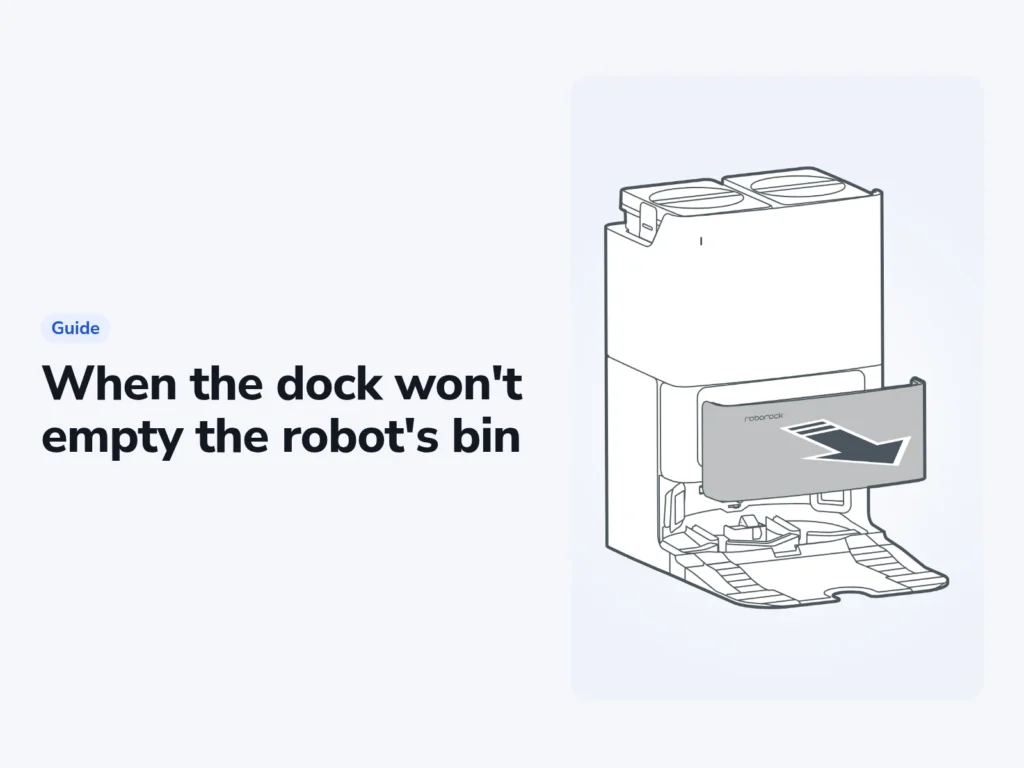
A robot vacuum dock not emptying the bin is often following a rule in its manual. On the Roborock Qrevo S and Ecovacs T80 OMNI covered here, Do Not Disturb (DND) hours and the auto-empty setting can stop the cycle. The Qrevo S manual sets DND from 10 p.m. to 8 a.m. by default, so check the schedule before assuming the dock is faulty.
When the dock does start and fails, the manuals point to three places: the bag, the cover over it, and a clog between the robot's bin and the bag. The steps come from the manuals for the Roborock Qrevo S and Saros Z70 and the Ecovacs DEEBOT T80 OMNI. The iRobot steps come from the owner's guides for the Roomba Max 715, Plus 575. An overheated iRobot dock needs a cooling pause before you try again.
Before you start
- The maker's app on your phone: Roborock, Roomba Home or ECOVACS HOME
- A spare dust bag made for your dock
- A flashlight and a dry cloth
Unplug the dock before you reach inside it, and keep water away from it. Roborock's manual rules out a wet cloth on the dock, and iRobot's says the same for the sensors and charging contacts.
Check whether the dock skipped the empty on purpose
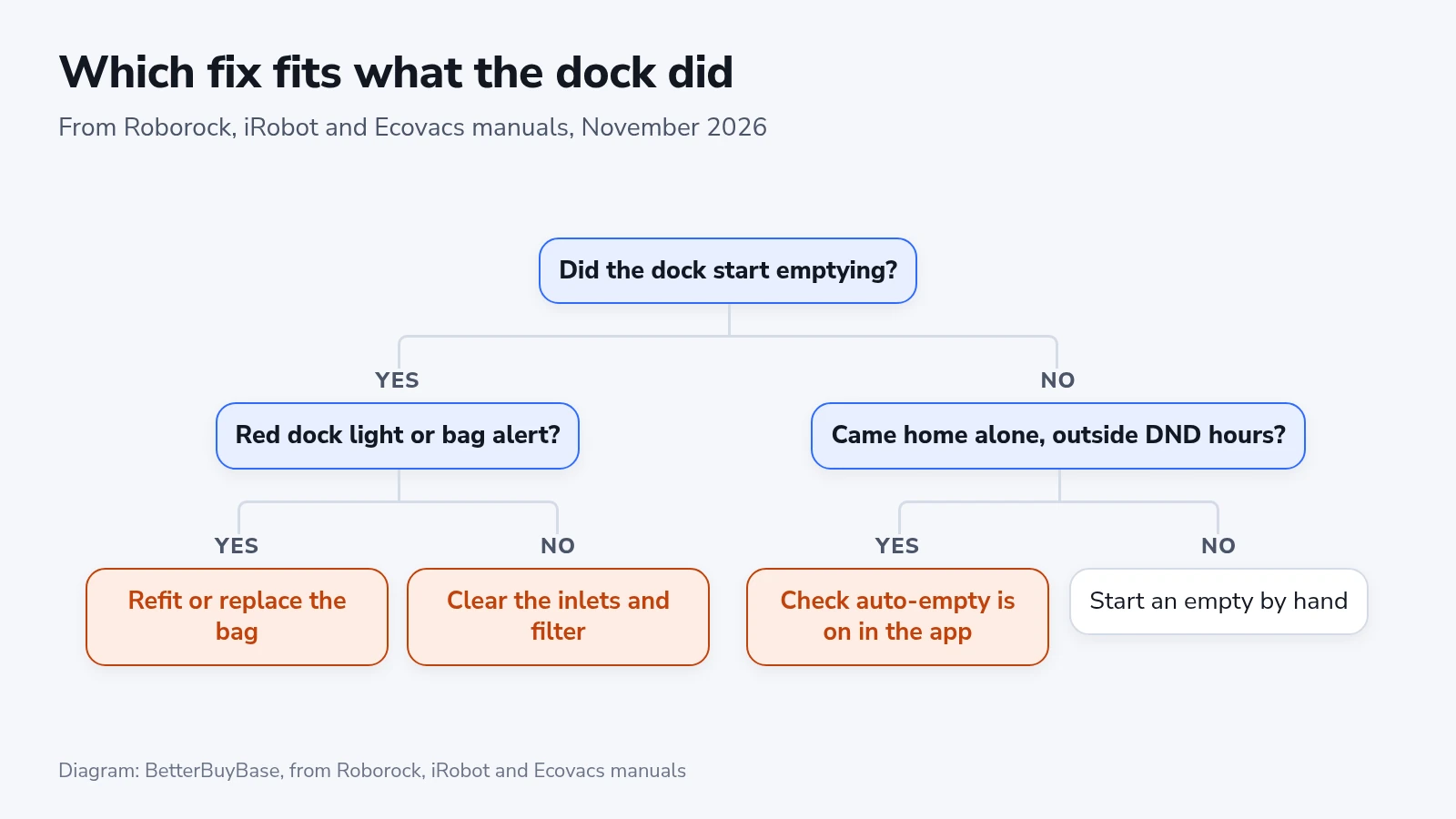
Three of the four reasons the Qrevo S manual gives for "Unable to auto-empty" are settings or habits, not faults, and the T80 OMNI manual has a similar list.
- Open the app and confirm that auto-empty is switched on. It heads the troubleshooting tables of both makers.
- Let the robot finish a clean and drive home on its own. The Saros Z70 manual says a robot you set on the dock by hand won't trigger auto-empty. The T80 OMNI manual says moving it by hand may stop the cycle. The Qrevo S manual also says returning without cleaning will not trigger it.
- Compare the time the clean ended with your DND hours. During DND, Roborock and Ecovacs robots dock without emptying.
- Start an empty by hand to test the dock itself.
- Watch for the sign that it started. A Qrevo S dock's status light breathes while it empties, and a Plus 575 dock shows solid white while it evacuates. Ecovacs shows the station's status in the app.
| Maker | Start an empty by hand |
|---|---|
| Roborock | Press the dock button (the house icon) on the docked robot, or tap the empty button in the Roborock app. Press any button to stop it. |
| Ecovacs | In the ECOVACS HOME app, open the robot, tap "Station" and choose dust collection. |
| iRobot | The owner's guides describe emptying only at the end of a cleaning routine, so run a short room clean from the Roomba Home app. |
If your schedule ends inside the DND window, we'd move the cleaning to the afternoon and leave the window alone, because it keeps the dock from emptying at 3 a.m. You can also start an empty by hand the next morning, which Roborock and Ecovacs both suggest. The Saros Z70 has one more option: its DND settings let you choose whether emptying runs during the window.
Roborock asks owners to avoid frequent manual emptying, so press the empty button once and wait.
When the dock starts but the bag or cover stops it
Each dock flags a bag problem its own way, and on some the same red light covers the water tanks too.
- iRobot Roomba Max 715: solid red on the dock means the bag is full, missing or not installed properly. On the Plus 575 the same red light also covers the water tanks and the wash basin.
- Roborock Qrevo S: the dock's status light turns red for any dock error. Roborock's troubleshooting pages tie it to the dust bag's fit, the water tanks, the cleaning tank and the local voltage.
- Ecovacs T80 OMNI: the app shows "Dust Bag Full" or "Abnormal dust bag installation".
Refit the bag even if it looks fine:
- Unplug the dock.
- Open the dust compartment. That is the dust container cover on a Roborock or Ecovacs, the lid on a Max 715 and the Cubby Door on a Plus 575.
- Lift the old bag out by its handle or card. On Roborock and iRobot docks, pulling the handle or card seals the bag as it comes out, and lifting an Ecovacs bag by its handle keeps the dust in.
- On a Roborock or Ecovacs, wipe the compartment and the area around its filter with a dry cloth.
- Slide the bag into its slot or guide rails until it sits all the way down. Unfold a Roborock bag so it can fill, and listen for the click on an Ecovacs.
- Close the cover or lid firmly. On a Roborock, a bag that isn't sealed can let waste escape and damage the dock.
- Follow the maintenance reset instructions for your exact Ecovacs model and app version after fitting a new bag.
- Plug the dock back in and start an empty by hand.
Don't open a new bag for every Ecovacs alert. The T80 OMNI manual says the station asks for a new bag when it detects that emptying has become less efficient, and that you can put the old bag back if it isn't full. A blocked outlet on the robot's dust bin is the other cause it lists for a failed empty, so check that first. If the alert persists after checking the bag and outlet, contact support for that model.
When nothing is red: clear the path from bin to bag
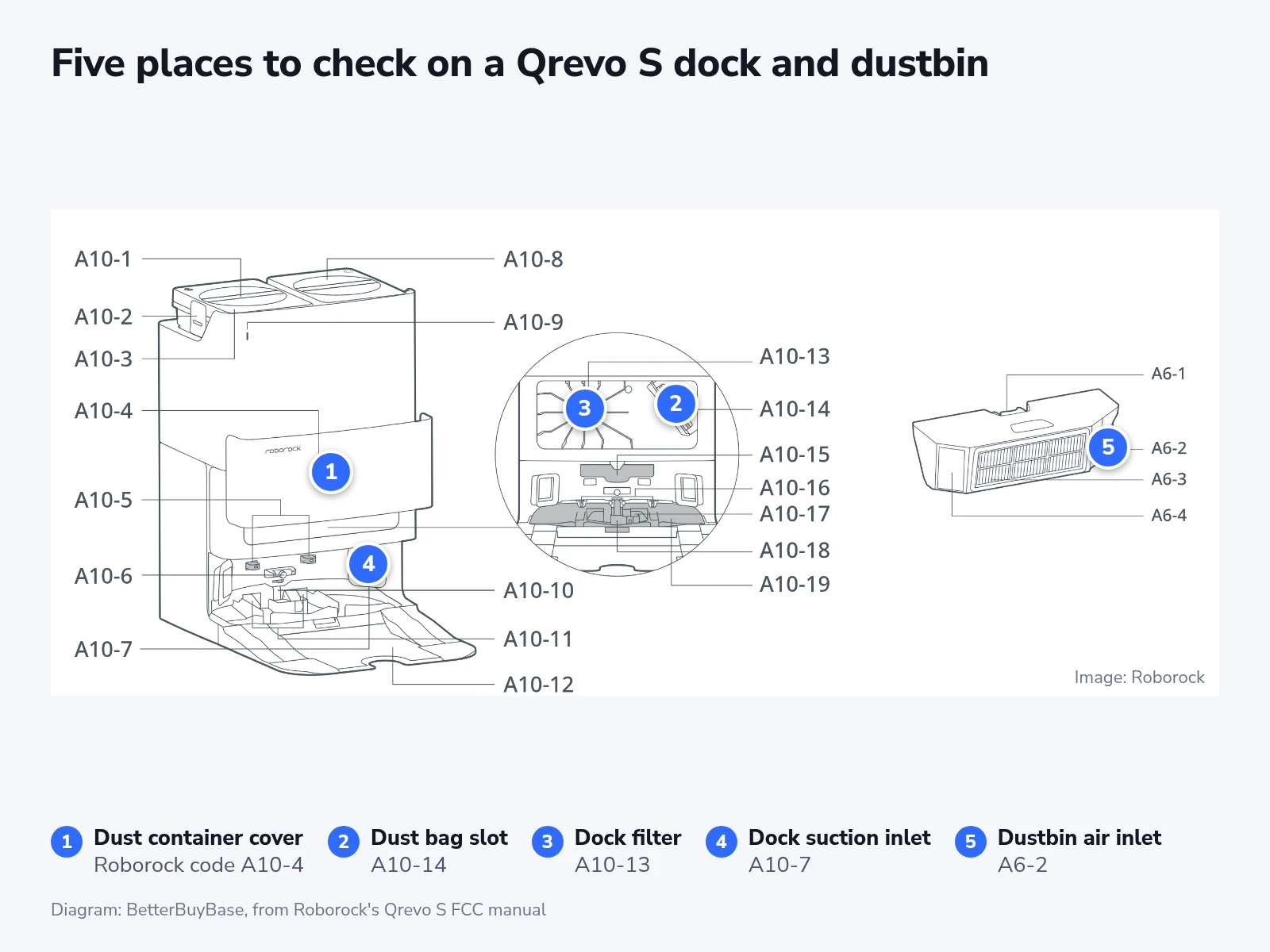
Weak or noisy emptying with no alert points to a clog or a leak somewhere between the robot's bin and the bag. For the Qrevo S, Roborock lists six places that can block (the filter, the air duct, the suction inlet, the air inlet, the dustbin and the dust bag) plus a main brush cover that isn't seated.
- Unplug the dock and lift the robot off it.
- Take out the robot's dustbin, empty it and check the air inlet (part A6-2 in Roborock's drawing). Do this whenever auto-empty has gone unused for a long time.
- If you rinse the bin, use clean water with no cleaning liquid, which can cause a blockage. A washed filter needs at least 24 hours to dry before it goes back.
- Shine the flashlight into the dock's suction inlet where the robot parks (A10-7) and onto the filter inside the dust compartment (A10-13). Wipe both with a dry cloth.
- Turn the robot over and refit the main brush cover. Seat its four teeth in their slots and press until it clicks.
- Plug the dock in, park the robot and start an empty from its dock button.
On an iRobot, clear debris from the port on the back of a Max 715 or Plus 575 and from the port at the front of the dock. Each month, open the dock and wipe the blower cover over its filter with a dry cloth.
If an iRobot dock's motor cuts out partway through, its thermal protector has tripped. Unplug the dock, let it cool for 30 minutes, clear the evacuation port and the evacuation tube, then plug it back in.
Clean a Max 715's bin at least once a week, dock or no dock, as its owner's guide asks. Tap the filter clean over a trash can and don't wash it. The bin can be rinsed in warm water once the filter is out, but it isn't dishwasher safe.
On an Ecovacs T80 OMNI, take the dust bin out of the robot and clear anything stuck in its outlet. A dusty compartment on that dock comes from fine dust passing through the bag, a torn bag, a badly fitted bag or a cover left open.
Ecovacs docks without a bag
The DEEBOT X11 OmniCyclone station collects dust in a container instead of a bag. To empty it, slide up the release button, pull the container out, hold it over a trash can and press the dump switch. Follow the maintenance confirmation instructions for your app version.
A failed empty on this station means the container isn't installed or firmly closed, or that emptying has lost efficiency. Cleaning the container and its sponge filter fixes the second. Maintain the sponge filter as its manual directs and let it dry completely before it goes back in.
Check it worked, and when to do it again
Run one room from the app, let the robot drive home on its own outside DND hours, and watch the dock light or the station status in the app. Then open the robot's bin. If the dock has done its job, the bin is close to empty.
Replace a Roborock bag when it is full and follow the maintenance instructions for that dock. A suggested interval for a different dock is not a replacement schedule for yours. A T80 OMNI bag lasts two to three months by Ecovacs's table. iRobot leaves the timing to the dock light and the app, and asks for the dock's filter, charging contacts and IR window to be wiped once a month.
If the dock still won't empty after all of this, contact the maker's support. Ecovacs's manual says parts inside the station may be faulty at that point.