USB flash drives used to be everywhere. Students carried them to school, office workers kept presentations on them, and PC users relied on them to move files from one computer to another.
Things have changed quite a bit.
Cloud storage now keeps files synced across devices. Portable SSDs move huge folders much faster. Phones can send photos wirelessly in seconds. At first glance, the little USB stick can look like a piece of technology left over from another era.
Still, USB flash drives are far from obsolete in 2026.
They no longer handle every portable storage job, but they remain useful for quick transfers, Windows installation media, BIOS updates, offline documents, recovery tools, and moving files between devices. USB-C has given the format fresh life too.
So, rather than asking whether USB drives are dead, it makes more sense to ask where they still fit.
Are USB Flash Drives Actually Obsolete?
No. USB flash drives still serve several practical purposes, and manufacturers continue to sell modern models with USB-C, USB 3.2, and large capacities.
Some current drives are far faster than older cheap USB sticks. Premium models can reach advertised read speeds close to 1,000 MB/s, and capacities of 512GB or 1TB are readily available.
That said, flash drives have lost some of their old jobs.
Cloud storage handles document syncing. Messaging services deal with small file transfers. Portable SSDs are better suited to large video folders. Wireless sharing works well between phones and computers.
Yet a flash drive still has one major advantage. You plug it in and use it.
There is no account to create, no subscription to pay for, and no internet connection to depend on.
For many tasks, that simplicity still matters.
Why USB Flash Drives Feel Outdated
The biggest change is not the USB drive itself. It is how we use our devices.
Years ago, moving a document from a home PC to an office computer often meant copying it to a thumb drive. Today, the same file may already be available through OneDrive, Google Drive, Dropbox, or iCloud.
At the same time, internal storage became larger. A modern laptop with 512GB or 1TB of storage gives most people plenty of room for everyday files.
Phones changed too. USB-C is common across newer mobile devices, and wireless transfers have become easier.
Portable SSDs created even more competition. They offer high sustained transfer speeds, large capacities, and better performance with heavy workloads.
So yes, USB sticks feel less central than they once did.
Still, less common does not mean obsolete.
Why USB Flash Drives Are Still Useful in 2026
The main strength of a USB drive is convenience.
It fits in a pocket. It works offline. It does not need a battery. You can hand it to another person and transfer files without giving them access to an online account.
For example, a USB drive still works well for:
- Moving documents between computers
- Carrying presentations
- Creating Windows installation media
- Storing bootable recovery tools
- Updating motherboard BIOS files
- Installing drivers on a new PC
- Transferring photos and videos
- Carrying offline documents
- Moving files between Windows and macOS
- Storing firmware update files
- Moving files to compatible TVs and other electronics
- Carrying encrypted work files
PC builders have especially good reasons to keep one nearby.
A newly built computer may need Windows installation media. Then you may need motherboard drivers, network drivers, or a BIOS update. A basic USB stick can handle all of those tasks.
For instance, I would rather have a 64GB USB drive in my PC toolkit than discover I need one after building a computer.
That is where the format still makes perfect sense.
USB-C Has Given Flash Drives a Second Life
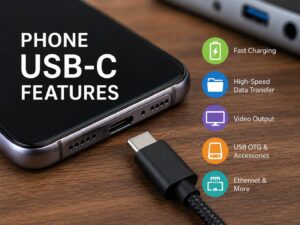
Traditional USB drives were designed around USB-A. That worked well for desktops and older laptops, but thin notebooks, tablets, and phones increasingly moved toward USB-C.
Modern flash drives have followed.
You can now buy USB-C thumb drives and dual-connector models with USB-A on one side and USB-C on the other.
That small change makes them much more useful.
For example, you can copy a video from a USB-C phone, connect the same drive to a desktop PC through USB-A, and move the file without an adapter.
USB-C iPhones can work with compatible external storage too. That means a tiny USB-C drive can become useful for moving photos, videos, documents, and other files without filling the phone’s internal storage.
So USB-C did not kill the flash drive. In some ways, it made the format more flexible.
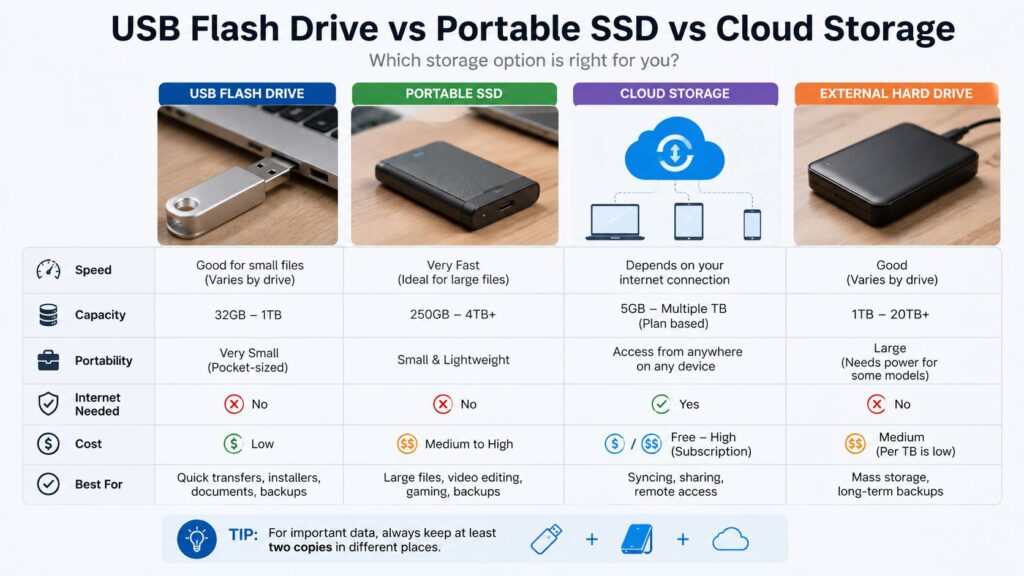
USB Flash Drive vs Portable SSD vs Cloud Storage
Each storage type has a different job.
| Storage type | Best for | Main strength | Main weakness |
|---|---|---|---|
| USB flash drive | Quick file transfers | Tiny and easy to carry | Performance varies |
| Portable SSD | Large files | Fast sustained transfers | Usually costs more |
| Cloud storage | Access across devices | Easy syncing and sharing | Internet access is often needed |
| External hard drive | Large archives | Low cost per gigabyte | Larger and more fragile |
A USB flash drive works best for small or occasional transfers.
For example, copying a 2GB presentation does not justify carrying an external SSD.
A 200GB video project is different. In that case, a portable SSD makes far more sense.
Cloud storage wins in another area. If you edit the same files across several devices every day, automatic syncing is easier than carrying a physical drive.
Still, cloud storage cannot fully replace removable media.
A poor internet connection, large download, account problem, or restricted computer can quickly make a physical USB drive useful again.
Are USB Flash Drives Good for Long-Term Storage?
USB flash drives can store files for long periods, but they should not be your only copy of valuable data.
Flash storage wears over time. Data retention can vary with the memory type, controller quality, usage history, temperature, and manufacturing quality.
More importantly, USB sticks are tiny.
That makes them easy to lose.
For that reason, I would not keep the only copies of family photos, business documents, or personal records on a thumb drive.
Use one as portable storage or as an extra copy instead.
For valuable files, keep at least another copy on a computer, external drive, NAS, or cloud service.
That way, losing one tiny USB stick does not become a disaster.
USB Flash Drive Speeds Can Be Confusing
One common mistake is assuming every USB 3.x drive is fast.
That is not true.
The USB interface sets the maximum connection speed, but the memory and controller inside the drive decide how fast files actually move.
For example, two drives may both carry a USB 3.2 label. One might write large files quickly. The cheaper model may start fast and then slow down badly once its small cache fills.
USB-C does not automatically mean high speed either.
USB-C describes the connector. It does not guarantee a particular transfer rate.
So look beyond the connector and USB version.
Check these details before buying:
- Advertised read speed
- Advertised write speed
- Sustained write performance
- Capacity
- USB-A or USB-C connection
- Warranty period
- Compatibility
- Independent testing
Write performance deserves special attention.
Fast read speeds make files quick to open or copy from the drive. Write speed controls how long you spend waiting for files to copy onto it.
That difference becomes very noticeable with large folders.
What File System Should You Use on a USB Drive?
Formatting can affect where a USB flash drive works.
FAT32 offers wide device compatibility, but it cannot store individual files larger than 4GB. That restriction can become annoying with modern videos, disk images, and large archives.
NTFS works well with Windows and supports large files. Yet compatibility with some phones, TVs, Macs, and other devices can vary.
exFAT is often the practical choice for a USB drive that needs to move large files between different modern devices. It supports files larger than 4GB and works across Windows and macOS.
If you are deciding between the two most common choices, our detailed exFAT vs NTFS guide explains their compatibility, file-size support, and best uses.
For a drive used mainly with Windows PCs, NTFS can work well.
For a drive that regularly moves between Windows, macOS, and other compatible devices, exFAT often makes more sense.
What USB Flash Drive Capacity Makes Sense in 2026?
Storage is cheap enough that very small USB drives have limited appeal now.
An 8GB or 16GB model can still work for a BIOS update, recovery tool, or a few documents.
Still, 64GB is a much more useful starting point.
A 128GB model gives most people enough room for documents, photos, installers, and videos without costing much more.
Then there is 256GB. This capacity hits a nice middle ground for users who regularly move larger files.
Here is a simple guide:
- 32GB: BIOS files, drivers, documents, basic recovery tools
- 64GB: General everyday use
- 128GB: Photos, videos, installers, and larger folders
- 256GB: Frequent transfers and media files
- 512GB: Large portable collections
- 1TB: Heavy storage use where tiny size matters
Once you reach 512GB or 1TB, compare prices with portable SSDs.
At that level, an SSD can offer much better sustained performance for a modest increase in size.
When a Portable SSD Is Better
Flash drives are great at being small. Portable SSDs are better at being fast.
For instance, an SSD is the better choice for:
- Large video projects
- RAW photo libraries
- Large local backups
- Game libraries
- 100GB or larger transfers
- Editing directly from external storage
- Frequent professional workloads
A premium flash drive can be very fast, but compact SSDs often maintain their speed better during long transfers.
Heat can affect tiny flash drives too. There simply is not much room inside the casing to deal with sustained workloads.
So a USB stick makes sense for portability.
An SSD makes sense for heavier storage work.
When Cloud Storage Is Better
Cloud services have replaced USB drives for many everyday tasks.
If you need access to the same documents from a phone, desktop, and laptop, syncing them through the cloud is easier than manually copying them.
Cloud storage works especially well for:
- Frequently edited documents
- Shared folders
- Collaborative projects
- Automatic phone backups
- Files needed from several locations
Still, cloud storage brings its own limits.
Free storage tiers can fill quickly. Larger plans can require recurring payments. Internet speed affects uploads and downloads too.
Then there are situations where internet access simply is not available.
In those cases, plugging in a USB stick is still hard to beat.
Are USB Flash Drives Safe?
They can be, but a standard USB stick does not automatically protect your files.
If someone finds an unencrypted drive, they can usually open its contents.
Encryption can reduce that risk.
Windows supports encryption for removable drives through BitLocker To Go on supported editions. Other encryption tools can protect files too.
At the same time, avoid plugging unknown USB devices into your computer.
A random drive found in a parking lot, hotel, conference center, or office should stay unplugged. Unknown USB hardware can pose security risks.
Your own flash drives are different. Keep them physically secure, encrypt sensitive files, and avoid using one device across untrusted computers.
Are Cheap USB Flash Drives Worth Buying?
Sometimes.
A cheap drive is fine for temporary, replaceable files. Spending more makes sense for repeated transfers, work files, installation media, or anything you rely on regularly.
Extremely cheap high-capacity drives deserve extra suspicion.
Fake flash drives can report more storage than they physically contain. A fake 1TB device may appear normal at first, but files can become corrupted once you write past the real capacity.
So buy from a reputable retailer and stick to established storage manufacturers.
Performance matters too.
A cheap 256GB drive can sound like a bargain until copying a large folder takes far longer than expected.
In fact, a smaller high-quality drive can be far more pleasant to use than a huge low-quality one.
Who Still Needs a USB Flash Drive?
More people than you might expect.
PC builders need them for Windows installations and BIOS updates.
IT workers can carry diagnostic and recovery tools.
Students can keep an offline copy of an assignment.
Office workers can carry presentations without trusting conference room Wi-Fi.
Photographers can move selected files between devices.
Travelers can keep offline copies of non-sensitive documents.
Even casual computer users can benefit from keeping one good drive in a drawer.
You may use it only a few times each year. Still, those few situations can make the small purchase worthwhile.
Should You Buy a USB Flash Drive in 2026?
Yes, if you need portable storage for quick transfers, recovery tools, installers, firmware, or offline files.
For most people, a 64GB, 128GB, or 256GB model offers the best balance between cost and usefulness.
Look for USB 3.x support and check real read and write speeds. A dual USB-A and USB-C model is especially useful if you own a mix of old and new devices.
Then compare larger drives with portable SSDs.
A 1TB thumb drive sounds convenient, but an external SSD may give you much better performance at a similar price.
The right choice comes down to the job.
So, Are USB Flash Drives Dying?
USB flash drives are becoming more specialized, but they are not obsolete.
Cloud storage has taken over everyday syncing. Portable SSDs handle large transfers better. Wireless tools make quick sharing easier.
Yet the humble USB stick still offers a rare combination of tiny size, offline access, low cost, and broad compatibility.
That is why I still think owning at least one good USB drive makes sense in 2026.
You probably will not carry it everywhere like people did years ago. You also will not use it every day.
Still, the moment you need to reinstall Windows, update a BIOS, hand someone a large file, or move data from a computer with no internet connection, that little drive suddenly feels very current.