
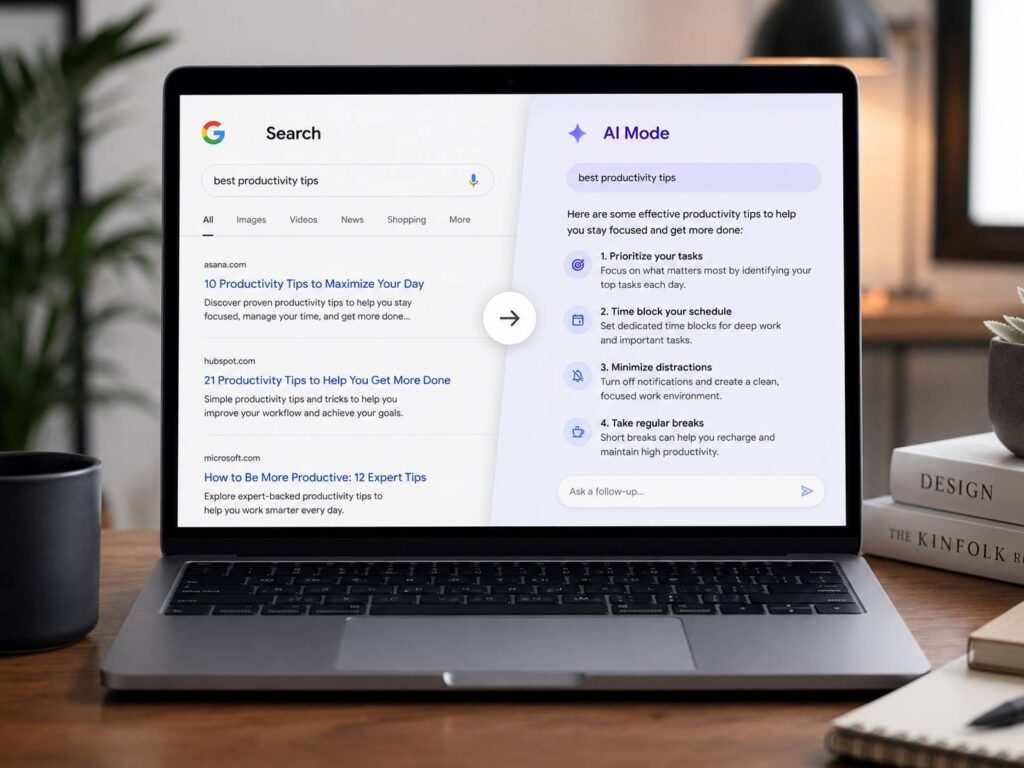
Google is testing a Chrome change that sends searches straight into AI Mode. At first, that sounds like a small browser tweak. You type in the address bar, press Enter, and Google gives you an AI-style answer instead of the classic search results page.
For many people, that would feel like a big change.
The test showed up in Chrome Canary, the early version of Chrome where Google tries new features. The hidden flag is called “Fulfill Searchbox Queries in AI Mode.” Once someone turns it on, searches from the Chrome address bar and New Tab search box open AI Mode threads instead of regular Google Search results.
For now, Google says AI Mode will not become the default for Chrome searches. Still, this test says a lot about where search is heading. Google wants AI Mode closer to the starting point of the web.
So, is that helpful, or is Google adding AI to places where users just want a quick answer?
What the Chrome AI Mode Test Does
Chrome already gives users a few ways to open AI Mode. You can access it from Search, the New Tab page, or the address bar. This Canary test takes away one step.
Instead of typing a question, opening regular results, then choosing AI Mode, the browser sends the search straight to an AI answer.
That changes a habit people have had for years. The classic search flow is simple:
- Type a search in Chrome
- See a Google results page
- Scan the links
- Open a page
- Compare the answer yourself
The AI Mode flow feels different:
- Type a search in Chrome
- Get an AI-made answer
- Ask a follow-up question
- Click links only if you need more detail
For deeper research, that can save time. For quick searches, though, it can feel like too much.
Why Google Wants AI Mode Inside Chrome Search
Google has been adding AI across Search and Chrome for a while now. AI Overviews already appear on many search results pages. AI Mode goes further and gives users a more chat-like search experience.
Chrome is the obvious place to test this. Many people do not open Google.com before searching. They open a new tab, type into Chrome, and press Enter.
So, if Google wants people to use AI Mode more often, Chrome is the fastest path.
That makes sense from Google’s side. Still, from the user’s side, it needs care. Search is not one single task. A person searching for “YouTube,” “weather tomorrow,” or “Gmail login” does not need an AI answer. They need the right page fast.
At the same time, a person comparing laptops, planning a trip, or trying to understand a tricky topic can benefit from AI Mode. The key is choice. AI Mode should help when the search needs depth, not interrupt every simple search.
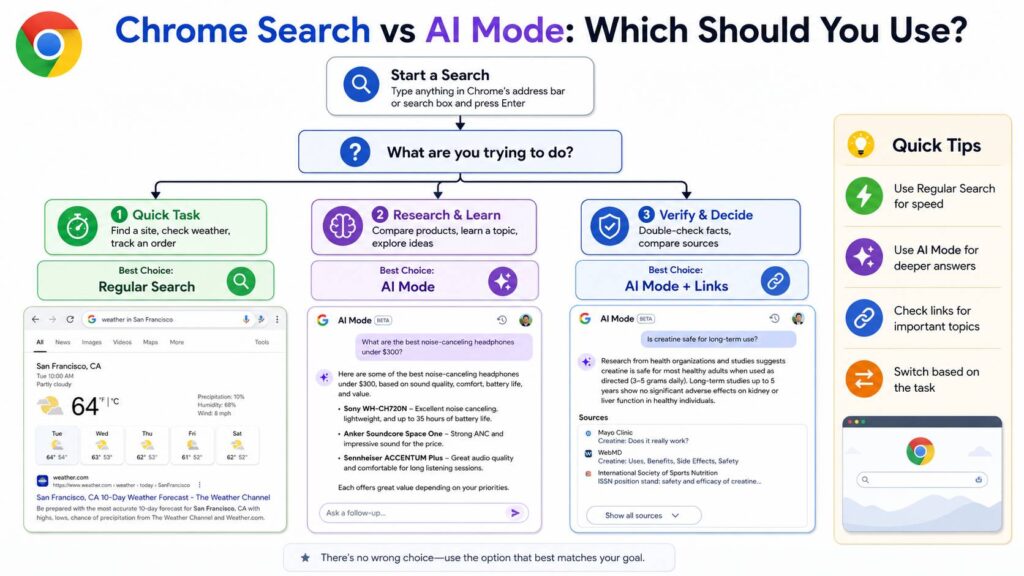
Where AI Mode Can Be Useful
AI Mode works best for searches that need sorting, comparison, or explanation. Regular search is great for direct links and simple facts. AI Mode fits better when the user has a broad question.
For example, these searches make sense for AI Mode:
- “Best budget laptop for students under $700”
- “Google AI Mode vs AI Overviews”
- “Plan a 3-day Rome trip with kids”
- “Chrome AI search settings”
- “OLED vs Mini LED monitor for office work”
- “Explain this PDF in simple words”
In those cases, AI Mode can break the topic into smaller parts. Then, the user can ask a follow-up question without starting a new search.
That feels useful. It turns search into a conversation, and for complex topics, that can save effort.
The feature may also help people who do product research. For instance, someone comparing keyboard layouts might start with broad questions, then move into details like compact layouts, numpads, and desk space. A guide like this 96% keyboard size guide still matters in that flow, since users need clear pages with real explanations behind the AI answer.
Why Some Users May Find It Annoying
The problem is not AI Mode itself. The problem is where Google places it.
People use Chrome search for quick tasks all day. They look for websites, support pages, store pages, local shops, videos, maps, and product manuals. In many cases, a full AI answer adds friction.
Plus, AI answers can make mistakes. They can miss details, combine facts poorly, or sound more confident than they should. That is a real concern for health, money, legal, and technical searches.
Regular search has flaws too. Some pages rank higher than they deserve. Ads can crowd the page. Low-quality content still exists. Even so, regular search gives users control. They can scan sources, compare pages, and decide what to trust.
AI Mode changes that order. It puts the generated answer first and the open web second. For users, that can feel easier. For publishers, it can feel risky.
What This Means for SEO and Websites
AI Mode does not kill SEO. It changes the pressure on content quality.
Websites still need clear pages that Google can crawl, index, and understand. Pages still need helpful titles, strong headings, direct answers, and clean structure. Yet the bar is higher now.
A weak article that repeats common facts has less value. A strong page gives real examples, fresh details, clear advice, and original opinion.
A page built for AI search should include:
- A clear answer near the top
- Simple headings
- Useful lists
- Real product names, specs, prices, or dates
- Direct comparisons
- Original testing or hands-on experience
- Helpful images or diagrams
- Short paragraphs
- Clean formatting
- A natural tone
This matters for Google AI Mode, AI Overviews, and normal search. If AI pulls from strong web pages, then those pages still have a place. If a page adds nothing new, it becomes easier to ignore.
My opinion is simple. Site owners should stop chasing tricks and build better pages. Useful content wins more often than thin content written only for keywords.
AI Mode vs AI Overviews vs Regular Search
Many users search for “Google AI Mode vs AI Overviews” since the names sound similar. The difference is easy to understand.
AI Overviews appear inside normal Google Search results. They give a short AI answer near the top of some results pages.
AI Mode is a deeper AI search space. It feels more like chat. You ask a question, get an answer, then continue the topic with follow-up questions.
Regular Search is the classic page with links, ads, snippets, images, videos, maps, and other Google features.
That is why the Chrome test matters. It does not just add another AI box to Search. It tests a direct path from the browser search box into AI Mode.
That is a bigger change.
Should AI Mode Become the Default in Chrome?
No, not for every search.
AI Mode should be easy to find. It should sit close to the address bar. It should be one click away for users who want deeper help. Still, regular search should remain the default for most people.
A better setup would give users clear control:
- Keep regular Search as the main default
- Show AI Mode as a visible option
- Let users hide AI Mode from the address bar
- Ask before changing search behavior
- Keep source links easy to find
- Give publishers fair visibility in AI results
That balance would help users without forcing AI into every search.
Some people will love AI Mode. Others will use it only for research. Many will want normal search most of the time. Chrome should respect that.
The Real Issue Is User Control
Google is pushing Search toward AI. That is clear. AI Mode will likely become more visible in Chrome, Search, and other Google tools.
For users, the best version of this future is simple. AI helps when the question is hard. Regular search stays fast when the task is simple.
For publishers, the best path is clear too. Create pages that answer real questions better than generic AI text. Use clean structure, real examples, and honest opinions. Give people a reason to click.
Chrome searches going straight to AI Mode could be useful in the right context. For research, shopping, planning, and learning, it can save time. For quick searches, it can feel heavy.
So, the feature should stay optional. Google should make AI Mode easy to use, but not hard to avoid. That is the difference between a smart upgrade and too much AI.