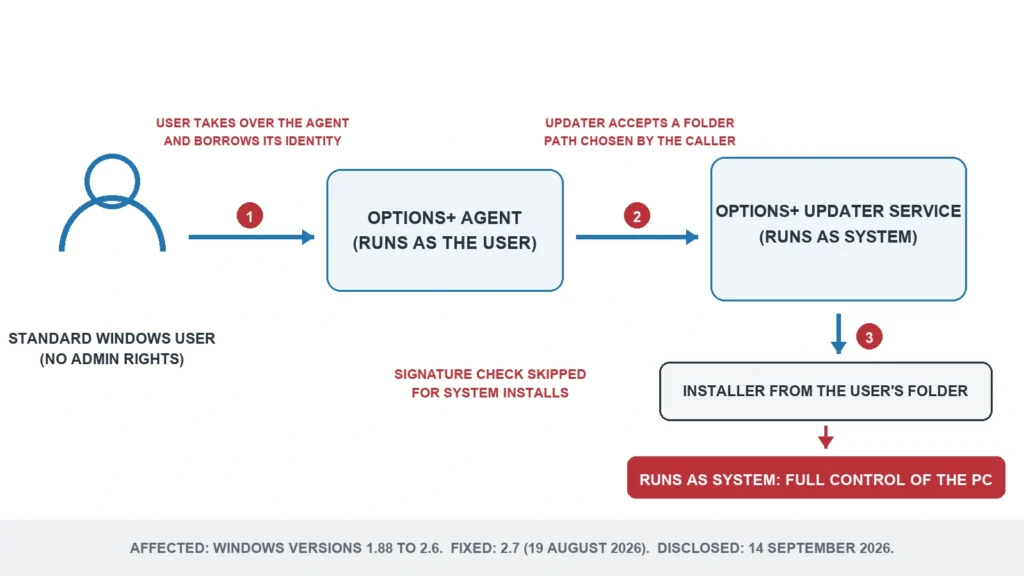
Logi Options+ 2.7 arrived on August 19, 2026 with a short set of release notes: support for the new MX Keypad, a webcam snapshot button that now grays out when the video is off, and a fix for Craft keyboard shortcuts. It also closed a hole that let anyone with a standard account on a Windows PC run their own code as SYSTEM, the highest privilege level in Windows. Logitech rates the Logi Options+ vulnerability 8.5 out of 10, and it affects Windows versions from 1.88 up to, but not including, 2.7. The US Cybersecurity and Infrastructure Security Agency (CISA) has seen no one exploit it. If your copy updates itself, you are already on 2.7 or the current 2.8.
Who could use the flaw
This is a local flaw. Nobody can reach it over the internet or across your Wi-Fi. The attacker needs an account on the PC, or a program already running under an ordinary account, and from there the flaw turns limited access into complete control.
On a single-user laptop where you are already an administrator, that step adds little. The account that gets the most out of it is the one that was deliberately held back: a child’s standard account on the family computer, a work laptop where the IT department has removed administrator rights, a shared PC in a small office. It also hands the whole machine to malware that arrives through a bad download and starts out with only your account’s rights.
CISA’s assessment, added to the record on September 14, reads no known exploitation, not automatable, total technical impact. The attack needs no clicks from the victim and no network access, according to the researchers who found it.
How the updater was fooled
Options+ installs a background updater that runs as SYSTEM, because it has to write into protected folders. The app you see talks to it through a local channel, and the updater only answered one caller: Logitech’s own agent program.
Jake Bolam of the security firm AmberWolf showed that the check trusted the wrong thing. It looked at which program was calling, and that program runs under your own account, so you can inject code into it and borrow its identity. Once inside, a request to reinstall a component accepted a folder path chosen by the caller. The last step was an installer the updater launched as SYSTEM, a path on which it skipped the signature check that would normally reject anything Logitech had not signed. Chained together, the three steps let a user swap in their own installer and have the updater run it.
The fix that was not called a fix
The 2.7 notes never mention security. A reader going through them in August would have found MX Keypad support and two small repairs, and nothing that suggested the update deserved priority.
The dates explain part of it. AmberWolf reported the flaw on March 11, 2026. Logitech first promised a fix by the end of May, moved it to the end of June, then on June 18 to the end of September. The patch arrived on August 19, earlier than the last promise, and Logitech filed the public CVE record, CVE-2026-12518, on September 14, when AmberWolf published its write-up. Holding back details for a while after a patch ships is normal practice. Leaving the release notes silent afterwards is a choice, and they still read the same today.
One detail in the write-up sits awkwardly with the record. AmberWolf says it first found the chain in build 667932 of Options+, a lower build number than any 1.88 release, while Logitech’s record lists 1.88 as the first affected version. Logitech has not said whether older builds were checked. If your PC runs an old copy because updates were switched off, treat it as affected.
Check your version and update
Open Logi Options+, go to Settings, and look under General. The Check for update button there shows whether you are current, and the automatic update switch sits on the same page. It is on by default. You want version 2.7.954611 or anything later. Version 2.8, released on September 21, is the newest.
Logitech itself gave some owners a reason to switch automatic updates off. Options+ 2.4 dropped support for Razer’s Stream Controller in Loupedeck, and Logitech’s own notes told anyone using one not to update to 2.4 or later. Those PCs are still inside the affected range. The choice now is between the Razer controller and a closed hole, and on a PC anyone else logs into, the hole should win.
Uninstalling Options+ also removes the updater. Your mouse keeps working as a mouse, but on the MX Master 4 the haptic panel, the Actions Ring and every custom button are set in Options+, and the mouse has no onboard memory to keep them. Most owners are better off updating.
What is not covered
Only the Windows app is affected. The Mac version is not listed in the record. Logitech’s gaming mice and keyboards use a different program, G HUB, which the record does not mention, and Logitech has published nothing about it in connection with this flaw. The older Logitech Options app, which Options+ replaced, is not listed either.
If you manage a few office PCs with Logitech keyboards such as the MX Keys S, the check is the same on each machine, and it is worth doing before the next person without administrator rights signs in.