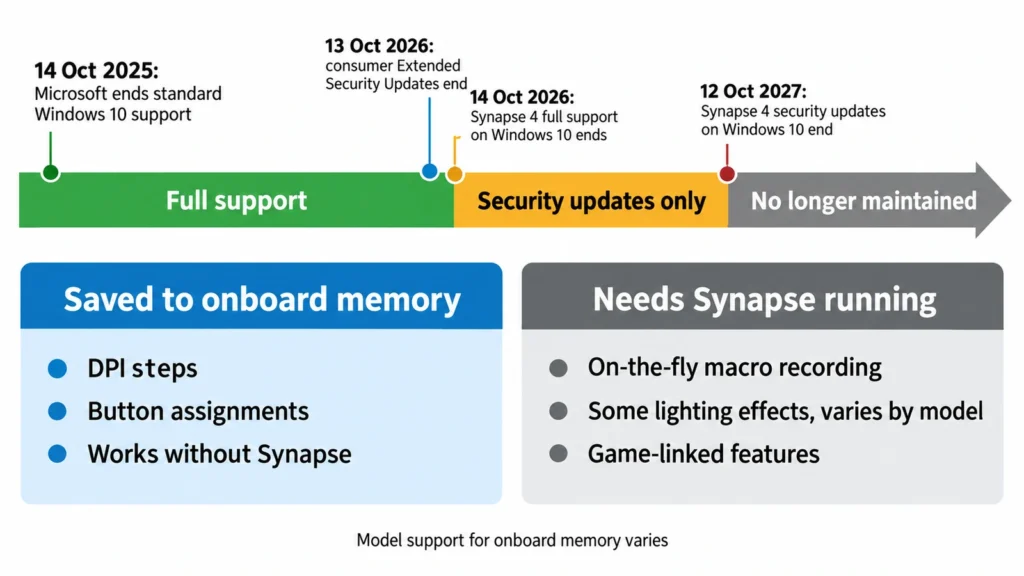
Razer has put a date on the end of Windows 10 support for Synapse 4, the app that configures its mice, keyboards, headsets and webcams. The release notes for the Synapse update dated September 18, 2026 say that “full support for Razer Synapse 4 on Windows 10 will end on October 14, 2026.” From that date until October 12, 2027, bug fixes for Synapse 4 on Windows 10 will be “limited to security updates only”, and after that “Windows 10 support and compatibility will no longer be maintained.” Windows 10 owners have three weeks before the first cutoff. The second is about a year away. What you do with that time depends mostly on whether your settings live in the app or on the device.
Two dates for Razer Synapse on Windows 10
The timetable follows Microsoft’s. The notice opens with “Following Microsoft’s end of standard support for Windows 10 back on October 14, 2025”, and it recommends moving to Windows 11. Microsoft’s US and European Economic Area pages for its Extended Security Updates program for home PCs say the program ends on October 12, 2027, the same day Razer stops security fixes for Synapse 4 on Windows 10. Razer says its security-only year mirrors Microsoft’s program.
The first date, October 14, 2026, ends full support, and the notice now says what that means. Bug fixes for Synapse 4 on Windows 10 shrink to security updates that day, and technical support ends. Razer says the app “will still receive feature updates” on Windows 10, but it does not guarantee that every feature will work, because it will no longer fix bugs seen only on Windows 10.
The second date, October 12, 2027, ends security updates for Synapse 4 on Windows 10, after which Razer says support and compatibility “will no longer be maintained”. That does not mean the app stops launching on that day. It means a Windows update or a Synapse update could break it, and Razer will not fix it.
The same update fixed Razer’s webcams
The notice sits in the release notes for Synapse for Windows version 4.0.86.2609100850, with Chroma version 4.0.63.2608271424. The main fix in that release is for “app instability when using certain devices”. Affected devices are the Kiyo V2 X, Kiyo V2, Kiyo Pro Ultra, Kiyo Pro and Kiyo X webcams, plus the Seiren V3 Pro and Seiren V3 Chroma microphones. If Synapse was unstable with one of these devices attached, install this version first.
Settings that survive without Synapse
Many Razer mice and keyboards can store profiles in onboard memory. Our page for the Razer Basilisk V3, an 11-button mouse with a tilting, free-spinning wheel, lists onboard memory as a feature. A profile saved there travels with the mouse. The DPI steps and button assignments keep working on a PC where Synapse is not installed, or where it no longer runs.
What can be stored on the device varies by model, and Razer’s own Synapse 4 FAQ lists some features that depend on the app. On-the-fly macro recording, for example, “only works when Razer Synapse 4 is installed and running in the background.” Features such as Linked Games also run through the app, and how much of the lighting a device keeps without it varies by model.
So the practical risk is uneven. A mouse with a saved profile loses little if Synapse stops working. A keyboard whose macros and lighting are driven live by the app loses more.
What to do before October 14
If your PC meets Windows 11’s requirements, upgrading solves the problem, and it also solves the larger one of running an operating system whose extended security updates end on October 12, 2027.
On a PC that cannot upgrade, use the remaining weeks of full support to move as much as possible onto the devices themselves. Open Synapse, check each mouse and keyboard for an onboard memory option, and save the profiles you use there. Then test them with Synapse closed, so you know which buttons and macros survive without the app.
Synapse 4 runs only on 64-bit versions of Windows 10 and Windows 11, according to Razer’s FAQ. The same FAQ says you can uninstall Synapse 4 and go back to Synapse 3. Razer has said nothing about Synapse 3 on Windows 10 in this notice, so do not count on the older app to last longer.
What Razer has not said
Razer has not said whether devices it launches after October 14 will be configurable on Windows 10, or which of the new features will work fully there. It also has not said whether the Chroma app follows the same timetable, although both ship in the same release. If Razer publishes a support article with those details, it will show how much a Windows 10 PC loses, and the advice above for owners who cannot upgrade could change.