Logitech M720 Triathlon Review
The Logitech M720 Triathlon is an older wireless mouse, but it still makes a lot of sense for office work. It is built for people who switch between devices, use long documents, scroll through large pages, and want a comfortable mouse that does more than the basics.
At first, the M720 looks like a normal full-size productivity mouse. Still, it has a few features that make it stand out. It connects through Bluetooth or the Logitech Unifying receiver, pairs with up to three devices, uses one AA battery, and includes a fast scroll wheel with tilt controls. For daily work, that combination feels more useful than a fancy design or RGB lighting.
This is not a gaming mouse. It is not the quietest mouse either. Also, it does not feel as premium as the newer MX Master models. Even so, the M720 Triathlon remains a strong choice for work, especially if you use a laptop, desktop, and tablet in the same setup.
If you are comparing office mice, you may also want to check this guide to the Best Wireless Mouse for Productivity. It gives a wider look at what matters for work, comfort, scrolling, and multi-device use.
Key Specifications
- Product name: Logitech M720 Triathlon
- Type: Wireless multi-device productivity mouse
- Shape: Right-handed, full-size, contoured
- Connectivity: Bluetooth Low Energy and Logitech Unifying 2.4 GHz receiver
- Wireless range: Up to 33 ft, or 10 m
- Sensor: High Precision Optical Tracking
- DPI: 1000±
- Buttons: 8
- Scroll wheel: Hyper-fast scrolling with tilt and middle click
- Battery: 1 replaceable AA battery
- Battery life claim: Up to 24 months
- Weight: 135 g with AA battery
- Dimensions: 115 mm tall, 74 mm wide, 45 mm deep
- Software: Logi Options+ on Windows and macOS
- Included in the box: Mouse, Unifying receiver, 1 AA battery, user documentation
Design and Build Quality
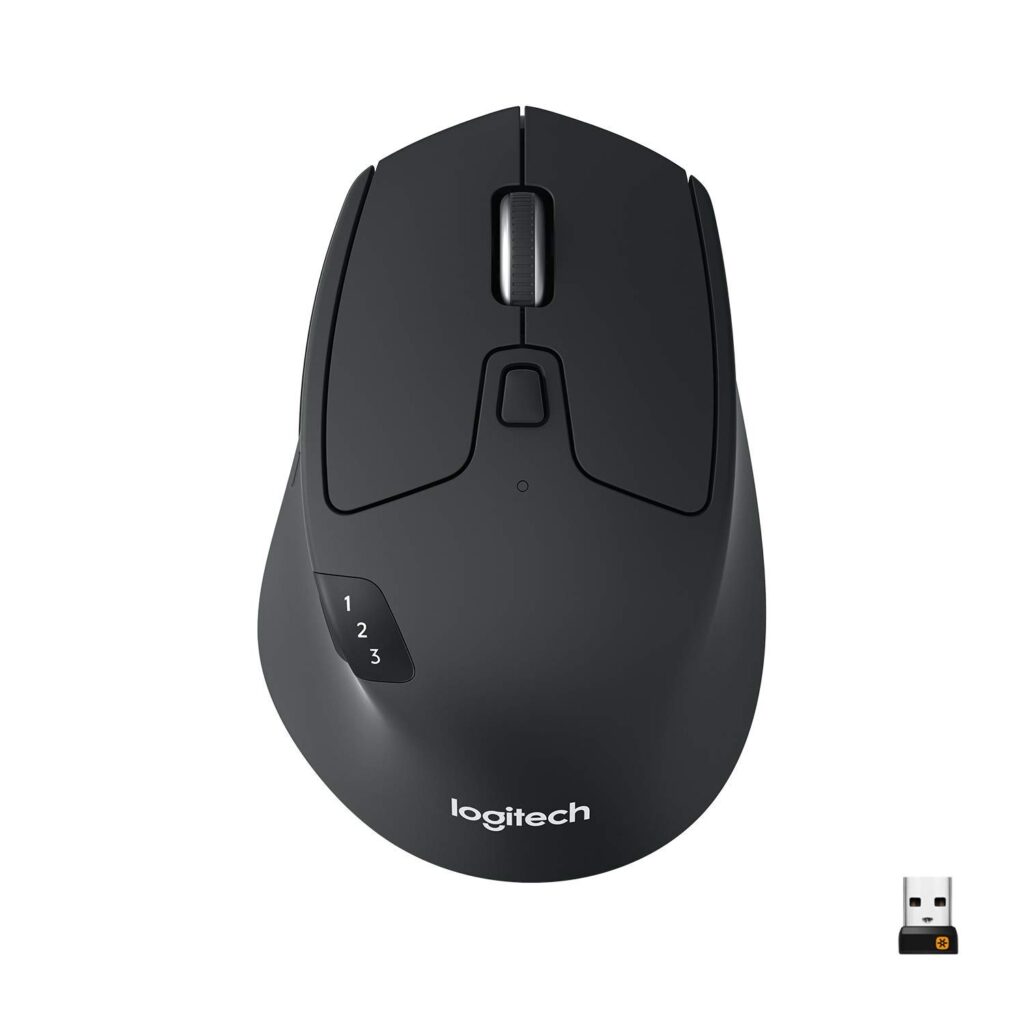
The Logitech M720 Triathlon has a practical design. It does not try to look ultra-modern, and that is fine. Instead, it focuses on comfort, grip, and easy access to work-focused controls.
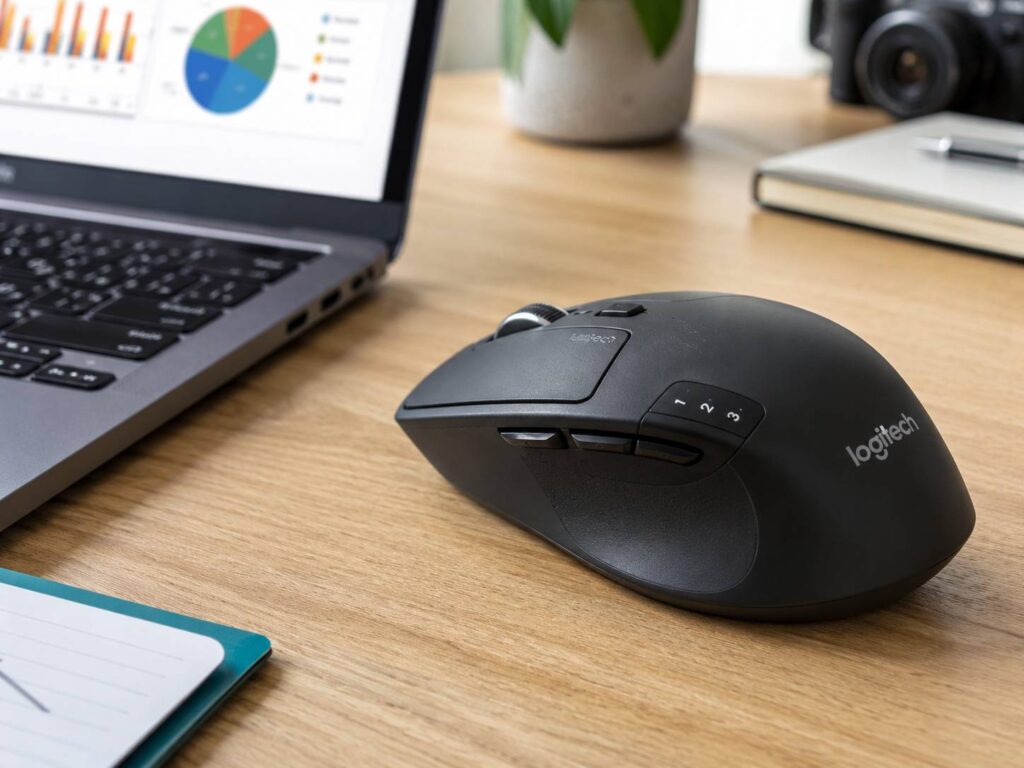
The body is taller than many compact wireless mice. As a result, your palm gets more support. The left side has a thumb rest, and the main shape favors a relaxed right-handed grip. The mouse works best for palm grip, but it can also suit a relaxed claw grip.
Next, the rubber side area helps with control. It gives your thumb a stable place to rest, which is useful during long work sessions. Still, rubberized areas can collect marks and hand oils over time. If you use the mouse daily, you will probably need to clean the side grip now and then.
The mouse weighs 135 g with the AA battery installed. That makes it feel stable on the desk. For spreadsheet work, browsing, and document editing, this weight can feel reassuring. Still, it is heavier than many newer wireless mice. If you lift your mouse often, you may notice the weight more.
Comfort for Long Workdays
Comfort is one of the main reasons to buy the M720 Triathlon. The shape feels much better for long desk work than small travel mice. Your hand gets more support, and your fingers sit naturally on the main buttons.
For a normal workday, the M720 feels like a mouse made for office use rather than quick laptop sessions. It works well for writing, web browsing, research, email, spreadsheets, and admin tasks. Also, the side buttons reduce repeated movement when you go back and forward through pages.
Compared with compact mice, the M720 feels more relaxed. Your hand does not need to pinch the mouse as much. Because of that, it can feel better during long sessions. Still, users with very small hands may find it a little bulky. Users with very large hands may prefer the bigger MX Master shape.
The main comfort issue is the weight. Some people like the planted feel. Others prefer a lighter mouse that glides faster. So, the M720 is best for users who keep the mouse on the desk most of the time.
Buttons and Daily Controls
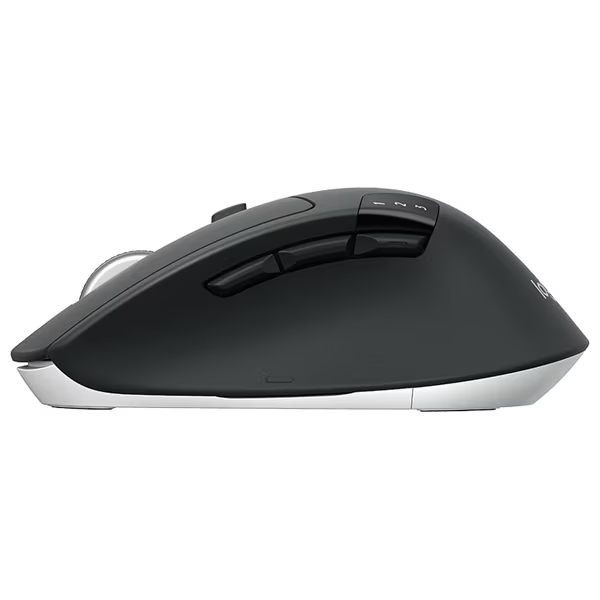
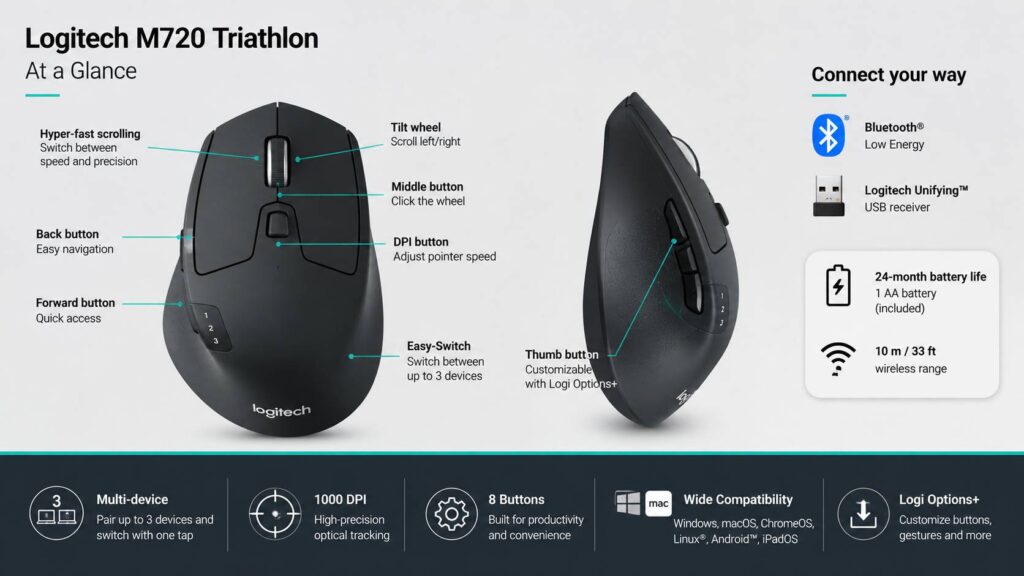
The M720 has 8 buttons, and most of them are useful for productivity. You get the main left and right buttons, a clickable scroll wheel, tilt wheel controls, back and forward buttons, an Easy-Switch button, and an extra thumb gesture button.
The back and forward buttons are especially useful in browsers and file managers. They sit in a good position near the thumb, so you do not need to stretch too much. After a few days, these buttons feel natural.
The Easy-Switch button is the feature that gives the M720 its Triathlon name. It lets you move between up to three connected devices. For example, you can pair it with a work laptop, a home desktop, and a tablet. Then, you can switch between them without reconnecting the mouse each time.
The hidden thumb button is useful too, but it is easy to forget it exists. With Logi Options+, you can assign it to shortcuts or gestures. For example, it can help with window control, app switching, or desktop navigation. Still, it needs software setup to feel truly useful.
Scroll Wheel Performance
The scroll wheel is one of the best parts of the Logitech M720 Triathlon. It supports both regular click-to-click scrolling and hyper-fast scrolling. You can switch modes using the button behind the wheel.
This matters more than it sounds. For long web pages, PDFs, product lists, and reports, the free-spin mode saves time. One quick flick can move through a large page quickly. Then, when you need more control, you can switch back to precise scrolling.
The wheel also tilts left and right. This helps in spreadsheets, timelines, wide documents, and dashboards. If you work in Excel or Google Sheets often, horizontal scrolling can be very handy.
Still, the scroll wheel does not feel as refined as the wheel on the MX Master series. It can feel more mechanical, and it may sound louder in quiet rooms. For many users, that will not be a deal-breaker. For shared offices, late-night work, or recording setups, a quieter mouse may be better.
Multi-Device Features
The M720 Triathlon is at its best when you use more than one device. It can connect through Bluetooth Low Energy or the included Logitech Unifying receiver. Better yet, it can pair with up to three devices.
This is great for a mixed desk setup. For example, you can use it with a Windows laptop during work hours, a personal desktop after work, and a tablet when needed. Instead of keeping three mice nearby, you can use one.
Switching is simple through the Easy-Switch button. The number indicator on top shows which device profile is active. As a result, the mouse feels easy to manage after setup.
Logitech Flow support can add more value on compatible systems. With Logi Options+ installed, you can move the cursor between supported computers and copy content between them. That feature is useful for people with two computers on one desk. Still, it can depend on software access, network settings, and company laptop restrictions.
Sensor and Tracking
The M720 uses a 1000± DPI optical sensor. For normal productivity work, that is enough. It handles browsing, documents, emails, spreadsheets, and general office tasks without trouble.
Still, the sensor is basic by modern standards. If you use a large 4K monitor or a multi-monitor setup, you may want more cursor speed control. You can adjust pointer speed in system settings and Logitech software, but the sensor itself is not aimed at high-performance work.
It is also not the best choice for gaming. The weight, office-focused shape, and 1000 DPI tracking make it poor for fast shooters or competitive games. It can handle casual use, but gamers should choose a proper gaming mouse.
For design work, it depends on the task. Basic photo sorting, simple edits, and content work are fine. For detailed pixel-level work, a higher-end mouse or pen tablet will feel better.
Battery Life
Logitech rates the M720 Triathlon for up to 24 months of battery life from one AA battery. That is a strong selling point. A replaceable battery also means there is no charging cable to manage.
This setup is simple. Use the mouse, replace the battery when needed, and keep working. Also, the power switch helps save battery during travel or storage.
There is one trade-off. The AA battery adds weight. So, if you want a very light mouse, the M720 will not feel ideal. Still, for office work, the long battery life claim makes daily use feel low-maintenance.
Software and Customization
The M720 works with Logi Options+ on Windows and macOS. This software lets you customize buttons, set app-specific actions, and use Logitech Flow on supported systems.
This is where the mouse becomes more useful. You can assign shortcuts to the side buttons, tilt wheel, or thumb gesture button. For example, you can use one button for mission control on a Mac, desktop switching on Windows, or custom commands in work apps.
Still, there is a catch. Some work laptops do not allow extra mouse software. If your company blocks Logi Options+, the M720 still works as a basic mouse, but you lose some of its best features.
Also, Logitech now points supported users toward Logi Options+ instead of the older Logitech Options app. So, new buyers should set it up with the newer software.
Real-World Work Experience
In a practical desk setup, the M720 makes the most sense for people who do repeated office tasks all day. Think emails, research, WordPress work, spreadsheets, admin tools, and browser tabs. The extra buttons reduce small repetitive actions, and the scroll wheel makes long pages easier to handle.
The mouse feels stable rather than fast. That is good for accuracy in office apps. It is less useful if you like a light mouse that moves with tiny wrist flicks.
The best real-world feature is device switching. Once you pair three devices, the mouse feels more useful than a normal wireless model. For example, switching from a work laptop to a personal desktop takes one button press. That sounds small, but it saves frustration every day.
The main real-world annoyance is noise. The clicks and scroll wheel are not silent. If you work alone, that may not matter. If you share a room, a quieter mouse will feel more polite.
Another issue is the side material. Over time, rubberized grips can show wear, dust, and shine. This does not ruin the mouse, but it does make it look used faster than hard plastic.
Logitech M720 Triathlon vs Logitech MX Master Series
The Logitech MX Master series feels more premium. It has a more sculpted shape, a better scroll system, a more advanced sensor, and a richer productivity feel. It is also more expensive.
The M720 Triathlon is the value pick. It gives you multi-device support, a fast scroll wheel, tilt scrolling, and strong office controls for less money. It also runs on a replaceable AA battery rather than a built-in rechargeable one.
If you want a premium Logitech mouse, read this Logitech MX Master 4 review for a newer comparison point. If you want the better value for regular office work, the M720 still makes a strong case.
Logitech M720 Triathlon vs Logitech MX Anywhere
The MX Anywhere line is better for travel. It is smaller, lighter, and easier to carry in a laptop bag. It also feels more modern in some areas.
The M720 is better for a fixed desk. It gives your hand more support, and the full-size body feels better during long sessions. Also, the bigger shape makes the side buttons easier to use.
So, the choice is simple. Pick the MX Anywhere if you move around a lot. Pick the M720 if your mouse stays on your desk most of the time.
Logitech M720 Triathlon vs Logitech M705 Marathon
The Logitech M705 Marathon is another popular long-battery office mouse. It is simple, comfortable, and built for long use. Still, the M720 is the stronger choice for modern multi-device setups.
The M720 supports Bluetooth and three-device switching. That makes it more flexible for laptops, desktops, and tablets. The M705 can still work well for one computer, but the M720 feels more useful today.
If your setup has only one device, the M705 can be enough. If you switch between machines, the M720 is the smarter buy.
Pros
- Comfortable right-handed shape for long desk sessions
- Connects through Bluetooth or Logitech Unifying receiver
- Pairs with up to three devices
- Easy-Switch button makes multi-device work simple
- Hyper-fast scroll wheel saves time on long pages
- Tilt wheel helps in spreadsheets and wide documents
- 8 buttons give strong productivity control
- Works with Logi Options+ on Windows and macOS
- Long battery life claim from one AA battery
- Good value compared with premium productivity mice
Cons
- Not suitable for left-handed users
- Heavy compared with newer wireless mice
- Clicks and wheel are not silent
- 1000 DPI sensor feels basic for high-resolution setups
- Not made for competitive gaming
- Best features need Logi Options+
- Rubber side areas can show wear over time
- Large hands may prefer the MX Master shape
Price

Who Should Buy the Logitech M720 Triathlon?
Buy the Logitech M720 Triathlon if you want one mouse for several devices. It is a strong fit for office workers, students, writers, researchers, spreadsheet users, remote workers, and people who use both a laptop and desktop.
It is also a smart buy if you want useful productivity features without paying for a premium MX mouse. You still get a fast scroll wheel, tilt scrolling, side buttons, software customization, and long battery life.
The M720 is best for:
- People who switch between two or three devices
- Windows and Mac users with mixed setups
- Spreadsheet users who need horizontal scrolling
- Home office users who value comfort
- Buyers who prefer AA batteries
- Users who want a reliable productivity mouse at a fair price
Who Should Not Buy It?
Skip the M720 Triathlon if you need a silent mouse, a lightweight mouse, or a gaming mouse. It is not built for fast aim, low weight, or high-DPI control.
It is also not the right choice for left-handed users. The shape, thumb rest, and side buttons are made for right-handed use.
You should look elsewhere if you need:
- Silent clicks for quiet rooms
- A lightweight mouse for fast movement
- A high-DPI sensor for gaming
- A compact travel mouse
- A left-handed mouse
- A premium rechargeable mouse with USB-C
Final Verdict
The Logitech M720 Triathlon remains one of the most practical wireless mice for productivity. It is comfortable, reliable, and useful for multi-device work. The three-device pairing, Bluetooth and Unifying support, hyper-fast scroll wheel, tilt wheel, and long AA battery life make it a strong choice for daily office use.
It does have limits. The mouse is heavy, the clicks are not quiet, and the 1000 DPI sensor feels basic next to newer premium mice. Also, the best customization features need Logi Options+.
Still, the M720 gets the important work details right. It feels comfortable at a desk, handles daily tasks well, and makes switching between devices much easier. For most people who need a dependable work mouse, it is still a very easy recommendation.