Quick verdict
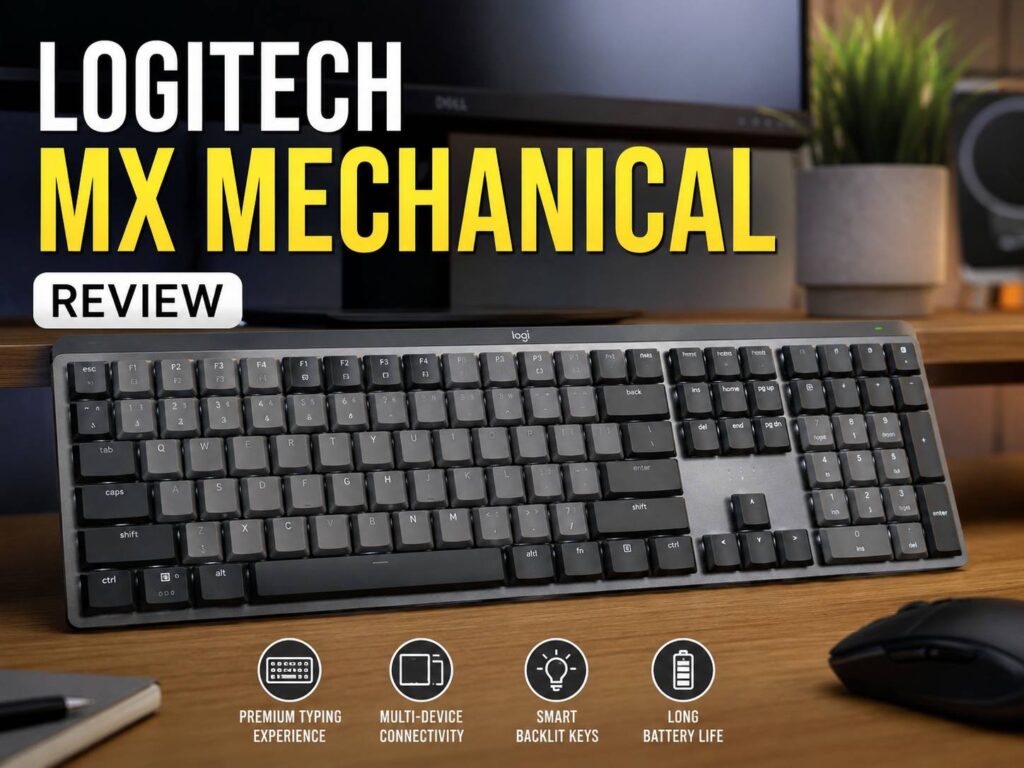
The Logitech MX Mechanical is a clean, full-size wireless keyboard for people who type a lot and want a more satisfying feel than a laptop-style board. It has low-profile mechanical switches, smart white backlighting, multi-device pairing, USB-C charging, and a full numpad.
That mix makes it a strong pick for office work, writing, coding, spreadsheets, and hybrid setups with more than one computer. It does not try to look like a gaming keyboard. Instead, it keeps a calm design that fits well on a work desk.
Still, it is not perfect. The price sits higher than many low-profile mechanical keyboards. You do not get deep keyboard tuning, switch swapping, QMK, VIA, or a fast gaming-focused 2.4 GHz mode. So the MX Mechanical makes the most sense for users who want a polished work keyboard, not a hobby keyboard.
For most buyers, the Tactile Quiet switch version is the best choice. It gives a clear typing feel without the sharp sound of clicky switches.
Price

Main specifications
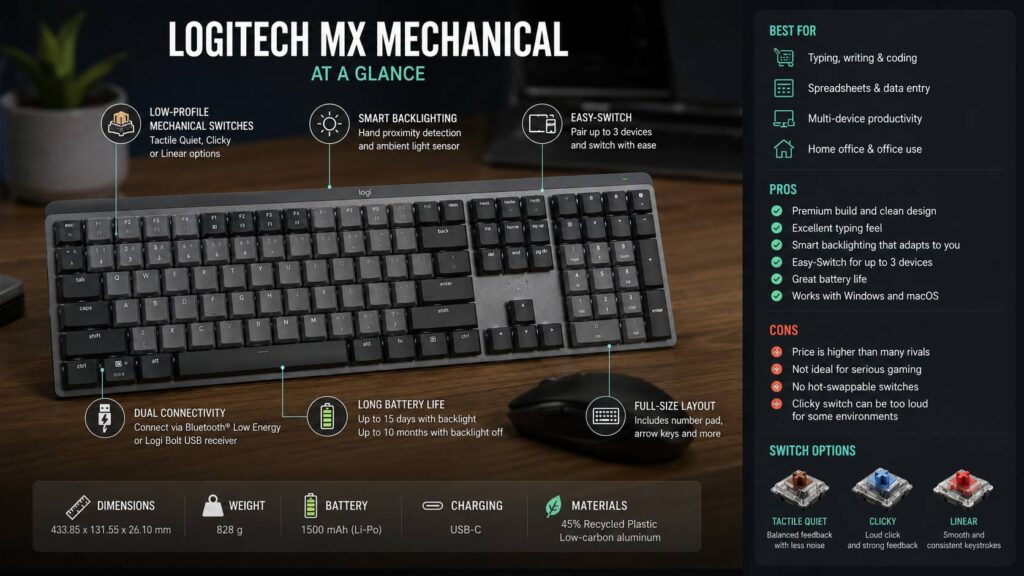
- Keyboard type: Low-profile mechanical wireless keyboard
- Layout: Full-size with integrated number pad
- Color: Graphite
- Switch options: Tactile Quiet, Clicky, Linear
- Size: 433.85 mm wide, 131.55 mm deep, 26.10 mm high with keycaps
- Weight: 828 g
- Battery: Rechargeable Li-Po 1500 mAh
- Battery life: Up to 15 days with backlighting, up to 10 months with backlighting off
- Connection: Bluetooth Low Energy or Logi Bolt USB receiver
- Wireless range: Up to 10 m
- Multi-device support: Up to 3 devices with Easy-Switch
- Charging: USB-C
- Backlighting: White smart backlighting with hand proximity and ambient light sensors
- Software: Logi Options+ on Windows and macOS
- Box contents: Keyboard, Logi Bolt receiver, USB-C charging cable, user documents
- Warranty: 2-year limited hardware warranty
- Recycled material: 45% post-consumer recycled plastic in Graphite plastic parts
- Top case: Low-carbon aluminum
Design and desk fit
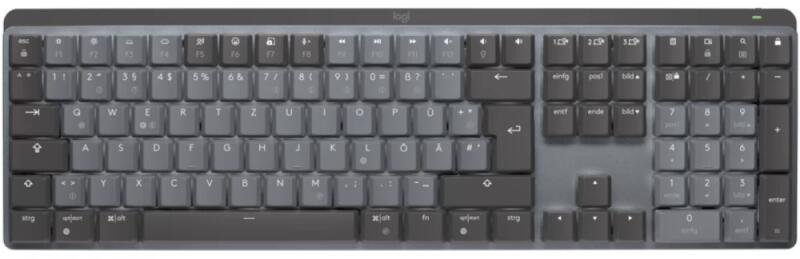
The Logitech MX Mechanical looks mature and tidy. It uses a dark Graphite finish, simple key legends, and a low-profile body. There are no bright accent colors, no flashy RGB effects, and no sharp gaming-style details.
That is part of its appeal. This keyboard looks at home next to a monitor, dock, laptop stand, and office mouse. It fits a work desk better than most gaming keyboards.
The full-size layout gives you a number pad, arrow keys, function row, and navigation keys. That helps a lot if you use spreadsheets, invoices, CMS fields, product tables, or admin panels. The number pad saves time, and the layout feels familiar right away.
There is one clear trade-off. At 433.85 mm wide, the MX Mechanical takes up real space. Your mouse will sit farther to the right than it does with a compact keyboard. On a smaller desk, that can make your shoulder feel stretched during long workdays.
So, desk size matters. The full-size model suits people who use the number pad often. The MX Mechanical Mini suits people who want more mouse room.
The 26.10 mm height gives the keyboard a lower profile than many standard mechanical boards. That helps wrist posture, mainly if you type without a wrist rest. It still feels more substantial than a laptop keyboard, but it does not force your hands as high as a chunky full-height mechanical board.
If you are still deciding between a slimmer board and a taller one, this low-profile vs standard mechanical keyboard guide explains the main comfort and typing differences in more detail.
Typing feel
Typing is the main reason to buy the MX Mechanical. The keys feel short, firm, and quick. They do not sink as deep as standard mechanical switches, but they give more feedback than most scissor-switch office keyboards.
The Tactile Quiet switch is the safest pick. It gives you a clear bump during each press, yet it avoids the loud click of the Clicky option. It still makes sound, though. You will hear the keys in a quiet room. The sound is more controlled than sharp.
The Clicky switch feels more playful. It gives stronger sound and more obvious feedback. That can feel fun for writing in a private room. In a shared office, it can become annoying fast.
Linear switches feel smoother. They move straight down without a tactile bump. Some users prefer that for fast key presses or casual gaming. For long writing sessions, Tactile Quiet feels more guided and easier to trust.
The matte keycaps feel pleasant under the fingers. They do not feel slick at first touch. The dual-tone key design helps you find sections of the board faster, too. The darker and lighter groups make the layout easier to scan.
Large keys feel stable enough for office work. The spacebar has a deeper sound than the smaller keys. That is common on low-profile mechanical boards. If you come from a custom keyboard with tuned stabilizers, the MX Mechanical will feel less soft and less deep. If you come from a laptop, it will feel much more tactile and controlled.
Real usage observations
The MX Mechanical feels best during long typing blocks. Emails, articles, tickets, code, product entries, and spreadsheets all feel better than they do on a flat laptop keyboard.
The shorter travel helps with speed. Then the tactile feedback helps reduce missed presses. That balance gives the board a clean work feel. You press a key, you feel the actuation, and you move to the next one.
The full-size layout helps with number-heavy work. If you manage prices, specs, stock numbers, analytics, or finance sheets, the number pad saves real time. You do not need to reach across the top row for every number.
The low body helps comfort. You may not need a wrist rest. Still, a wrist rest can help if your desk sits high or your chair does not line up well with the keyboard tray.
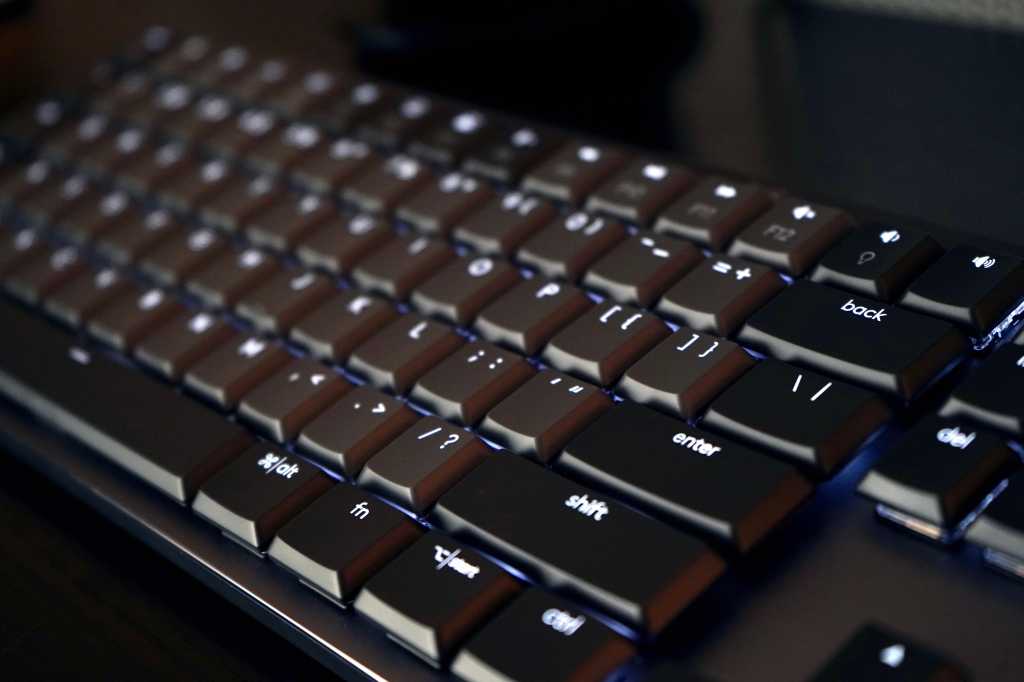
The smart backlighting feels better in practice than a basic light toggle. The keys light up as your hands get close. Then the brightness changes based on room light. In a dim room, that feels smooth and useful. In a bright room, you can turn lighting off and save a lot of battery.
Battery life depends heavily on the lights. Logitech rates the keyboard for up to 15 days with backlighting on. With backlighting off, the rating goes up to 10 months. So, the keyboard can be low-maintenance, but only if you do not keep the lights active all the time.
Backlighting and battery life
The MX Mechanical uses white smart backlighting, not RGB. That choice fits the office-first design. The lighting looks clean, and it keeps the keyboard easy to read at night.
Hand proximity detection is the best part. The keyboard wakes the lighting as your hands approach. You do not have to tap a key first or search for a brightness shortcut in the dark.
The ambient light sensor helps too. It adjusts the lighting based on the room. As a result, the board does not blast light in a bright office or look too dim in a darker room.
Charging uses USB-C. The box includes a USB-C charging cable and a Logi Bolt receiver. Many desktop users will plug in the receiver and forget about it. Laptop users will likely switch between Bluetooth and charging through USB-C.
The battery rating is strong for a work keyboard. Up to 15 days with backlighting is good enough for most desks. Up to 10 months with lighting off is excellent for users who dislike charging accessories.
Software and shortcuts
Logi Options+ gives the MX Mechanical more value for daily work. You can adjust function keys, set app shortcuts, and change common actions.
For example, you can set shortcuts for screen capture, mute, app switching, or productivity tools. That helps if you repeat the same actions every day.
The app feels simple enough for normal users. You do not need to learn keyboard firmware or build layers from scratch. Open the app, change the key, and keep working.
Still, Logi Options+ is not a deep keyboard tool. It does not replace QMK or VIA. Keyboard hobby users who want full layout control, advanced layers, and firmware-level changes will feel boxed in.
Easy-Switch is more useful for most people. You can connect up to 3 devices and move between them with dedicated keys. That works well for a work laptop, personal desktop, and tablet. It keeps the desk cleaner and removes the need for multiple keyboards.
Noise level
The MX Mechanical is not silent. Even the Tactile Quiet version makes clear key noise. It sounds softer than many clicky mechanical keyboards, but it is still a mechanical board.
For shared spaces, Tactile Quiet is the best choice. It gives feedback without the sharp click. It suits calls, office work, and evening typing better than the Clicky switch.
Clicky switches are fun for solo use. They can feel more precise and more satisfying for some writers. Still, the sound can bother people nearby. It can also become tiring during long calls or late-night work.
Linear switches sit between the two for sound and feel. They are smoother and less bumpy. They suit users who want a faster, lighter press.
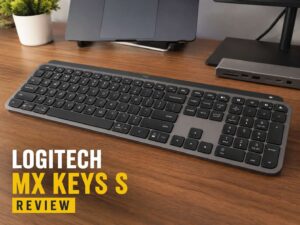
If quiet typing matters more than mechanical feel, MX Keys S is the safer pick. It uses a low-profile scissor design and feels softer under the fingers. You can read the full comparison in this Logitech MX Keys S review.
Logitech MX Mechanical vs MX Keys S
MX Mechanical and MX Keys S look like close relatives, but they feel very different.
MX Keys S is quieter, slimmer, and softer. It feels closer to a laptop keyboard. It suits shared offices, calls, and people who want a smooth typing feel with less sound.
MX Mechanical gives more feedback. The keys feel more alive, and each press feels more defined. It suits writers, developers, and anyone who finds laptop-style keyboards too flat.
The smart lighting system feels strong on both models. Both fit multi-device setups well. The real difference is key feel.
Pick MX Keys S if you want quiet comfort. Pick MX Mechanical if you want a more tactile typing feel and do not mind extra sound.
Logitech MX Mechanical vs Keychron K5 Max
Keychron K5 Max is the more flexible low-profile keyboard. It offers 2.4 GHz wireless, Bluetooth, and USB-C wired mode. It also supports QMK and Keychron Launcher. Some versions support hot-swap switches.
That gives the Keychron more appeal for keyboard fans. It suits users who want layout control, switch choice, macro layers, and a faster wireless mode for gaming.
The MX Mechanical feels more polished for work. The smart backlighting, Easy-Switch keys, Logi Options+ setup, and clean design make it easier to use right away.
So the better choice depends on your desk habits. Keychron fits users who like tuning. Logitech fits users who want a premium keyboard that stays out of the way.
What I like
The typing feel stands out first. Tactile Quiet switches give the keyboard a crisp and controlled feel. They make long writing sessions feel more satisfying than most laptop-style boards.
The design is another strong point. It looks serious, clean, and easy to match with office gear.
Smart backlighting adds real daily value. It reacts to your hands, adjusts to room light, and feels far more useful than basic keyboard lighting.
Multi-device support works well for a desk with a work laptop, personal PC, and tablet. The MX Mechanical handles that type of setup with little effort.
The full-size layout makes work easier. The number pad, arrow keys, and navigation keys give you a proper desktop feel.
What I dislike
The price is the main issue. Many low-profile mechanical keyboards cost less and offer more tuning options.
The full-size body takes a lot of desk space. That can push your mouse too far away, mainly on smaller desks.
The Clicky version is risky for shared spaces. It sounds fun at first, but the noise can become irritating.
The MX Mechanical is not built for serious gaming. It works for casual games, but gaming-focused keyboards offer faster wireless modes, wired options, and more gaming controls.
Logi Options+ is useful, but it stays basic compared with deeper keyboard software. Users who enjoy remapping every key will want more freedom.
Pros
- Clean design that fits work desks
- Full-size layout with number pad
- Low-profile mechanical switches
- Strong typing feel with Tactile Quiet switches
- Smart white backlighting
- Hand proximity and ambient light sensors
- Bluetooth and Logi Bolt support
- Easy-Switch for up to 3 devices
- USB-C charging
- Up to 10 months of battery life with backlighting off
- Stable 828 g body
- Good fit for writing, coding, office work, and spreadsheets
- 2-year limited hardware warranty
Cons
- Higher price than many rivals
- Not the best choice for serious gaming
- No QMK or VIA support
- No hot-swap feature listed by Logitech
- Full-size layout needs more desk space
- Clicky switch version can get loud
- Logi Bolt receiver uses USB-A
- Backlighting cuts battery life down to up to 15 days
Who should buy the Logitech MX Mechanical?
Buy the MX Mechanical if you type for hours and want a better feel than a laptop-style keyboard. It suits writers, coders, office workers, finance users, students, and people who manage lots of text or numbers.
It is a smart choice if you use more than one device. Easy-Switch makes it simple to move between a laptop, desktop, and tablet.
The full-size version suits users who need a number pad. If you work with spreadsheets, product data, invoices, or reports, that number pad is worth the extra space.
If you are unsure which switch to pick, the Tactile Quiet version is the best match. It gives the keyboard a premium mechanical feel without the harsh sound of clicky switches.
Who should skip it?
Skip the MX Mechanical if you want a cheap mechanical keyboard. There are lower-cost boards with similar layouts.
Pass on it if you want deep keyboard tuning. Keychron and other enthusiast brands give more control.
Avoid the Clicky version if you share a room. The sound can bother coworkers, family, or anyone on calls.
Choose the Mini version if your desk is small. The full-size board can push your mouse too far away.
Gamers should look at gaming-focused keyboards instead. The MX Mechanical can handle casual play, but it is not built around fast gaming response.
Best switch choice
Tactile Quiet is the safest switch choice. It gives feedback, keeps noise under better control, and works well for long typing sessions.
Clicky suits people who work alone and enjoy loud feedback. It feels fun, but it is not the safest choice.
Linear suits users who prefer a smoother press. It can feel better for quick repeated inputs, though it feels less defined for typing.
Final verdict
The Logitech MX Mechanical is a premium work keyboard with a strong typing feel, clean design, and smart features. It is not the most customizable low-profile mechanical keyboard. It is not the best gaming board either. Yet it does its main job very well.
It gives you a full-size layout, low-profile mechanical switches, smart backlighting, USB-C charging, and strong multi-device support. The Tactile Quiet version gives the best balance of comfort, feedback, and noise control.
MX Keys S is better for quiet rooms. Keychron K5 Max is better for tuning and gaming-style flexibility. The MX Mechanical sits between them as the more refined work keyboard for people who want mechanical feel without a loud gaming look.
If you want a polished keyboard for typing, coding, spreadsheets, and multi-device work, the MX Mechanical is easy to recommend.