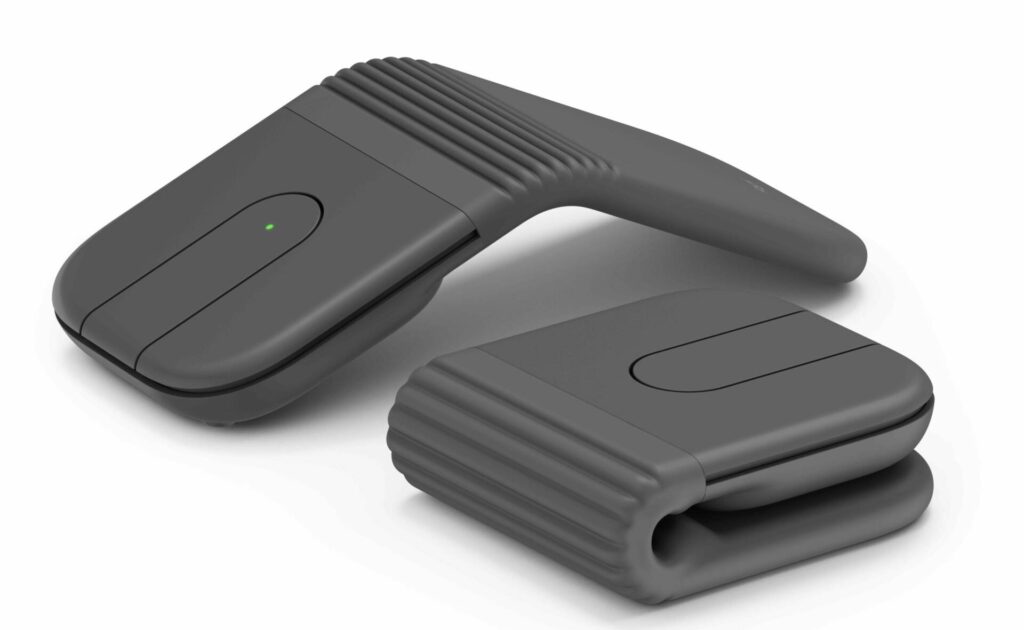
The Logitech Mobi Fold is a small folding mouse made for people who work away from a full desk. It folds down for travel, opens when you need it, and gives laptop users a real mouse without adding much bulk to a bag.
That sounds like a simple idea, but it solves a common problem. Trackpads work fine for quick tasks, but they can feel cramped during long work sessions. A normal wireless mouse feels better, yet it takes up more room in a pouch or backpack. So, Logitech Mobi Fold sits between those two needs. It gives you more control than a trackpad and more portability than a regular mouse.
The design feels made for modern work habits. People now move between laptops, tablets, shared desks, hotel rooms, trains, and cafes. For that kind of setup, a tiny folding mouse has a clear purpose.
A Travel Mouse Built Around Space
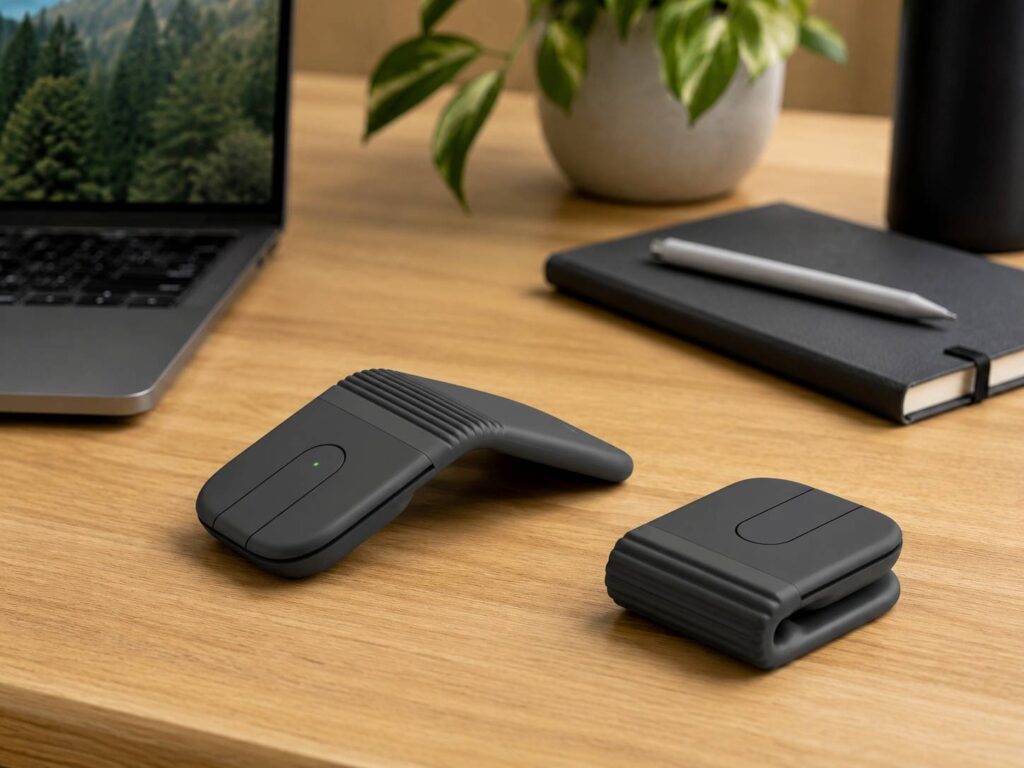
Most compact mice use the same basic shape as a desk mouse, only smaller. The Logitech Mobi Fold takes a different path. It folds shut, so it becomes easier to slide into a tech pouch, jacket pocket, or laptop sleeve.
That folding design does more than save space. It turns the mouse off when closed, then wakes it when opened. For travel, that matters. A normal mouse can sit inside a bag with the power on. It can drain battery or register clicks by accident. Mobi Fold avoids that with a cleaner pack-and-go style.
Small details like this make a gadget feel more useful. You do not need to think about a power switch every time you leave a cafe or close your laptop. You fold it, pack it, and move.
Why the Logitech Mobi Fold Stands Out
The main feature is clear from the name, but the folding body is not the only useful part. Logitech gives Mobi Fold an Adaptive Touch Scroll area instead of a normal scroll wheel.
That choice helps keep the mouse thin. It also gives the mouse a cleaner top surface. For reading articles, scrolling through long documents, or moving through spreadsheets, the touch scroll area should feel natural after a short adjustment period.
Still, some people will miss a physical wheel. A scroll wheel gives clear feedback under the finger. The Mobi Fold trades that familiar feel for a thinner design. That trade makes sense for travel, but it will not please every user.
The shape is ambidextrous too. Left-handed and right-handed users can share it without much trouble. That makes it more practical for families, students, and shared work bags.
Multi-Device Support Makes It More Useful
A small mouse needs more than a clever shape. It needs to work with the devices people carry every day. Logitech Mobi Fold supports Easy-Switch, so you can move between devices without pairing from scratch each time.
For example, you can use it with a Windows laptop at work, an iPad during travel, and a home laptop later in the day. The mouse supports major systems, including Windows, macOS, ChromeOS, Android, and iPadOS.
This feature matters for remote workers and students who move between screens, apps, and devices during the day. So, a portable Bluetooth mouse with quick device switching can save time during normal daily use.
Battery Life That Fits Travel
The Mobi Fold uses a rechargeable battery, and Logitech rates it for up to one month of use per charge. That is enough for most short trips and weekly work routines.
The quick charging feature adds more value. Logitech says a one-minute USB-C charge can give up to 22 hours of use. That is the kind of feature people notice during rushed mornings. You plug it in for a moment, pack your laptop, and still get enough battery for a workday.
USB-C charging helps too. You probably already carry a USB-C cable for phones, laptops, tablets, or earbuds. So, the Mobi Fold does not add another cable problem to your bag.
Better Than a Trackpad for Long Sessions
Laptop trackpads have improved a lot, but they still keep your hand in a tight position. After a long writing session, editing task, or research session, that can feel tiring.
A small mouse gives your hand more room to move. It can feel more relaxed, mainly during tasks that need careful cursor control. Think photo sorting, spreadsheet edits, product research, document formatting, or web browsing with many tabs open.
That said, Mobi Fold is not a large ergonomic mouse. Its flat body favors portability over full-hand comfort. For eight hours at a desk, a larger mouse will still feel better. For travel and short work sessions, the Mobi Fold makes more sense.
Who Should Buy a Folding Mouse Like This?
The Logitech Mobi Fold fits a specific type of user. It is best for people who want a real mouse but hate carrying extra bulk.
It makes sense for:
- Frequent travelers who work from hotels or airports
- Laptop users who dislike trackpads
- Tablet users who need better cursor control
- Students who carry light bags
- Remote workers who use cafes and shared desks
- People who switch between several devices
- Minimal desk setup fans who want less clutter
Gamers should skip it. So should users who need many buttons, a tall palm rest, or a heavy desk mouse. The Mobi Fold has a clear mission: small size, fast setup, and better control than a trackpad.
The Price Makes More Sense for Heavy Travelers
The Logitech Mobi Fold is not a cheap backup mouse. It costs more than many basic Bluetooth mice, so the value comes from the folding design, Easy-Switch support, USB-C charging, and compact size.
For someone who works from one desk every day, that price will feel high. A normal wireless mouse offers more comfort for less money. For someone who travels often, the price starts to make more sense.
The same buying logic applies to many smart gadgets. You pay more when a feature saves time, space, or effort often enough. That is the same reason people ask whether a self-emptying robot vacuum is worth it. The answer comes from daily use, not from the feature list alone.
Mobi Fold vs a Normal Compact Mouse
A standard compact mouse wins on price. It may also feel more familiar in the hand, with a scroll wheel, a higher body, and a shape closer to a regular mouse.
Mobi Fold wins on packability. It folds flat, turns off when closed, and takes less space in a small bag. Easy-Switch gives it another clear advantage for people who move between devices.
So, the choice is simple. Buy a normal compact mouse if comfort and price matter most. Pick the Logitech Mobi Fold if portability and device switching matter more.
Final Thoughts
The Logitech Mobi Fold feels like a smart travel gadget with a clear purpose. It does not try to replace a full-size desk mouse. Instead, it gives laptop and tablet users a better tool for work outside the home or office.
The folding body is the main reason to care. The touch scroll area keeps the design slim. Easy-Switch support makes it fit modern multi-device setups. USB-C charging and fast top-ups make it easier to trust during travel.
My honest view is simple: Logitech Mobi Fold is not for everyone, but it makes sense for the right person. If you travel often, hate trackpads, and want a portable Bluetooth mouse that takes almost no space, this tiny folding mouse is worth a close look.