The quick answer
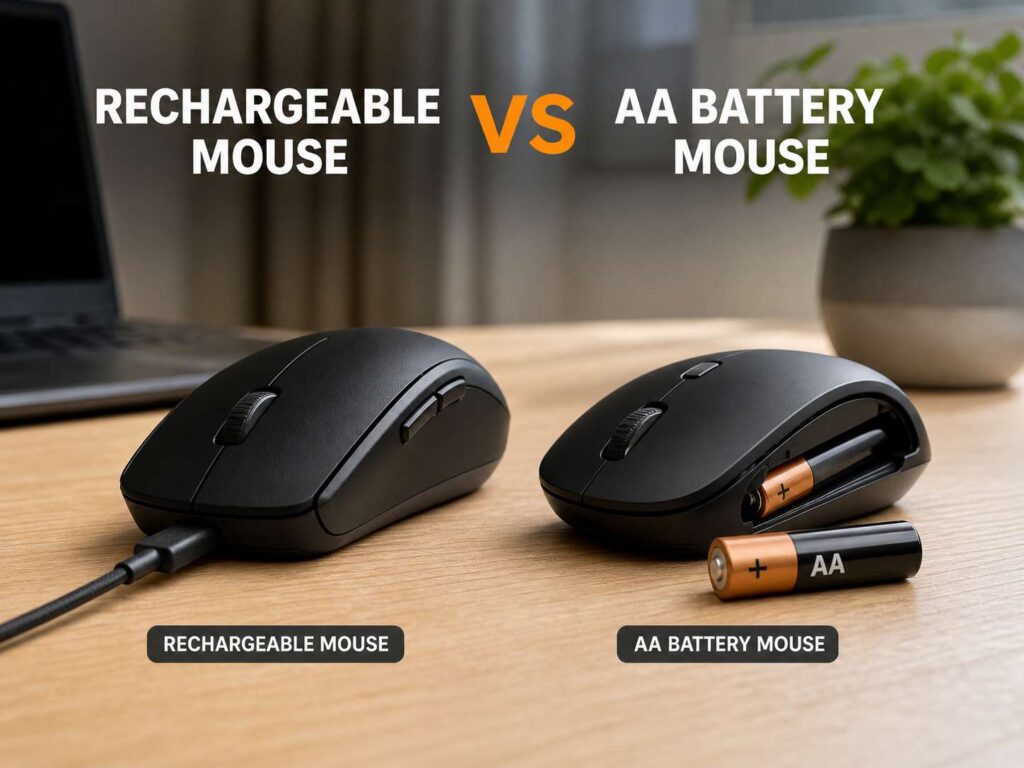
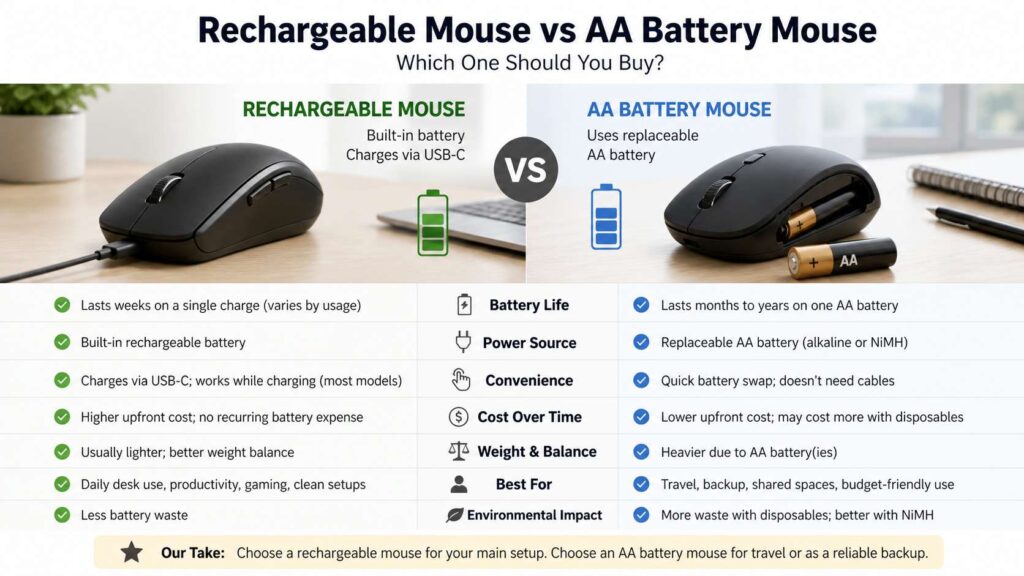
A rechargeable mouse makes the most sense for most daily desk setups. It keeps your workspace cleaner, cuts battery swaps, and fits well with modern USB-C gear. You charge it, use it for weeks, then plug it back in for a short top-up.
An AA battery mouse still has a real place. It works well for travel, school, shared desks, backup bags, and simple office setups. You do not need to remember a cable. You swap the battery and get back to work.
So which one should you buy? Pick a rechargeable mouse for your main desk. Choose an AA battery mouse for travel, backup use, or a low-cost setup. For gaming, look beyond the battery type. Shape, weight, sensor quality, and polling rate matter more.
What is a rechargeable mouse?
A rechargeable mouse has a built-in battery. Most newer models charge through USB-C, and some older ones still use micro-USB. USB-C feels much better in 2026 since it matches many laptops, phones, tablets, headphones, and keyboards.
This type of mouse suits people who work at the same desk each day. You leave a cable nearby, charge during a break, or plug it in overnight. Many rechargeable mice work during charging too, which helps if the battery runs low during work.
Premium office mice often use rechargeable batteries. They usually come with extra buttons, multi-device pairing, fast scroll wheels, and app-based settings. Gaming mice use rechargeable batteries too, mainly to keep weight low and support high-performance sensors.
The main trade-off is clear. You gain convenience at your desk, but the built-in battery will age over time.
What is an AA battery mouse?
An AA battery mouse uses one or two removable AA batteries. Most budget wireless mice use this design. Many travel mice use it too.
The battery can be a regular alkaline AA, a lithium AA, or a rechargeable NiMH AA. Regular alkaline batteries are easy to find. Rechargeable AA batteries cost more at first, but they reduce waste and save money over time.
AA mice feel simple. No cable. No charging habit. No desk clutter. You replace the battery and keep moving.
This design works best for people who want a mouse that can sit in a drawer or bag for weeks. A basic AA wireless mouse can feel boring, but that is part of its charm. It does the job with little attention.
Battery life: weeks, months, or years?
Battery life creates the biggest difference between these two mouse types.
A rechargeable mouse often lasts from several days to several weeks. Premium productivity models can run for many weeks from one charge. Gaming models drain faster, especially at high polling rates.
AA battery mice often last much longer between battery changes. Many office models run for months. Some models can run for more than a year from one battery set. That makes them great for people who do not want another device to charge.
Still, battery life depends on use. A mouse used for 8 hours a day will drain faster than one used for a few hours a week. Bluetooth mode may use less power than a high-speed 2.4GHz gaming connection. RGB lighting drains power faster too.
For simple office work, AA battery life often wins. For a cleaner daily setup, rechargeable still feels better.
Charging versus swapping batteries
Daily convenience depends on your habits.
A rechargeable mouse suits you if you already charge many USB-C devices. You plug it in the same way you charge your keyboard, headset, phone, or power bank. The process feels natural.
An AA battery mouse suits you if you hate charging small devices. You keep spare batteries in a drawer, and the mouse stays ready. That works well in offices, schools, and shared family computers.
Travel changes the picture. A rechargeable mouse needs the right cable and enough time to charge. An AA mouse only needs a spare battery. That can matter in a hotel room, airport lounge, or client meeting.
For people who travel often, a compact power bank helps a lot. This is one reason a guide like this fast charging power bank buying guide for 2026 pairs well with rechargeable accessories. A small USB-C power bank can charge your phone, earbuds, mouse, and keyboard during a long day.
Cost over time
An AA battery mouse often costs less at checkout. You can find many simple wireless mice at low prices. That makes them easy to buy for school, office desks, spare laptops, and family computers.
A rechargeable mouse usually costs more. Many models sit in the mid-range or premium range. You often pay for better build quality, a stronger sensor, extra buttons, smoother scrolling, and a built-in battery.
The long-term cost depends on the batteries you use. Disposable AA batteries add cost over time. Rechargeable AA batteries reduce that cost, but you need a charger too.
A built-in rechargeable mouse has no regular battery purchase. The battery sits inside the mouse, and you recharge it many times. After years of use, that battery may hold less charge. At that point, repair can be hard on some models.
For low upfront cost, AA wins. For a clean desk and fewer battery purchases, rechargeable wins.
Weight and feel
Battery type changes how a mouse feels in your hand.
AA batteries add weight. A single AA battery can make a small mouse feel heavier than expected. Two AA batteries add even more weight. Some people like that solid feel. Others find it tiring.
Rechargeable mice can feel lighter and better balanced. Designers can place the internal battery in a more controlled way. That helps with comfort and movement.
For office work, extra weight does not always hurt. A heavier mouse can feel stable for spreadsheets, browsing, and emails. For fast gaming, lighter mice often feel easier to flick, lift, and control.
Shape matters too. A light mouse with a bad shape can still feel wrong. A heavier mouse with the right curve can feel great. For a deeper comparison of comfort, hand position, and use case, read this guide on ergonomic mouse vs gaming mouse.
Gaming: battery type is only one part
Gamers should not choose by battery type alone.
A good gaming mouse needs the right shape, low weight, a strong sensor, quick clicks, and a reliable wireless connection. Battery type matters, but it does not decide the whole result.
Rechargeable gaming mice dominate the premium space. Many support USB-C, high DPI sensors, low weight, and high polling rates. Some models charge fast enough to make battery life feel like a small issue.
AA gaming mice can still work well. They often offer long battery life and simple upkeep. The downside is weight. A removable AA battery adds grams, and that can affect fast aim.
Competitive FPS players often prefer lightweight rechargeable mice. Casual players can use either type. MMO, strategy, and everyday gamers may care more about comfort and buttons than battery format.
Office work and productivity
For office use, both mouse types can work well.
A rechargeable productivity mouse makes sense for people who use their mouse all day. It often comes with features that help real work: side buttons, horizontal scroll, gesture controls, quiet clicks, and device switching.
An AA battery office mouse works well for basic tasks. It suits email, documents, video calls, browsing, and light spreadsheet work. It also suits shared desks where nobody wants to manage a charging cable.
Quiet clicks matter in offices too. Many budget AA mice offer silent buttons. Rechargeable models offer this feature as well, but the price can be higher.
Comfort should guide the final choice. A comfortable AA mouse beats an expensive rechargeable mouse that hurts your wrist.
Travel and laptop use
Travel use favors simple gear.
An AA battery mouse works well in a laptop bag. You can leave it packed, pull it out later, and start working. A spare AA battery takes little space and solves most power problems.
A rechargeable travel mouse works best if it uses USB-C. You do not want to carry a rare cable for one small device. A short USB-C cable and a compact charger can keep your setup neat.
Bluetooth support matters for travel too. A Bluetooth mouse does not need a USB receiver, which helps on laptops with few ports. Some mice offer both Bluetooth and 2.4GHz wireless. That gives you more flexibility.
For frequent travel, check these details before buying:
Battery life
Charging port
Bluetooth support
USB receiver storage
Weight
Size
On-off switch
Battery warning light
Small details matter more on the road than at a desk.
Built-in battery aging
Rechargeable mice use built-in batteries, and those batteries age. Over time, they hold less charge. The mouse may still work fine, but you may need to charge it more often.
This problem does not affect AA mice in the same way. The mouse itself can last for years, and you replace the battery whenever needed. That makes AA mice easier to keep alive long term.
Some premium rechargeable mice can be repaired, but many do not make battery replacement simple. The battery sits inside the shell, and opening the mouse can damage feet, clips, or screws.
For buyers who care about long service life, this matters. AA mice have a clear advantage here.
Waste and recycling
Rechargeable mice reduce disposable battery waste. That helps if you use your mouse every day.
AA mice create more waste if you use single-use batteries. Rechargeable AA batteries fix much of that problem. You buy a set, recharge them many times, and replace them only after they wear out.
Neither option is perfect. Built-in lithium batteries need proper recycling. Rechargeable AA batteries need proper recycling too. Regular batteries should not sit forgotten in old devices for years, since leaks can damage electronics.
The cleanest setup is simple: buy a rechargeable mouse, or use rechargeable AA batteries in an AA mouse.
Which one is better for a clean desk?
A rechargeable mouse wins here.
You do not need battery packs in a drawer. You do not open the mouse body. You do not hunt for a fresh cell during work. A USB-C cable handles the job.
Some people still dislike cables on the desk. That is fair. Charging pads and magnetic cables can help, but not every mouse supports them.
AA mice keep the desk clean too, at least until the battery dies. Then you need a spare battery nearby. For people who already keep batteries at home, this is no problem.
For a modern desk setup, rechargeable feels more polished. For a simple desk setup, AA feels dependable.
Which one is better for emergencies?
AA battery mice win in emergencies.
A dead rechargeable mouse needs power and time. A dead AA mouse needs a fresh battery. That is the whole story.
This makes AA mice great as backup devices. Keep one in a drawer, laptop bag, camera bag, or office cabinet. It may save you when your main mouse fails.
A rechargeable mouse can still work well as a main device. Just avoid letting it run completely flat. Charge it once every few weeks, and you will rarely think about the battery.
Common buying mistakes
Do not buy an old rechargeable mouse with micro-USB unless the price is very low. USB-C is much easier to live with in 2026.
Do not assume every rechargeable mouse works during charging. Check before you buy.
Do not judge a gaming mouse by battery life alone. Weight, shape, sensor, and wireless performance matter more.
Do not buy a very heavy AA mouse for fast FPS games unless you already like heavier mice.
Do not ignore hand size. A tiny travel mouse can feel painful during long work sessions.
Do not leave old alkaline batteries inside a mouse for years. Remove them from devices you no longer use.
Do not buy based only on DPI. High DPI numbers rarely tell you how good a mouse feels.
Best choice by user type
Pick a rechargeable mouse if you want a clean desk, premium features, USB-C charging, and strong daily comfort. It suits office workers, creators, students with one main desk, and many gamers.
Pick an AA battery mouse if you want long standby time, fast battery swaps, low cost, and simple upkeep. It suits travel, backup use, shared computers, and basic office work.
Pick an AA mouse with rechargeable AA batteries if you want a practical middle ground. You get easy battery replacement, lower waste, and lower long-term cost.
Final verdict
A rechargeable mouse is the smarter pick for most people in 2026. It fits modern USB-C setups, removes battery swaps, and often comes with better features. For a main desk, it feels easier to live with.
An AA battery mouse still earns its place. It lasts a long time, costs less in many cases, and works better as a backup or travel mouse. It also gives you one major benefit that built-in batteries cannot match: instant replacement.
For your main computer, buy rechargeable. For your bag, drawer, or spare setup, buy AA. That combination covers almost every situation without much fuss.