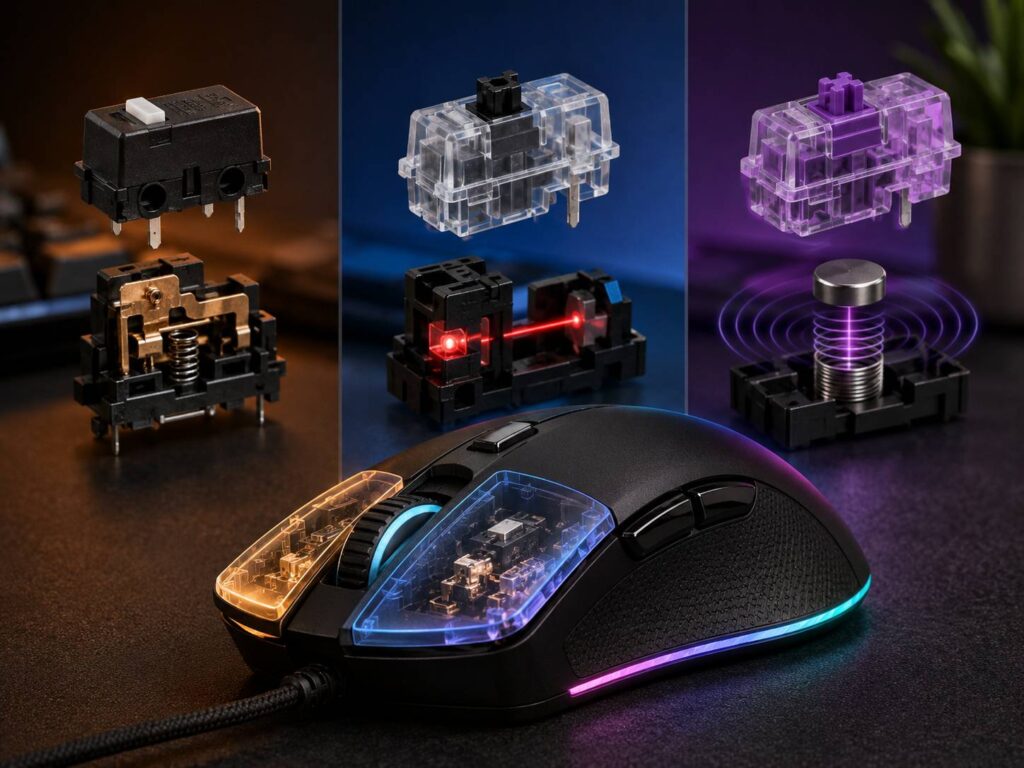
Mouse switches don’t usually get the same attention as sensor accuracy, weight, polling rate, or wireless latency. Still, they’re responsible for every left and right click you make. The type of switch inside a mouse can affect click feel, responsiveness, durability, and the chance of developing problems such as unwanted double-clicking.
Today, the main technologies you’ll run into are mechanical, optical, and magnetic mouse switches.
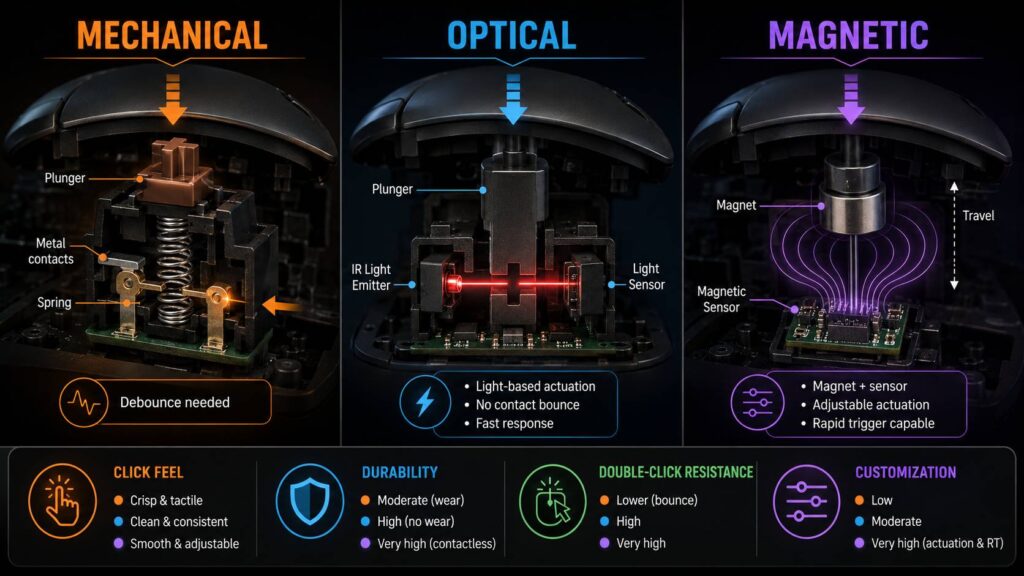
Mechanical switches are the traditional option and still feel excellent when they’re implemented well. Optical switches use light to register clicks instead of relying on electrical contacts, which helps avoid traditional contact bounce. Magnetic and other analog contactless designs go further by sensing button movement through magnetic or electromagnetic fields. Some even let you adjust actuation distance and reset behavior.
So, which one is best?
For most gamers, optical switches currently offer a very good balance between speed, reliability, and availability. Mechanical switches are far from outdated, though, while magnetic switches are starting to introduce features that neither traditional mechanical nor standard optical switches can easily match.
Mechanical vs Optical vs Magnetic Mouse Switches Compared
Here’s a quick look at the main differences.
| Feature | Mechanical | Optical | Magnetic / Analog Contactless |
|---|---|---|---|
| Input detection | Metal electrical contacts | Optical sensing | Magnetic or electromagnetic sensing |
| Physical click mechanism | Yes | Usually | Varies by design |
| Traditional contact bounce | Possible | No | No |
| Debounce requirement | Usually | Minimal for switch detection | Usually minimal for switch detection |
| Adjustable actuation | Usually no | Usually no | Often possible |
| Rapid trigger | No | Rare | Possible |
| Click feel | Often crisp and tactile | Varies from soft to very crisp | Depends heavily on implementation |
| Electrical contact wear | Possible | Eliminated from primary detection | Eliminated from primary detection |
| Availability | Very common | Common | Still uncommon |
| Best for | General use and tactile preference | Competitive gaming and reliability | Advanced gaming customization |
There’s one thing worth keeping in mind here. Switch technology doesn’t tell the whole story.
Two mice with the same type of switch can feel completely different because the shell, button tensioning, firmware, switch mounting, and internal construction also matter.
How Mechanical Mouse Switches Work
Most traditional mice use small snap-action microswitches underneath the main buttons.
When you press the button, a spring mechanism inside the switch moves a conductive metal contact. Once the contact reaches its actuation point, the electrical circuit changes state and the mouse registers your click.
It’s a simple design, but that’s part of the reason it has worked so well for decades.
Mechanical switches can be compact, inexpensive, responsive, and very tactile. Manufacturers can also tune the operating force, spring characteristics, travel, and other details to create very different click experiences.
Why mechanical switches need debounce
Physical contacts don’t always produce one perfectly clean electrical transition.
When two contacts meet, they can briefly bounce against each other before settling. The mouse may otherwise interpret these extremely fast changes as multiple clicks.
To prevent that, mice use debouncing.
Debounce logic filters the signal so the controller knows that several electrical changes occurring almost instantly are actually part of one physical click.
Older or inexpensive implementations may use relatively simple timing delays. More advanced gaming mice can use smarter firmware, different switch configurations, or hardware techniques to reduce bounce without adding much latency.
Because of that, claims such as “mechanical switches always add 10 ms of latency” aren’t accurate. Click latency varies considerably between individual mouse models.
Why Mechanical Switches Are Still Popular
Mechanical switches haven’t disappeared just because newer technologies exist.
One major reason is click feel.
A good mechanical switch can feel:
- Sharp and crisp
- Clearly tactile
- Predictable
- Easy to spam-click
- Consistent between presses
- Satisfying without being overly heavy
There’s also a huge selection of mechanical microswitches available.
Some enthusiast mice even use hot-swappable sockets. With compatible switches, this lets you change the click feel without soldering anything.
Mechanical switches are also relatively inexpensive, which means manufacturers can put high-quality versions into affordable mice.
The Main Weakness of Mechanical Mouse Switches
The biggest disadvantage comes from the same component that makes them work, the electrical contacts.
Those contacts physically touch every time you click.
After a very large number of activations, factors such as mechanical wear, oxidation, contamination, changing electrical resistance, or spring degradation can affect the signal.
This is one reason older mice sometimes develop the infamous double-click problem.
You press the button once, but the computer registers two clicks.
Increasing the mouse’s debounce delay can sometimes hide the issue temporarily. Still, this isn’t an ideal long-term solution because a larger debounce window can also increase click latency.
That doesn’t mean every mechanical mouse will eventually start double-clicking. A good switch can remain reliable for years. It simply has a failure mode that contactless technologies largely avoid.
How Optical Mouse Switches Work
An optical switch keeps much of the familiar physical clicking experience, but it changes the way the mouse detects actuation.
Instead of waiting for two conductive contacts to close an electrical circuit, the switch uses light.
Pressing the button changes the state of an optical path. The mouse detects that change and registers the click.
Depending on the design, springs and other moving parts are still present. You’ll still feel and hear a physical click in most optical gaming mice.
The important difference is that the electrical signal doesn’t depend on two metal contacts touching each other.
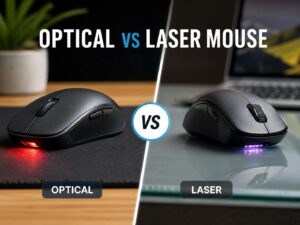
This distinction can sometimes cause confusion because mouse sensors are also commonly called optical. If you’re comparing the tracking technology rather than the switches themselves, our guide to optical vs laser mouse technology explains how those sensor types differ. The sensor underneath the mouse and the switches beneath its buttons are separate systems.
Why Optical Switches Avoid Traditional Contact Bounce
Since an optical switch doesn’t rely on electrical contacts colliding to detect the click, traditional contact bounce isn’t part of the input signal.
As a result, the mouse doesn’t need the same type of debounce delay used for a conventional mechanical microswitch.
This makes optical switches particularly attractive for gaming mice designed around low click latency.
Still, an optical switch doesn’t magically make the entire mouse instantaneous.
After you click, the mouse still has to:
- Detect the actuation.
- Process the input through its controller.
- Add that information to a USB report.
- Transmit the report over the wired or wireless connection.
- Let the computer receive it.
- Pass the input through the operating system and game.
Switch detection is only one part of that chain.
So, a well-designed mechanical gaming mouse can still outperform a poorly implemented optical one.
Advantages of Optical Mouse Switches
No traditional electrical contact bounce
This is the clearest technical benefit.
Because the click isn’t registered through metal contacts touching each other, the switch avoids the electrical bouncing behavior associated with traditional microswitches.
Less risk of contact-related double-clicking
Optical switches remove one of the common causes of unwanted double-clicks.
The electrical contact itself can’t degrade in the same way because it isn’t responsible for detecting the click.
That doesn’t mean an optical mouse can never register an unwanted double-click. Firmware bugs, mechanical problems, software issues, or other hardware failures can still cause strange behavior.
High durability ratings
Modern optical switches are often advertised with extremely high lifecycle ratings.
Depending on the manufacturer and switch generation, ratings can reach tens of millions or even around 100 million activations.
Those numbers need some context, though.
A manufacturer’s click rating comes from controlled testing. It doesn’t mean every switch will fail at exactly that number, and it certainly doesn’t mean the entire mouse will survive for the same number of clicks.
Well suited to competitive gaming
The combination of contactless detection and no traditional electrical debounce makes optical switches a natural fit for performance-focused gaming mice.
That’s why they’ve become increasingly common in lightweight esports models.
Disadvantages of Optical Mouse Switches
Optical switches aren’t perfect.
Click feel isn’t automatically better
Some older optical switches developed a reputation for sounding hollow or feeling less crisp than good mechanical switches.
Modern designs have improved quite a bit.
Manufacturers now tune springs, housings, button tensioning systems, and shell construction to make optical clicks feel sharper.
Even so, “optical” alone tells you almost nothing about whether you’ll enjoy the click feel.
Replacement can be more complicated
Traditional mechanical microswitches have existed for a long time, and many compatible replacements are easy to find.
Optical switches can be much more manufacturer-specific.
A particular optical switch might use a unique mounting system, electrical connection, or housing. That can make repairs and replacements harder.
Optical doesn’t mean no moving parts
This is another common misunderstanding.
Your button still moves.
There can still be springs, hinges, plungers, shell components, and other physical parts under stress every time you click.
Only the actuation detection method is optical.
What Are Magnetic Mouse Switches?
Magnetic mouse switches are much newer and aren’t nearly as standardized as mechanical or optical designs.
The general idea is simple. Instead of detecting a click through conventional electrical contacts, the mouse measures movement using a magnetic or electromagnetic field.
This can be done in several ways.
Some designs use a magnet and a Hall effect sensor. Others rely on inductive sensing with electromagnetic coils.
The important part is that these systems can potentially measure how far the button has moved, rather than simply knowing whether it’s open or closed.
That’s what makes them especially interesting.
Hall Effect vs Inductive Mouse Switches
The terms are often mixed together online, but they don’t describe exactly the same technology.
Hall effect switches
A Hall effect sensor measures changes in a magnetic field.
If a magnet moves with the mouse button, the sensor can use that changing field to estimate the button’s position.
This idea is already widely used in gaming keyboards with adjustable actuation.
Inductive switches
Inductive sensing works differently.
Instead of relying on a traditional Hall effect sensor and permanent magnet arrangement, an inductive system can use coils and electromagnetic fields to detect movement.
For example, Logitech introduced its Haptic Inductive Trigger System, called HITS, in the PRO X2 SUPERSTRIKE.
That implementation uses inductive analog sensing for the main buttons. The mouse can change its actuation and reset behavior through software rather than depending on a single fixed mechanical actuation point.
So, it’s better not to describe every analog mouse switch as “Hall effect.”
A more accurate umbrella term is magnetic or electromagnetic contactless switching.
Why Analog Mouse Buttons Are Different
A conventional mechanical mouse switch is basically binary.
It’s either:
Not pressed → Pressed
Most optical switches behave the same way from the user’s perspective.
Analog sensing can provide more information because it measures where the button sits during its travel.
That allows several new features.
Adjustable actuation distance
The mouse can decide how far you need to press before a click registers.
A shallow setting makes the button respond earlier in the stroke.
A deeper setting requires more deliberate movement and may help reduce accidental clicks.
Adjustable reset point
An analog button can also change how far it must return before another click becomes possible.
That matters during fast repeated tapping.
Rapid trigger
Rapid trigger doesn’t rely entirely on one fixed activation and reset position.
Instead, the input can respond dynamically when your finger changes direction.
This is similar to rapid-trigger functionality found on some analog gaming keyboards.
Haptic feedback
There’s another challenge with analog switching.
If you remove a traditional snap-action switch, what creates the familiar click sensation?
One possible answer is haptic feedback.
Some newer designs separate physical feedback from the actual sensing mechanism. This gives manufacturers more control over how the button feels while keeping the input detection contactless.
Are Magnetic Mouse Switches Faster?
They can be, but this isn’t as simple as saying magnetic is always faster than optical.
The big advantage of an analog button is adjustable physical actuation.
Imagine a normal switch that only activates after the mouse button has traveled a fixed distance.
An analog button could be configured to trigger much earlier in that same movement.
Your finger physically reaches the actuation point sooner.
That’s different from reducing electronic processing latency by a fraction of a millisecond.
The practical result still depends on several factors:
- Actuation distance
- Reset settings
- Button travel
- Your clicking speed
- Firmware
- USB polling rate
- Wireless implementation
- Game processing
- Your own preferences
There’s also a downside.
If you make the actuation point extremely sensitive, you may start triggering clicks accidentally while simply resting your fingers on the buttons.
So, the lowest possible setting isn’t automatically the best one.
Optical vs Magnetic Mouse Switches
Both technologies avoid conventional electrical contacts, but they solve different problems.
A normal optical switch still behaves like a familiar digital mouse button.
You press it past its actuation point, and the mouse registers the click.
An analog magnetic or inductive switch can potentially monitor the button throughout its movement.
That allows features such as:
- Adjustable actuation
- Adjustable reset
- Rapid trigger
- Software-controlled sensitivity
- Advanced haptic behavior
Optical switches remain the simpler and more practical pick.
Magnetic or inductive analog systems become more interesting if you actually plan to customize the click behavior.
Mechanical vs Optical Switches for Double-Clicking
If your main concern is avoiding the classic worn-switch double-click problem, optical switches have a clear structural advantage.
Mechanical switches depend on electrical contacts.
Those contacts can degrade or behave differently over time.
Optical switches register clicks without using them.
Magnetic and inductive switches also avoid conventional contact closure for primary actuation.
Still, don’t assume that buying an optical mouse guarantees you’ll never experience unwanted inputs. Other hardware and software faults can produce similar symptoms.
Which Mouse Switch Has the Lowest Latency?
There’s no universal ranking where magnetic always beats optical and optical always beats mechanical.
The actual mouse matters more.
A high-end mechanical mouse with good firmware and optimized debounce logic can deliver extremely low click latency.
Optical switches make low-latency design easier because traditional contact debounce isn’t required.
Analog systems add another advantage. They can potentially register your input earlier during the physical button stroke.
This is why latency comparisons should focus on measurements for a specific mouse model rather than the type of switch listed on the box.
Polling rate should be treated the same way.
At 1,000 Hz, the interval between USB reports is up to 1 ms.
At 8,000 Hz, that interval drops to 0.125 ms.
That doesn’t mean every 8,000 Hz mouse makes every click exactly 0.875 ms faster. Where the click lands within the polling cycle still matters, as do firmware and system processing.
Which Mouse Switch Type Lasts the Longest?
Click ratings are useful, but they’re also easy to overvalue.
A switch rated for 100 million clicks does not mean the following:
- It will fail at exactly 100 million clicks.
- Every switch will reach that number.
- The entire mouse has the same lifespan.
- Another 100-million-click switch is equally durable.
- Real-world use matches laboratory testing.
Optical and magnetic systems remove electrical contact wear from the primary detection mechanism, which is an advantage.
But the rest of the mouse still ages.
The scroll-wheel encoder, battery, feet, shell, side switches, charging connector, and button hinges may all wear before the primary click switches do.
Don’t Ignore Click Feel
Technical specifications can tell you how a switch detects an input.
They can’t fully tell you how the button will feel.
Click feel depends on several components working together:
- Switch operating force
- Button pre-travel
- Post-travel
- Spring tension
- Shell stiffness
- Button hinge position
- Internal tolerances
- Switch placement
- Mouse construction
- Haptic settings on compatible models
This is why two mice using supposedly similar optical switches can feel nothing alike.
A great switch inside a badly designed button isn’t particularly useful.
Best Switch Type for FPS Gaming
For most competitive FPS players, optical switches are probably the safest default right now.
They’re widely available, mature, and capable of very low click latency without conventional contact debounce.
Mechanical switches are still completely competitive when the mouse firmware is well designed.
Magnetic or inductive analog buttons become especially interesting if you want more control over:
- Actuation distance
- Reset distance
- Rapid trigger
- Click sensitivity
- Repeated inputs
Still, these options aren’t guaranteed to make you play better.
An overly sensitive actuation point can actually make aiming and shooting less consistent if you start clicking unintentionally.
Best Mouse Switches for Everyday Use
For office work, browsing, productivity, and casual gaming, mechanical switches are still perfectly fine.
Differences measured in fractions of a millisecond simply aren’t meaningful for most normal desktop tasks.
Instead, pay more attention to:
- Mouse shape
- Button force
- Scroll-wheel quality
- Noise level
- Battery life
- Wireless reliability
- Side-button placement
- Repairability
Optical switches are still attractive if you’re particularly concerned about traditional switch wear.
Magnetic buttons offer less of a practical advantage for everyday work unless you enjoy experimenting with actuation settings.
Common Mistakes When Comparing Mouse Switches
Assuming optical always means lower latency
Optical detection removes traditional contact debounce, but total latency depends on the complete mouse.
Don’t judge the mouse from the switch alone.
Buying based only on the click rating
A 100-million-click rating sounds impressive, but the switch isn’t the only component that can fail.
Consider the overall build quality too.
Calling every analog switch Hall effect
Some analog buttons use Hall effect sensors.
Others use inductive or other electromagnetic sensing methods.
Check the actual manufacturer’s description.
Setting magnetic actuation to the minimum immediately
Extremely short actuation can feel fast, but it can also cause accidental clicks.
Try a moderate setting first, then lower it until you find a comfortable balance.
Ignoring mouse shape
This is probably the biggest mistake.
A mouse with advanced switches isn’t useful if its shape causes discomfort or makes your grip inconsistent.
Shape should still come before switch technology.
Mechanical, Optical, or Magnetic: Which Should You Choose?
Choose mechanical switches if you enjoy a traditional crisp click, want broad availability, or care about easier switch replacement.
Choose optical switches if you want contactless click detection, very low latency potential, and less risk of contact-related double-clicking.
Choose magnetic or inductive analog switches if you specifically want adjustable actuation, rapid trigger, or deeper control over button behavior.
Still, the switch type shouldn’t decide the entire purchase.
Start with the mouse’s shape, size, weight, sensor performance, wireless quality, button layout, and overall construction. Then consider the switch technology as one part of the package.
Frequently Asked Questions
Are optical mouse switches better than mechanical switches?
Not in every situation.
Optical switches avoid traditional electrical contact bounce and contact wear. Mechanical switches can still provide excellent latency, durability, and click feel.
Implementation matters more than the label.
Can optical mouse switches develop double-click problems?
They avoid the traditional electrical contact failure that can cause worn mechanical switches to double-click.
Still, other mechanical, firmware, or software problems can create unwanted repeated inputs.
Do mechanical mouse switches have input lag?
All mouse inputs involve some latency.
Mechanical switches can require debounce processing, but modern gaming mice can handle it very efficiently.
You can’t determine total click latency from the switch type alone.
Are magnetic mouse switches the same as Hall effect switches?
No.
Hall effect sensing is one form of magnetic position detection.
Some newer analog mouse buttons use inductive electromagnetic sensing instead.
What is rapid trigger on a mouse?
Rapid trigger allows the button’s activation and reset behavior to respond dynamically to movement.
The button doesn’t always need to return to one fixed reset point before another activation.
Are magnetic mouse switches better for competitive gaming?
They can offer useful features for competitive play, particularly adjustable actuation and reset behavior.
That doesn’t automatically make them better for everyone.
Players who prefer a predictable fixed click may actually be more comfortable with optical or mechanical switches.
Is 8,000 Hz polling more important than the switch type?
They affect different parts of the input chain.
The switch determines how the click is detected. The polling rate determines how often the mouse can report data to the computer.
Neither specification alone tells you the mouse’s complete click latency.
Which switches are best for avoiding double-click problems?
Optical, magnetic, and inductive contactless designs avoid the traditional electrical contact mechanism that can cause mechanical switch bounce and wear.
Optical mice currently offer the widest range of mature options if this is your main concern.
Which Mouse Switch Technology Makes the Most Sense?
Mechanical, optical, and magnetic mouse switches can all work extremely well. They simply take different routes to detect the same finger movement.
Mechanical switches remain popular because they’re proven, tactile, affordable, and widely available. Optical switches remove traditional electrical contact bounce while keeping the familiar feel of a normal digital mouse button. Magnetic and inductive analog systems take things further by measuring movement and allowing software-controlled actuation behavior.
For most gamers, a good optical mouse currently provides the easiest balance of speed, reliability, durability, and availability.
That doesn’t make mechanical mice a bad choice. A well-made mechanical model can still perform at an extremely high level.
Magnetic and inductive systems are the ones to watch if adjustable click behavior matters to you. They offer possibilities that traditional switches simply weren’t designed to provide.
Still, don’t choose a mouse just because its product page mentions optical, magnetic, 100-million-click switches, or rapid trigger.
The best mouse is still the one that fits your hand, feels predictable, and performs consistently.