What Is Lift-Off Distance on a Mouse?
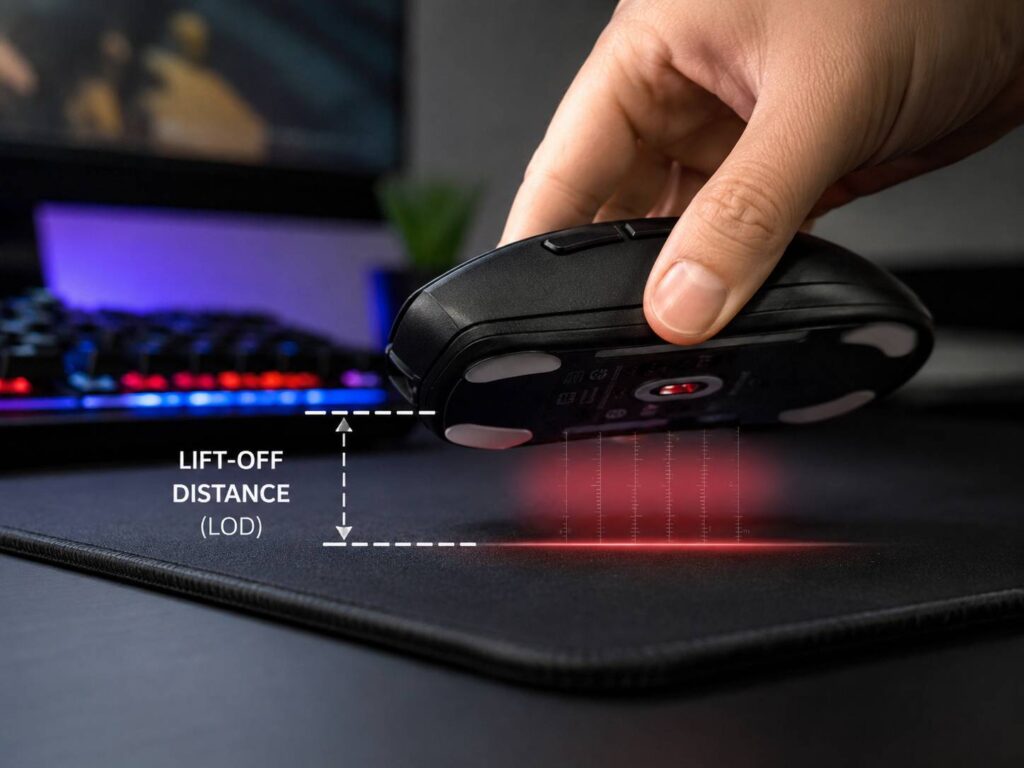
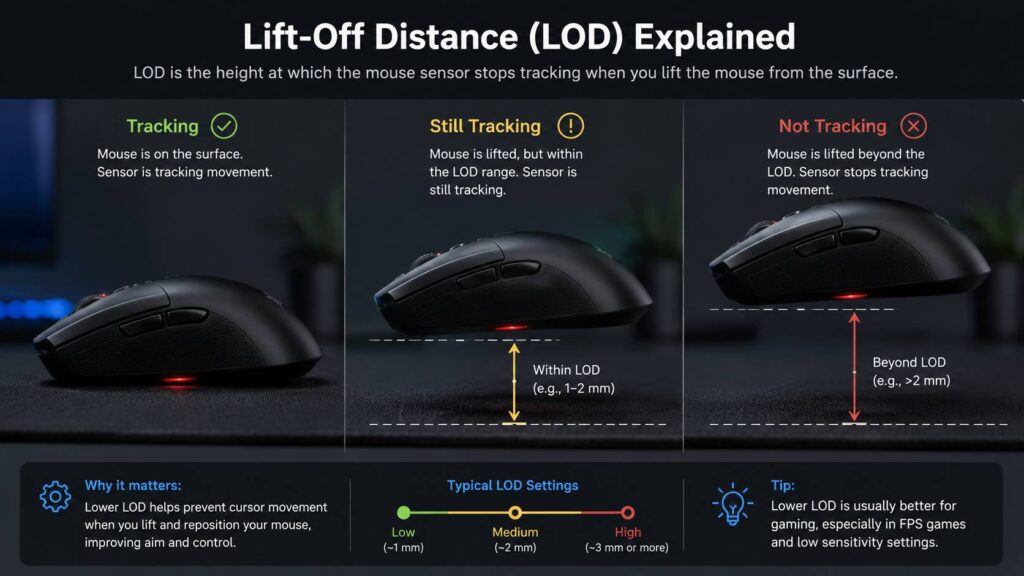
Lift-off distance, often called LOD, is the height where a mouse sensor stops tracking after you lift the mouse from the desk or mouse pad.
The idea sounds tiny, and it is. Lift-off distance is measured in millimeters. Still, this small sensor setting can change how a mouse feels in games, office work, photo editing, and daily browsing.
Picture this. You move your mouse across the pad, and the cursor moves. Then you lift the mouse slightly to reset your hand position. If the sensor keeps tracking during that lift, your cursor or crosshair can move even though you did not want it to.
A low lift-off distance means the sensor stops tracking soon after the mouse leaves the surface. A high lift-off distance means the sensor keeps reading movement for a little longer after you lift it.
For many office users, LOD stays invisible. For FPS players, low-sensitivity gamers, and anyone who lifts the mouse often, it can make the difference between a clean reset and a slightly messy one.
Why Lift-Off Distance Matters
Lift-off distance matters most during mouse resets. This happens when you move the mouse across the pad, reach the edge, lift it, place it back near the center, then continue moving.
Gamers do this all the time. Low-sensitivity players do it even more, since they need larger hand or arm movements to turn in-game. If the sensor keeps tracking during the lift, the crosshair can drift.
That drift feels small at first. Then, after a few matches, it starts to annoy you. Your aim feels less settled. Flicks feel slightly off. Micro-adjustments feel less clean.
For desktop use, the same issue appears as cursor movement after lifting the mouse. In spreadsheets or photo editing software, this can feel clumsy. You lift the mouse to reposition it, then the pointer slides a little.
A good lift-off distance makes the mouse feel predictable. It tracks when it touches the surface. It stops tracking when you lift it. Simple, but very useful.
Low vs High Lift-Off Distance
Low lift-off distance works best for users who lift and reset the mouse often. The sensor cuts off earlier, so the cursor stays steadier during resets.
High lift-off distance keeps the sensor active longer. This can help on tricky surfaces, but it can feel bad for gaming. If the mouse keeps tracking in the air, your aim can shift during every reset.
Here is a practical way to think about it:
- Low LOD: Best for FPS games, low DPI, arm aiming, and fast mouse resets.
- Medium LOD: Best for mixed use, casual gaming, and normal work.
- High LOD: Best for uneven surfaces, poor mouse pads, or users who rarely lift the mouse.
Most people should start with low or medium. Very high LOD rarely feels good unless your surface causes tracking cutouts.
What Is a Good Lift-Off Distance for Gaming?
For FPS gaming, a low lift-off distance usually feels best. Start around 1 to 2 mm. At that height, the mouse stops tracking quickly after it leaves the pad.
That helps in games like Counter-Strike, Valorant, Apex Legends, Fortnite, Call of Duty, and similar shooters. These games reward clean aim, steady crosshair placement, and fast resets.
Low LOD works well if you use:
- Low DPI
- Low in-game sensitivity
- A large mouse pad
- Arm aiming
- Fast flicks
- Frequent resets
A small personal note here: lift-off distance will not fix bad aim. It will not make a cheap, uncomfortable mouse feel premium either. Still, if your crosshair drifts every time you lift the mouse, LOD is one of the first settings worth checking.
It is not a magic setting. It is a feel setting. Once it feels right, you stop thinking about it.
What Is a Good Lift-Off Distance for Office Work?
For office work, medium lift-off distance often feels fine. Browsing, writing, email, and spreadsheets do not need the same reset control as competitive games.
Still, low LOD can feel cleaner on large monitors. It helps if you use low pointer speed or a large desk pad. The cursor stays more stable when you lift and reposition the mouse.
For design work, video editing, CAD, or photo editing, sensor control matters more. A low or medium lift-off distance can make the pointer feel less floaty. This helps during small selections, timeline edits, and precise clicks.
DPI matters here too. If you want a more practical guide for normal work setups, this breakdown of does DPI matter on office mice explains why high DPI is not always better.
A higher LOD can still work for office use if your surface is rough or uneven. In that case, tracking stability matters more than a super-low cutoff.
Lift-Off Distance and Mouse Sensors
Lift-off distance links closely to the mouse sensor. Modern gaming mice usually use optical sensors. Some older or office-style mice use laser sensors.
Optical sensors often feel more predictable on cloth mouse pads. Laser sensors can track on more surfaces, but they can feel less consistent on some pads. This is one reason many gaming mice use optical sensors today.
Surface type matters a lot. Cloth pads, hard pads, glass-like desks, wood desks, and worn mouse mats all reflect light differently. The sensor reads those reflections, then turns them into movement.
For a deeper look at sensor behavior, this guide on optical vs laser mouse is a useful next read.
If your mouse has adjustable LOD, the sensor can adapt better to your pad. If it has fixed LOD, you get what the manufacturer tuned into the mouse.
Lift-Off Distance and Mouse Pads
Your mouse pad can change how LOD feels. A mouse that tracks perfectly on one pad can feel strange on another.
Cloth pads usually work well with gaming mice. Hard pads can feel faster, but some sensors react differently to them. Worn pads can cause small tracking issues, mainly in areas where the surface texture has changed.
Common mouse pad problems include:
- Cursor drift after lifting the mouse
- Sensor cutouts during fast swipes
- Jitter on glossy desks
- Different tracking feel after changing pads
- Uneven response near worn areas
- More drift after installing thicker mouse skates
A clean pad helps more than people expect. Dust, hair, skin oil, and small fibers can affect the sensor area. If your mouse suddenly feels odd, clean the mouse feet, sensor area, and mouse pad first.
Then test the LOD again. Many times, the “bad sensor” is just a dirty pad or worn surface.
Lift-Off Distance vs DPI
Lift-off distance and DPI are different settings.
DPI controls how far the cursor moves based on hand movement. A higher DPI makes the cursor travel farther. A lower DPI gives more physical control, but it requires more desk space.
Lift-off distance controls how high the mouse can rise before the sensor stops tracking.
These two settings still affect each other in real use. At high DPI, even tiny unwanted movements become easier to notice. If your mouse tracks during a lift, the cursor can move more on screen. At lower DPI, the same drift may look smaller, but it can still hurt aim.
A balanced gaming setup often looks like this:
- DPI: 400 to 1600 for many FPS players
- Polling rate: 1000 Hz or higher on many modern gaming mice
- Lift-off distance: low or medium
- Mouse pad: large, clean, and flat
- Sensitivity: low enough for control, high enough for comfort
Do not copy someone else’s settings blindly. Test them on your desk, with your hand, your games, and your pad.
Lift-Off Distance vs Polling Rate
Polling rate and lift-off distance affect different parts of mouse feel.
Polling rate tells you how often the mouse reports its position to the computer. Lift-off distance tells you how high the mouse can lift before tracking stops.
A higher polling rate can make movement feel smoother, mainly on high-refresh-rate displays. LOD affects what happens when the mouse leaves the surface.
If your cursor moves after you lift the mouse, polling rate is not the first setting to change. Check LOD instead. If your mouse movement feels delayed, choppy, or inconsistent, then polling rate, wireless signal, USB port, firmware, or game settings deserve attention.
This is a common mistake. People raise polling rate and DPI, then wonder why lift drift remains. The sensor is still tracking too high above the pad.
How to Test Mouse Lift-Off Distance at Home
You can test lift-off distance with a simple coin stack. It will not give lab-level accuracy, but it gives you a useful real-world check.
Try this:
- Put the mouse on your normal mouse pad.
- Move the cursor slowly.
- Lift the mouse a tiny bit.
- Place one thin coin under the mouse near the sensor area.
- Move the mouse gently.
- Add another coin if the cursor still moves.
- Stop when the cursor no longer tracks.
The height where tracking stops gives you a rough idea of your LOD.
A gaming test works even better. Open your main game, aim at a small object, lift the mouse, reset it, then place it back down. Repeat this several times.
If your crosshair moves during the lift, your LOD is probably too high. If tracking cuts out while the mouse still touches the pad, the LOD may be too low for your surface.
A good setting feels boring. You lift the mouse, reset it, and nothing weird happens.
How to Change Lift-Off Distance
Many gaming mice let you change lift-off distance through their software. The setting can appear under names like LOD, lift-off distance, surface tuning, sensor height, smart tracking, low, medium, or high.
Check these areas in your mouse app:
- Sensor settings
- DPI settings
- Surface calibration
- Advanced performance settings
- Onboard memory profiles
- Game profile settings
Some mice save the setting directly to onboard memory. That helps if you use the same mouse on another PC. Other mice need the software running for full control.
Budget mice and office mice often use fixed LOD. In that case, you cannot change it through software. You can still improve tracking with a better mouse pad, cleaner surface, or thinner mouse skates.
Best Lift-Off Distance Settings by Use
Use these settings as a starting point:
- Competitive FPS: Low
- Casual gaming: Low or medium
- Office work: Medium
- Photo editing: Low or medium
- Video editing: Medium
- MMO and MOBA games: Medium
- Rough desk surface: Medium or high
- Thick cloth pad: Low or medium
- Hard mouse pad: Low first, then test for cutouts
Do not chase the lowest LOD just to feel more advanced. Very low LOD can cause tracking problems on some pads. If the sensor cuts out during normal swipes, raise the setting one step.
The best lift-off distance is the one that feels stable on your real setup.
Common Lift-Off Distance Problems
Cursor drift is the most common LOD issue. You lift the mouse, but the cursor keeps moving. This points to a lift-off distance that is too high for your style.
Sensor cutout is the opposite problem. The mouse stops tracking too early, even though it still touches the pad. This can happen with very low LOD, uneven pads, thick mouse skates, or a surface the sensor does not read well.
New mouse feet can change the feel too. Thicker skates raise the sensor farther from the pad. That small height change can affect LOD.
Wireless mice can add another layer of confusion. If movement feels strange, place the receiver closer, update the firmware, then check the sensor settings. Do not blame LOD before you rule out basic connection issues.
Another issue comes from old mouse pads. A worn center area can track differently from the corners. If your mouse feels good at the edge of the pad but bad in the middle, the pad may be the problem.
Does Lift-Off Distance Matter for Every User?
No. Some people never notice it.
If you use high sensitivity and rarely lift your mouse, LOD will not feel like a major setting. If you mostly browse, write, or watch videos, comfort and button quality matter more.
Lift-off distance matters more if you:
- Play FPS games
- Use low sensitivity
- Lift and reset the mouse often
- Notice cursor movement after lifting
- Use a large mouse pad
- Do precise design or editing work
- Feel like your mouse keeps moving in the air
For these users, a lower LOD can make the mouse feel tighter and easier to control.
Should You Buy a Mouse Based on Lift-Off Distance?
Lift-off distance should be part of your buying choice, but not the whole reason to buy a mouse.
A good mouse still needs the right shape, a reliable sensor, solid clicks, smooth feet, good weight balance, and stable wireless performance if it is wireless. LOD only controls one part of the feel.
For competitive shooters, adjustable LOD is a nice feature. It gives you more control if you change mouse pads later.
For normal work, fixed LOD is fine as long as tracking feels stable. Comfort matters more during long typing, browsing, and spreadsheet sessions.
My real opinion: mouse shape matters more than LOD for most people. A mouse with perfect LOD but poor comfort still feels bad after one hour. Pick a shape that fits your hand first. Then tune the sensor.
Final Verdict: Lift-Off Distance Is Small, But It Can Matter
Lift-off distance is the height where your mouse stops tracking after you lift it. It sounds like a tiny detail, but it can change how clean and predictable your mouse feels.
For gaming, low LOD usually gives the best control. For daily work, medium LOD often feels fine. For difficult surfaces, a higher setting can help the sensor stay stable.
Start with low if your mouse supports it. Test it in real use, not just in software. If tracking cuts out, move to medium. If the cursor drifts during lifts, lower the setting or try a better mouse pad.
A mouse should move only when you want it to move. That is the real value of a good lift-off distance setting.