Bluetooth headphones have come a long way. A few years ago, the questions were battery life, comfort, and whether the headphones stayed connected. Now product pages are packed with codec names such as SBC, AAC, aptX, LDAC, and LC3.
Those names can make headphone shopping more confusing than it needs to be.
The short answer is that there is no single Bluetooth codec that wins in every situation. LDAC offers one of the highest bitrates among common lossy Bluetooth codecs. aptX has several versions aimed at different uses. AAC makes the most sense for many Apple users. LC3 is tied closely to Bluetooth LE Audio and focuses on getting good sound from less data. SBC remains the basic compatibility option.
Still, codec support alone does not decide how good a pair of headphones sounds. Driver quality, tuning, fit, digital processing, wireless stability, and the quality of the original music matter just as much.
This guide breaks down the main Bluetooth audio codecs in plain language. It also explains which codec works best for music, Android phones, iPhones, movies, gaming, and everyday listening.
What Is a Bluetooth Audio Codec?
A Bluetooth audio codec compresses sound before your phone, tablet, computer, or television sends it to wireless headphones or speakers.
The receiving device then decodes that data and turns it back into audio.
Bluetooth has limited wireless bandwidth. Sending large amounts of uncompressed audio data is not practical over a normal Bluetooth connection. So the codec reduces the amount of information that needs to travel between the two devices.
That compression creates a few trade-offs:
- Sound quality
- Bitrate
- Wireless stability
- Latency
- Battery use
- Device compatibility
At first glance, it is tempting to assume that the codec with the highest bitrate must sound best. In practice, the answer is not that simple.
A newer codec can produce very good sound at a lower bitrate. Better compression can preserve more useful audio information without sending as much data.
For example, LC3 was designed to deliver strong perceived audio quality at lower data rates than older Bluetooth codecs. So bitrate is useful, but it should never be the only figure you compare.
SBC vs AAC vs aptX vs LDAC vs LC3 at a Glance
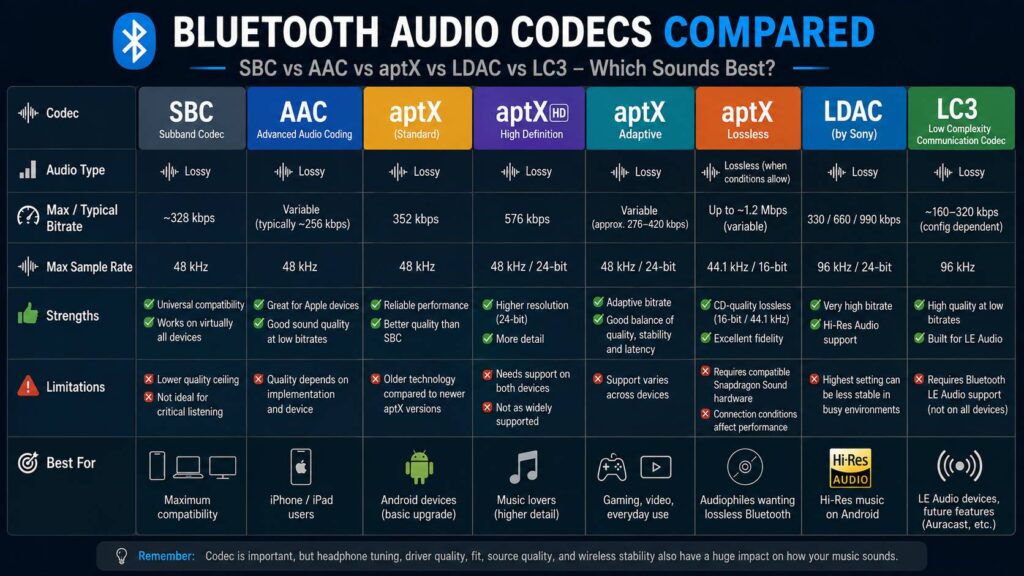
Here is the basic difference between the main Bluetooth codecs.
| Codec | Main strength | Main weakness | Best suited for |
|---|---|---|---|
| SBC | Very broad compatibility | Lower quality ceiling | Basic Bluetooth audio |
| AAC | Strong Apple support | Results vary by device | iPhone and iPad users |
| aptX | Reliable mainstream performance | Older than newer aptX versions | Compatible Android devices |
| aptX HD | Higher-resolution support | Needs support on both devices | Music listening |
| aptX Adaptive | Changes bitrate as needed | Support varies | Music, video, and gaming |
| aptX Lossless | Can deliver CD-quality lossless audio | Requires compatible hardware | Premium Android setups |
| LDAC | Very high bitrate | Highest setting can be less stable | High-quality Android listening |
| LC3 | Good quality at low data rates | Needs LE Audio support | Newer Bluetooth LE Audio devices |
One point is easy to miss. Standard aptX, aptX HD, aptX Adaptive, and aptX Lossless are not the same thing.
That matters when a headphone manufacturer simply writes “aptX” in a specification list. Always check the exact aptX version.
SBC: The Bluetooth Codec That Works Almost Everywhere
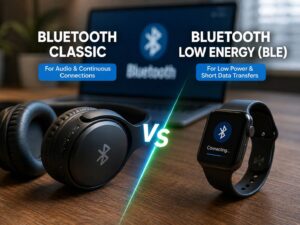
SBC stands for Subband Codec. It is the basic codec used by Bluetooth Classic audio.
Its biggest advantage is compatibility.
You will find SBC support across phones, tablets, laptops, televisions, car audio systems, speakers, wireless receivers, earbuds, and headphones.
SBC often gets treated as the “bad” Bluetooth codec, but that description is too harsh.
A good pair of headphones can still sound perfectly enjoyable through SBC. Podcasts, casual music listening, YouTube videos, and background listening rarely expose its limits in an obvious way.
Still, SBC has less room to preserve fine detail than newer options.
Dense music can make that easier to hear. Cymbals, layered guitars, busy electronic tracks, and complex high-frequency sounds can expose compression more easily.
SBC is best viewed as a dependable fallback.
If your phone and headphones cannot agree on AAC, LDAC, aptX, or another supported codec, SBC often takes over.
For that reason, seeing LDAC or aptX on the box does not mean you will use it every time. Both the source device and the headphones need to support the same codec.
AAC: The Sensible Choice for iPhone Users
AAC stands for Advanced Audio Coding.
It appears in music files, video platforms, streaming services, and many other forms of digital media. It is also a major Bluetooth audio option across Apple devices.
For iPhone and iPad owners, AAC is usually the codec that deserves the most attention.
Many AirPods and Beats models use AAC for normal Bluetooth audio. That makes AAC far more relevant to an iPhone owner than a codec such as LDAC that their intended Bluetooth setup may never use.
AAC does have one complication. Its Bluetooth performance can vary between devices.
The encoder, operating system, hardware, and processing choices can affect the result. So one AAC connection is not automatically identical to another.
Even so, AAC can sound very good on a properly designed device.
If you mainly use an iPhone, I would not reject a good pair of headphones just because they lack LDAC. I would care more about the headphone tuning, comfort, noise cancellation, microphone quality, and AAC performance.
That produces a far more useful buying decision.
aptX: Good, but Check Which Version You Are Getting
aptX is one of the best-known Bluetooth codec names, especially among Android users.
The original aptX codec supports 16-bit audio and sampling rates up to 48 kHz. It was marketed for years as an upgrade over basic SBC connections.
Today, the name “aptX” covers several codecs.
The main versions include:
- aptX
- aptX HD
- aptX Adaptive
- aptX Lossless
That distinction is important.
Standard aptX is the oldest option in this group. It can still work well, but newer versions offer better features.
aptX HD adds 24-bit audio support and runs at a higher bitrate.
aptX Adaptive takes a different path. It can change its bitrate based on wireless conditions and the type of content being played.
aptX Lossless sits at the top of the family. Under suitable connection conditions, it can deliver bit-for-bit 16-bit/44.1 kHz CD-quality audio.
So a product that says “supports aptX” tells only part of the story.
Check the full specification before buying.
aptX Adaptive: A Better Fit for Everyday Wireless Use
Wireless conditions change constantly.
You might listen to music at home, walk through a crowded shopping center, play games on your phone, then watch a movie on a tablet. Each situation puts different pressure on the wireless connection.
aptX Adaptive was created with that type of use in mind.
Instead of staying fixed at one bitrate, it can adjust according to connection conditions. It is designed to balance sound quality, latency, and wireless stability.
That makes it a very practical codec for people who use one pair of headphones for almost everything.
For example, aptX Adaptive can make sense for:
- Spotify or Apple Music on Android
- YouTube
- Netflix and other streaming apps
- Mobile gaming
- Video calls
- Daily commuting
- Laptop use
The appeal here is not just maximum sound quality.
A slightly lower bitrate with a stable connection often feels better than a higher bitrate that keeps producing short dropouts.
That is especially true in busy areas packed with Wi-Fi networks, phones, smartwatches, controllers, and other Bluetooth devices.
aptX Lossless: Is It Really Lossless?
aptX Lossless deserves separate attention since the name creates a strong expectation.
The codec can deliver lossless 16-bit/44.1 kHz CD-quality audio under the right conditions.
That sounds simple, but the full chain must support the feature.
You need compatible source hardware, compatible headphones or earbuds, and the required Bluetooth platform support.
Radio conditions matter too.
A device can reduce the data rate if the wireless link becomes difficult to maintain. So seeing “aptX Lossless” in a product specification does not mean every second of every listening session will stay lossless in every environment.
Still, aptX Lossless is one of the strongest options for people who care about preserving CD-quality audio through Bluetooth.
It changes one common comparison too.
Plain aptX does not beat LDAC on technical audio capability. aptX Lossless is a different story and deserves to be compared separately.
That is why “aptX vs LDAC” is too broad on its own.
LDAC: One of the Best Choices for High-Bitrate Bluetooth Audio
Sony developed LDAC for higher-quality Bluetooth listening.
Its headline figure is 990 kbps.
LDAC can work at several data rates, commonly around 330 kbps, 660 kbps, and 990 kbps. Depending on the device and settings, the connection can change between these rates.
For Android users with compatible headphones, LDAC remains one of the most attractive options for music.
Still, there is a catch.
Choosing LDAC does not guarantee that your device is running at 990 kbps.
Phones can use lower LDAC settings. The selected quality mode, manufacturer software, distance from the headphones, and local wireless interference all play a role.
This becomes easy to notice in crowded areas.
Forcing the highest LDAC mode can sometimes lead to short audio interruptions. If that happens, dropping to a lower setting can make the listening experience much better.
My preference is simple. Use the highest LDAC rate that remains stable in the places where you normally listen.
A flawless 660 kbps connection is far more enjoyable than 990 kbps that breaks up every few minutes.
LC3: Why Bluetooth LE Audio Matters
LC3 stands for Low Complexity Communications Codec.
It is a central part of Bluetooth LE Audio, so it represents more than another codec choice in a settings menu.
Bluetooth Classic audio and Bluetooth LE Audio use different audio architectures.
LC3 was created to deliver strong audio quality with less transmitted data. That can help with battery life, wireless reliability, and the design of smaller audio devices.
The lower bitrate can look unimpressive next to LDAC’s 990 kbps figure.
Still, comparing those numbers directly does not tell the full story.
LC3 uses newer compression methods. Its goal is to get more perceived audio quality from each bit of transmitted data.
Bluetooth LE Audio brings other features too, including Multi-Stream Audio and Auracast broadcast audio.
So LC3 is interesting for more than sound quality alone.
It is part of a broader change in how Bluetooth audio works.
Does a Higher Bluetooth Bitrate Always Sound Better?
No.
Bitrate tells you how much compressed data travels each second. It does not tell you exactly how that data is used.
Codec design has a huge effect.
Imagine one older codec needs 500 kbps to reach a certain level of perceived quality. A newer codec can produce a similar result at 300 kbps.
The higher number looks better on a specification sheet, but the listener may hear little difference.
Other factors matter just as much:
- Encoder quality
- Headphone tuning
- Driver performance
- Digital signal processing
- Wireless interference
- Source quality
- Fit and seal
This explains why choosing headphones only by codec bitrate is risky.
LDAC cannot fix poor headphone tuning. LC3 cannot fix a weak driver. aptX Lossless cannot make a badly mixed song sound great.
The codec can preserve more of what is available, but the headphones still need to reproduce it well.
Which Bluetooth Codec Sounds Best?
If pure technical capability is your main concern, the answer depends on which codecs you include.
For standard lossy Bluetooth audio, LDAC at 990 kbps offers one of the highest quality ceilings among widely supported consumer codecs.
aptX Lossless can go further in a different way. With compatible hardware and suitable wireless conditions, it can transmit CD-quality audio without loss.
AAC remains a strong option for Apple users.
aptX Adaptive makes sense for people who care about sound quality but still want good stability and lower latency.
LC3 is attractive for Bluetooth LE Audio devices, where the focus shifts toward better quality at lower data rates.
SBC remains the compatibility king.
So there is no universal winner.
The right codec is the best option supported properly by both of your devices.
Best Bluetooth Codec for Android
Android offers more codec choice than most other mobile platforms.
Depending on the phone, you may see:
- SBC
- AAC
- aptX
- aptX HD
- aptX Adaptive
- aptX Lossless
- LDAC
- LC3
Support varies by manufacturer and model.
For music-focused Android listening, my practical order would look like this:
- aptX Lossless with fully compatible hardware
- LDAC at the highest stable setting
- aptX Adaptive
- aptX HD
- Standard aptX or AAC
- SBC
Treat that list as a codec preference, not a headphone ranking.
A well-designed pair of AAC headphones can easily sound better than a poorly tuned LDAC model.
The hardware still matters more.
Best Bluetooth Codec for iPhone
For most iPhone owners, AAC is the codec to focus on.
That makes buying decisions simpler.
You do not need to chase every Android-focused codec badge on the box. Instead, spend more attention on the parts of the headphones that affect you every day.
Check:
- Sound tuning
- Comfort
- Active noise cancellation
- Transparency mode
- Microphone quality
- Battery life
- Bluetooth stability
- AAC performance
Those features will affect your experience much more than LDAC support that your normal iPhone Bluetooth connection does not use.
This is one area where fewer codec choices can actually make shopping easier.
Best Bluetooth Codec for Gaming
Gaming changes the priorities again.
Audio quality matters, but latency quickly becomes more noticeable.
A small delay between an on-screen action and the sound can feel distracting. Competitive games make that problem even easier to notice.
aptX Adaptive is a strong option here thanks to its focus on lower latency and changing wireless conditions.
LC3 and Bluetooth LE Audio can also provide useful latency improvements on compatible systems.
Still, the codec is only one part of the delay.
The game, operating system, Bluetooth stack, headphones, and internal audio processing all add time.
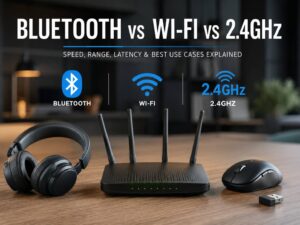
For serious competitive gaming, a dedicated 2.4 GHz wireless headset can still be a better choice than standard Bluetooth.
For casual games, video streaming, and everyday use, modern Bluetooth codecs are far easier to live with than older implementations.
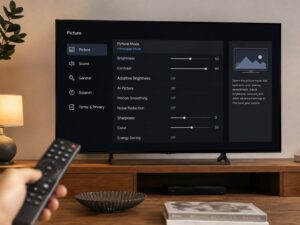
The same idea applies to home entertainment devices. Display processing can affect perceived timing too. If you use a Fire TV, settings such as Amazon Fire TV Adaptive Display can change how the television handles content, so it is worth checking both the display setup and the audio connection when movies or games feel slightly out of sync.
Why Your Phone Uses the Wrong Bluetooth Codec
Sometimes your phone refuses to use the codec you expected.
This can happen for several reasons.
Both devices need to support the same codec. A phone with LDAC cannot use LDAC with headphones that only support SBC and AAC.
The reverse is true too.
Manufacturers can set their own codec priorities. Certain audio modes can change available options. Reconnecting the headphones can sometimes reset a manually selected setting.
Common reasons include:
- Your headphones do not support the codec
- Your phone does not support it
- The manufacturer disabled the codec
- The selected listening mode changes codec availability
- Software changes the preferred codec
- The devices negotiated another compatible option
On many Android phones, you can inspect codec settings through Developer options.
Menu names differ between brands, so the exact path is not identical on every phone.
One useful habit is checking the active codec after reconnecting your headphones. Do not assume yesterday’s setting is still active.
Do Lossless Music Services Sound Better Over Bluetooth?
Lossless streaming and Bluetooth compression are two separate parts of the audio chain.
A music service can send a lossless file to your phone. The phone can then compress that audio again before sending it through a lossy Bluetooth codec.
So listening to a lossless streaming service does not automatically mean the Bluetooth connection is lossless.
AAC, SBC, LDAC, and most aptX versions still apply compression.
aptX Lossless is different, but it needs the right hardware and suitable connection conditions.
Even so, starting with a high-quality source is still sensible.
A clean source avoids unnecessary compression earlier in the chain. Just do not confuse source quality with the final Bluetooth transmission format.
If guaranteed lossless playback matters to you, a wired digital connection remains easier to verify.
Should You Buy Headphones Based on Codec Support?
Codec support should be part of your buying checklist, but it should not be at the top.
I would rather use well-tuned headphones with AAC than badly tuned headphones with LDAC.
I would rather have stable aptX Adaptive than LDAC at 990 kbps that keeps dropping out.
And I would not pay extra for aptX Lossless without checking whether my phone supports the complete setup.
Focus on the full headphone package:
- Driver quality
- Sound tuning
- Fit
- Ear tip or ear pad seal
- Noise cancellation
- Transparency mode
- Battery life
- Microphone quality
- Wireless stability
- Controls
- App quality
- Codec compatibility
Then check whether your main source device supports the codec you want.
That order saves money and prevents disappointment.
Which Bluetooth Codec Should You Choose?
Choose AAC if you mainly listen from an iPhone or iPad.
Choose LDAC if you use a compatible Android phone and want high-bitrate Bluetooth music playback.
Choose aptX Adaptive if you want a good balance of sound quality, stability, video performance, and gaming support.
Choose aptX Lossless if CD-quality lossless Bluetooth matters to you and your full setup supports it.
Choose LC3 if you are buying newer Bluetooth LE Audio gear or want access to features such as Auracast.
Stick with SBC if that is the common codec between your devices. It is not automatically bad, especially with good headphones.
The codec logo is not a sound-quality score.
A good Bluetooth setup comes from the complete chain. Source quality matters. Wireless stability matters. Headphone tuning matters. Fit matters too.
For Android music listening, LDAC and the newer aptX versions are often the most attractive options. For Apple users, AAC remains the practical choice. LC3 is becoming more relevant as Bluetooth LE Audio support spreads to more devices.
The best Bluetooth codec is the one your devices support properly, and the one that stays stable where you actually listen.