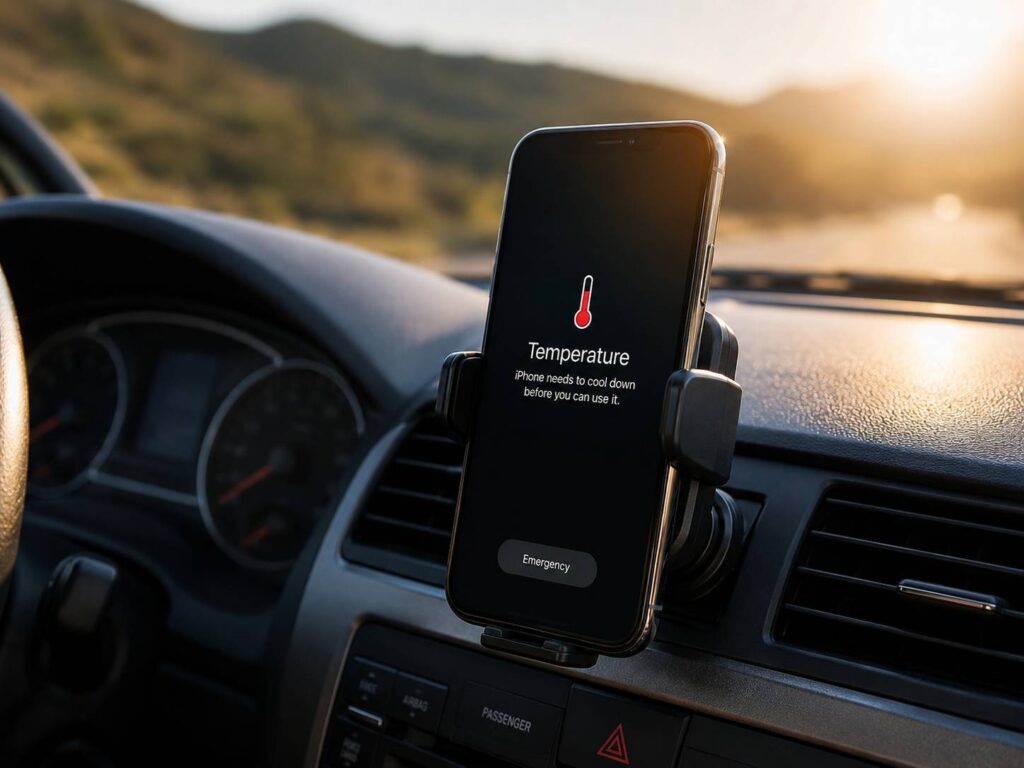
A phone can overheat in the car on an ordinary drive. You start a journey, open Google Maps or Apple Maps, connect the charger, and place the phone on the dashboard. A few minutes later, the screen dims, charging stops, or a temperature warning appears.
It can feel like something is wrong with the phone, but the car itself is often the main cause. Direct sunlight, high cabin temperatures, navigation, mobile data, and charging can all heat the device at the same time.
Modern phones have built-in safety controls. They can slow down, pause charging, reduce screen brightness, or shut off for a short time. These controls protect the phone from immediate harm. Repeated overheating can still wear down the battery faster, so it is worth fixing the cause rather than ignoring the warning.
Why Does a Phone Overheat in the Car?
A parked car can become extremely hot, even on a day that does not feel especially warm. The dashboard, windshield, seats, and center console absorb sunlight and trap heat inside the cabin.
Your phone creates heat of its own at the same time. Navigation uses GPS, mobile data, the processor, and the screen. Bluetooth may be connected to the car. Music may be streaming. The phone may be charging too.
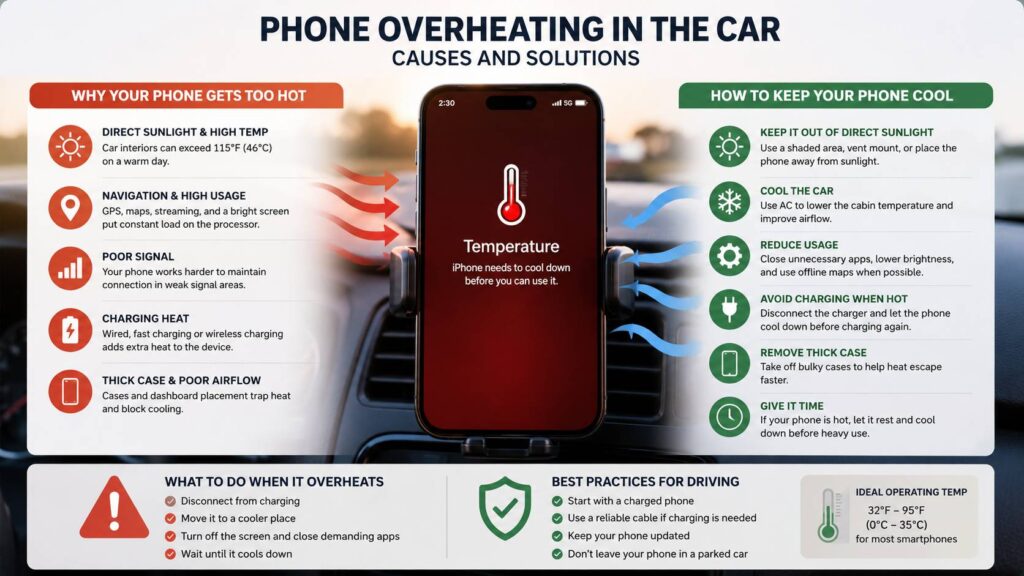
Common causes of phone overheating in the car include:
- Direct sunlight through the windshield
- GPS navigation running for a long time
- High screen brightness
- Weak mobile signal
- 5G or mobile data use
- Wireless Android Auto or Apple CarPlay
- Music or podcast streaming
- Fast charging
- Wireless charging
- A thick phone case
- Background updates or cloud backups
- Hot air around a dashboard mount
One task may only make the phone slightly warm. Several tasks running together can push it past its normal temperature range.
Why Navigation Makes a Phone So Hot
Navigation places a steady load on the phone. It tracks your location, calculates the route, downloads traffic data, updates the map, and keeps the screen active.
The phone may work harder in areas with poor mobile coverage. It keeps searching for a stronger signal, which can raise power use and heat. A bright screen adds more heat, mainly when sunlight makes it hard to see the map.
The phone’s position matters too. A windshield mount may look convenient, but it places the device close to hot glass and direct sun. A dashboard mount can become just as hot during summer.
This is why a phone can feel cool inside the house, then become uncomfortably hot after 15 or 20 minutes of driving.
Signs Your Phone Is Getting Too Hot
A warm phone is not always a problem. Charging, navigation, video recording, gaming, and updates can make a device feel warm during normal use.
Overheating becomes more likely when the phone starts changing how it works.
Watch for these signs:
- The screen becomes dim
- Charging slows down or stops
- The camera flash stops working
- Apps become slow or freeze
- Mobile data disconnects
- The phone enters battery-saving mode
- A temperature warning appears
- The device shuts down
- The phone feels too hot to hold comfortably
These reactions show that the phone is trying to protect its internal parts. Do not fight the safety controls by restarting the device straight away or reconnecting the charger.
What to Do When Your Phone Overheats in the Car
The first goal is to stop adding more heat. A few quick changes can help the phone cool down safely.
Disconnect the charger
Remove the charging cable or take the phone off the wireless charging pad. Charging creates heat, so keeping it connected can slow down the cooling process.
Move the phone out of sunlight
Take it off the dashboard or windshield mount. Place it somewhere shaded with some airflow around it.
Do not place it under a seat where it can be stepped on or forgotten. A cup holder away from direct sun can work for a short time, as long as it is dry and not heated by the console.
Turn off demanding apps
Stop navigation, video, games, hotspot mode, and the camera. Pause music streaming for a few minutes when the phone is very hot.
Lock the screen. Turning the phone off completely can help after a temperature warning or shutdown.
Remove the case
A thick rubber, wallet, leather, or battery case can trap heat around the device. Remove it until the phone returns to a normal temperature.
Cool the cabin
Start the air conditioning and lower the temperature inside the car. Keep the phone in a shaded area where cool air can move around it.
Avoid pressing the phone directly against an ice-cold air vent. Strong cooling on one small area is not ideal. Normal cabin airflow is enough.
Leave the phone alone for a few minutes
Do not restart every app as soon as the warning disappears. Give the phone a little more time to cool before starting navigation or charging again.
Do Not Put an Overheated Phone in the Fridge or Freezer
Placing a hot phone in a freezer may sound like a fast fix, but it can create a new problem.
A sudden temperature change can cause moisture to form around ports or inside the device. Ice packs and frozen bottles can create the same risk.
Let the phone cool naturally in a dry, shaded area. Air conditioning can help, but extreme cold is not needed.
Why Charging Makes the Phone Even Hotter
Every charging method creates some heat. Fast charging sends more power to the battery over a shorter period. Wireless charging loses some energy during the transfer, and part of that energy turns into heat.
A dashboard wireless charger can be especially rough on a phone during summer. The device receives heat from the sun, the cabin, navigation, and charging at the same time.
Poor alignment on a wireless pad can make things worse. The charger keeps trying to transfer power even when the coils are not lined up properly.
For long trips, I prefer a good cable over a dashboard wireless pad. A cable still creates some heat, but it usually avoids the extra warmth linked to wireless charging.
Many drivers also wonder whether charging affects the car itself. This guide on whether charging your phone in the car wastes fuel or drains the battery explains what happens when the phone stays connected during a drive or after the engine is turned off.
Try to start the journey with a charged phone. Connect it only when the battery level starts getting low.
How to Stop Your Phone Overheating During Navigation
You do not need to stop using navigation. A few changes can make a noticeable difference.
Move the phone away from the windshield
A vent mount or shaded console mount is often better than a windshield mount. Pick a position that does not block your view or interfere with airbags.
A vent mount can help cool the phone, but do not aim freezing air at it for long periods.
Lower the screen brightness
Maximum brightness drains the battery and creates heat. Set the screen to a level that is easy to read without leaving it at 100 percent.
Use the car’s built-in display for maps when Apple CarPlay or Android Auto is available. The phone screen can stay locked, which reduces heat.
Download maps before the trip
Offline maps reduce the amount of data the phone needs to download during the drive. GPS will still run, but the phone does less work in weak-signal areas.
Download the route area before leaving home, mainly for long journeys or rural roads.
Pause background activity
Cloud backups, app updates, photo uploads, and social media syncing can run without being obvious.
Pause large downloads and uploads before a long drive. This keeps more of the phone’s power available for navigation.
Turn off unused connections
Disable hotspot mode, nearby device scanning, and connections you do not need.
Keep Bluetooth and location services active when the car or navigation app relies on them.
Remove a thick case
A slim case may not cause any trouble. A thick protective case can hold heat around the battery and processor.
Try driving without the case on a very hot day. The difference can be bigger than expected.
Use a good charger and cable
Cheap or damaged cables can become hot around the plug. Replace any cable with exposed wires, loose connectors, discoloration, or a burned smell.
A reliable charger with the right power rating is safer and more stable during a long drive.
Can Car Heat Damage the Battery?
Yes, repeated heat exposure can shorten battery life.
Lithium-ion batteries age faster at high temperatures. Over time, the phone may hold less charge, drain faster, or lose performance earlier than expected.
One overheating warning does not mean the battery is ruined. The bigger concern is repeated exposure. A phone that gets very hot every day during navigation and charging may lose battery capacity faster.
Leaving the phone in a parked car is another risk. Moving it into the glovebox protects it from direct sunlight, but the inside of the car can still become hot enough to damage the battery and other parts.
Take the phone with you when leaving the car. It is a simple habit that can save you from battery trouble later.
When Overheating May Point to a Hardware Problem
Heat during summer navigation has a clear cause. Heat during light indoor use is more concerning.
A phone may need inspection when:
- It overheats during simple tasks
- It becomes hot when sitting unused
- It shuts down often
- The charging port becomes very hot
- The battery drains much faster than before
- The screen or back cover starts lifting
- The battery looks swollen
- You notice smoke, discoloration, or a chemical smell
Stop charging a phone with a swollen battery or lifted casing. Keep it away from heat and flammable objects. Arrange a repair through the manufacturer or a trusted service center.
Do not press the back cover into place. A swollen battery can become dangerous when bent, crushed, or punctured.
The Best Phone Setup for Summer Driving
A shaded vent mount works well for many drivers. It keeps the phone visible and allows some air to move around it.
A practical summer setup looks like this:
- Medium screen brightness
- Offline maps downloaded
- A reliable charging cable
- No thick case during extreme heat
- Background uploads paused
- Air conditioning running
- Voice guidance turned on
- The car display used for maps
- Wireless charging avoided on very hot days
I would not use a dashboard wireless charging pad for a long trip in strong summer sun. It is convenient for short drives, but the mix of heat, charging, and limited airflow can quickly trigger a warning.
Phone Overheating in the Car: What Really Helps
A phone overheating in the car does not always mean it is faulty. The cabin may be too hot, the phone may be sitting in direct sunlight, or several demanding features may be running at once.
Disconnect the charger, move the phone into shade, close demanding apps, remove the case, and let it cool naturally. Then change the mounting position or charging method before restarting navigation.
Prevention works best. Keep the phone away from hot glass, lower the screen brightness, cool the cabin, and avoid wireless charging during extreme heat.
These small changes can protect the battery, keep navigation working, and make summer drives far less frustrating.