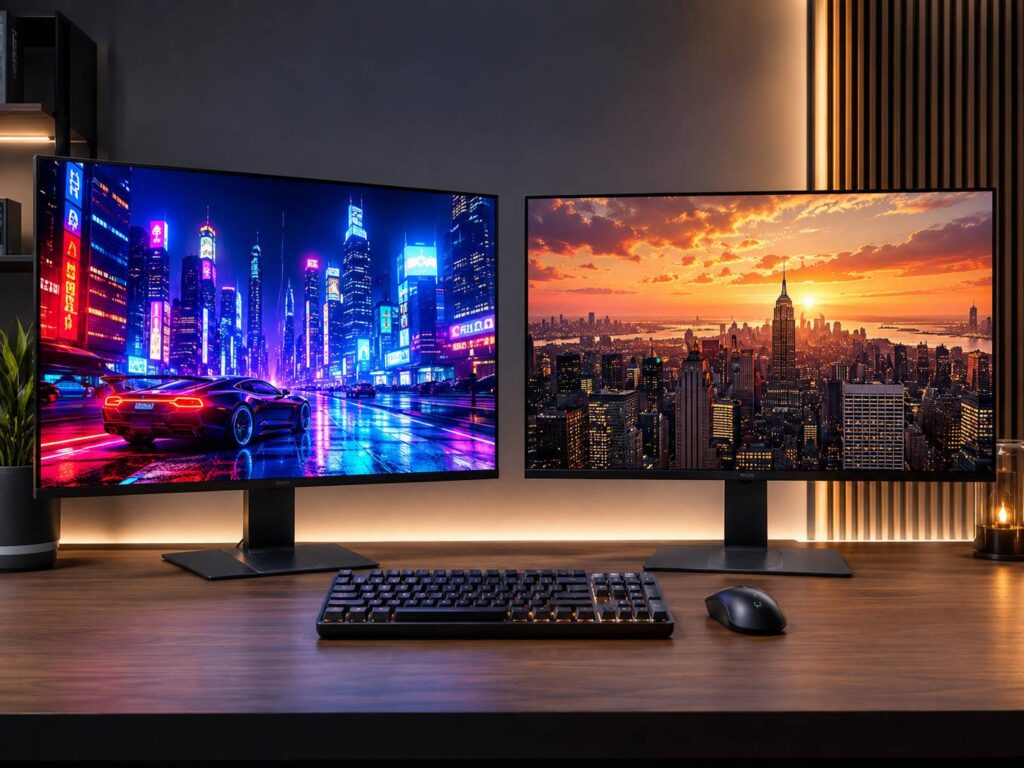
Choosing between a QD-OLED vs WOLED monitor is no longer as simple as saying QD-OLED has better colors and WOLED works better in bright rooms. Both technologies have improved quickly, and newer generations address several weaknesses found in early OLED gaming monitors.
For gaming and HDR in a dark or controlled room, QD-OLED remains especially attractive because of its excellent color volume and deep blacks. WOLED, meanwhile, tends to hold up better under strong ambient lighting and now offers much better brightness and color performance than earlier versions.
The exact monitor matters just as much as the panel technology, though. Resolution, pixel density, screen coating, refresh rate, warranty, firmware, brightness behavior, and panel generation can all influence the experience.
What Is the Difference Between QD-OLED and WOLED?
Both QD-OLED and WOLED are self-emissive display technologies. Each pixel produces its own light, so the display doesn’t need a separate LED backlight.
When a pixel needs to show black, it can simply switch off. That’s why both technologies can produce extremely dark blacks and excellent contrast.
The main difference is how they create color.
How QD-OLED works
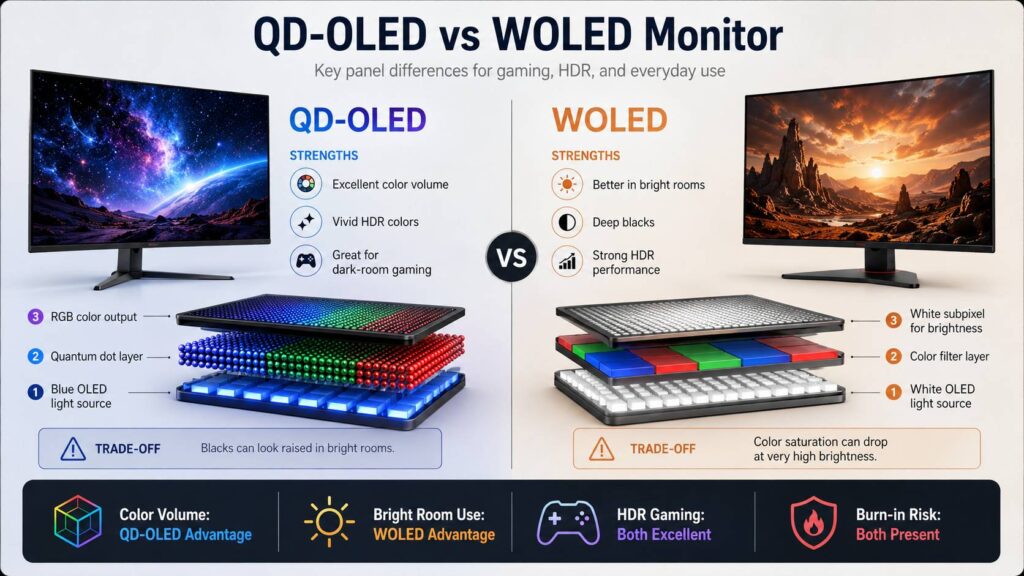
QD-OLED uses blue OLED light as its starting point. Quantum dots convert some of that blue light into red and green, creating the three primary colors needed for the image.
Because of this design, QD-OLED doesn’t depend on a traditional color-filter system in the same way as WOLED.
One of its biggest advantages is strong color saturation at higher brightness levels. Bright reds, blues, greens, neon lights, fire effects, and other colorful HDR highlights can look particularly vivid.
If you’d like a deeper explanation of the technology itself, this guide on what a QD-OLED monitor is covers how the panel works and what separates it from other display types.
How WOLED works
Traditional WOLED panels generate white light and then use color filters to create red, green, and blue. Many WOLED designs also include a white subpixel that can help raise brightness.
That additional white element has one trade-off. At very high brightness levels, some colors may become less saturated because part of the luminance comes from white light rather than pure red, green, or blue.
Newer WOLED generations have improved considerably, though. Tandem OLED designs use multiple emitting layers to improve brightness and efficiency, while some recent monitor panels are moving toward more conventional RGB stripe layouts.
As a result, old assumptions about WOLED don’t always apply to the latest monitors.
QD-OLED vs WOLED Monitor Comparison
| Feature | QD-OLED | WOLED |
|---|---|---|
| Black levels in dark rooms | Excellent | Excellent |
| Black levels in bright rooms | More affected by ambient light | Usually better |
| Color volume | Excellent | Very good to excellent |
| Bright saturated HDR colors | Major strength | Better on newer generations |
| Motion clarity | Excellent | Excellent |
| Response time | Extremely fast | Extremely fast |
| Text clarity | Depends on generation | Depends on generation |
| High refresh gaming | Excellent | Excellent |
| Burn-in risk | Present | Present |
| Bright-room use | Less ideal | Usually better |
| Dark-room HDR gaming | Excellent | Excellent |
| Screen coating | Depends on monitor | Depends on monitor |
The gap between the two technologies has become smaller. Still, a few differences can matter quite a lot in real-world use.
QD-OLED Still Has an Edge in Color Volume
Color is one of the main reasons people choose QD-OLED.
Since the panel doesn’t rely on a white subpixel to boost brightness, saturated colors can remain vivid as luminance increases. This becomes most noticeable with demanding HDR material.
Think of scenes with bright neon signs, glowing energy effects, sunsets, explosions, or highly saturated game environments. QD-OLED tends to preserve the intensity of those colors very well.
In normal SDR desktop use, the difference may be much harder to spot.
Modern WOLED panels have also closed the gap. New Tandem designs improve both brightness and color purity, so calling WOLED dull or washed out would be inaccurate.
For HDR enthusiasts, QD-OLED still has a particularly strong case. Yet the difference isn’t big enough to ignore every other part of the monitor.
WOLED Usually Works Better in Bright Rooms
Ambient lighting is one area where WOLED often has a practical advantage.
QD-OLED panels can show slightly raised blacks when strong light reaches the screen. Instead of appearing completely black, darker areas may take on a faint gray or purple appearance.
The OLED pixels themselves haven’t stopped producing proper blacks. Ambient light interacting with the panel causes the visible change.
This effect matters most if your desk is:
- beside a large window
- opposite a window
- underneath strong ceiling lights
- in a bright office
- exposed to direct lamps
WOLED normally keeps blacks looking darker under those conditions.
Once you lower the room lighting, though, the difference becomes much smaller. In a dark room, both technologies can deliver the deep blacks people expect from OLED.
Screen coating also matters here. A good anti-reflective treatment can make a noticeable difference, although it won’t completely remove the underlying behavior of the panel.
Which OLED Technology Is Brighter?
There isn’t a simple winner anymore.
Early OLED monitors were relatively dim compared with high-end Mini LED models, especially when displaying large bright windows. New generations have improved substantially.
Recent WOLED panels can deliver very bright highlights, especially in small areas of the screen. QD-OLED brightness has improved as well, with newer panel designs pushing peak HDR luminance higher.
Still, peak brightness figures need context.
A monitor advertised at more than 1,000 nits won’t produce that brightness across the entire screen. OLED panels usually reach their highest luminance in small HDR highlights.
As more of the screen becomes bright, overall brightness drops.
That’s why a tiny explosion in an HDR game might look intensely bright, while a mostly white browser or spreadsheet won’t reach anywhere near the same luminance.
When comparing monitors, look at more than the biggest number in the specifications. Full-screen brightness, 10% window brightness, HDR tone mapping, and sustained luminance can tell you much more about everyday performance.
HDR Performance Is Excellent on Both
OLED works particularly well for HDR because it combines bright highlights with pixel-level blacks.
There are no backlight zones behind the panel. As a result, OLED doesn’t produce the same haloing or blooming that can appear around bright objects on Mini LED displays.
Picture a small bright star on a black background. An OLED screen can illuminate only the pixels forming the star while keeping everything around it completely dark.
QD-OLED adds excellent color volume to this advantage. Bright colors often remain highly saturated rather than shifting toward white.
WOLED can fight back with excellent highlight brightness, especially on recent high-end panels.
So, there’s no bad option here. Both can produce very impressive HDR.
If your main priority is colorful HDR gaming in a dark room, QD-OLED has a slight advantage. If you’re buying a newer high-brightness WOLED model, though, the difference may not justify choosing an otherwise less suitable monitor.
QD-OLED vs WOLED for Gaming
Both technologies are excellent for gaming.
OLED pixels respond extremely quickly compared with typical LCD pixels. Fast motion looks clean, and traditional response-time ghosting is minimal.
Refresh rates have also climbed dramatically. High-end OLED gaming monitors now reach several hundred hertz, putting them firmly into competitive gaming territory.
For most gamers, however, refresh rate matters more than whether the panel says QD-OLED or WOLED.
A sensible order of priorities is:
- Screen size
- Resolution
- Refresh rate
- GPU performance
- Variable refresh rate support
- Connectivity
- Panel generation
- QD-OLED or WOLED
There’s little value in buying an extremely high-refresh monitor if your PC can’t produce enough frames to take advantage of it.
For example, a 480Hz display won’t suddenly feel dramatically better if your games usually run around 120 fps.
Competitive players should match the monitor to their hardware and the games they actually play.
Text Clarity Has Been an OLED Weakness
OLED monitors haven’t always been ideal for desktop text.
Windows and many other operating systems traditionally expect a conventional RGB stripe subpixel layout. Older OLED monitor panels often use something different.
Traditional QD-OLED commonly uses a triangular RGB arrangement. Older WOLED models may use four-subpixel structures rather than a standard RGB stripe.
These layouts can sometimes create faint colored fringing around text and thin interface elements.
The effect varies from person to person.
Some users barely notice it. Others find it distracting, especially on 27-inch 1440p monitors viewed from a short distance.
Higher pixel density helps a lot.
Newer OLED Panels Improve Text Quality
Recent panel generations are starting to address the text issue directly.
Samsung Display has developed V-Stripe QD-OLED panels that position the subpixels in a more vertically aligned layout. The goal is clearer text and better compatibility with desktop applications.
LG Display has also introduced RGB Stripe OLED monitor panels. These arrange red, green, and blue subpixels in a more conventional linear structure.
That change is particularly useful for:
- coding
- office documents
- web browsing
- spreadsheets
- photo editing
- video editing
- applications with small interface text
This is why you shouldn’t judge a 2026 OLED monitor using only reviews of early OLED panels.
Always check the exact panel generation.
4K Makes OLED Text Look Better
Resolution can reduce many text-rendering concerns even when the panel doesn’t use a traditional RGB stripe.
A 27-inch 2560 × 1440 monitor has roughly 109 pixels per inch.
At the same 27-inch size, a 3840 × 2160 display reaches roughly 163 pixels per inch.
That difference is substantial.
With much smaller pixels, individual subpixel artifacts become harder to see. Text edges also look smoother, while small interface elements appear sharper.
For mixed gaming and productivity, a 27-inch 4K OLED is therefore very appealing.
A 32-inch 4K model is another strong option. It offers more physical screen space while maintaining good pixel density.
The main downside is GPU performance.
Gaming at native 4K requires considerably more graphics power than 1440p, particularly if you want high frame rates.
Glossy vs Matte Can Matter More Than Expected
Don’t assume the screen coating based on the OLED technology.
Both QD-OLED and WOLED monitors can use different surface treatments.
A glossy or semi-gloss screen often gives images a very clear, rich appearance in controlled lighting. Unfortunately, reflections can also become distracting if you have windows or lights behind you.
Matte finishes diffuse reflections, which can make a monitor more comfortable in bright environments. They can slightly reduce the clean appearance of the image, though.
Neither finish is automatically better.
Think about your room before deciding.
For a dark gaming room, a glossier surface can look fantastic.
In a bright home office, a stronger anti-glare treatment may make far more sense.
What About OLED Burn-In?
Burn-in remains relevant to both QD-OLED and WOLED.
OLED panels use organic light-emitting materials. Over enough time, uneven wear can cause parts of the image to become permanently visible.
Static elements create the greatest concern, including:
- Windows taskbars
- browser controls
- game HUDs
- spreadsheet menus
- editing software panels
- channel logos
- static application interfaces
Modern OLED monitors include several protective features.
Depending on the model, these may include pixel shifting, static logo detection, automatic brightness adjustments, screen savers, pixel cleaning, and panel refresh routines.
For varied everyday use, you don’t need to panic every time a taskbar stays visible for an hour.
A more demanding scenario would be running the same static productivity software for eight or ten hours every day.
If you’re buying an OLED primarily for office work, check the manufacturer’s burn-in warranty carefully. Coverage differs between brands and sometimes between individual models.
VRR Flicker Can Affect Both Panel Types
Variable refresh rate flicker is another issue that isn’t exclusive to either technology.
OLED displays can sometimes show brightness fluctuations in dark scenes when frame rates change quickly.
You may notice it during loading screens, game menus, dark environments, or poorly optimized games.
If it becomes annoying, try:
- Setting a frame-rate cap.
- Lowering demanding graphics settings.
- Updating your graphics driver.
- Keeping frame rates more stable.
- Checking for monitor firmware updates.
- Disabling VRR in a specific problematic game if necessary.
Switching from QD-OLED to WOLED won’t automatically solve the problem.
Stable frame delivery from the GPU usually helps more.
Which Is Better for Productivity?
OLED can work well for productivity, but it’s not automatically the best choice for everyone.
If you spend most of the day coding, reading documents, working in spreadsheets, or using applications with static interfaces, a good IPS monitor may still be the simpler option.
There’s no burn-in risk to worry about, and conventional RGB layouts usually provide excellent text rendering.
OLED makes more sense if your setup mixes work with:
- gaming
- video editing
- photography
- movies
- media consumption
- HDR content
For productivity, focus on 4K resolution and high pixel density first.
Other useful features include USB-C, KVM support, good SDR brightness, comfortable screen coating, and a strong burn-in warranty.
New RGB Stripe WOLED and V-Stripe QD-OLED panels also make modern OLED monitors far more interesting for office use than previous generations.
Which Is Better for a Bright Room?
For most bright rooms, WOLED is the safer choice.
Its ability to preserve dark-looking blacks under ambient lighting gives it an advantage near windows or strong light sources.
QD-OLED doesn’t suddenly look bad in daylight. Still, its perfect-black appearance becomes less convincing when plenty of light reaches the screen.
You can reduce the difference by controlling room lighting.
Closing blinds, repositioning lamps, or moving the monitor away from direct sunlight can help considerably.
Which Is Better for a Dark Room?
QD-OLED is particularly strong in a dark or controlled environment.
You get excellent blacks, rich HDR colors, wide color coverage, fast pixel response, and very high refresh rates.
WOLED is excellent here too.
In fact, the difference between a good modern QD-OLED and WOLED can be relatively small during normal gaming.
QD-OLED simply makes more sense if maximum color volume and saturated HDR highlights sit near the top of your priority list.
Which OLED Is Better for Competitive Gaming?
Don’t make the decision based on panel technology alone.
Competitive gaming depends more heavily on refresh rate, latency, resolution, screen size, and the number of frames your PC can produce.
Both QD-OLED and WOLED monitors now reach refresh rates far beyond what most gaming PCs can consistently use.
For esports titles such as Counter-Strike 2, Valorant, Overwatch 2, or Rainbow Six Siege, a 1440p high-refresh OLED can make more sense than 4K.
The lower resolution is easier for the GPU to drive, which makes extremely high frame rates more achievable.
Meanwhile, someone playing Cyberpunk 2077 or Alan Wake 2 may prefer 4K HDR image quality over a few hundred extra hertz.
What About Console Gaming?
Both QD-OLED and WOLED work very well with modern consoles.
For PlayStation 5 or Xbox Series gaming, look for:
- HDMI 2.1
- 4K resolution
- 120Hz support
- variable refresh rate
- low input lag
- proper HDR support
Refresh rates beyond 120Hz aren’t especially important for current console gaming.
Instead, focus on image quality, HDMI bandwidth, HDR behavior, and screen size.
A 32-inch 4K OLED is particularly well suited to desk-based console gaming. It gives you a larger, more immersive picture without becoming as overwhelming as a large television at close range.
Don’t Pick a Monitor Based on OLED Type Alone
This is probably the most useful buying advice in the entire comparison.
Two QD-OLED monitors can perform differently.
The same is true for two WOLED monitors.
Manufacturers influence many parts of the experience, including:
- HDR tone mapping
- brightness limits
- factory calibration
- cooling
- firmware
- OLED protection
- screen coating
- ports
- USB functionality
- KVM features
- stand quality
- warranty coverage
A well-designed WOLED monitor can easily be a better purchase than a poorly implemented QD-OLED model.
The reverse is equally true.
Choose the general panel technology that suits your room and priorities, then compare specific monitors.
QD-OLED vs WOLED: Which Should You Choose?
For most people, the decision becomes easier once you think about where and how you’ll use the display.
Choose QD-OLED if:
- you mainly game in controlled lighting
- HDR gaming is a priority
- rich, saturated colors matter
- you watch a lot of HDR content
- you want excellent color volume
- you’re considering a high-resolution newer-generation model
Choose WOLED if:
- your room gets a lot of daylight
- maintaining deep-looking blacks in ambient light matters
- your preferred screen size is easier to find with WOLED
- you want one of the newer Tandem or RGB Stripe panels
- the WOLED monitor you’re considering has better features or pricing
For mixed work and gaming, either technology can now make sense.
A high-resolution OLED with a modern subpixel layout is much easier to recommend for desktop use than the first generation of OLED gaming monitors.
Frequently Asked Questions
Is QD-OLED better than WOLED?
Not in every situation. QD-OLED typically offers stronger color volume, while WOLED usually handles bright rooms better. Newer panel generations have narrowed the difference between them.
Does QD-OLED have better colors?
QD-OLED usually has an advantage with bright, highly saturated colors. That’s especially noticeable in HDR games and movies.
Is WOLED better in a bright room?
Usually, yes. WOLED tends to maintain darker-looking blacks when strong ambient light reaches the panel.
Is QD-OLED better for HDR gaming?
QD-OLED is an excellent choice for HDR gaming because it combines deep blacks with strong color saturation. Recent WOLED monitors can also provide excellent HDR, particularly high-brightness models.
Does WOLED have better text clarity?
Not necessarily. Older WOLED and QD-OLED panels both use non-standard subpixel layouts.
New RGB Stripe WOLED and V-Stripe QD-OLED panels improve the situation considerably, so the panel generation matters more than the basic technology name.
Does QD-OLED burn in faster than WOLED?
There’s no reliable rule showing that every QD-OLED monitor will burn in faster than every WOLED model. Both technologies can experience permanent image retention after enough uneven wear.
Is OLED good for office work?
Yes, especially at 4K resolution, but it depends on your workload. Someone displaying the same static applications all day may still be better served by IPS or Mini LED.
Should I buy QD-OLED or WOLED?
Choose QD-OLED if you prioritize HDR color, dark-room gaming, and vivid image quality.
WOLED makes more sense if your room is bright or if a particular WOLED monitor offers better features, pricing, warranty coverage, or screen size.
Most importantly, compare the exact monitor models rather than buying based only on the words QD-OLED or WOLED.