Review

Logitech K400 Plus Review: The Couch Keyboard That Still Makes Sense for a TV-Connected PC

A television wired to a PC creates an awkward input problem. A mouse needs a flat surface, and a full keyboard needs somewhere to rest. Logitech's answer has not changed in years. Put a trackpad where the number pad would go, and make the whole thing light enough to balance on your knees.

The K400 Plus still moves in volume. On 15 September 2026 it sat at number 2 in Amazon's Best Sellers list for Computer Keyboards in the United States, behind only the Amazon Basics wired board. That ranking tracks units moving through one retailer. It is not total sales and it is not search demand, but it does show the keyboard is far from forgotten.

This review is a research-based editorial assessment. Nobody on this team has used a K400 Plus. Everything below comes from Logitech's specification and support documentation, from the RTINGS laboratory review, and from the current United States retail listing. Where those sources disagree, the review says so.
By Published Research-based assessment

Affiliate disclosure: the price links on this page may earn us a commission at no extra cost to you. Retailers cannot pay for placement or influence the score. How we stay independent

Quick verdict

K400 Plus
6.8/10
Editorial ratingFairWeighted average of 6 rated sections.

A cheap, light keyboard with a real touchpad that turns a PC-connected television into something you can drive from a sofa. The plastic body flexes, there is no backlight and there is no Bluetooth, so it only makes sense for that one job.

Strengths

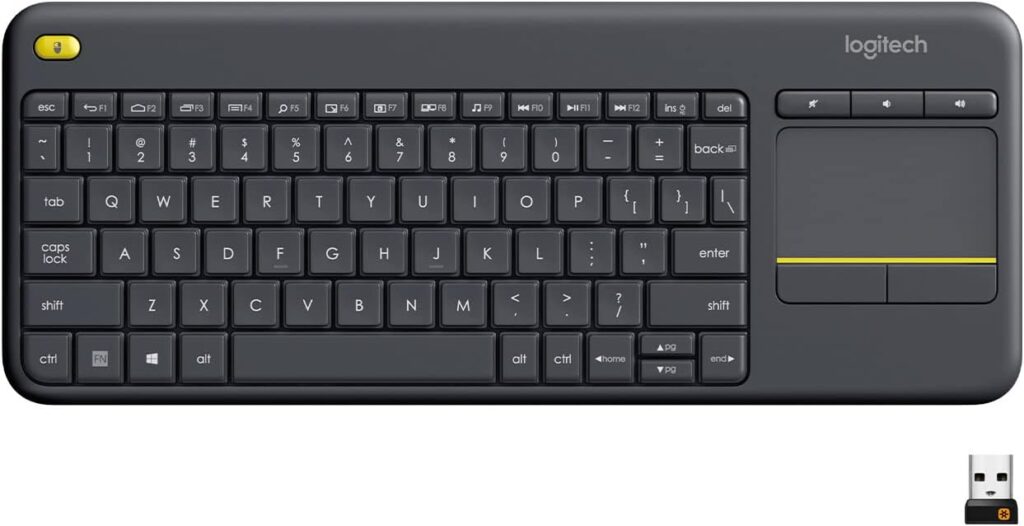
  • A 3.5 inch touchpad replaces the mouse completely, with two finger scrolling, tap to click and a second left click button for two handed use
  • Dedicated mute and volume keys sit apart from the top row, and every shortcut key is documented by Logitech
  • Two AA cells and a claimed 18 month life, with an on and off switch to stretch it further

Weaknesses

  • No backlighting of any kind, which makes a dark living room hard work for anyone who does not touch type
  • No Bluetooth, so it cannot pair with a smart TV, tablet or phone and always needs a free USB-A port
  • All plastic body that RTINGS found flexes and twists, with a build quality score the site lowered in October 2021

Key specifications

Switch type
Rubber dome membrane
Size class
Tenkeyless, no number pad
Connection
Logitech Unifying 2.4 GHz, USB 2.0 full speed
Bluetooth
Not supported
Touchpad
3.5 inch diagonal, about 76 mm by 47 mm
Backlight
None
Battery
2 x AA, not rechargeable, up to 18 months claimed
Dimensions
354.3 mm x 139.9 mm x 23.0 mm
Weight
380 g per Logitech specification, 390 g per the packaging diagram
Wireless range
Up to 33 ft or 10 m, manufacturer claim
Model numbers
Keyboard Y-R0055, receiver C-U0007 or C-U0008
Operating systems
Windows 7 and later, Chrome OS, Android. Logitech states 5.0 or higher on the specification page and 7 or later on the product page
Configuration software
Logitech Options
Spill resistance
Tested to a maximum of 60 ml, no immersion
Carbon footprint
4.9 kg CO2e, stated by Logitech

How we reviewed it

Basis
Research-based: assessed from the manufacturer’s published specifications, documentation and the independent sources listed at the end. We have not tested this unit ourselves; any measurement quoted belongs to the cited source.
Research period
September 15, 2026
Method

This assessment rests on documentation and published laboratory work. No unit was obtained or operated by this team. Research carried out on 15 September 2026 covered Logitech's United States product page, the technical specification support article, the FAQ and the download page for this model, the current Amazon.com listing with its Logitech supplied images, the Amazon Best Sellers list for Computer Keyboards, and the RTINGS laboratory review. Specification figures are taken from Logitech's support documentation in preference to retail copy. Where two Logitech sources disagree, both figures appear in the text. A section receives a score only where a cited source supports a judgement. Touchpad precision and typing latency are left unrated because no public measurement exists for this model.

Evidence

Dimensions, weight, wireless protocol, USB speed, battery type, backlight status and the dedicated special keys come from Logitech's technical specification article. Key functions, FN combinations, tap and scroll behaviour, notification options and the limits of key customization come from Logitech's FAQ for this model. Build quality, keycap material, switch type, size class and typing noise come from RTINGS, which states that it bought and tested a unit on its keyboard test bench. Touchpad dimensions, in-box contents, the carbon figure and the current compatibility statement come from the Amazon.com listing and the Logitech supplied packaging diagrams on it. The popularity claim comes from the Amazon Best Sellers list for Computer Keyboards retrieved on 15 September 2026 at 06:42 UTC.

Limitations

No member of this team has used a K400 Plus, so nothing here describes typing feel, tracking accuracy or long-term reliability from direct experience. RTINGS publishes its numeric test results behind a paid membership, so only its written verdict and the freely visible summary could be used. No independent measurement of wireless range, battery life, touchpad latency or key actuation force was found for this model. Search demand data is not available to this workflow, so for search interest I cannot confirm this. Logitech's specification page states Android 5.0 or higher while the product page and the retail listing both state Android 7 or later, and the specification page gives 380 g while the packaging diagram gives 390 g. Both figures are reported in the text. Whether the current Logi Options+ application supports this model could not be confirmed, because Logitech's supported device list requires a signed-in account and this workflow does not sign in to anything. Recent editorial coverage of this model comes mostly from low-authority affiliate sites, so it is not used as evidence anywhere in this review.

Design and build

5.5/10Mediocre
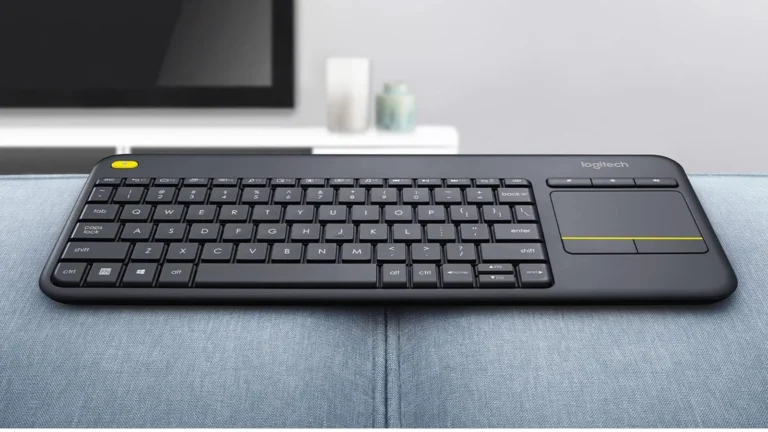
Logitech K400 Plus resting on a grey sofa arm, showing its flat black plastic body, yellow left click button and touchpad
Product illustration based on manufacturer imagery: an authentic crop of a Logitech product photograph, with no backdrop added. Product illustration based on manufacturer imagery (Logitech render)

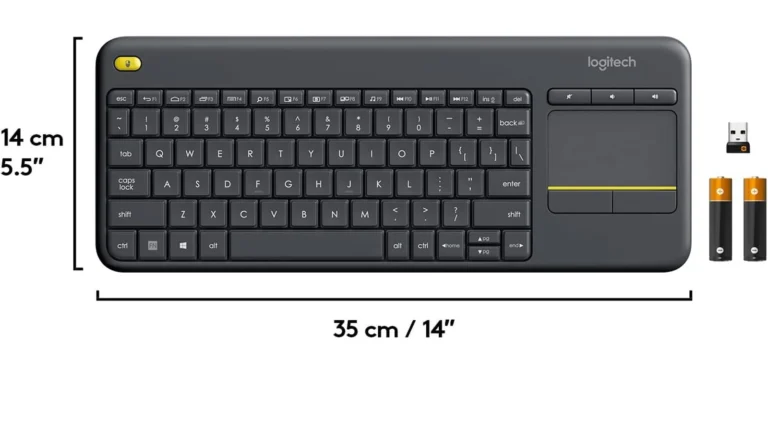
Logitech lists the keyboard at 354.3 mm long, 139.9 mm deep and 23.0 mm high, with a weight of 380 g (Logitech technical specifications). The packaging diagram on the United States retail listing rounds those numbers to 35 cm by 14 cm and gives the weight as 390 g. The gap is small, but it is two Logitech sources disagreeing. This review uses 380 g, because the specification article is the more precise document.

The shell is plastic throughout. RTINGS bought a unit and ran it through its keyboard test bench, and it reports a lot of flex and torsion in the chassis. The company lowered the board's build quality score in October 2021 after revisiting it. RTINGS also describes the ABS keycaps as slippery (RTINGS review).

That reads worse than it plays out. This is a membrane keyboard sold at the bottom of the market, and it spends its life on a sofa cushion rather than being carried in a bag. Our guide to mechanical and membrane keyboards sets out what the switch type means for feel and lifespan.

Two details help. Logitech rates the design as spill resistant and, unusually, publishes the test condition: a maximum of 60 ml of liquid, with no immersion. An on and off switch cuts power when the keyboard vanishes behind a cushion for a week.

Keys, shortcuts and media controls

7.5/10Good
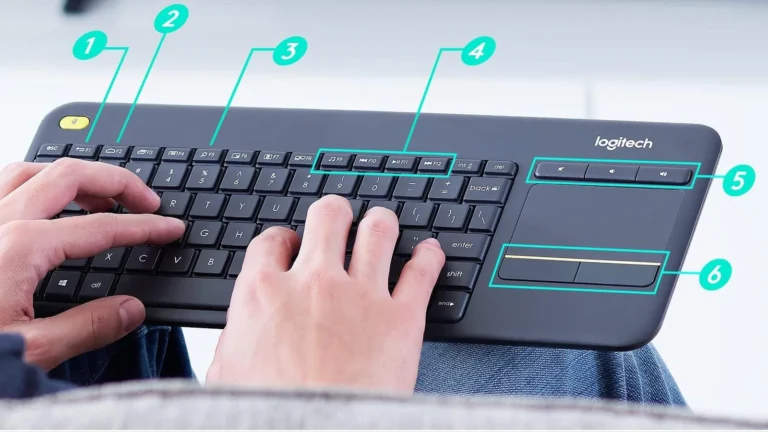
Logitech K400 Plus held on a lap with Logitech's numbered markers pointing at the back key, home key, search key, media keys, volume keys and click zones
Logitech's own annotated view. The markers read 1 back, 2 home, 3 search, 4 media hot keys, 5 volume controls, 6 left and right click. Authentic crop of a Logitech product photograph. Product illustration based on manufacturer imagery (Logitech render)

The top row carries icons rather than plain F-key labels, and Logitech documents what every one of them does. Running from the left: back, home, switch application, menu, search, show or hide the desktop, maximize window, switch screen, media, previous track, play and pause, and next track (Logitech FAQ). Mute, volume down and volume up sit as three separate keys above the touchpad, so volume never needs a modifier.

The FN layer fills the gaps left by a board with no number pad and no navigation cluster. FN with the arrow keys gives home, end, page up and page down. FN with Insert sleeps the PC, FN with Backspace takes a screenshot, and FN with Caps Lock toggles scroll lock.

Two limits matter. The top row acts as shortcuts by default, and switching it to standard F1 to F12 behavior requires the Logitech Options application. Customization then reaches only F1 to F9 and the Insert key, so letters and modifiers cannot be remapped in Logitech's software. Options can also disable Caps Lock, Scroll Lock, Insert and the Windows key, which is a small but useful touch for a keyboard that gets handed around a room.

The touchpad

7.0/10Good
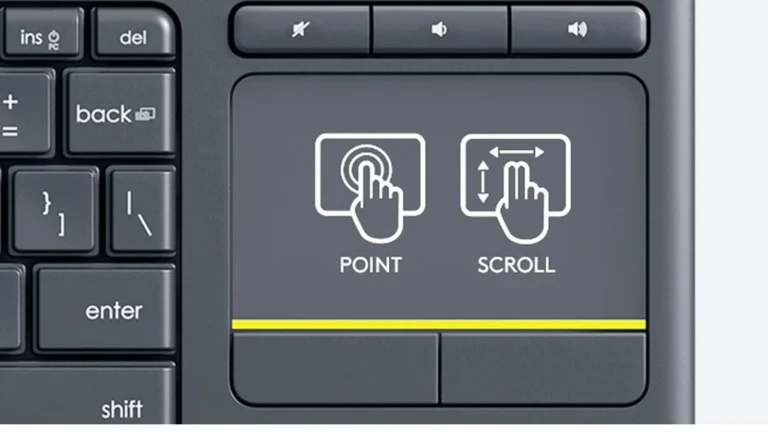
Close view of the Logitech K400 Plus touchpad, the three volume keys above it and the yellow line separating the left and right click zones
Authentic close crop of a Logitech product photograph. The point and scroll icons on the pad are Logitech's own overlay, not markings on the hardware. Product illustration based on manufacturer imagery (Logitech render)

The touchpad is the reason this keyboard exists. Logitech gives it a 3.5 inch diagonal (Logitech technical specifications), and the retail listing puts the pad at 76 mm by 47 mm. The two figures agree with each other, because a rectangle of 76 mm by 47 mm has a diagonal of about 89 mm, which is 3.5 inches.

It does more than move a pointer. Two fingers scroll vertically and horizontally by default, and holding FN while sliding one finger scrolls in any direction. One tap clicks, two taps double click, and a two finger tap produces a right click. Tap to click can be switched off by pressing FN together with the left mouse button.

Below the yellow line at the bottom of the pad sit two physical click zones, left and right. A second left click button sits at the top left corner of the keyboard. That is the detail that makes two handed use work, because the right hand can drive the pointer while the left thumb clicks.

Logitech Options adjusts pointer speed, scroll direction, smooth scrolling and the two scroll axes. No laboratory has published tracking accuracy or pointer latency measurements for this pad, so this review does not rate its precision and no claim is made about how it compares with a laptop trackpad.

Living-room use and comfort

7.5/10Good
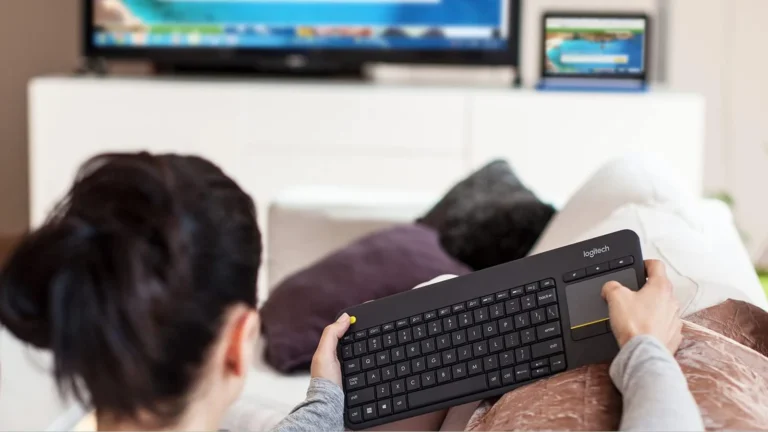
Person on a sofa holding the Logitech K400 Plus on their lap with a thumb near the yellow left click button and a hand on the touchpad, a television in the background
Product illustration based on manufacturer imagery: an authentic crop of a Logitech lifestyle photograph, with no backdrop added. Product illustration based on manufacturer imagery (Logitech render)

At 380 g the K400 Plus sits on a lap without becoming a weight, and its 354 mm width is close to a laptop keyboard, so both hands reach the home row while the device rests on your knees. The touchpad sitting to the right of the letters, rather than below them, is what keeps the footprint down.

Noise matters more than it sounds in a room where somebody else is watching. RTINGS rates the typing noise as very quiet and calls the board decent for office use on that basis (RTINGS review).

The missing feature is light. There is no backlighting of any kind, which Logitech's specification article confirms with a plain entry. In a dark living room, unlit ABS legends are guesswork for anyone who does not touch type. Logitech's own retail listing points buyers who want illuminated keys toward the K830 instead.

The layout also drops the number pad, and RTINGS classes the board as tenkeyless. For typing a search term into a streaming app that costs nothing. For entering numbers in a spreadsheet it will grate.

Wireless connection and setup

6.0/10Fair
The black and silver Logitech Unifying USB receiver supplied with the K400 Plus, shown against Logitech's graphic for six paired devices
Authentic crop of Logitech's Unifying receiver image. The figure of six devices is Logitech's specification for the Unifying receiver, not a K400 Plus feature on its own. Product illustration based on manufacturer imagery (Logitech render)

Setup is a USB port and nothing else. The Unifying receiver ships in the box, and Logitech's specification lists the link as its own 2.4 GHz protocol running over USB 2.0 at full speed. There is no pairing screen, no account and no application needed before you start typing.

The dongle is the Logitech Unifying type, which Logitech designs to carry up to six compatible Logitech devices on one receiver. That helps if a Logitech mouse already occupies a port on the same machine.

The cost of that simplicity is real. There is no Bluetooth, so the keyboard cannot talk to a smart TV, a tablet or a phone on its own, and it cannot hold more than one host at a time. A free USB-A port is mandatory. Our comparison of Bluetooth and 2.4 GHz keyboard connections sets out which link suits which setup.

Logitech claims a range of up to 33 feet, which it also gives as 10 metres, and attaches the caveat that range varies with the user, the environment and the computer (Logitech product page). No independent range test for this model was found during research, so treat that number as a manufacturer figure rather than a result.

Size, power and value

7.0/10Good
Logitech size diagram of the K400 Plus marked 14 cm deep and 35 cm wide, with the Unifying receiver and two AA batteries beside it
Logitech's own dimension diagram, showing the keyboard alongside the Unifying receiver and the two AA cells supplied in the box. Authentic crop, no backdrop added. Product illustration based on manufacturer imagery (Logitech render)

Two AA cells power the keyboard, and Logitech claims up to 18 months from them with the caveat that the figure depends on use and computing conditions (Logitech technical specifications). The cells are not rechargeable. Logitech supplies two of them in the box along with the receiver, so the keyboard works as soon as it arrives.

That choice divides buyers. A rechargeable keyboard never needs a trip to the battery drawer, and a keyboard that runs for a year and a half on two cells never needs a cable. For a device that lives beside a television and gets picked up twice a day, the second pattern is the easier one to live with. The on and off switch stretches the interval further.

Logitech also publishes a carbon figure for the product, 4.9 kg CO2e, and states that the keyboard is made with recycled plastic.

Value is where the K400 Plus earns its ranking. It does one job, it needs no subscription and no account, and current buying options appear in the table on this page.

Alternatives worth considering

Logitech Pebble Keys 2 K380s

The sensible choice if the missing Bluetooth is the dealbreaker. The K380s pairs directly with a smart TV, tablet or phone and switches between three of them, but it has no touchpad, so a media box still needs a separate mouse.

Logitech Signature K650

Better if the keyboard will mostly sit on a table rather than a lap. It is full size with a wrist rest and a number pad, which the K400 Plus gives up to stay small enough to hold.

Where to buy

We have no current, in-stock price for the K400 Plus from the retailers we track. The links below go to the listings we last saw; the price shown there may have changed.

No retailer listing is on record for this exact model at the moment.

Prices and availability come from retailer feeds and change without notice; the retailer’s page is authoritative. We may earn a commission if you buy through these links.

Final verdict

K400 Plus
6.8/10Editorial ratingFair

Score breakdown

Scores run from 1.0 to 10.0: 9+ exceptional, 8–8.9 excellent, 7–7.9 good, 6–6.9 fair, 5–5.9 mediocre, below 5 poor. The overall score is the weighted average of the rated sections; unrated sections do not count.

Pros

  • A 3.5 inch touchpad replaces the mouse completely, with two finger scrolling, tap to click and a second left click button for two handed use
  • Dedicated mute and volume keys sit apart from the top row, and every shortcut key is documented by Logitech
  • Two AA cells and a claimed 18 month life, with an on and off switch to stretch it further
  • Plug and play over the Unifying receiver, with no account, app or pairing step required to start typing
  • Light at 380 g and rated very quiet by RTINGS, which suits a shared room

Cons

  • No backlighting of any kind, which makes a dark living room hard work for anyone who does not touch type
  • No Bluetooth, so it cannot pair with a smart TV, tablet or phone and always needs a free USB-A port
  • All plastic body that RTINGS found flexes and twists, with a build quality score the site lowered in October 2021
  • Software support rests on the older Logitech Options application, and support in the newer Logi Options+ could not be confirmed
  • Only F1 to F9 and the Insert key can be remapped, so letters and modifiers are fixed

Conclusion

The K400 Plus is a narrow tool that has not needed to change. It turns a PC-connected television into something you can drive from a sofa, using one USB port, two AA cells and no software at all. That is why it still sits near the top of a large retailer category years after its introduction.

The compromises are just as clear, and every one of them is visible before you buy. No backlight, no Bluetooth, a flexible plastic body and a membrane feel. None of those are faults in the sense of something going wrong. They are the reasons the keyboard costs what it costs.

Buy it for the living room. Do not buy it as a desk keyboard, and think twice if that living room is usually dark.

Andreea-Viviana Jitaru’s take

The interesting thing about the K400 Plus in 2026 is not the keyboard itself. It is what the ranking says about the problem it solves. Nothing cheap has replaced the idea of putting a trackpad where the number pad should be, and the obvious modern version, one that pairs straight to a smart TV over Bluetooth, does not exist in Logitech's range at this price.

That leaves a product with a clear ceiling, and the score reflects it. This is a device that is very good at one narrow job and unremarkable at everything else. A reader shopping for a desk keyboard should look at almost anything else covered on this site. A reader who has a PC under a television and is tired of balancing a mouse on the arm of a chair will find that this does the job and keeps doing it.

The one change worth asking Logitech for is light. A backlit version at a slightly higher price would remove the single complaint that applies to the exact room this keyboard is sold for.

Buy it if
  • You run a PC, mini PC or media box into a television and want one device for typing and pointing
  • You want a keyboard that works the moment its receiver goes into a USB port
  • You would rather change two AA cells occasionally than keep a charging cable nearby
  • You need a quiet keyboard for a room where other people are watching something
Consider an alternative if
  • You type in a dark room and do not touch type
  • You want to connect straight to a smart TV, tablet or phone with no PC in between
  • You want to switch one keyboard between several devices
  • You want a rigid chassis, a mechanical typing feel or a full number pad

About the reviewer

Editor

Andreea edits the written side of the site: the editor's note on each product page, the category buying guides and the blog. Her brief is to say what a specification table cannot — where a product is genuinely good, where it quietly compromises, and who should walk past it. A note that reads like marketing copy, or that praises a product without naming a drawback, does not go live.

This is a research-based assessment: the reviewer compiled it from published specifications, documentation and independent measurements rather than from testing the unit.

Profile and other work →

Sources

  • Logitech K400 Plus product page (United States)logitech.com
  • Logitech technical specifications for the Wireless Touch Keyboard K400 Plussupport.logi.com
  • Logitech FAQ for the Wireless Touch Keyboard K400 Plussupport.logi.com
  • Logitech download page for the Wireless Touch Keyboard K400 Plussupport.logi.com
  • RTINGS laboratory review of the Logitech K400 Plusrtings.com
  • Amazon.com product listing for the Logitech K400 Plusamazon.com
  • Amazon Best Sellers in Computer Keyboards, retrieved 15 September 2026amazon.com

← Back to the blog