
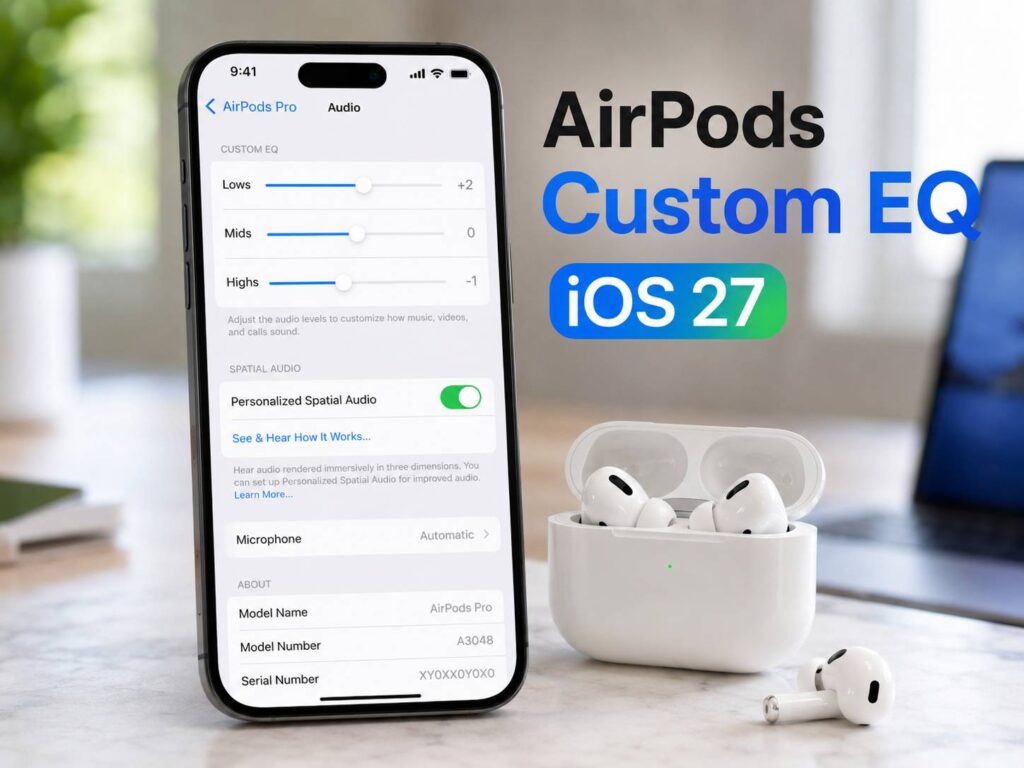
Apple is finally giving AirPods users more control over how their earbuds sound. With iOS 27, AirPods Custom EQ lets users adjust lows, mids, and highs from AirPods settings.
That sounds like a small change. Still, it could make AirPods feel more personal than ever. For years, users could pick music presets on iPhone, use Accessibility audio tools, or trust Apple’s automatic tuning. Now they get a clearer way to shape the sound by hand.
For many people, this is the AirPods feature they wanted years ago.
Why AirPods Custom EQ Is a Big Deal
AirPods have always focused on simple use. You open the case, pair them fast, and start listening. That clean setup helped make them popular, but it also came with a tradeoff. Apple kept deep sound controls limited.
Custom EQ changes that. Users can now tune three key parts of the sound:
- Lows for bass, drums, and deeper tones
- Mids for voices, guitars, podcasts, and calls
- Highs for detail, clarity, and sharper sounds
So, instead of accepting one sound profile, users can shape the sound around their own ears. That matters for music. It matters for podcasts too. It even matters for YouTube, FaceTime, Netflix, and calls.
A small change in mids can make speech clearer. A small bass boost can make music feel fuller. Then, a light cut in highs can make long listening sessions less sharp.
Apple Is Fixing a Common AirPods Complaint
AirPods sound good for most people, but not everyone likes the same tuning. Some users want stronger bass. Others want cleaner voices. Some think AirPods sound too bright during podcasts or videos.
Until now, iPhone users had limited options. Apple Music has EQ presets, but those presets do not feel personal. They also do not give the same kind of control as a simple three-band equalizer.
AirPods Custom EQ feels better suited to daily use. It sits inside AirPods settings, so it feels tied to the earbuds themselves. That makes sense. AirPods are not only for music anymore. People use them at work, at the gym, on flights, during walks, and in bed before sleep.
For that reason, sound control should not live only inside a music app.
How Custom EQ Can Improve Daily Listening
The best part of Custom EQ is its practical value. Most users will not need a complex audio menu. They just need a few clear controls that make sound feel right.
For music, the lows control should help users who want more punch. Hip-hop, pop, dance, and rock can all feel stronger with a careful bass lift. Still, a small change works better than a heavy boost. Too much bass can hide vocals and detail.
For podcasts, the mids control will matter more. Voices live mostly in the mid range, so a small lift can make speech easier to follow. This can help during travel, cooking, walking, or office work.
For movies and shows, the right mix of lows and mids can make dialogue easier to hear without making explosions or background music too loud.
Then there are long listening sessions. Some people find higher tones tiring after an hour or two. A small cut in highs can make AirPods feel smoother, mainly with spoken content.
Custom EQ and Noise Cancelling Features Work Toward the Same Goal
Custom EQ and noise control serve different needs, but they both help users hear better in real life. Noise cancellation removes outside sound. EQ changes the sound coming from the earbuds.
That pairing matters. A strong noise cancelling mode can reduce traffic noise, office chatter, or airplane hum. Custom EQ can then make music, voices, and videos sound closer to what the user wants.
This is why AirPods Custom EQ fits well into the broader market for noise cancelling headphones in 2026. Buyers no longer look only at battery life or brand name. They want better control, cleaner calls, stronger noise blocking, and sound that fits their own taste.
Apple seems to understand that shift. AirPods Custom EQ gives users one more reason to stay inside the Apple audio setup.
Custom EQ Versus Adaptive EQ
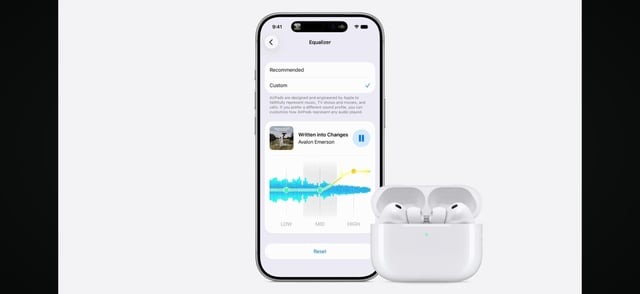
AirPods already use Adaptive EQ on supported models. That feature adjusts sound automatically based on ear fit and shape. It works in the background, so users do not have to touch anything.
Custom EQ has a different role. It gives the user direct control.
Adaptive EQ tries to make AirPods sound balanced. Custom EQ lets the listener decide what balanced means. That difference matters. A person who listens to bass-heavy playlists may not want the same sound as someone who listens to audiobooks all day.
So, the two features can work together in a useful way. Apple can keep its smart tuning, and users can still make small changes based on taste.
Best AirPods Custom EQ Settings to Try First
There is no single best AirPods EQ setting for everyone. Ears differ. Music taste differs. AirPods models differ too. Still, these simple starting points can help:
- More bass: raise lows slightly, keep mids near center, keep highs near center
- Clearer podcasts: raise mids slightly, lower highs a little
- Softer sound: lower highs slightly, keep lows and mids steady
- Better vocals: raise mids slightly, lower lows a little
- Warmer music: raise lows slightly, lower highs slightly
- More detail: raise highs slightly, keep lows under control
Small moves usually sound best. If you push one area too far, the sound can become muddy or sharp. Start with tiny changes, listen for a few minutes, then adjust again.
That slower method works better than chasing a perfect setting in ten seconds.
What This Means for Spotify, YouTube, and Apple Music
AirPods Custom EQ should matter across more than Apple Music. Since Apple places the control inside AirPods settings, users will likely expect it to affect sound across apps.
That makes the feature useful for Spotify, YouTube Music, podcast apps, games, streaming services, and calls. People do not want to change sound settings in five different places. They want their AirPods to sound right everywhere.
This point may turn Custom EQ into one of the most searched iOS 27 audio features. Users will look for phrases like AirPods EQ settings, AirPods bass boost, AirPods Pro custom EQ, best AirPods settings for Spotify, and iOS 27 AirPods equalizer.
Should You Install iOS 27 Just for Custom EQ?
Custom EQ is exciting, but most users should wait for a stable iOS 27 release. Beta software can bring bugs, app issues, battery drain, and audio glitches. That is a bad trade for earbuds used every day.
AirPods need to work during calls, meetings, workouts, and travel. A new EQ feature is useful, but stable audio matters more.
The better move is simple. Wait until iOS 27 reaches a public version that feels ready for daily use. Then test Custom EQ with your usual playlists, podcasts, and videos.
My Opinion on AirPods Custom EQ
AirPods Custom EQ feels overdue, but it still lands at the right time. Earbuds have changed. They are no longer simple music accessories. They are work tools, fitness tools, travel tools, and entertainment devices.
Apple’s old sound controls felt too limited for that kind of use. A basic lows, mids, and highs setup gives people the control they need without turning AirPods settings into a studio menu.
The feature will not turn AirPods into audiophile headphones. It will not fix every sound complaint either. Still, it should make AirPods easier to enjoy for more people, and that is what matters.
If Apple supports enough AirPods models, Custom EQ could become one of the most useful iOS 27 upgrades.