Tactile vs Linear vs Clicky Switches: What Changes?
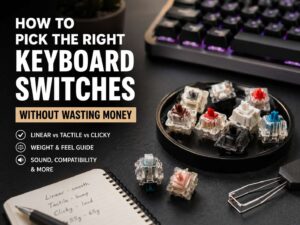
Tactile vs linear vs clicky switches is one of the first choices people face with a mechanical keyboard. The switch type changes the feel, sound, speed, and comfort of the board. It can make a keyboard feel smooth and fast, firm and controlled, or loud and sharp.
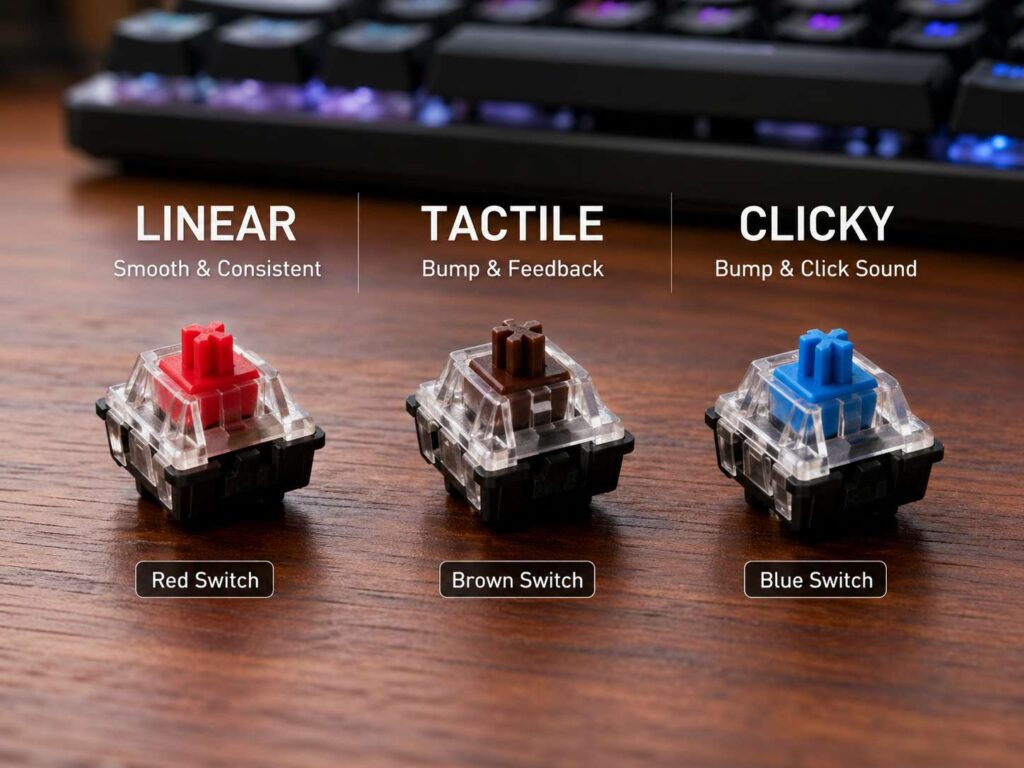
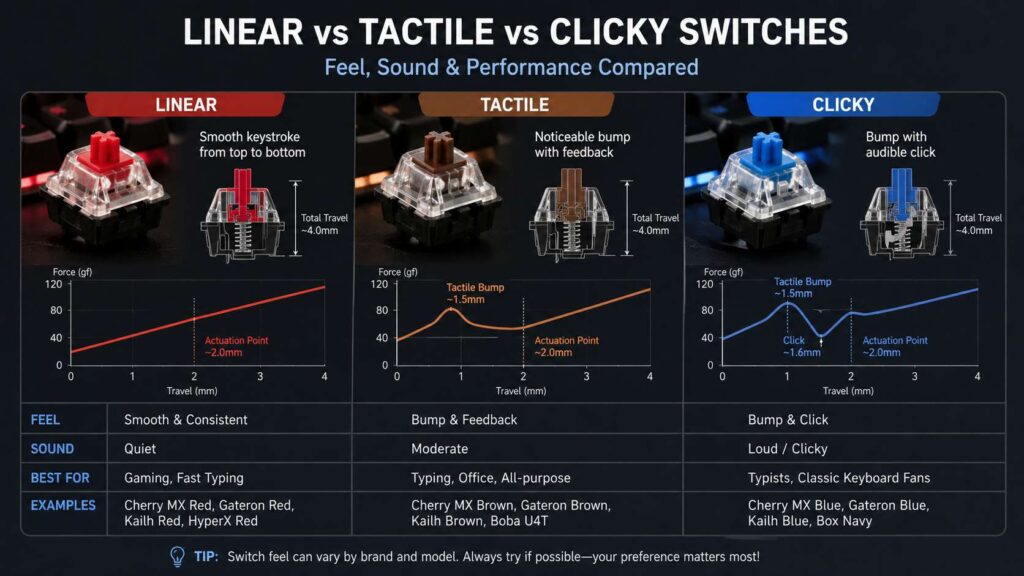
Linear switches move straight down with no bump. Tactile switches add a small bump during the key press. Clicky switches add that bump, then add a clear click sound.
That small change makes a big difference. A linear switch can feel quick in games. A tactile switch can feel safer for typing. A clicky switch can feel fun, but it can annoy people nearby.
Red, brown, and blue are the usual starting point. Red switches usually mean linear. Brown switches usually mean tactile. Blue switches usually mean clicky. Still, color names do not tell the whole story anymore. Brands now use different springs, housings, stems, and sound designs.
For that reason, switch type matters more than color. So, instead of asking only for “red switches” or “brown switches,” it helps to ask what kind of feel you want first.
What Are Linear Switches?
Linear switches feel smooth from top to bottom. They do not have a tactile bump, and they do not make a click on purpose. Press the key, and it travels in one clean motion.
Linear switches make repeated key presses feel easy. Movement keys in FPS games can feel faster, cleaner, and less tiring. So, red switches, speed switches, and many magnetic keyboard switches often target gamers.
Popular linear switches include red, black, silver, and speed-style switches. Red switches usually feel light. Black switches usually feel heavier. Silver switches often actuate sooner. The exact feel changes by brand, but the core idea stays the same.
For typing, linear switches can feel calm and soft. Yet, new users sometimes make more mistakes at first. There is no bump to tell your finger that the key has actuated. So, it is easy to press too hard or hit nearby keys by accident.
The adjustment can take a few days. Then linear switches can feel smooth, quiet, and clean. They suit users who want a fast board, a softer sound, and a simple key press.
A good linear switch works best in a solid keyboard case. Thick keycaps, a desk mat, and good stabilizers can make the sound deeper. Cheap cases can make the same switch sound hollow.
What Are Tactile Switches?
Tactile switches add a bump during the press. That bump gives your finger feedback. You feel the key register without hearing a loud click.
This makes tactile switches a strong middle choice. They work well for typing, office tasks, school work, coding, and mixed gaming. They give more feedback than linear switches but less noise than clicky switches.
Brown switches are the most common tactile option. That makes them an easy first mechanical keyboard switch. They feel familiar, light enough for long sessions, and quieter than blue switches.
Still, not all brown switches feel the same. Some have a soft bump. Others have a sharper bump. Premium tactile switches can feel much stronger than standard browns.
That feedback can help you type with more control. The bump tells your finger that the key press has registered. So, you do not need to press the key all the way down every time. That can make long writing sessions feel easier.
Tactile switches are not silent, though. They do not create a click sound by design, but the key still makes noise at the bottom and top of the stroke. The keyboard case, plate, keycaps, and stabilizers all change the final sound.
For most people, tactile switches offer the safest start. They feel clear without becoming too loud.
What Are Clicky Switches?
Clicky switches give both physical and sound feedback. They have a tactile bump, then they add a click sound near the actuation point. Blue switches are the classic example.
This switch type feels crisp and lively. Each press gives a clear signal. Many typists enjoy that old-school mechanical keyboard feel.
Clicky switches can make typing feel more deliberate. They give strong feedback, and that can help with rhythm. They work well in a private room, a home office with no calls, or a setup where sound does not matter.
The problem is noise. Clicky switches stand out in offices, dorm rooms, bedrooms, libraries, and shared spaces. A microphone can pick them up during calls or online games. For this reason, clicky switches are rarely the best choice for shared work.
Some clicky switches use a click jacket. Others use a click bar. Click bar switches often sound cleaner and sharper. Click jacket switches can sound more rattly, mainly on cheaper boards.
Pick clicky switches only if you enjoy the sound and control the room around you. They feel fun, but they are not polite in every space.
Red, Brown, and Blue Switches Explained
Red, brown, and blue are the best-known switch names. They are useful labels, but they can mislead you.
Red switches usually mean linear. They feel smooth and light. Many gaming keyboards use red-style switches.
Brown switches usually mean tactile. They add a bump but keep the sound more controlled. Many office and all-purpose keyboards use brown-style switches.
Blue switches usually mean clicky. They have a bump and a loud click. They suit private typing more than shared spaces.
The problem starts when different brands use the same colors with different feel. A red switch from one brand can feel lighter than another red switch. A brown switch can feel almost linear on one board and much bumpier on another. A blue switch can sound clean on one keyboard and harsh on another.
So, color helps as a quick guide, but it should not be your only rule. Feel, force, travel, and sound matter more.
A full guide like stop buying the wrong keyboard switches can help if you keep choosing switches that sound good in reviews but feel wrong at your desk.
Actuation Force, Travel, and Bottoming Out
Switch specs can look confusing, but only a few numbers matter at first.
Actuation force tells you how much pressure the switch needs. It is usually measured in grams. A 45 g switch feels light. A 60 g switch feels firmer. A heavier switch can reduce accidental presses, but it can tire your fingers faster.
Pre-travel tells you how far the key moves before it registers. Many standard mechanical switches actuate near 2 mm. Some gaming switches actuate sooner.
Total travel tells you how far the key moves from top to bottom. Many full-size mechanical switches travel near 4 mm. Low-profile switches travel less.
Bottoming out means pressing the key all the way down. It is easy to do without thinking. It creates more sound and can make typing feel harder over time.
Linear switches make bottoming out easier to miss, since there is no bump. Tactile and clicky switches give more feedback, so it is easier to stop pressing sooner. That can make typing feel lighter after some practice.
Best Switch Type for Gaming
Linear switches are the easiest pick for gaming. They feel smooth, quick, and predictable. That matters for rapid key presses and fast movement.
FPS players often like light linear switches. Keys such as W, A, S, and D feel easy to tap over and over. Racing, action, and competitive games can feel clean on linear switches too.
Speed switches and magnetic Hall effect switches go further. They often offer shorter actuation. Some magnetic boards let users adjust the actuation point. Some add rapid trigger, which resets a key based on movement rather than a fixed height.
That sounds attractive, but very sensitive switches can cause mistakes. A shallow actuation point can trigger a key before you mean to press it. For this reason, faster is not always better.
Tactile switches still work fine for gaming. The bump gives control, but it can feel less smooth during repeated taps.
Clicky switches work for casual gaming, but they can ruin voice chat. Teammates may hear each press through the mic. Streamers and online players should be careful here.
For most gaming setups, pick linear switches. For mixed gaming and writing, pick tactile switches. For private casual gaming, clicky switches can work.
Best Switch Type for Typing, Work, and School
Tactile switches often feel best for typing. The bump gives your fingers a clear cue. That helps with emails, essays, code, notes, and long writing sessions.
A tactile switch can make each press feel more controlled. You know the key has registered, so you do not need to slam it down. After some practice, this can reduce harsh typing.
Linear switches can work well for typing too. They feel smooth and quiet, mainly in a well-built keyboard. People who type lightly often enjoy them. Still, light linear switches can cause accidental key presses.
Clicky switches give the strongest feedback. They can make typing feel fun and clear. Yet, the sound can become tiring for nearby people.
For shared work, tactile switches or silent linear switches make more sense. For home writing, tactile switches are the safer choice. For a private setup with no sound limits, clicky switches can be satisfying.
If you are still unsure whether the switch upgrade makes sense, read do you really need a mechanical keyboard before buying a new board.
Quiet, Thocky, Clacky, or Loud: What Affects Sound?
Switch type plays a major role in sound, but it does not act alone. The keyboard case, plate, keycaps, foam, desk mat, and stabilizers all shape what you hear.
Linear switches often sound smoother and lower. Tactile switches add more texture. Clicky switches sound loud by design.
Terms like “thocky keyboard switches” and “creamy keyboard sound” describe a deeper and softer sound. Thick keycaps, a heavier case, foam, and lubed switches can help create that sound.
A clacky keyboard sounds sharper. Thin keycaps, metal plates, and hollow plastic cases can push the sound in that direction.
For a quiet setup, choose silent linear or silent tactile switches. Add a desk mat. Use thicker keycaps. Check the stabilizers on large keys like spacebar, enter, backspace, and shift.
Clicky switches will stay loud. Mods can change the tone, but they will not remove the click.
Hot-Swappable Keyboards Make Testing Easier
Hot-swappable keyboards make switch testing much easier. You can pull switches out and replace them without soldering. That helps a lot if you are not ready to commit.
A switch tester can help, but it has limits. One switch in a small plastic block does not feel like a full keyboard. The case, plate, and keycaps change the sound and feel.
A better test is simple. Buy a hot-swappable keyboard and try small packs of linear, tactile, and clicky switches. Put them on the letter keys, spacebar, and gaming keys. Then use each type for a few days.
This gives you a real feel for actuation force, bump strength, travel, and sound. It also stops you from buying a full set based only on a short video.
Low-Profile, Optical, and Magnetic Switches
Mechanical keyboard switches now come in more forms than the classic red, brown, and blue choices.
Low-profile switches have shorter travel and thinner keycaps. They feel closer to a laptop keyboard, but they keep a mechanical feel. They suit travel keyboards, compact desks, and users who dislike tall keycaps.
Optical switches use light to register a press. Many gaming keyboards use them for speed and long rated life. They can feel linear, tactile, or clicky, but linear optical switches are common.
Magnetic Hall effect switches use magnets and sensors. Many of these keyboards let users adjust actuation. This means you can set a lighter press for gaming or a deeper press for typing.
These newer switch types give buyers more control. Still, the main choice remains the same. Smooth, bumpy, or clicky.
Which Switch Should You Choose?
Choose linear switches if you want smooth travel, fast gaming input, and a cleaner sound. They suit gamers, quiet setups, and users who like a soft key press.
Choose tactile switches if you want feedback for typing without the loud click. They suit office work, school, writing, coding, and mixed use. For most first-time mechanical keyboard buyers, this is the safest choice.
Choose clicky switches if you want a loud, classic mechanical keyboard feel. They suit private rooms and users who love strong feedback.
A simple rule works well. Pick linear for gaming. Pick tactile for typing and mixed use. Pick clicky for sound and fun in a private space.
Your hand style matters too. Heavy typists may prefer firmer switches. Light typists may prefer softer switches. Users who make many mistakes on light switches should try heavier springs or tactile bumps.
Final Verdict
Tactile vs linear vs clicky switches comes down to feel and sound. Linear switches feel smooth. Tactile switches add a bump. Clicky switches add a bump and a click.
For gaming, linear switches make the most sense. For typing, tactile switches fit most people better. For a loud and classic keyboard feel, clicky switches deliver the strongest feedback.
The best switch is not always the one with the most hype. It is the one that fits your fingers, your room, and your daily habits. Start with the feel first. Then think about sound, force, travel, and keyboard build.
A good switch should make your keyboard easier to use every day. That matters more than the color name printed on the product page.