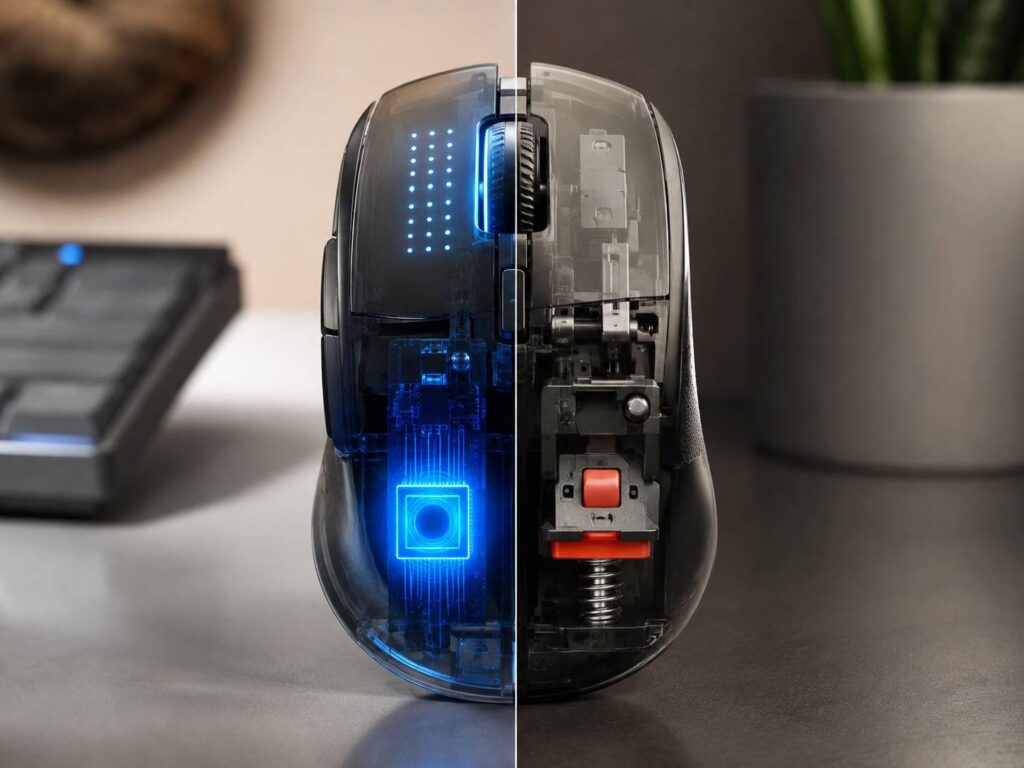
Haptic mouse clicks are starting to change something that has stayed almost the same for decades, the basic mouse button.
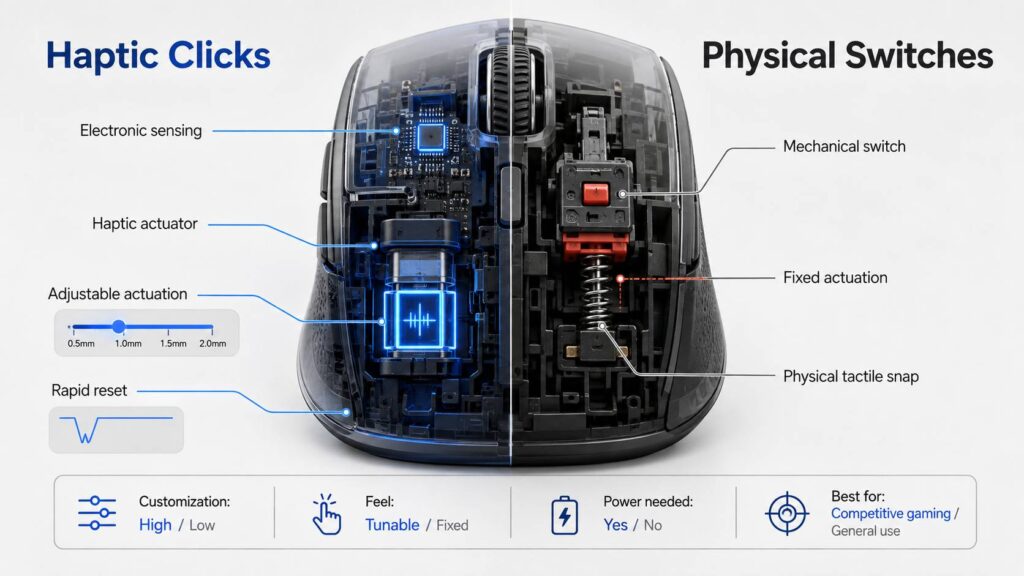
Traditional mice rely on a physical switch under the button. You press down, the mechanism snaps, and the mouse registers the click. Haptic systems take a different route. They can detect button movement electronically, then create the familiar click sensation through controlled tactile feedback.
That difference may sound small, but it opens the door to features such as adjustable actuation, faster reset behavior, and configurable click strength.
Physical switches still have plenty going for them, though. They are simple, familiar, widely available, and often feel more natural because the click comes directly from the switch mechanism.
So, are haptic mouse clicks actually better than physical switches? Not in every situation. The better choice depends on how you use your mouse, what kind of feedback you prefer, and how much you care about customization.
What Are Haptic Mouse Clicks?
A haptic mouse click separates two things that traditional switches usually handle at the same time.
Those are:
- Detecting the button press
- Producing the tactile click sensation
With a conventional mechanical switch, pressing the mouse button pushes directly against a small internal mechanism. Once you apply enough force, the switch snaps into another state and registers the input.
The snap also creates the familiar click you feel under your finger.
A haptic system can work differently.
Instead of waiting for a microswitch to physically activate, the mouse can measure the position or movement of the button electronically. Once the button reaches a chosen actuation point, the mouse registers the input.
Then a haptic actuator creates a short tactile pulse to simulate the feeling of a traditional click.
In practical terms, the mouse can decide when the click registers independently from when the button produces its strongest tactile feedback.
That gives manufacturers much more control over the experience.
Depending on the implementation, users may be able to adjust:
- Actuation distance
- Reset distance
- Haptic strength
- Repeated click behavior
- Different button profiles
The Logitech G PRO X2 SUPERSTRIKE is one of the clearest examples of this approach in 2026. It uses Logitech’s Haptic Inductive Trigger System, often called HITS, instead of conventional microswitches for its main buttons.
The buttons still physically move. The important difference is that a standard mechanical switch no longer decides the exact moment when the click activates.
How Physical Mouse Switches Work
Most mice still rely on physical switches under their main buttons.
When you press the outer shell, the button transfers that force to the switch below. The internal switch mechanism then activates and sends a signal to the mouse controller.
There are a few different types worth separating.
Mechanical Microswitches
Traditional mechanical switches use physical electrical contacts.
Once enough pressure reaches the switch, the internal mechanism snaps and closes or opens those contacts.
This design remains popular because mechanical switches are:
- Compact
- Affordable
- Widely available
- Easy to integrate
- Naturally tactile
- Available with different click forces and sound profiles
One limitation is that physical electrical contacts can briefly bounce when they close.
The mouse firmware normally filters this through debounce logic so one press does not appear as multiple clicks.
Over time, worn or damaged contacts can sometimes contribute to unwanted double-clicking.
That does not mean every mechanical switch will eventually fail this way. Build quality, switch design, firmware, button tension, and usage all affect long-term reliability.
Optical Mouse Switches
Optical switches use a different way to detect the click.
Rather than relying on two electrical contacts touching each other, the switch changes an optical path. A sensor then detects that change.
Razer’s optical mouse switches are a well-known example. Their design uses infrared light and a moving shutter to detect actuation.
The button still gives you a physical tactile snap, though.
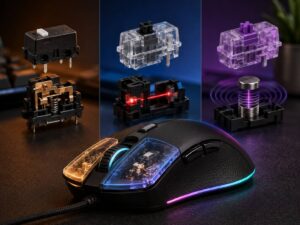
That makes optical switches different from haptic systems. Optical switches change how the input is detected, while haptic designs can change both the sensing method and the way tactile feedback is produced.
Hybrid Switches
Hybrid designs combine elements from different technologies.
Logitech’s LIGHTFORCE switches, for example, combine optical actuation with the familiar physical feel of a mechanical switch.
This type of design tries to keep the crisp, natural click people already know while replacing traditional electrical contact detection.
So there is no simple divide between “old physical switches” and “new haptic switches.” Modern gaming mice now use several different approaches.
Haptic Mouse Clicks vs Physical Switches at a Glance
| Feature | Haptic Click System | Mechanical Switch | Optical Physical Switch |
|---|---|---|---|
| Click detection | Electronic position or movement sensing | Physical electrical contacts | Optical sensing |
| Tactile feedback | Electronically generated | Mechanically generated | Mechanically generated |
| Adjustable actuation | Often possible | Usually fixed | Usually fixed |
| Adjustable reset point | Often possible | Usually fixed | Usually fixed |
| Adjustable click strength | Possible | Usually fixed | Usually fixed |
| Requires power for feedback | Yes | No | Detection requires power |
| Electrical contact bounce | Not inherent to sensing method | Possible | Avoided |
| Traditional click feel | Simulated | Native | Native |
| Software dependence | Usually higher | Low | Usually low |
| Availability | Still limited | Very common | Common in gaming mice |
The exact experience still depends heavily on the mouse itself.
A well-designed mechanical switch can feel better than a poorly tuned haptic one. Likewise, an excellent haptic system can offer flexibility that a normal microswitch simply cannot match.
Adjustable Actuation Is the Biggest Difference
The biggest advantage of haptic and analog click systems is adjustable actuation.
Traditional switches normally have one fixed activation point.
You press the button until the switch reaches the point where it snaps. That physical threshold does not normally change through software.
Analog sensing changes that.
Because the mouse can track button position continuously, the firmware can decide how far the button must move before it registers a click.
Someone who wants a very sensitive gaming mouse could select a shallow actuation point.
Another user could choose a deeper setting to make accidental clicks less likely.
This works in a similar way to adjustable actuation on modern analog and Hall effect gaming keyboards.
The Logitech PRO X2 SUPERSTRIKE, for example, supports multiple selectable actuation points for its main buttons.
You probably will not change the setting every day. Still, having the option is useful if you play different types of games or prefer a very specific click feel.
Rapid Trigger Changes Repeated Clicking
Adjustable reset behavior may be even more useful than adjustable initial actuation.
A traditional switch needs to return far enough toward its resting position before it becomes ready for another click.
That reset point is usually fixed by the physical switch mechanism.
An analog or haptic system can use software to determine when the button resets.
This makes rapid-trigger behavior possible.
Instead of waiting for the button to return to one specific fixed position, the mouse can become ready for another click after only a small amount of upward movement.
That may help with actions such as:
- Semi-automatic firing
- Repeated ability activation
- Strategy game selections
- MOBA inputs
- Rhythm games
- Fast repeated menu commands
It does not magically make your finger faster.
Game mechanics, network conditions, frame rate, input processing, and your own timing still matter.
Still, reducing the travel needed between presses can make repeated clicks feel noticeably more responsive.
Are Haptic Mouse Clicks Faster?
They can be, but “haptic equals faster” is too simple.
Mouse click latency comes from several parts of the input chain.
A simplified version looks like this:
- Your finger starts moving.
- The button reaches its actuation point.
- The mouse detects the input.
- Firmware processes the click.
- The mouse sends the input report.
- The computer receives it.
- The game processes the command.
- The next frame shows the result.
Switch technology only affects part of that process.
A shallow haptic actuation point can reduce how far your finger needs to move before registration. Electronic sensing can also avoid traditional mechanical contact debounce behavior.
Still, polling rate, wireless implementation, USB processing, firmware, game engines, and frame timing all play a role.
For that reason, you should not judge a mouse by the switch technology alone.
A modern optical gaming mouse with well-tuned firmware can already offer extremely fast click response.
In everyday use, the adjustable actuation distance may feel more meaningful than a tiny electronics-level latency difference.
Click Feel Is Where Preference Matters Most
This is probably the part users notice first.
A mechanical switch creates its own physical feedback.
You press the button, resistance builds, the switch passes its tactile point, and then it snaps.
That movement creates the click naturally.
A haptic system has to reproduce that sensation.
Once the mouse detects the intended actuation point, an actuator creates a brief pulse or vibration that gives your finger the feeling of a click.
Manufacturers can then adjust how strong that feedback feels.
For example, some haptic systems provide several intensity levels.
A low setting may feel light and subtle. A stronger setting can feel much more pronounced.
This flexibility is useful, but not everyone will prefer it.
Some users simply like the sharp, mechanical snap of a traditional switch.
Others may prefer haptics because they can fine-tune the response.
There is no universal winner here. Click feel is highly personal.
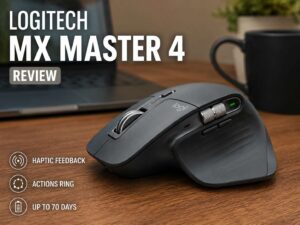
This is also one reason productivity-focused mice can feel so different from gaming models. If you’re comparing button feel, ergonomics, and productivity features more broadly, the Logitech MX Master 4 review offers a useful look at how a modern premium mouse balances tactile feedback with everyday usability.
Haptic Clicks Need Power
This difference is easy to overlook.
A traditional mechanical switch can still physically click even if the mouse has no power.
Unplug the mouse and press the button. The switch mechanism will still snap.
A haptic actuator cannot generate its normal feedback without electricity.
The button itself may still move while the mouse is powered off, but the simulated click sensation may disappear.
That can make the button feel strangely soft or unfinished.
This usually does not matter during normal use because the mouse needs power to function anyway.
Still, it shows one of the biggest design differences between the two technologies.
With mechanical switches, the feedback comes from the hardware itself.
With haptic systems, the feedback depends on electronics.
What About Battery Life?
Haptic feedback consumes power.
Every tactile pulse requires a small amount of energy, while a physical switch generates feedback mechanically.
That does not automatically mean haptic wireless mice have terrible battery life.
A mouse’s total power consumption depends on several factors, including:
- Polling rate
- Sensor settings
- Wireless transmission
- Lighting
- Processor activity
- Sleep behavior
- Haptic intensity
Higher polling rates can have a particularly noticeable effect on battery life.
Running a gaming mouse at 4,000 Hz or 8,000 Hz requires more frequent communication and processing than using 1,000 Hz.
So if battery runtime matters, check the manufacturer’s estimate using the settings you actually plan to use.
Do not judge battery life based only on the presence of haptic feedback.
Are Haptic Mouse Buttons More Durable?
They may avoid some traditional failure points, but durability still depends on the complete mouse.
A conventional mechanical microswitch uses electrical contacts that physically touch.
Those contacts can wear, become contaminated, or degrade over time.
An inductive sensing system does not rely on the same contact mechanism.
That removes one potential source of failure.
Still, a haptic mouse contains plenty of parts that can wear.
These may include:
- Button hinges
- Plastic shells
- Springs
- Return mechanisms
- Haptic actuators
- Scroll wheel assemblies
- Side switches
- Battery components
So a switchless sensing system is not the same thing as a wear-free mouse.
Optical switches also avoid traditional electrical contact detection while keeping a physical click mechanism.
The better way to judge durability is to look at the full button assembly and the overall construction, not just the switch type.
What About the Double-Click Problem?
Traditional mechanical switches are sometimes associated with unwanted double-clicking.
A healthy mechanical switch can create very brief contact bounce when it activates. Mouse firmware normally filters this out using debounce logic.
Problems can appear when an aging or damaged switch produces electrical behavior outside the expected range.
A single press may then register as two clicks.
Optical switches avoid this specific electrical contact problem because they detect actuation through light.
Inductive haptic systems also avoid conventional contact-based detection.
That removes one common cause of unwanted double-clicking.
It does not make duplicate inputs impossible, though.
Firmware bugs, sensor faults, bad calibration, software configuration, or other hardware failures can still cause incorrect clicks.
Haptic Mice Depend More on Software
Traditional mechanical switches do not need much configuration.
You click them and they work.
Haptic and analog systems can expose far more settings.
Depending on the mouse, you may be able to adjust:
- Actuation distance
- Reset distance
- Haptic strength
- Rapid-trigger behavior
- Left and right button profiles
- Polling rate
- Game profiles
- Onboard settings
That level of control can be useful for competitive gaming.
It also creates more complexity.
Someone buying a basic office mouse probably does not want to spend time adjusting actuation thresholds.
Long-term software support also matters more.
A physical switch does not stop feeling normal because its configuration software becomes outdated.
A heavily customizable mouse may depend more on its manufacturer’s software ecosystem.
Onboard memory helps here because it can keep your settings stored directly on the mouse.
Which Type Is Better for Competitive Gaming?
Haptic and analog buttons make the most sense for players who care about fine-tuning.
They are especially interesting if you want:
- Very shallow actuation
- Adjustable reset behavior
- Fast repeated clicks
- Different settings for different games
- Adjustable tactile strength
FPS and MOBA players are probably the most obvious audience.
Still, optical physical switches remain excellent for competitive play.
A modern optical mouse can provide fast response, crisp feedback, reliable actuation, and good durability without requiring much configuration.
Mouse shape may matter more than switch technology anyway.
A lighter actuation point will not help much if the shell feels awkward in your hand.
Grip width, hump position, weight distribution, button height, and side shape all affect control.
Which Is Better for Everyday Work?
Physical switches still make more sense for most office and productivity users.
They are straightforward and predictable.
Most productivity tasks do not benefit much from rapid trigger or ultra-shallow actuation.
Office users usually care more about:
- Comfortable shape
- Quiet clicking
- Scroll wheel quality
- Side buttons
- Bluetooth
- Multi-device switching
- Battery life
Haptic feedback could become more interesting in productivity mice if manufacturers use it for contextual feedback.
Different haptic patterns could potentially indicate different actions, modes, or commands.
Trackpads already use similar ideas.
Mouse implementations remain far less common.
Haptic Clicks Are Not the Same as Silent Switches
It is easy to confuse these technologies.
A silent mechanical switch still uses a physical mechanism.
Manufacturers simply design it to reduce the sharp impact and noise associated with a traditional click.
A haptic mouse produces tactile feedback electronically.
The two approaches are not the same.
Haptic systems may have the potential to produce quieter clicks, but the button and actuator can still make noise.
If silence is your main priority, listen to sound comparisons or check reliable measurements rather than assuming haptics are automatically quieter.
Can You Turn Haptic Feedback Off?
That depends on the mouse.
Some models let you reduce haptic strength through their configuration software.
A very low setting may make the click feel subtle.
Completely disabling the feedback can feel odd, though.
Without the tactile pulse, the button may move without giving you much confirmation that the mouse registered the input.
For most users, lowering the intensity makes more sense than removing the feedback entirely.
Common Mistakes When Comparing Mouse Click Technologies
Assuming haptic means no moving parts
The sensing method may not use a microswitch, but the outer mouse button can still move.
Treating optical and haptic switches as the same thing
Optical switches usually create tactile feedback mechanically. Haptic systems can generate it electronically.
Comparing latency by switch type alone
Firmware, polling rate, wireless design, USB processing, and game behavior all affect responsiveness.
Choosing the shallowest setting immediately
Extremely low actuation can make accidental clicks easier.
Start somewhere in the middle and reduce the distance gradually.
Ignoring mouse shape
A great switch cannot fix a shell that does not suit your grip.
Treating click ratings as guarantees
A manufacturer switch rating does not guarantee that every part of the mouse will survive exactly that number of presses.
How to Configure a Haptic Gaming Mouse
If your mouse offers adjustable haptic actuation, do not immediately set everything to the fastest possible value.
A gradual setup usually works better.
- Install the manufacturer’s configuration software.
Check for firmware updates before changing advanced settings. - Start with a middle actuation point.
Use the mouse normally and watch for accidental clicks. - Lower the actuation distance slowly.
Change one level at a time. - Adjust reset behavior separately.
A shorter reset distance can improve repeated clicking without making the first press overly sensitive. - Set a clear haptic strength.
Choose enough feedback to confirm the click without making it distracting. - Test click-and-drag actions.
Try moving files, selecting text, and dragging objects. - Test your settings in actual games.
Desktop use does not always reveal an overly sensitive configuration. - Save the profile to onboard memory if available.
This helps preserve your settings on other computers.
The fastest setting is not automatically the best one.
The better goal is finding the shortest actuation you can use consistently without accidental presses.
What Has Changed Recently?
Gaming mice are beginning to move beyond simple binary switches.
For years, most premium designs focused on improving mechanical, optical, or hybrid switch assemblies.
New analog and haptic systems add something different.
Instead of asking only whether the button is pressed or released, the mouse can measure how far it moves.
That makes adjustable actuation and rapid reset behavior possible.
Logitech’s PRO X2 SUPERSTRIKE is one notable example of this shift, using inductive sensing and real-time haptic feedback.
Other manufacturers have also explored magnetic and analog-style click detection.
This mirrors what already happened in gaming keyboards.
Adjustable actuation once seemed like a niche feature. It is now common on many premium Hall effect keyboards.
Mouse buttons may be heading in a similar direction.
That does not mean physical switches are disappearing.
They remain cheap, compact, reliable, familiar, and easy to implement.
Haptic technology is expanding the available options rather than immediately replacing the old ones.
Haptic Mouse Clicks vs Physical Switches: Which Should You Choose?
Haptic or analog mouse buttons make the most sense if click customization is high on your priority list.
They are worth considering if you:
- Play competitive games
- Want very shallow actuation
- Use fast repeated clicks
- Like adjusting input settings
- Want configurable tactile feedback
- Enjoy experimenting with newer mouse technology
Traditional physical switches may be the better choice if you:
- Prefer a natural mechanical snap
- Want minimal software dependence
- Do not need adjustable actuation
- Want more mouse shapes to choose from
- Prefer simpler hardware
- Have a tighter budget
Optical physical switches sit somewhere between the two.
They keep a traditional tactile mechanism while avoiding normal electrical contact-based click detection.
For most buyers, switch type should probably come after basic mouse fit.
Start with shape, grip style, weight, sensor quality, connectivity, and button placement.
Then compare click technology.
Haptic systems offer features that conventional switches cannot easily match, especially adjustable actuation and reset behavior.
Physical switches are simpler and still work extremely well.
The newer design gives you more control. The traditional design gives you familiarity and fewer things to configure.
Neither one makes every mouse better.
Frequently Asked Questions
Are haptic mouse clicks real clicks?
Yes. They produce normal mouse input. The difference is that the tactile feeling may come from a haptic actuator rather than a traditional microswitch.
Do haptic mouse buttons still move?
Yes, current implementations can still use moving outer buttons. Haptic feedback does not automatically mean a completely stationary button.
Are haptic clicks faster than mechanical switches?
They can reduce the movement needed before activation and avoid traditional contact debounce. Total mouse latency still depends on the entire hardware and firmware design.
Are optical switches haptic?
No. Optical switches use light for actuation detection, but they normally create the click sensation mechanically.
Can haptic mice develop double-click problems?
They avoid the traditional electrical contact failure associated with mechanical switches. Other hardware, firmware, or software problems could still produce duplicate inputs.
Do haptic mice use more battery?
Haptic actuators consume power. Battery life also depends on polling rate, sensor operation, wireless communication, lighting, and firmware.
Are physical mouse switches becoming obsolete?
No. Mechanical, optical, and hybrid switches remain widely used. Haptic and analog designs are another option, not a universal replacement.
Are haptic clicks useful for casual gaming?
They can be, especially if you enjoy adjusting settings. Casual players may get more value from a better shape, lower weight, or more comfortable button layout.
What is rapid trigger on a mouse?
Rapid trigger lets the button reset based on its movement rather than requiring it to return to one fixed physical point. That can reduce the travel needed between repeated clicks.
Should I choose haptic clicks for FPS games?
They can work well because adjustable actuation lets you reduce button travel. Still, comfort, consistency, shape, and overall mouse performance matter just as much.