HP LaserJet Enterprise MFP 5601dn: Specs, Price, Pros & Cons
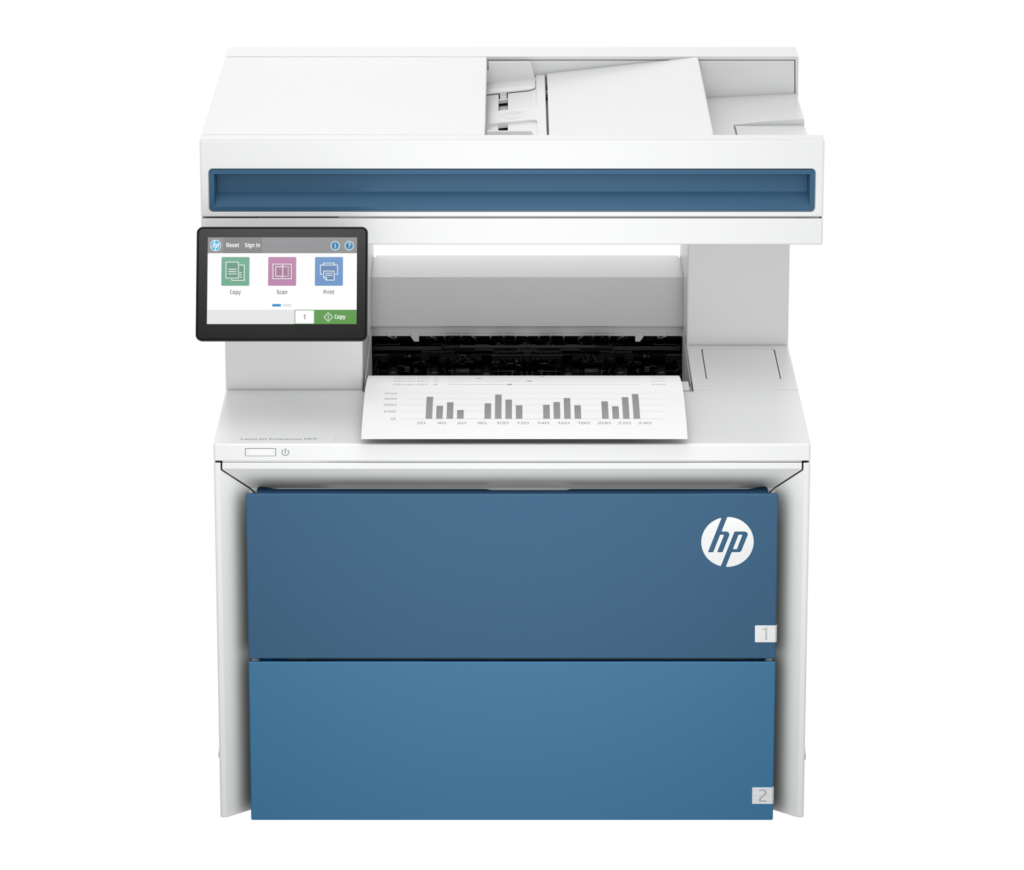
The LaserJet Enterprise MFP 5601dn is the kind of printer a purchasing department buys, and it helps to read it that way. It is a mono laser multifunction for a workgroup: 52 pages a minute, a 50-sheet document feeder that scans both sides of a page in one pass, automatic duplex printing, and the security firmware HP sells to IT departments under the Wolf name.
The number that defines it is the speed. Fifty-two pages a minute in black, with a first page in a few seconds from ready, is the pace of a shared office machine, and the paper path is built for it: a 100-sheet multipurpose tray plus a 550-sheet drawer as standard, a 250-sheet output tray, and optional 550-sheet drawers that take the input to 2,300 sheets. Toner comes in three yields up to a 26,000-page cartridge.
The scanning side is where the MFP earns the letters. The feeder handles fifty sheets, scans two-sided originals automatically, and drives copying, scan-to-email and scan-to-folder from a 4.3-inch color touchscreen. There is no fax on this model. HP puts fax on the fdn variant.
Connectivity is Gigabit Ethernet and USB. Wi-Fi is not built in (it needs HP's Jetdirect 3200w accessory), which is normal for enterprise hardware and a surprise for anyone shopping it like a home printer. The Amazon listing behind this page is labeled "5601n/dn", but everything it describes is the MFP 5601dn that HP actually sells, and this page follows HP.
It suits an office of ten to thirty people that prints and copies text all day, has an IT person who cares about firmware and fleet management, and does not need color or fax. It is overkill for a home office, and its price (HP lists it at over a thousand dollars) only makes sense at that scale.
Category strengths
Where the HP LaserJet Enterprise MFP 5601dn beats the median
- A much higher print speed (black) ?52 ppm vs 32 ppm (median)
- A much higher output tray capacity ?250 sheets vs 100 sheets (median)
- A slightly lighter build ?17.2 kg vs 18.35 kg (median)
Where the HP LaserJet Enterprise MFP 5601dn trails the median
- No color printing ?
- No Wi-Fi ?
- No Wi-Fi Direct ?
- No fax ?
How this VS Score was computed
Score 41: each known spec is measured against the median of laser printers (12 products), then weighted. 57% of the scoreable weight could be used. See how we score
| Specification | This product | Cohort median | Score weight | Points moved |
|---|---|---|---|---|
| Color printing | No | 58% of the class have it | 1.5 | −72.0 |
| Wi-Fi | No | 92% of the class have it | 1 | −48.0 |
| Duplex scanning | Yes | 64% of the class have it | 0.5 | +25.0 |
| Touchscreen display | Yes | 75% of the class have it | 0.5 | +25.0 |
| Wi-Fi Direct | No | 92% of the class have it | 0.3 | −14.4 |
| Print speed (black) | 52 — capped at the class’s upper range (36) | 32 | 2 | +12.0 |
| Fax | No | 67% of the class have it | 0.2 | −9.6 |
| Output tray capacity | 250 — capped at the class’s upper range (150) | 100 | 0.3 | +7.5 |
| Weight | 17.2 | 18.35 | 0.3 | +0.9 |
| Print resolution | 1,200 | 1,200 | 0.5 | +0.0 |
| ADF capacity | 50 | 50 | 0.5 | +0.0 |
| Input tray capacity | 650 — capped at the class’s upper range (250) | 250 | 1 | +0.0 |
Not scored: Print speed (color) (unknown: not scored); Automatic duplex printing (standard for the class (100% have it)); Supertank / refillable ink (unknown: not scored); Monthly duty cycle (unknown: not scored); All-in-one (standard for the class (100% have it)); Automatic document feeder (standard for the class (100% have it)); Ethernet (standard for the class (100% have it)); USB (standard for the class (100% have it)); Apple AirPrint (standard for the class (100% have it)); Mobile app printing (standard for the class (100% have it)).
Editor’s note
The MFP 5601dn is a very good office machine that has been listed on Amazon for far more than it is worth, so where to buy it is the first thing a buyer should hear. HP's own store sets the reference price, and a marketplace offer at several times that is a reseller inflating an enterprise SKU. Buy it from HP, an authorized reseller or a business supplier.
At HP's price it is straightforward value for a small-to-mid office. The combination that matters is the print speed, single-pass duplex scanning and a proper two-tray paper supply, because those are the three things that stop a shared printer becoming a queue. The Wolf security stack and the fleet-management hooks are real for anyone who manages more than one printer and irrelevant for anyone who does not.
What would make me hesitate is buying it as a home-office printer. There is no Wi-Fi without an accessory, no fax at all on this variant, no color, and the TerraJet toner is HP-chipped, so third-party cartridges are a gamble. For a home office a Brother mono MFP does the job at a third of the price.
The listing confusion is worth a sentence too. HP names these machines by suffix (dn for duplex, fdn for fax), and the marketplace title mashes two together. If the box you receive says fdn, it has a fax modem this page does not credit.
I would buy it for a workgroup of ten to thirty on a wired network with an IT owner, and at HP's price. I would not pay a marketplace premium for it, and I would send a solo home office to a smaller, cheaper mono MFP.
Specifications
Printing
Scanning & copying
Paper handling
Connectivity
Design
Sources and verification
Where the specifications come from
- Official product pagehp.com
Verification
- First published
- Specifications last checked
- Sheet completeness
- 21 of 24 specifications verified; the rest show as Unknown and are never estimated or scored
- Page type
- Product specification page — Compiled from the manufacturer’s published specifications and the cited sources; this is not a hands-on test.
- Basis
- Research-based: specifications and editorial text were compiled from the documents listed here and the manufacturer’s published data. We have not tested this unit ourselves; where independent measurements are mentioned they belong to the linked publication.
Where to buy
Prices and availability may change. Check the retailer before buying. We may earn a commission on purchases.
Price history
Printers with similar specs to the HP LaserJet Enterprise MFP 5601dn

Ratings & reviews
No reviews yet. Be the first to share your experience.
The bottom line
The HP LaserJet Enterprise MFP 5601dn earns a VS Score of 41, below the median of the 12 laser printers it is measured against (a score of 50 is level with that median).
- Who it’s for
- An office of roughly ten to thirty people on a wired network that prints and copies text all day, has someone managing printers, and wants 52 ppm, one-pass duplex scanning and a two-tray paper supply without color or fax.
- Who should look elsewhere
- Home offices and solo workers (no built-in Wi-Fi, no fax on this variant, no color, chipped toner) and anyone tempted by a marketplace listing priced far above HP's own.
- The trade-off that matters
- You get enterprise speed, security and paper handling in exchange for enterprise assumptions: a wired network, an IT owner, HP-only toner and a purchase price that is only reasonable through HP or a business reseller.
- The main alternative
- Brother MFC-L6915DW: a 52 ppm mono laser MFP with duplex scanning, built-in Wi-Fi and fax at a lower price, for offices that want the speed without HP's enterprise stack or its accessory-only wireless.
This page was created with the help of AI. How we work