
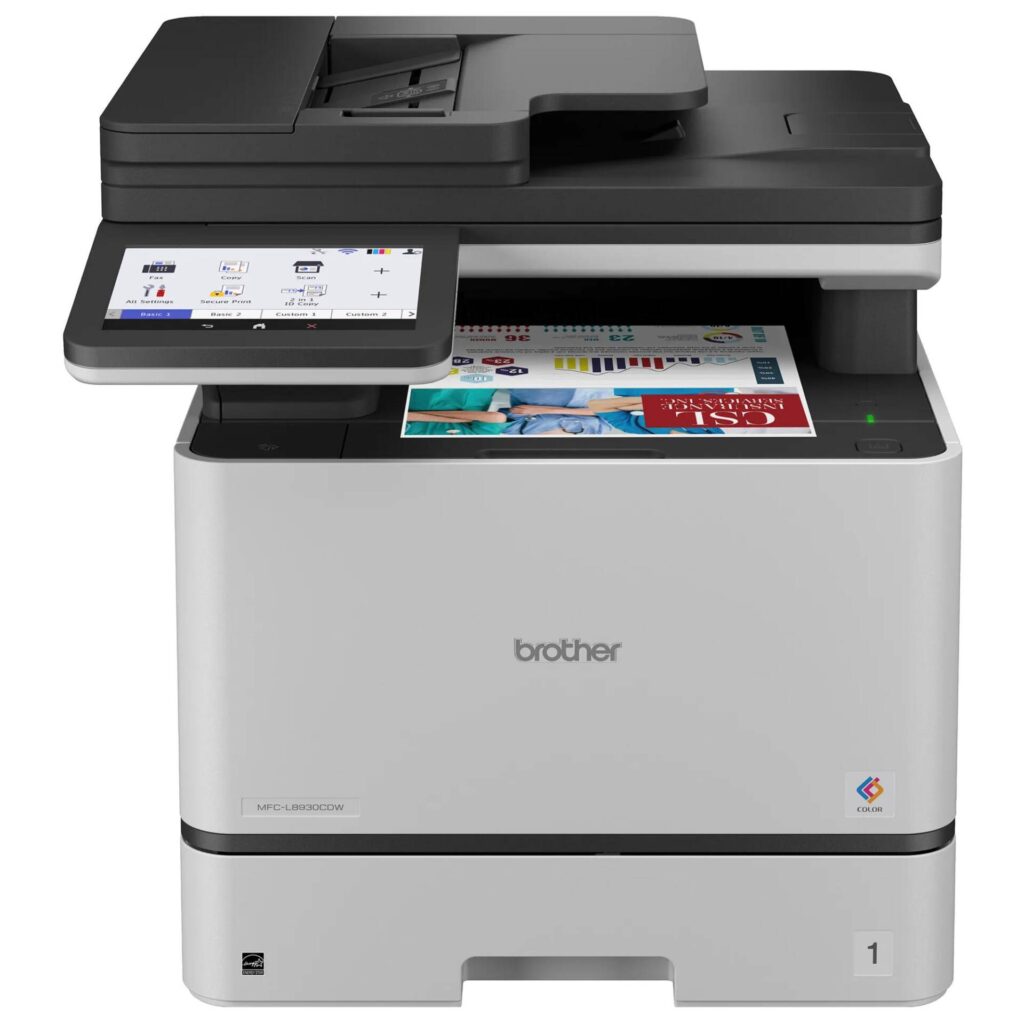
Brother MFC-L8930CDW: Specs, Price, Pros & Cons
Several people sharing one printer is the job the MFC-L8930CDW was built for. Its scanner reads both sides of each page in one pass from a large feeder, its color and black printing run at the same speed, and its monthly duty cycle is many times that of a home printer.
The spec sheet reads like one written for an IT department. Wired Ethernet, an NFC card reader, network security protocols and directory support let several people share the printer while an administrator controls who prints what. A large touchscreen runs the whole thing, and print resolution is 2,400 dpi, ample for reports and business graphics.
It ships with full standard-yield toner in place of the small starter cartridges most rivals include, which pushes the first toner purchase further down the road and makes early running costs easier to predict. An EPEAT Gold rating covers its environmental record, and its peak power draw is high enough to plan a dedicated socket for.
What it gives up starts with the body. Its weight settles where it lives: it is placed once and never moved. The main paper supply is a single cassette, and the extra trays that raise its capacity cost more. Its warranty is short for a machine in this bracket, which shifts more risk to the buyer without a service contract.
The office it suits has several people printing color and at least one person turning stacks of double-sided paperwork into files every week. Its speed, its capacity and its security list all assume a queue of jobs from different desks, and that queue is what makes the size worth housing.
Category strengths
Where the Brother MFC-L8930CDW beats the median
- A much higher print speed (color) ?33 ppm vs 9 ppm (median)
- A much higher print speed (black) ?33 ppm vs 16 ppm (median)
- A much higher monthly duty cycle ?70,000 pages vs 10,000 pages (median)
- A much higher input tray capacity ?250 sheets vs 150 sheets (median)
- A much higher ADF capacity ?80 sheets vs 35 sheets (median)
- Has duplex scanning ?
- Has touchscreen display ?
- A much higher output tray capacity ?150 sheets vs 67.5 sheets (median)
- Has fax ?
Where the Brother MFC-L8930CDW trails the median
- A much heavier build ?26.5 kg vs 7.98 kg (median)
- A much lower print resolution ?2,400 dpi vs 4,800 dpi (median)
How this VS Score was computed
Score 86: each known spec is measured against the median of all printers (65 products), then weighted; 50 means level with that median. In classes of six or more, a value beyond the class’s 10th–90th percentile range counts as that limit, so one extreme product cannot set the scale. 66% of the scoreable weight could be used; unknown values, features not applicable to this class and proxies (battery capacity where a rated life exists) add or remove nothing.
| Specification | This product | Cohort median | Score weight | Points moved |
|---|---|---|---|---|
| Print speed (black) | 33 — capped at the class’s upper range (32) | 16 | 2 | +100.0 |
| Print speed (color) | 33 — capped at the class’s upper range (27) | 9 | 1 | +50.0 |
| Automatic duplex printing | Yes | 73% of the class have it | 1 | +50.0 |
| Automatic document feeder | Yes | 55% of the class have it | 1 | +50.0 |
| Input tray capacity | 250 | 150 | 1 | +33.0 |
| Duplex scanning | Yes | 23% of the class have it | 0.5 | +25.0 |
| Ethernet | Yes | 54% of the class have it | 0.5 | +25.0 |
| Touchscreen display | Yes | 45% of the class have it | 0.5 | +25.0 |
| Supertank / refillable ink | No | 30% of the class have it | 0.5 | −24.0 |
| Monthly duty cycle | 70,000 — capped at the class’s upper range (50,000) | 10,000 | 0.3 | +15.0 |
| Output tray capacity | 150 | 67.5 | 0.3 | +15.0 |
| Print resolution | 2,400 | 4,800 | 0.5 | −12.5 |
| ADF capacity | 80 — capped at the class’s upper range (50) | 35 | 0.5 | +10.5 |
| Fax | Yes | 35% of the class have it | 0.2 | +10.0 |
| Weight | 26.5 — capped at the class’s upper range (19.5) | 7.98 | 0.3 | −9.0 |
Not scored: Color printing (standard for the class (88% have it)); All-in-one (standard for the class (85% have it)); Wi-Fi (standard for the class (97% have it)); Wi-Fi Direct (standard for the class (90% have it)); USB (standard for the class (100% have it)); Apple AirPrint (standard for the class (97% have it)); Mobile app printing (standard for the class (100% have it)).
Editor’s note
The L8930CDW is where Brother stops making a home machine and starts making office equipment, and the specification that gives it away is the scanner: an 80-sheet feeder that captures both sides in one pass at up to 104 images per minute. If part of your week is turning paper into PDFs, that number is the whole argument for this machine.
The rest is proportionate. Color and black printing both run at 33 ppm, the monthly duty cycle is 70,000 pages, and there is a 7-inch touchscreen, Gigabit Ethernet, an NFC card reader, IPsec, Secure Function Lock and Active Directory support. It carries an EPEAT Gold rating. Brother also ships it with full standard-yield toner in place of the token starter cartridges most competitors include, which is a real and easily overlooked saving in the first year.
Then there is the physical reality. It weighs 58.4 pounds and measures roughly 18 by 20 by 18 inches, so this is a machine you site once and do not move again. Peak power draw is 600 watts. Standard paper input is one 250-sheet tray plus a 50-sheet bypass, and the extra trays that take it to 1,340 sheets are paid options.
The thing I find hardest to defend is the warranty. One year of limited cover on a machine in this bracket is thin, particularly next to Canon's three years on cheaper color lasers in the same segment. It does not make the hardware worse, but it changes the calculation if you are buying without a service contract.
Buy it if several people will share it and the paperwork volume is real. For one person at a desk, most of what is here is capacity you pay for and never reach.
Specifications
Quality bars show where each figure sits between the lowest and highest of the 65 printers this VS Score is measured against.
Printing
Scanning & copying
Paper handling
Connectivity
Design
Sources and verification
Where the specifications come from
- Official product pagebrother-usa.com
- Datasheet or manualsupport.brother.com
- Independent testingrtings.com
Verification
- First published
- Specifications last checked
- Sheet completeness
- 24 of 24 specifications verified; the rest show as Unknown and are never estimated or scored
- Page type
- Product specification page — Compiled from the manufacturer’s published specifications and the cited sources; this is not a hands-on test.
- Basis
- Research-based: specifications and editorial text were compiled from the documents listed here and the manufacturer’s published data. We have not tested this unit ourselves; where independent measurements are mentioned they belong to the linked publication.
Where to buy
Prices and availability may change. Check the retailer before buying. We may earn a commission on purchases.
Price history
Printers with similar specs to the Brother MFC-L8930CDW


Ratings & reviews
No reviews yet. Be the first to share your experience.
The bottom line
The Brother MFC-L8930CDW earns a VS Score of 86, above the median of the 65 printers it is measured against (a score of 50 is level with that median).
- Who it’s for
- A shared small-office machine where several people print color and someone regularly digitizes stacks of double-sided paperwork.
- Who should look elsewhere
- Single-person offices and light-duty desks. The capacity, the footprint and the peak draw are all sized for a workload one person will not generate.
- The trade-off that matters
- Workgroup speed and duty cycle against permanence. It is heavy enough to claim its space for good, and one year of warranty does not match what you spend.
- The main alternative
- Canon Color imageCLASS MF753Cdw and MF755Cdw are the direct rivals in this class and worth pricing against it, particularly if warranty terms matter to you.
The VS Score is calculated from the weighted specifications above, each measured against the median of comparable printers — a shortlisting guide, not a substitute for your own priorities. See how we score.



