
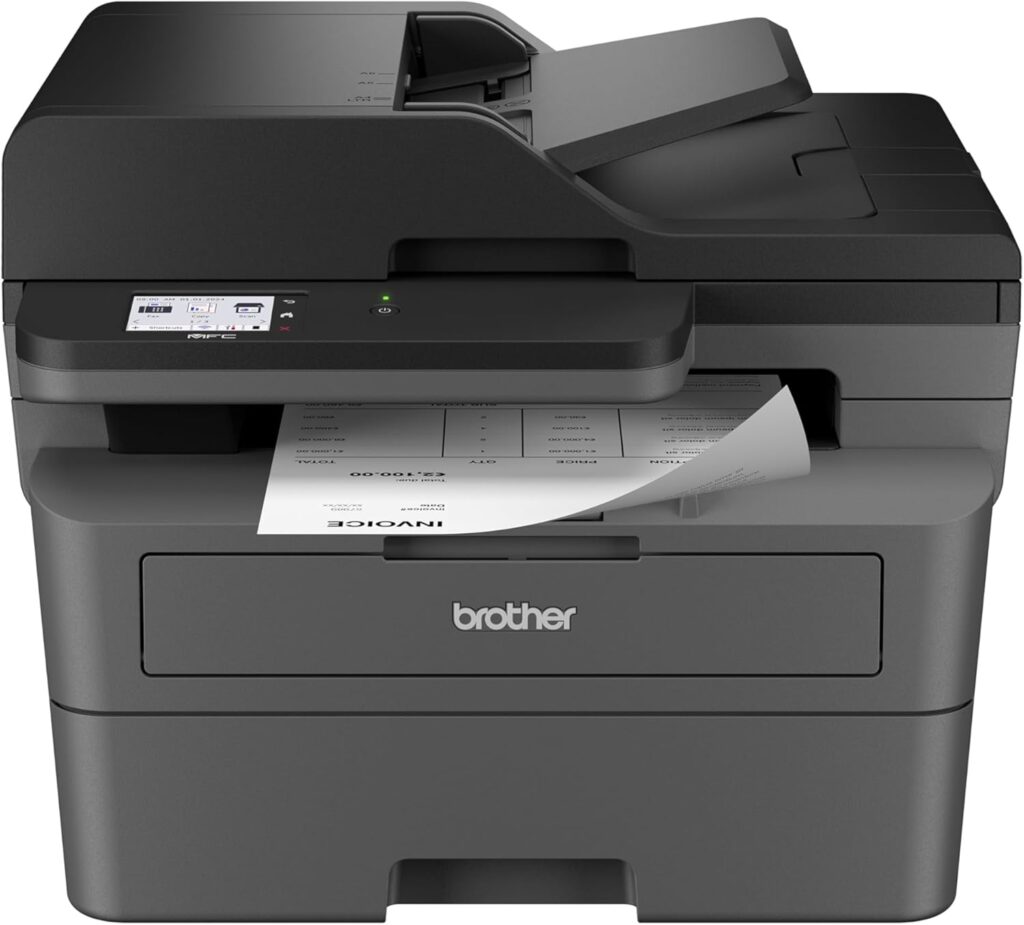
Brother MFC-L2820DW: Specs, Features, Pros & Cons
Rated for a monthly workload several times that of a typical home printer, the MFC-L2820DW is a mono laser all-in-one built for an office that turns paper around every day. It prints, copies, scans and faxes from one body, with a color touchscreen to run all four.
The paper side is generous for its size. The main tray holds 250 sheets, a document feeder takes a stack for copying or scanning, and automatic two-sided printing is standard. Scans can still be saved in color. Output resolution is 1,200 dpi, low next to an inkjet's figure and plenty for the text and forms this printer is built to produce.
Connections cover a small office. There is wired Ethernet for a fixed place on the network and Wi-Fi for a desk without a socket, with AirPrint and Brother's own app for phones. The fax is a working modem, useful for a practice or a small firm that still receives forms over a phone line.
It gives up color printing entirely, so logos and charts come out in gray, and it is heavy, so it needs a permanent shelf. The document feeder reads one side of a page at a time, so double-sided originals go through twice. There is also no standard page description language listed for it, which limits it on Linux machines and print servers that expect one.
The office this suits prints invoices, letters and forms in black, scans a stack now and then, and still sends a fax. Double-sided scanning every day is the one job that pushes a buyer further up Brother's range, where the feeder reads both sides of each page in one pass.
Category strengths
Where the Brother MFC-L2820DW beats the median
- A much higher print speed (black) ?34 ppm vs 16 ppm (median)
- A much higher monthly duty cycle ?35,000 pages vs 10,000 pages (median)
- A much higher input tray capacity ?250 sheets vs 150 sheets (median)
- Has touchscreen display ?
- A higher ADF capacity ?50 sheets vs 35 sheets (median)
- Has fax ?
Where the Brother MFC-L2820DW trails the median
- No color printing ?
- A much lower print resolution ?1,200 dpi vs 4,800 dpi (median)
- A much heavier build ?11.6 kg vs 7.98 kg (median)
How this VS Score was computed
Score 67: each known spec is measured against the median of all printers (65 products), then weighted; 50 means level with that median. In classes of six or more, a value beyond the class’s 10th–90th percentile range counts as that limit, so one extreme product cannot set the scale. 68% of the scoreable weight could be used; unknown values, features not applicable to this class and proxies (battery capacity where a rated life exists) add or remove nothing.
| Specification | This product | Cohort median | Score weight | Points moved |
|---|---|---|---|---|
| Print speed (black) | 34 — capped at the class’s upper range (32) | 16 | 2 | +100.0 |
| Color printing | No | 88% of the class have it | 1.5 | −72.0 |
| Automatic duplex printing | Yes | 73% of the class have it | 1 | +50.0 |
| Automatic document feeder | Yes | 55% of the class have it | 1 | +50.0 |
| Input tray capacity | 250 | 150 | 1 | +33.0 |
| Ethernet | Yes | 54% of the class have it | 0.5 | +25.0 |
| Touchscreen display | Yes | 45% of the class have it | 0.5 | +25.0 |
| Supertank / refillable ink | No | 30% of the class have it | 0.5 | −24.0 |
| Duplex scanning | No | 23% of the class have it | 0.5 | −24.0 |
| Print resolution | 1,200 | 4,800 | 0.5 | −18.5 |
| Monthly duty cycle | 35,000 | 10,000 | 0.3 | +15.0 |
| ADF capacity | 50 | 35 | 0.5 | +10.5 |
| Fax | Yes | 35% of the class have it | 0.2 | +10.0 |
| Weight | 11.6 | 7.98 | 0.3 | −4.8 |
Not scored: Print speed (color) (unknown: not scored); All-in-one (standard for the class (85% have it)); Output tray capacity (unknown: not scored); Wi-Fi (standard for the class (97% have it)); Wi-Fi Direct (standard for the class (90% have it)); USB (standard for the class (100% have it)); Apple AirPrint (standard for the class (97% have it)); Mobile app printing (standard for the class (100% have it)).
Editor’s note
This is the unexciting, sensible answer for an office that mostly moves black text around. Laser printing at up to 34 ppm, a 50-sheet feeder, wired Ethernet alongside dual-band Wi-Fi, a 2.7-inch color touchscreen and a proper 33.6 kbps fax modem. It also scans in color even though it prints only in mono, which is the right way round for document work.
What you notice against pricier machines is the feeder. It scans one side at a time, so duplex originals mean two passes and duplex copying is out for the same reason. If you regularly digitize double-sided paperwork, that limitation will annoy you every week, and it is the main reason to look further up the range.
Two other things are worth knowing before buying. Brother does not publish an output tray capacity for this model. And Brother lists no PCL or PostScript emulation for it, which is fine for Windows and Mac desktops but matters if you planned to hang it off a Linux box or a print server that expects a standard page description language.
The consumables story is the usual Brother mono one: TN830 toner plus a separate DR830 drum rated at 15,000 pages. The drum is a line item the cheapest all-in-one-cartridge competitors do not have, though cost per page still lands well. Worth noting that cartridges supplied through Brother's Refresh subscription stop working if you cancel the plan.
For a home office printing invoices, letters and school paperwork, with the odd fax and a stack to scan now and then, this covers the ground properly and should be dull in the best sense.
Specifications
Quality bars show where each figure sits between the lowest and highest of the 65 printers this VS Score is measured against.
Printing
Scanning & copying
Paper handling
Connectivity
Design
Sources and verification
Where the specifications come from
- Official product pagebrother-usa.com
- Independent testingrtings.com
Verification
- First published
- Specifications last checked
- Sheet completeness
- 22 of 24 specifications verified; the rest show as Unknown and are never estimated or scored
- Page type
- Product specification page — Compiled from the manufacturer’s published specifications and the cited sources; this is not a hands-on test.
- Basis
- Research-based: specifications and editorial text were compiled from the documents listed here and the manufacturer’s published data. We have not tested this unit ourselves; where independent measurements are mentioned they belong to the linked publication.
Printers with similar specs to the Brother MFC-L2820DW



Ratings & reviews
No reviews yet. Be the first to share your experience.
The bottom line
The Brother MFC-L2820DW earns a VS Score of 67, above the median of the 65 printers it is measured against (a score of 50 is level with that median).
- Who it’s for
- Home and small offices whose printing is overwhelmingly black text, and who want wired networking, a touchscreen and a working fax without paying color-laser money.
- Who should look elsewhere
- Anyone scanning double-sided originals in volume, and anyone driving it from Linux or a print server that expects PCL or PostScript emulation.
- The trade-off that matters
- Laser speed and low mono page costs against a one-sided feeder, so every double-sided document you scan or copy costs a second pass through the machine.
- The main alternative
- Brother MFC-L3780CDW costs considerably more but fixes the one real weakness here by scanning both sides in a single pass, and adds color while it is at it.
The VS Score is calculated from the weighted specifications above, each measured against the median of comparable printers — a shortlisting guide, not a substitute for your own priorities. See how we score.


