Quick answer
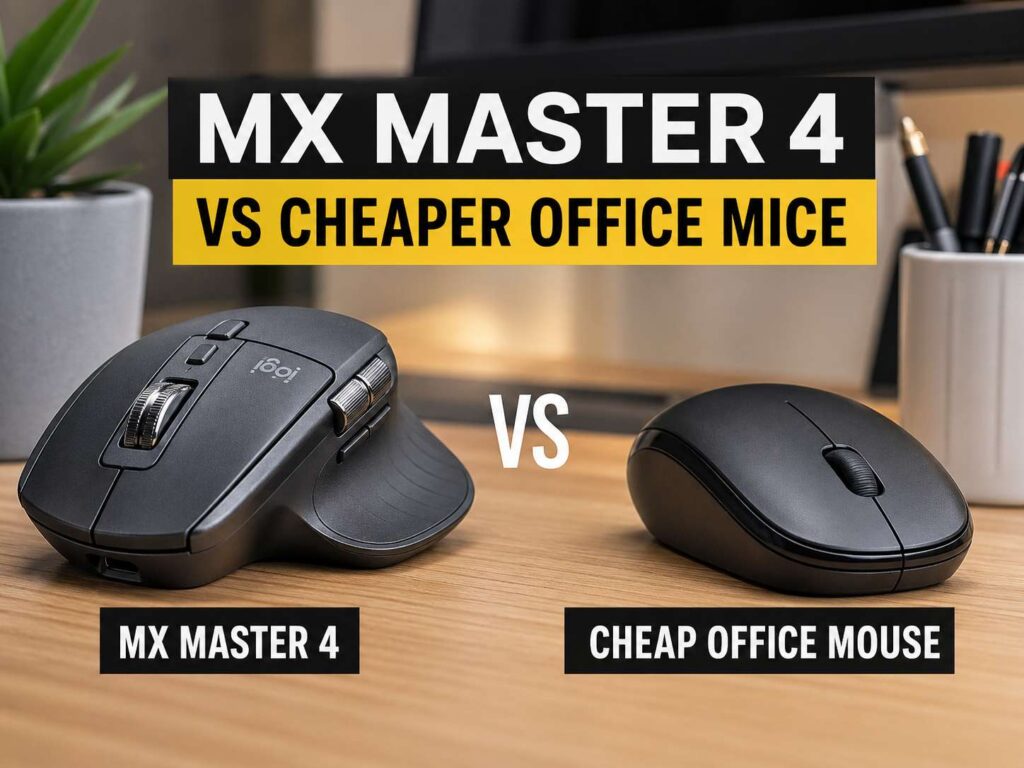
The MX Master 4 vs cheap office mice choice comes down to how much time you spend at your desk. A basic office mouse can handle email, web browsing, documents, and light spreadsheet work. It clicks, scrolls, and moves the cursor. For many people, that covers the job.
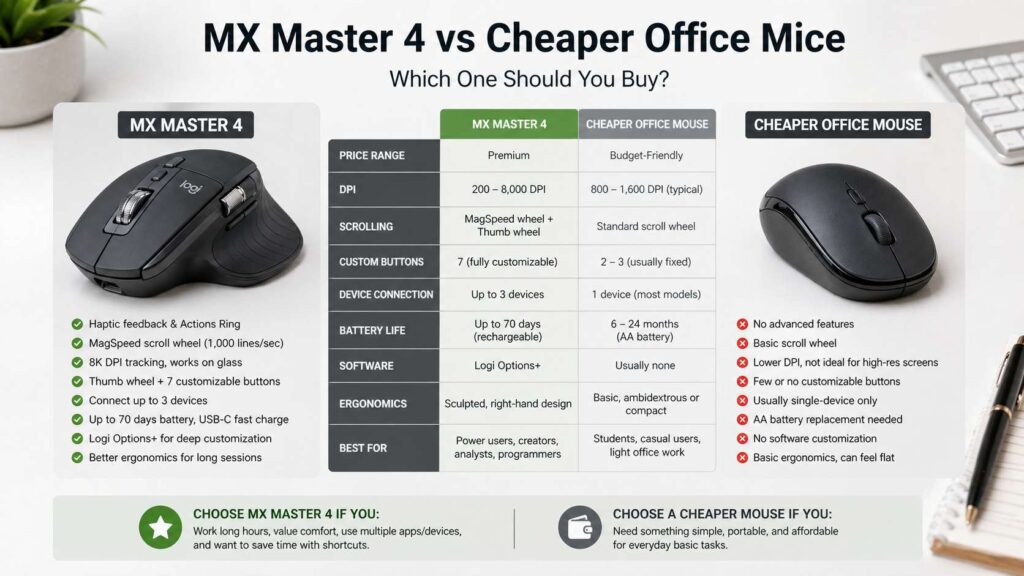
The MX Master 4 goes further. It suits people who work for hours in spreadsheets, browser tabs, PDFs, design apps, code editors, and video calls. It gives you extra buttons, a thumb wheel, fast scrolling, app shortcuts, high DPI tracking, and a more sculpted shape.
So the answer is simple. Pick a cheap office mouse for casual use. Pick the MX Master 4 for daily desk work, repeated tasks, and better control.
Why the MX Master 4 costs more
The MX Master 4 is built as a productivity mouse, not a basic pointer. It has a large right-hand shape, quiet clicks, a premium scroll wheel, thumb controls, and software support through Logi Options+.
That matters during real work. For example, you can set buttons for copy, paste, browser back, app switching, screenshot tools, or spreadsheet actions. Then your mouse does more than move the cursor. It helps you finish small tasks faster.
The scroll wheel is one of the biggest upgrades. It can move through long documents and large pages fast, but it can still give controlled scrolling for careful work. That feels minor at first. Then you open a 60-page PDF or a wide spreadsheet, and the value becomes clear.
For a deeper look at practical work features, this guide on best productivity mouse features covers what matters most in a desk mouse.
What cheap office mice still do well
Cheap office mice are not bad by default. Many people only need a simple wireless mouse with two buttons and a scroll wheel. For that use, paying more can feel wasteful.
A low-cost mouse works well for email, schoolwork, light browsing, admin tasks, and shared office computers. It often uses one AA battery, needs little setup, and fits easily in a laptop bag. That makes it a smart pick for travel or backup use.
Price matters too. A cheaper mouse lets you place one at home, one at work, and one in a bag without spending much. If one breaks or gets lost, the loss feels small.
Still, cheaper mice have limits. They often use basic scroll wheels. Many have fewer buttons. Their shapes can feel flat or cramped during long work sessions. That gap becomes more obvious after several hours of daily use.
Comfort matters more than specs
DPI is the easy spec to compare, but comfort matters more for office work. High DPI helps on large monitors and multi-screen desks. Yet hand shape, grip style, weight, and button placement affect your day more.
The MX Master 4 uses a large sculpted body. It suits right-handed users who like a palm grip. Your hand rests on it, and your thumb sits near the side controls. This makes it feel steady during long work sessions.
A cheap office mouse often uses a smaller body. That can work well for travel and small desks. It can also suit people with smaller hands. But a small mouse can force your hand into a tighter grip, which feels tiring after a long day.
So do not buy by specs alone. A mouse should fit your hand first. Then the extra features should match your work.
Scrolling is where the premium mouse pulls ahead
Scrolling is one of the clearest differences between the MX Master 4 and cheaper office mice. A basic scroll wheel works fine for short pages. But it can feel slow in long documents, large websites, product lists, spreadsheets, and PDFs.
The MX Master 4 gives you faster vertical scrolling and a side thumb wheel for horizontal movement. That side wheel helps in wide sheets, video timelines, design boards, and large tables. Instead of dragging bars across the screen, you move with your thumb.
For example, an Excel user can scroll across columns without breaking flow. A writer can move through a long draft faster. A researcher can scan pages with less effort. These are small wins, but they repeat many times per day.
Cheap office mice rarely match this feel. Some offer tilt-wheel scrolling, but it usually feels less natural than a dedicated thumb wheel.
Buttons and shortcuts can save real time
Extra buttons only help if you use them. That is the key point. The MX Master 4 gives you more control, but you need to set it up well.
For example, you can map one button to open search, one to take screenshots, one to switch desktops, and one to paste plain text. In creative apps, you can set controls for zoom, brush size, timeline movement, or undo. In browsers, you can map back and forward. Then your hand does less travel across the keyboard.
Cheap mice often keep things simple. That is good for people who dislike setup. It is less useful for users who repeat the same actions every day.
So the MX Master 4 makes more sense for people who like shortcuts. A cheaper mouse makes more sense for people who want to plug it in and forget about it.
Battery life and charging
Battery life is not a clear win for either side. Cheap office mice often last many months on a single AA battery. That is simple and practical. You change the battery, then keep working.
The MX Master 4 uses a rechargeable battery. It charges through USB-C and can run for many weeks between charges. That suits a fixed desk setup. You keep a cable nearby, charge it during a break, and carry on.
For travel, a cheap mouse has an advantage. It is smaller, lighter, and easier to replace. For a main desk, the MX Master 4 feels more complete.
So think about where you will use it. A desk mouse and a travel mouse do not need to be the same product.
Multi-device work makes the MX Master 4 stronger
Many workers now use more than one device. A laptop sits beside a desktop. A tablet joins for notes. A second computer handles meetings or testing.
The MX Master 4 fits that kind of setup. It can pair with several devices and switch between them. That is useful if you move between a work laptop and a personal computer each day.
Cheap office mice can support Bluetooth or USB receivers, but many budget models focus on one device at a time. That keeps them easy to use, but it limits mixed setups.
This is where the premium mouse earns part of its price. It reduces friction for people with more than one screen, one computer, or one workspace.
Pairing your mouse with the right keyboard setup
A mouse upgrade works best as part of a clean desk setup. If your keyboard takes too much space, your mouse may sit too far to the side. That can strain your shoulder during long work sessions.
This is why a productivity mouse pairs well with a smaller keyboard. A 65% or 75% keyboard can bring the mouse closer to the center of your body. That can make the desk feel more natural, especially on smaller desks.
If you are comparing compact keyboard sizes, this 65% vs 75% keyboard guide explains the difference in a simple way.
A premium mouse will not fix a poor desk layout by itself. But a better mouse, a better keyboard size, and a cleaner desk position can make daily work feel smoother.
Who should buy the MX Master 4
The MX Master 4 makes sense for people who use a mouse for several hours each day. It suits office workers, writers, designers, analysts, developers, editors, marketers, and remote workers.
It is a strong fit if you use large spreadsheets, long documents, multiple browser tabs, creative software, or several devices. It also fits people who like custom shortcuts and want more control under their fingers.
You should skip it if you need a small travel mouse, a left-handed mouse, or a low-cost backup. It is also not the best pick for competitive gaming. It is made for work first.
Buy it for comfort, scrolling, shortcuts, and desk control. Do not buy it only for DPI.
Who should buy a cheap office mouse
A cheap office mouse makes sense for light work. It is enough for students, casual laptop users, shared computers, and basic office tasks.
It is also a good pick for travel. You can throw it in a bag, use it at a cafe, or keep it near a spare laptop. You do not need to tune software or learn extra controls.
Budget mice also work well in offices where many people use the same computer. Simple controls reduce confusion. The mouse does its job, and no one needs a setup guide.
Pick a cheap office mouse if you only need basic clicking and scrolling. Save the money for a better keyboard, monitor, chair, or laptop stand.
Value comparison
The MX Master 4 gives you better long-term value if your workday depends on mouse comfort and speed. It costs more, but it gives you more ways to work faster. The value comes from repeated use, not from one big feature.
A cheap office mouse gives better value if your tasks are simple. It costs less, lasts a long time, and does the basics well. For light use, that is hard to beat.
So the smarter buy depends on your daily workload. A premium mouse pays off through time saved and less friction. A budget mouse pays off through low cost and simple use.
Final verdict
The MX Master 4 is the better mouse for serious desk work. It gives you better scrolling, stronger shortcut support, multi-device control, and a more comfortable shape for long sessions.
A cheaper office mouse still makes sense for casual work, travel, shared desks, and simple tasks. It costs less and keeps things easy.
Choose the MX Master 4 if your mouse is part of your workday. Choose a cheap office mouse if you only need simple wireless control. The right choice is the one that fits your hand, your desk, and the way you work.