Quick Answer
A scissor-switch keyboard suits people who want a slim shape, quiet keys, short travel, and a laptop-style feel. It works well for office work, school, travel, note-taking, and small desks.
A mechanical keyboard suits people who want deeper key travel, stronger feedback, more switch choice, and a more custom typing feel. It works well for gaming, coding, writing, and long daily typing sessions.
Both styles can feel good. The right pick comes down to your desk, your noise limits, your typing habits, and your budget.
What Is a Scissor-Switch Keyboard?
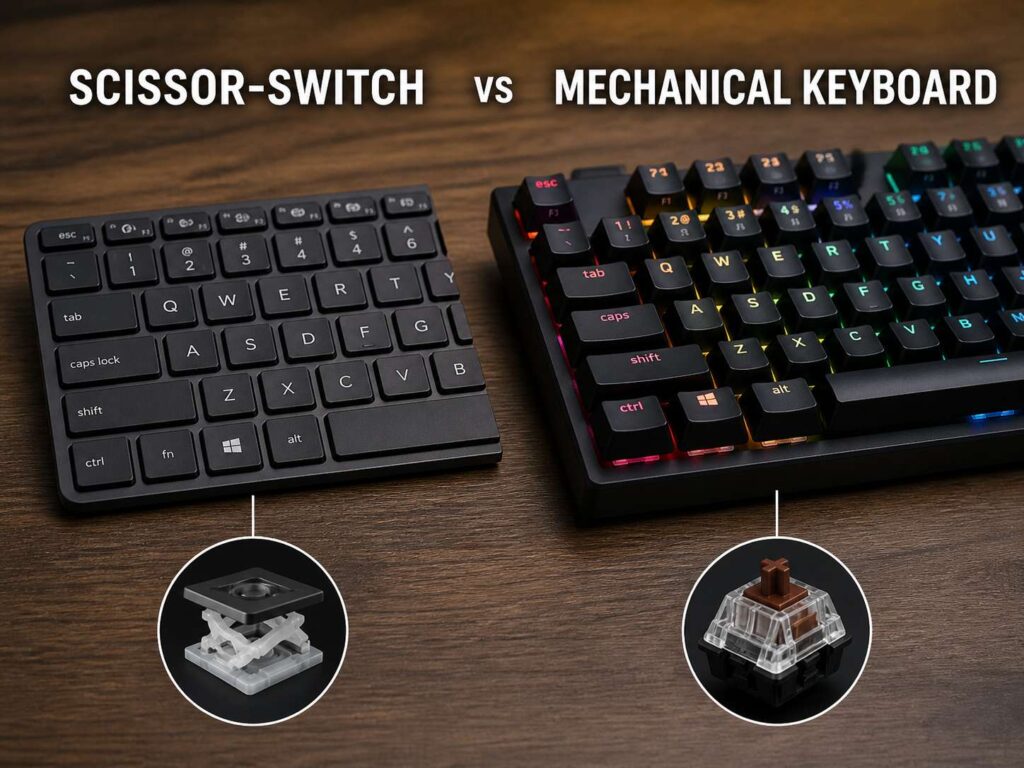
A scissor-switch keyboard uses a low-profile switch under each key. The switch has two small plastic arms that cross under the keycap. This shape keeps the key stable, even though the key does not move very far.
You will find this design in many laptop keyboards, slim desktop keyboards, tablet keyboards, and compact wireless keyboards. The typing feel is light, flat, and quick. You press the key a short distance, then it pops back up.
For many users, that feels familiar. Most laptop keyboards use a similar low-profile design, so the switch from a laptop to a slim desktop keyboard feels easy.
Still, the short travel has a clear tradeoff. The key can feel firm at the bottom. Some users like that crisp stop. Others feel it gets tiring during long writing sessions.
A scissor-switch keyboard makes the most sense for clean desks, shared workspaces, and people who want a quiet keyboard that stays out of the way.
What Is a Mechanical Keyboard?
A mechanical keyboard uses one physical switch under each key. Each switch has its own housing, spring, stem, and contact point. That design gives each key a more defined feel.
Mechanical keyboards come in many switch types. Linear switches feel smooth from top to bottom. Tactile switches give a small bump during the press. Clicky switches give a bump and a click sound.
This variety makes mechanical keyboards more personal. You can choose a soft typing feel, a firmer gaming feel, a quiet office feel, or a loud clicky feel.
Many mechanical keyboards also support different keycaps. Some models support hot-swappable switches too. That means you can pull out the switches and try new ones without soldering.
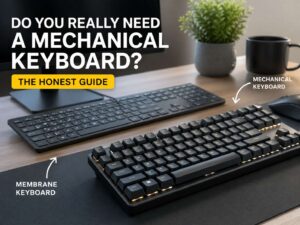
That extra choice is one reason keyboard fans like them so much. For a deeper look at whether the upgrade makes sense, read this guide on whether you really need a mechanical keyboard.
Typing Feel and Key Travel
Typing feel is the biggest difference between scissor-switch and mechanical keyboards.
Scissor-switch keyboards have short key travel. The key moves a small amount before it registers. This can feel fast and neat, mainly for emails, notes, spreadsheets, and browser work.
Mechanical keyboards usually have deeper travel. Many switches register before the key reaches the bottom. So, you can type without pressing each key all the way down.
That deeper motion gives your fingers more feedback. Some people feel more accurate on a mechanical keyboard. Others prefer the short, flat feel of a laptop-style board.
Your current habit matters here. A laptop user will often adjust faster to a scissor-switch keyboard. A desktop user who writes, codes, or games for hours may enjoy the extra movement of a mechanical keyboard.
Neither feel is wrong. The better feel is the one your hands can use for hours without strain.
Noise Level
Scissor-switch keyboards usually win in quiet rooms. They make a soft tap instead of a sharp click. That makes them a safe pick for offices, shared rooms, libraries, dorms, and late-night work.
Mechanical keyboards vary a lot. Clicky switches can sound loud. Tactile switches sit in the middle. Linear switches can sound smoother, but the case, plate, keycaps, and stabilizers change the final sound.
Silent mechanical switches exist. They reduce the sound from each press. Still, a quiet mechanical keyboard rarely sounds as flat and muted as a good scissor-switch keyboard.
Noise matters more than many buyers expect. A loud keyboard can annoy people nearby. It can also come through on calls, mainly with a desk mic close to the keyboard.
So, think about your room before you buy. A clicky mechanical keyboard can feel fun at first, but it can become a problem in shared spaces.
Gaming Performance
Mechanical keyboards have a strong place in gaming. The reason is not only speed. It is control, feedback, switch choice, and layout choice.
Linear switches feel smooth and quick for repeated key presses. Many players like them for movement keys in shooters, racing games, and action games. Tactile switches work well for players who want a clear press without a loud click.
Scissor-switch keyboards can still handle casual gaming. They respond well enough for many players. They also leave more mouse space, which helps on small desks.
For competitive gaming, a mechanical keyboard gives you more control over the feel. You can choose lighter switches, faster actuation, compact layouts, and stronger keycaps.
A simple rule works well. Casual gaming feels fine on a scissor-switch keyboard. Competitive gaming feels better on a mechanical keyboard for most players.
Office Work and Daily Use
For office work, scissor-switch keyboards make a lot of sense. They stay quiet, slim, and simple. They pair well with laptops and tablets. They also look neat on a desk.
A scissor-switch keyboard feels quick for short daily tasks. It suits email, web browsing, meeting notes, chat, and light spreadsheet work. It is easy to move and easy to store.
Mechanical keyboards shine during longer sessions. Writers, programmers, editors, and data entry users often prefer the stronger feedback. The keys feel more separate, and each press feels clearer.
That said, a mechanical keyboard can take more desk space. Many models sit higher too. A wrist rest can help, but it adds another item to your desk.
For a clean office setup, choose scissor-switch. For a richer typing feel, choose mechanical.
Laptop Keyboard Feel vs Desktop Keyboard Feel
A scissor-switch keyboard feels close to a laptop keyboard. The keys sit low. The travel is short. The typing feel is familiar for people who work on laptops every day.
A mechanical keyboard feels more like a dedicated typing tool. It has more height, more movement, and more feedback. It can feel strange at first for laptop users.
This is one reason people buy the wrong keyboard. They hear praise for mechanical keyboards, then they try one and find it too tall or too loud. Other buyers choose a slim keyboard, then miss the deeper feel of a mechanical switch.
The best starting point is your current keyboard. If you like your laptop keyboard, a scissor-switch model will feel natural. If your laptop keyboard feels flat or harsh, a mechanical keyboard may feel much better.
Durability and Repair
Mechanical keyboards usually have the edge for long-term repair. Many models let you replace keycaps. Some models let you replace switches. You can also clean many mechanical boards more easily.
Scissor-switch keyboards are harder to repair. The small plastic arms under each key can break. Keycap clips can be fragile too. On many slim keyboards, switch replacement is not practical.
That does not mean every mechanical keyboard lasts longer. A cheap mechanical board can fail early. A good scissor-switch keyboard can last for years.
Still, mechanical keyboards give you more ways to fix or refresh the board. This matters for heavy users. If you type for hours each day, repair options can save money over time.
Size, Portability, and Desk Space
Scissor-switch keyboards are often thin and light. They fit in bags easily. They work well with tablets, laptops, and small desks. Many models use Bluetooth, so you can keep cable clutter low.
Mechanical keyboards come in many sizes. Full-size boards include a number pad. Tenkeyless boards remove the number pad. Compact 75 percent, 65 percent, and 60 percent layouts save more space.
Still, width is not the only thing that matters. Height matters too. A tall keyboard can raise your wrists and feel tiring over time.
A scissor-switch keyboard works better for travel and low desk height. A compact mechanical keyboard works better for users who want strong key feel in a smaller footprint.
Keycap and Switch Choice
Scissor-switch keyboards offer little choice after purchase. You buy the keyboard, then you use the feel it came with. Some models feel crisp. Others feel soft or uneven.
Mechanical keyboards give you far more room to choose. You can pick linear, tactile, clicky, silent, speed, heavy, light, full-height, or low-profile switches. You can change keycaps on many boards too.
Keycaps can change both feel and sound. PBT keycaps often feel more textured and resist shine better than many ABS keycaps. Thicker keycaps can make a keyboard sound deeper. Low-profile keycaps reduce height.
For most buyers, the switch choice comes down to three types:
Linear switches feel smooth and suit gaming or fast typing.
Tactile switches give a small bump and suit mixed work.
Clicky switches sound loud and suit private rooms.
If you want to compare another common keyboard type, this guide on mechanical vs membrane keyboards explains the main differences in feel, price, and daily use.
Price and Value
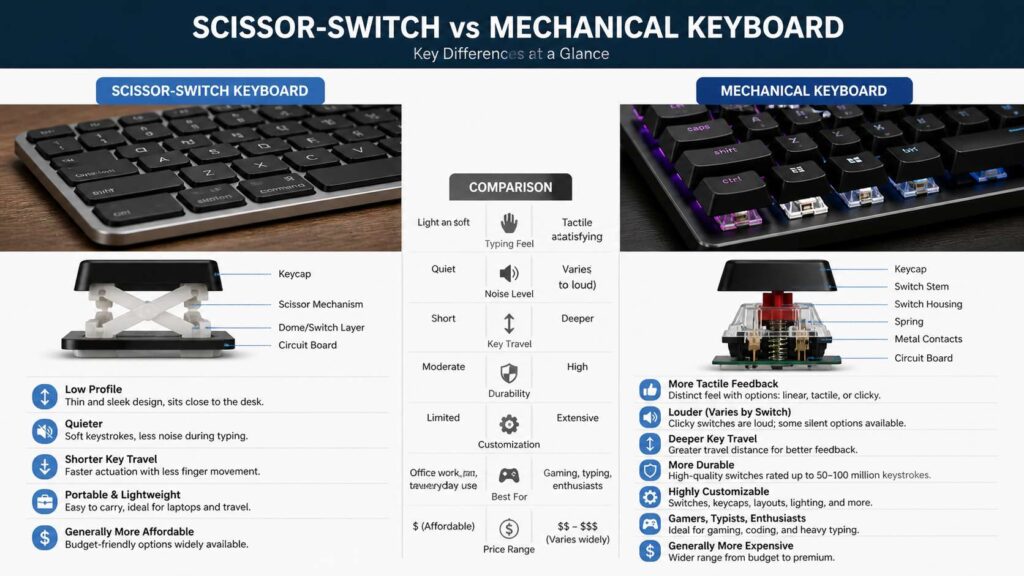
Scissor-switch keyboards often cost less than premium mechanical keyboards. Yet price depends on the brand, wireless features, build quality, and device support.
Mechanical keyboards cover a wide range. Entry-level models can cost less than some slim office keyboards. Mid-range boards often bring better stabilizers, better keycaps, hot-swap sockets, and stronger cases. Premium boards cost more for sound, build quality, layout, and custom parts.
The best value comes from your real use. A quiet scissor-switch keyboard is a smart buy for office work, school, travel, and small spaces. A mechanical keyboard is a smart buy for long typing sessions, gaming, and users who care about feel.
Do not pay extra for features you will not use. RGB lighting, macro keys, metal cases, hot-swap switches, and wireless modes can be useful. They can also raise the price with little gain for basic work.
Best Choice by User Type
A scissor-switch keyboard fits you best if you want a slim keyboard, quiet typing, short key travel, and easy wireless use. It also fits people who move between a laptop, tablet, and desktop setup.
Students often benefit from scissor-switch keyboards. They are easy to carry, quiet in shared spaces, and simple to pack.
Office workers often like scissor-switch keyboards too. The low profile feels familiar, and the softer sound helps during calls.
A mechanical keyboard fits you best if you want stronger feedback, more switch choice, better keycap choice, and a more custom typing feel.
Gamers often prefer mechanical keyboards. Writers and programmers often prefer them too, mainly during long sessions.
For mixed use, a low-profile mechanical keyboard can be a good middle ground. It keeps some of the slim feel but adds more switch feedback.
Common Buying Mistakes
Many people start with a loud clicky mechanical keyboard. That can be a mistake. Clicky switches feel fun in short tests, but they can annoy people fast.
Some buyers choose the thinnest keyboard and expect it to feel better. Thin keyboards can feel great, but they can also feel shallow.
Layout causes problems too. A 60 percent keyboard looks clean, but it removes the function row, arrow keys, and number pad. That can slow down work. A 75 percent or tenkeyless keyboard often gives a better balance.
Wireless mode deserves attention. Bluetooth works well for switching between devices. A 2.4 GHz dongle usually feels better for gaming. Wired mode removes battery worries.
So, do not buy by looks alone. Buy by feel, size, sound, and daily use.
Simple Buying Checklist
Ask these questions before you buy:
Do you share your room or desk area with other people?
Do you prefer laptop keys or deeper desktop keys?
Do you need a number pad?
Do you play games often?
Do you type for more than 3 hours per day?
Do you need Bluetooth for more than one device?
Do you want to change keycaps or switches later?
Do you care more about quiet sound or strong feedback?
Your answers will point you in the right direction. Quiet, thin, and portable points to scissor-switch. Custom, tactile, and repairable points to mechanical.
Final Verdict
The scissor-switch vs mechanical keyboard choice has no single winner. It comes down to fit.
A scissor-switch keyboard is better for quiet work, travel, laptop-style typing, and low-profile desk setups. It gives you short travel, a neat shape, and easy daily use.
A mechanical keyboard is better for gaming, long typing sessions, custom feel, and repair options. It gives you switch choice, stronger feedback, and more ways to shape the typing experience.
Most casual users will feel comfortable with a good scissor-switch keyboard. Heavy typists and gamers will often get more value from a mechanical keyboard. For a middle ground, look at low-profile mechanical keyboards. They keep the board slimmer but add more feedback than most scissor-switch models.