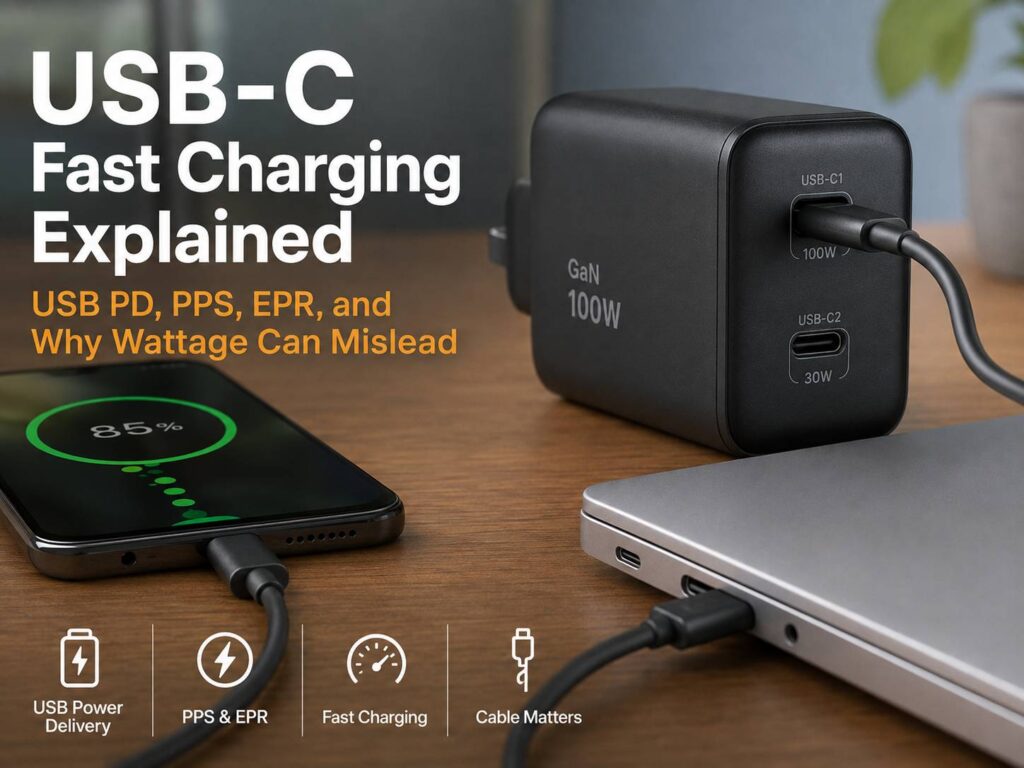
USB-C was meant to make charging easier, but buying the right charger can still feel surprisingly complicated. Two chargers may both have USB-C ports and the same wattage printed on the box, yet one charges your phone at full speed while the other does not.
The biggest source of confusion is that USB-C only describes the connector. It does not guarantee a particular charging speed, power level, data rate, or charging protocol.
Modern devices can use USB Power Delivery, PPS, Extended Power Range, Qualcomm Quick Charge, Samsung Super Fast Charging, SUPERVOOC, and other manufacturer-specific technologies. The phone or laptop, charger, and cable must all support a compatible charging mode before you get the fastest possible speed.
If you’re also choosing a portable charger, the same compatibility rules apply. Our fast-charging power bank buying guide for 2026 explains what to check before buying a high-output power bank.
Here’s how the confusing USB-C fast-charging standards actually work and what matters when choosing a charger or cable.
USB-C Doesn’t Tell You How Fast a Device Will Charge
Seeing a USB-C port tells you less than you might expect.
A USB-C charger could support:
- Basic USB charging
- USB Power Delivery
- USB PD with PPS
- Extended Power Range charging
- Qualcomm Quick Charge
- A proprietary fast-charging system
- Several charging protocols at once
Cables have similar differences. A basic USB-C cable might handle everyday phone charging and USB 2.0 data speeds. Another cable may carry up to 240 W while also supporting much faster data transfer.
Because of this, choosing a charger only by looking at the connector can lead to disappointing results.
A better way to think about USB-C charging is:
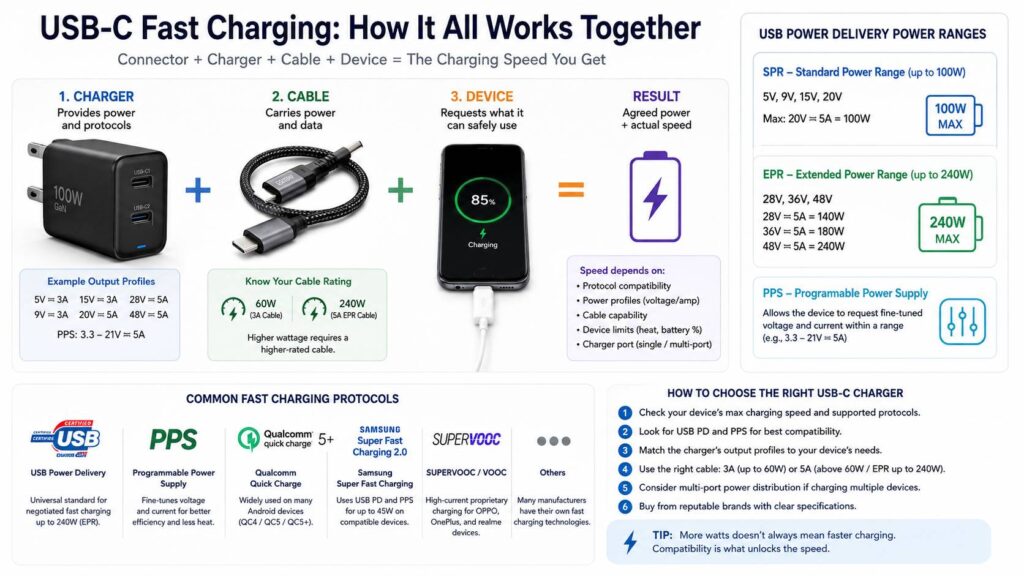
Device support + charger protocol + charger power profile + cable capability = actual charging performance
If one part doesn’t support the required mode, the system normally falls back to a slower compatible option.
The USB-C Fast-Charging Standards You Need to Know
Several charging technologies currently use USB-C.
| Charging technology | Main purpose | Common devices |
|---|---|---|
| USB Type-C power | Basic power delivery without advanced USB PD negotiation | Accessories and low-power devices |
| USB Power Delivery | Negotiates voltage and current between charger and device | Phones, tablets, laptops, handheld gaming devices |
| USB PD PPS | Allows more precise voltage and current adjustments | Many modern Android phones |
| USB PD EPR | Extends USB PD beyond 100 W and up to 240 W | High-power laptops, monitors and similar hardware |
| Qualcomm Quick Charge | Qualcomm’s fast-charging technology | Compatible Android phones |
| Samsung Super Fast Charging | Samsung charging system built around USB PD and PPS | Galaxy phones and tablets |
| SUPERVOOC and VOOC | Proprietary high-current charging | OPPO, OnePlus and selected related devices |
Some manufacturers also use their own charging technologies alongside USB PD.
Thankfully, many modern chargers support several standards. That’s useful if you own devices from different brands, but you still need to check the individual output profiles.
A charger marked “100 W” does not necessarily provide 100 W to every connected device.
How USB Power Delivery Works
USB Power Delivery, usually called USB PD, is the most important universal fast-charging standard used with USB-C.
Instead of a charger blindly sending maximum power, USB PD allows the charger and connected device to communicate.
The process works roughly like this:
- The charger tells the device which voltage and current combinations it supports.
- The device examines those available power profiles.
- It requests a suitable charging mode.
- The charger supplies the negotiated voltage and current.
- Power can change as charging continues.
This negotiation is one reason a powerful laptop charger can safely charge a much smaller device.
For example, imagine a charger with these profiles:
- 5 V at 3 A
- 9 V at 3 A
- 15 V at 3 A
- 20 V at 3.25 A
Power is calculated using:
Watts = Volts × Amps
At its highest profile:
20 V × 3.25 A = 65 W
That makes it a 65 W charger.
Still, a phone might request only 9 V at 2 A, which equals about 18 W. The existence of a 65 W maximum output does not force the phone to consume 65 W.
What USB PD SPR Means
Standard Power Range, commonly shortened to SPR, covers USB Power Delivery operation up to 100 W.
A familiar high-power SPR combination is:
20 V × 5 A = 100 W
The cable becomes especially important here.
A standard 3 A USB-C cable can support up to:
20 V × 3 A = 60 W
Once charging needs more than 60 W, you’ll generally need a suitable 5 A USB-C cable.
This creates a common situation where someone has a 100 W charger and a laptop capable of accepting 100 W, yet charging remains limited to about 60 W. The cable may be the missing piece.
Why USB-C Cables Are Often Marked 60 W or 240 W
USB-C cable labeling has changed as higher-power USB charging has become more common.
For practical shopping, you’ll now frequently see cables marketed for 60 W or 240 W USB power.
A 60 W cable is enough for many everyday devices. That includes phones, tablets, accessories, handheld gaming systems, and quite a few thin laptops.
A 240 W cable is designed for the higher power levels available through USB Power Delivery Extended Power Range.
Older 100 W cables still exist and can remain perfectly useful within their designed limits. The important part is not assuming that every older high-power cable supports the voltage levels needed for newer EPR charging.
If you’re buying a cable specifically for a new high-power USB-C setup, a clearly marked 240 W model can simplify the decision.
USB PD EPR Explained
Extended Power Range, or EPR, allows USB Power Delivery to go beyond the previous 100 W ceiling.
EPR supports higher voltage levels that make charging much more powerful USB-C devices possible.
The main fixed voltage levels include:
- 28 V
- 36 V
- 48 V
At the upper end:
48 V × 5 A = 240 W
This makes USB-C practical for hardware that previously needed larger proprietary power adapters.
It also means more pieces need to match.
For maximum EPR charging, you generally need:
- An EPR-capable charger
- A device that supports the required EPR mode
- A suitable 240 W USB-C cable
Connecting a 240 W charger to a laptop that only accepts 100 W will not make the laptop consume 240 W. The two devices negotiate a lower compatible power level.
What PPS Means and Why It Matters for Android Phones
Programmable Power Supply, better known as PPS, is part of the USB Power Delivery system.
Traditional USB PD relies heavily on predefined voltage profiles. PPS adds more flexibility by allowing compatible devices to request voltage and current in smaller adjustable increments.
That lets the phone fine-tune the power it receives as the battery’s needs change.
There are a few practical benefits.
The phone may perform less voltage conversion internally, which can improve charging efficiency. Heat management can also benefit because the charger can adjust its output more closely to what the device requires.
PPS is especially relevant for some Samsung Galaxy and Google Pixel phones.
This is why a charger advertised as “65 W USB-C PD” might still fail to activate the fastest charging mode on a particular Android phone. It may have plenty of total power but lack the necessary PPS profile.
Wattage is only part of the specification.
How Samsung Super Fast Charging Fits In
Samsung’s naming makes the situation look more complicated than it really is.
Recent Samsung fast-charging implementations rely heavily on USB Power Delivery and PPS.
Depending on the phone, you may see terms such as:
- Super Fast Charging
- Super Fast Charging 2.0
A compatible third-party charger can work well, so you don’t necessarily need a Samsung-branded charger.
You do need to check the specifications carefully.
For a Galaxy model that supports higher charging rates, look for:
- USB Power Delivery support
- PPS support
- The correct PPS voltage and current range
- A suitable 5 A cable when the charging mode requires one
This explains why some 65 W laptop chargers charge a Galaxy phone quickly but never trigger its fastest advertised mode.
The charger has enough total wattage. It simply doesn’t offer the exact charging profile the phone wants.
Apple USB-C Fast Charging Is Usually Simpler
Apple relies heavily on USB Power Delivery for wired fast charging.
Recent iPhones use USB-C directly. Older fast-charge-capable models with Lightning can use a USB-C to Lightning cable with an appropriate USB PD adapter.
For most users, charger selection is straightforward.
Choose a reputable USB PD charger with enough output for the device.
Using a 65 W USB PD laptop charger with an iPhone is also fine when the charger follows the standard properly. The phone requests the amount of power it supports.
It does not receive the charger’s entire 65 W output simply because that power is available.
A higher-output adapter can still be useful if you want one charger for an iPhone, iPad, laptop, and other USB-C hardware.
Qualcomm Quick Charge Still Matters
Qualcomm Quick Charge remains part of the fast-charging mix, especially with Android devices.
You may see charger specifications listing several technologies together, such as:
- USB PD
- PPS
- Quick Charge
- QC 4+
- QC 5
Multi-standard support can make one adapter more useful across a collection of devices.
Still, both sides need to understand the charging technology.
A charger supporting Quick Charge cannot make an unsupported phone charge faster. Likewise, a device may fall back to USB PD or another supported mode if the preferred protocol isn’t available.
Why SUPERVOOC Can Be More Complicated
OPPO and OnePlus provide a good example of why matching USB-C connectors do not guarantee matching charging speeds.
SUPERVOOC can use proprietary charging methods and high current levels. Reaching the manufacturer’s maximum advertised speed can require a compatible charger, cable, and phone.
Some OnePlus chargers also support more universal standards such as USB Power Delivery, PPS, and Quick Charge.
Here’s where things get confusing.
A charger marketed as 100 W might provide its full 100 W through SUPERVOOC but offer a lower maximum through standard USB PD.
That means the same charger could provide very fast charging to a compatible OnePlus phone while giving a laptop considerably less power.
The information is usually available in the charger’s specifications, but it may be hidden beneath the much larger headline wattage.
Why Your 100 W Charger Might Only Deliver 18 W
A charger’s rated wattage represents its maximum capability under specific conditions.
Actual charging power may be lower because of:
- The phone or laptop’s charging limit
- Unsupported PPS profiles
- Missing proprietary charging support
- A 3 A cable instead of a required 5 A cable
- Power sharing between charger ports
- High battery temperature
- High device temperature
- Battery charge level
- Using the device heavily while charging
- Battery protection features
- Charger temperature
- Software-based charging limits
Maximum charging speed also doesn’t stay constant for the entire session.
Phones and laptops reduce charging power as the battery fills. This tapering helps control heat and battery stress.
As a result, seeing 40 W at 25 percent and 15 W at 85 percent doesn’t automatically indicate a problem.
Your USB-C Cable Can Limit Charging Speed
It’s easy to blame the charger when a device charges slowly, but the cable can be the bottleneck.
For everyday buying decisions, USB-C charging cables can be thought of in two broad power groups.
60 W USB-C cables
A normal 3 A cable can deliver up to 60 W at 20 V.
That’s enough for many:
- Smartphones
- Tablets
- Portable gaming systems
- Accessories
- Thin and light laptops
240 W USB-C cables
A properly rated 240 W cable supports USB Power Delivery Extended Power Range.
These cables make sense for:
- High-power laptops
- EPR chargers
- USB-C docks
- High-power displays
- A general-purpose charging setup you want to keep for several years
Buying a 240 W cable will not make a 25 W phone suddenly charge faster.
It simply prevents the cable from becoming the power bottleneck with devices that need much more electricity.
What Is an E-Marker?
Some USB-C cables contain an electronic identification chip commonly called an E-Marker.
This chip provides information about the cable’s capabilities to connected hardware.
For higher-current USB-C charging, that identification becomes especially useful. The charger and device need to know that the cable can safely carry the requested current.
You don’t configure or interact with an E-Marker.
The connected hardware handles everything automatically.
From a buying perspective, there’s a much simpler rule to follow. If you need more than 60 W, don’t assume any random USB-C cable will work. Check its advertised power rating.
Charging Speed and Data Speed Are Different Specifications
Here’s another USB-C detail that catches people off guard.
A cable that supports 240 W charging does not automatically provide fast data transfer.
Some high-power charging cables may still offer USB 2.0 data speeds.
The reverse can also cause confusion. A cable designed for high-speed data does not automatically support the highest charging wattage unless its specifications say so.
If you’re buying a cable for charging only, focus on its power rating.
For external SSDs, docks, high-resolution displays, and other high-bandwidth equipment, check both:
- Maximum charging power
- Maximum data transfer speed
Display support may also need separate attention.
One USB-C cable can look exactly like another while behaving very differently.
Multi-Port Chargers Have Their Own Catch
A charger advertised as 100 W may deliver 100 W only when a single specific USB-C port is being used.
Plug in another device and the available power can change.
A hypothetical charger might behave like this:
- USB-C1 alone: 100 W
- USB-C2 alone: 65 W
- USB-C1 + USB-C2: 65 W + 30 W
Those numbers are only an example. Manufacturers use many different power-sharing arrangements.
Some chargers dynamically redistribute power whenever you connect or disconnect a device. A laptop may briefly stop charging while the adapter renegotiates the available output.
Before buying a multi-port adapter, find its power-distribution table.
The total wattage printed prominently on the charger rarely tells the whole story.
How to Choose the Right USB-C Fast Charger
You can avoid most USB-C charging problems with a few checks.
1. Find your device’s maximum wired charging rate
Start with the device manufacturer’s specifications.
Don’t assume two phones from the same brand support identical charging standards.
2. Identify the required charging protocol
Look for terms such as:
- USB PD
- PPS
- EPR
- Quick Charge
- Super Fast Charging
- SUPERVOOC
USB Power Delivery should be a priority if you want a charger that works well across several brands.
3. Look at the output profiles
Don’t stop after seeing “65 W.”
A detailed charger specification may show something like:
Fixed USB PD profiles
5 V × 3 A
9 V × 3 A
15 V × 3 A
20 V × 3.25 A
It may also list a PPS range.
Two chargers marketed as 65 W can behave differently because their supported profiles aren’t identical.
4. Check the cable
For charging up to 60 W, a suitable 3 A USB-C cable is normally enough.
Higher USB PD power levels may require a compatible 5 A cable.
If you’re building an EPR setup above 100 W, choose a properly rated 240 W cable.
5. Look at multi-port power sharing
Planning to charge a phone and laptop at the same time?
Check how much power each port receives with both connected. A “100 W charger” that drops one USB-C port to 45 W after a second device is connected may not suit a high-power laptop.
6. Avoid vague specifications
Be cautious with adapters that advertise a huge wattage number without clearly listing:
- Voltage
- Current
- USB PD support
- PPS support
- Individual port limits
- Multi-port power distribution
Good documentation makes compatibility much easier to judge.
Is Using a Higher-Wattage USB-C Charger Safe?
With properly designed USB Power Delivery equipment, using a charger rated above your device’s requirements is normal.
The charger advertises the power modes it can provide. Your phone, tablet, or laptop then requests a compatible option.
A 140 W USB PD charger can therefore charge a phone that needs far less power.
The phone doesn’t simply absorb 140 W.
Quality still matters, though. Cheap or poorly manufactured chargers and damaged cables can create electrical or thermal problems regardless of the protocol.
Choose reputable hardware with clear specifications and appropriate safety certifications.
What to Do If USB-C Fast Charging Stops Working
If a device suddenly charges more slowly than expected, work through the charging chain one part at a time.
Try another cable
Cables wear out.
A damaged cable may continue charging while failing to support the higher current it once handled.
Disconnect other devices
If you’re using a multi-port charger, unplug everything except the device you’re testing.
Charging faster afterward usually points to the charger’s power-sharing behavior.
Check the USB-C connector
Lint and debris can prevent a plug from seating correctly.
Inspect the port carefully. Avoid poking metal objects into the connector.
Allow the device to cool
High temperatures often reduce charging speed.
Gaming, navigation, video calls, direct sunlight, and hot rooms can all raise battery temperature enough for the device to limit charging power.
Check battery protection features
Modern phones and laptops may intentionally slow or stop charging at certain levels.
Features that limit charging to around 80 percent are becoming more common because they can reduce the amount of time a battery spends fully charged.
Verify PPS support
This is especially useful when troubleshooting Samsung and other Android devices.
A charger can have more than enough total wattage yet lack the PPS profile required for the device’s highest charging mode.
Try another USB-C port on the charger
Not every port on a multi-port adapter necessarily supports the same power.
Some models reserve their highest output for USB-C1 while giving secondary ports lower limits.
USB-C Charging Is Becoming More Standardized in Europe
European common-charger rules now apply to many categories of portable electronics.
The requirements already cover devices such as smartphones and tablets. Laptop requirements also took effect in April 2026.
USB Power Delivery plays an important role in these rules for covered devices that support higher wired charging power.
Manufacturers can still provide proprietary charging technologies. However, supporting an additional fast-charging method does not remove the required standardized USB charging functionality where the rules apply.
This should make basic cross-brand charging easier.
It does not mean every USB-C charger can activate every manufacturer’s highest proprietary charging speed.
A phone may charge perfectly well through USB PD while still requiring a brand-specific charger and cable to reach its headline maximum.
A Simple USB-C Charging Setup for Most People
If you want one charger for several devices, a USB Power Delivery charger with PPS is one of the most flexible options.
For phones and tablets, a good 45 W to 65 W charger covers many common devices.
Adding a laptop makes 65 W to 100 W more useful.
High-power laptops that support EPR may benefit from 140 W or higher adapters.
Pair the charger with a cable that matches your power requirements. A 240 W USB-C cable can be a practical long-term choice if you expect to use it with laptops and higher-power devices.
Just don’t forget that data speed is separate.
If you also want the cable for external SSDs, docks, or monitors, check its data and display capabilities before buying.
Proprietary chargers still have a place too. If achieving the absolute fastest charging speed on a compatible OnePlus, OPPO, or similar phone matters to you, the manufacturer’s matching charging ecosystem can still outperform ordinary USB PD.
Frequently Asked Questions
Does every USB-C charger support fast charging?
No. USB-C describes the connector. The charger still needs enough output power and a protocol that your device supports.
Is USB-C the same as USB Power Delivery?
No. USB-C is the physical connector. USB Power Delivery is a charging and power-negotiation system that can operate through USB-C.
Is PPS better than regular USB PD?
PPS gives compatible devices finer control over voltage and current. It can help certain phones reach their intended charging speeds and manage power more precisely.
Devices that don’t support PPS won’t gain a special benefit from it.
Can I charge a 25 W phone with a 100 W charger?
Yes, if the charger and phone use compatible charging standards.
The phone negotiates the power it needs. It doesn’t automatically receive the charger’s full 100 W capability.
Why won’t my 65 W charger give my Samsung phone 45 W charging?
The charger might lack the required PPS profile. You may also need a suitable 5 A cable for certain Samsung charging modes.
Battery temperature and charge level can lower charging speed as well.
Do I need a 5 A USB-C cable?
You need a suitable 5 A cable when the charging mode requires more current than a standard 3 A cable can provide.
This becomes particularly relevant once USB PD charging goes beyond 60 W.
Will a 240 W USB-C cable charge my phone faster?
Usually not.
The phone decides how much charging power it accepts. A 240 W cable only allows compatible high-power devices to operate without the cable becoming the limiting factor.
Can a 240 W USB-C cable have slow data speeds?
Yes.
Charging power and data transfer performance are separate capabilities. A cable can support very high charging power while still offering basic USB data speeds.
Does a newer USB PD version automatically mean faster charging?
No.
The version number alone does not tell you what power your particular charger can provide to your device.
Check the actual wattage, voltage profiles, PPS support, EPR support, cable rating, and device requirements instead.
What You Should Check Before Buying
USB-C charging becomes much easier once you stop treating the connector itself as the charging specification.
For broad compatibility, start with USB Power Delivery.
If you use a modern Android phone, PPS is also worth prioritizing because some devices depend on it for their fastest standardized charging modes.
High-power laptops that need more than 100 W require extra attention. Check whether the computer supports EPR and pair it with a suitable charger and 240 W USB-C cable.
Proprietary charging systems remain different. Devices using technologies such as SUPERVOOC may require the manufacturer’s compatible charger and cable to reach their highest advertised charging speeds.
Most slow-charging problems come back to four basic mismatches:
- The charger doesn’t support the required protocol.
- The necessary voltage or current profile isn’t available.
- The cable cannot handle the requested power.
- The device cannot use the charger’s highest advertised mode.
Check those four things before replacing your charger.
A bigger wattage number can be useful, but it doesn’t automatically mean faster charging.