Xerox C305ae: Specs, Price, Pros & Cons
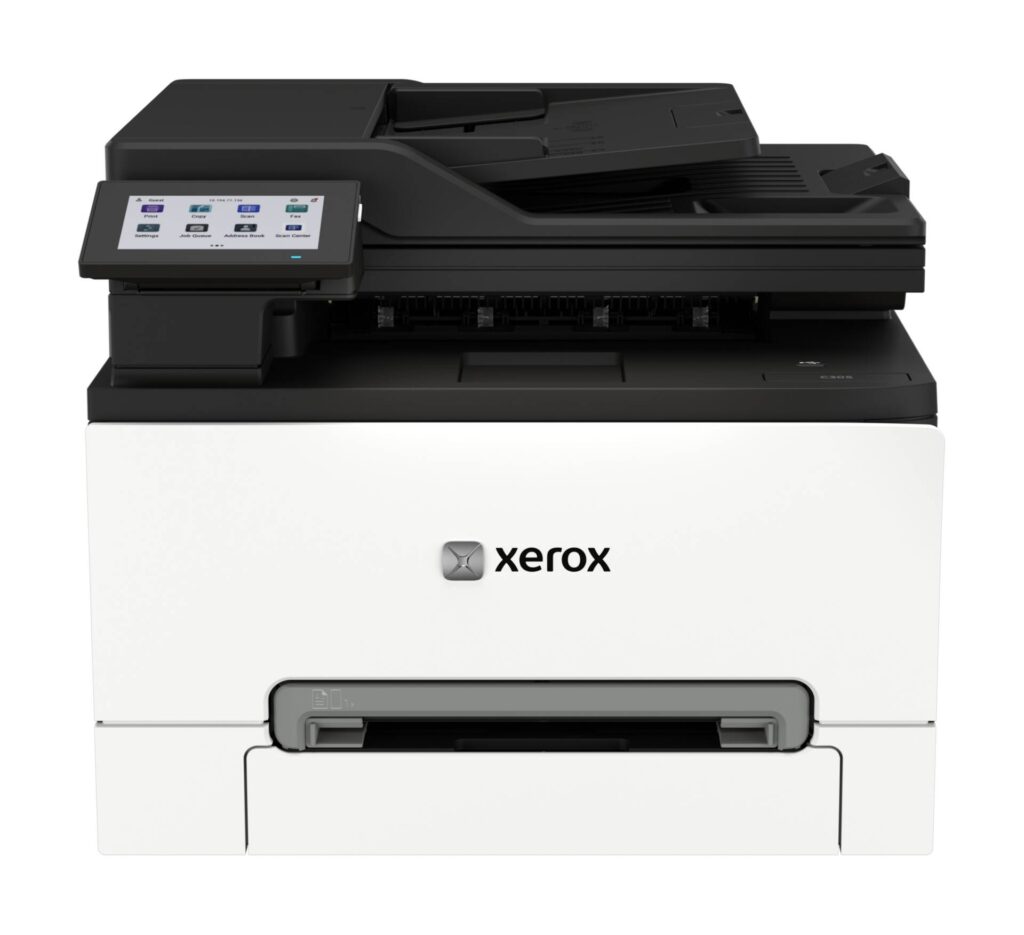
The C305ae is Xerox's color laser all-in-one for a small office that has stopped pretending a home printer will do, and the specification that says so is the document feeder: 50 sheets, scanning both sides in a single pass at up to 42 images per minute in color and 96 in mono. Print and copy are matched to it at 32 ppm in both color and black, with automatic duplex, an 8-second first page and a 75,000-page maximum monthly duty cycle against a recommended 5,000.
The controls and connectivity are office-grade throughout. A 4.3-inch tablet-style color touchscreen runs the panel, with voice guidance on this model. There is Gigabit Ethernet, dual-band Wi-Fi with Wi-Fi Direct, USB, front and rear USB-A ports for printing from and scanning to a drive, AirPrint, Mopria and Xerox's own apps, and a 33.6 kbps fax modem. Security is where Xerox spends its marketing: TPM 2.0 on this model, signed firmware, post-quantum-ready cryptography, WPA3, TLS 1.3, secure print and audit logging, which is more than a small office will use and exactly what an IT-managed one will ask about.
Paper handling is modest: a 250-sheet main tray, a single-sheet manual feed in place of a bypass tray, and a 100-sheet output tray, with two optional 250-sheet trays taking it to 751. Resolution is 2400 x 600 in Xerox's color-quality mode with a 1200 x 1200 mode available. It draws around 430 W while printing, runs at 53 dB, measures 411 x 402 x 450 mm and weighs 20.2 kg, so it is sited once.
The box ships with real starter toners, where most rivals include samplers, and Xerox backs it with a one-year warranty, extendable to three years on site.
Category strengths
Where the Xerox C305ae beats the median
- A much higher print resolution ?2,400 dpi vs 1,200 dpi (median)
- A much higher monthly duty cycle ?75,000 pages vs 50,000 pages (median)
- A slightly higher print speed (color) ?32 ppm vs 31 ppm (median)
Where the Xerox C305ae trails the median
- A heavier build ?20.2 kg vs 18.35 kg (median)
How this VS Score was computed
Score 70: each known spec is measured against the median of laser printers (12 products), then weighted. 57% of the scoreable weight could be used. See how we score
| Specification | This product | Cohort median | Score weight | Points moved |
|---|---|---|---|---|
| Color printing | Yes | 58% of the class have it | 1.5 | +75.0 |
| Print resolution | 2,400 | 1,200 | 0.5 | +25.0 |
| Duplex scanning | Yes | 64% of the class have it | 0.5 | +25.0 |
| Touchscreen display | Yes | 75% of the class have it | 0.5 | +25.0 |
| Fax | Yes | 67% of the class have it | 0.2 | +10.0 |
| Monthly duty cycle | 75,000 | 50,000 | 0.3 | +7.5 |
| Print speed (color) | 32 | 31 | 1 | +2.0 |
| Weight | 20.2 | 18.35 | 0.3 | −1.5 |
| Print speed (black) | 32 | 32 | 2 | +0.0 |
| ADF capacity | 50 | 50 | 0.5 | +0.0 |
| Input tray capacity | 250 | 250 | 1 | +0.0 |
| Output tray capacity | 100 | 100 | 0.3 | +0.0 |
Not scored: Automatic duplex printing (standard for the class (100% have it)); Supertank / refillable ink (not applicable: only 9% of this class have it); All-in-one (standard for the class (100% have it)); Automatic document feeder (standard for the class (100% have it)); Wi-Fi (standard for the class (92% have it)); Wi-Fi Direct (standard for the class (92% have it)); Ethernet (standard for the class (100% have it)); USB (standard for the class (100% have it)); Apple AirPrint (standard for the class (100% have it)); Mobile app printing (standard for the class (100% have it)).
Editor’s note
The C305ae is the printer I would recommend to an office of five to fifteen people that has an IT person, or a contract with one, and a scanning habit. The single-pass duplex feeder turns a stack of two-sided contracts into a PDF while someone else prints, and the security list is the kind that satisfies a procurement checklist. If nobody in your office knows what TPM stands for, you are paying for things you will not switch on.
In use, the tablet-style panel is the pleasant surprise: configurable shortcuts turn scan-to-email and scan-to-USB into one-touch jobs for the people who use them daily. Voice guidance is there for accessibility and can be ignored by everyone else.
The paper handling needs an honest look before ordering. Envelopes and letterhead go through the manual feed one at a time, and the output tray fills well before the input runs out on a long job. An office that mails a lot should budget for the optional second tray or accept a daily walk to the printer.
Toner is the running-cost story. The starter cartridges are real ones (2,000 pages black, 1,200 per color), and the extra-high-yield set at 6,200 and 6,400 pages is what makes the per-page cost sensible at the recommended 5,000 pages a month. The waste toner bottle is a consumable too, good for about 15,000 pages, so know it exists before the panel asks for it.
One year of warranty is thin for a machine this heavy. The on-site extension is worth pricing in. Against the Brother MFC-L8930CDW, this is a slower feeder and printer with a stronger security story and a better touchscreen. Against the Canon Color imageCLASS MF665Cdw, it is faster and more secure but with a third of the warranty. Buy it where the IT checklist matters.
Specifications
Printing
Scanning & copying
Paper handling
Connectivity
Design
Sources and verification
Where the specifications come from
- Official product pagexerox.com
- Retailer listing (cross-check)amazon.com
Verification
- First published
- Specifications last checked
- Sheet completeness
- 24 of 24 specifications verified; the rest show as Unknown and are never estimated or scored
- Page type
- Product specification page — Compiled from the manufacturer’s published specifications and the cited sources; this is not a hands-on test.
- Basis
- Research-based: specifications and editorial text were compiled from the documents listed here and the manufacturer’s published data. We have not tested this unit ourselves; where independent measurements are mentioned they belong to the linked publication.
Where to buy
Prices and availability may change. Check the retailer before buying. We may earn a commission on purchases.
Price history
Printers with similar specs to the Xerox C305ae

Ratings & reviews
No reviews yet. Be the first to share your experience.
The bottom line
The Xerox C305ae earns a VS Score of 70, above the median of the 12 laser printers it is measured against (a score of 50 is level with that median).
- Who it’s for
- Offices of five to fifteen people with an IT checklist to satisfy and a real scanning habit. The feeder and the security list are what this machine does that cheaper all-in-ones do not.
- Who should look elsewhere
- A single desk or a home, and any office that feeds envelopes and letterhead in stacks.
- The trade-off that matters
- Documented security and a real touchscreen against a thin warranty for a machine this heavy and paper handling that is honest rather than generous.
- The main alternative
- Brother MFC-L8930CDW: if throughput matters more than the security list, a faster feeder and printer, with the same one-year warranty.
This page was created with the help of AI. How we work