
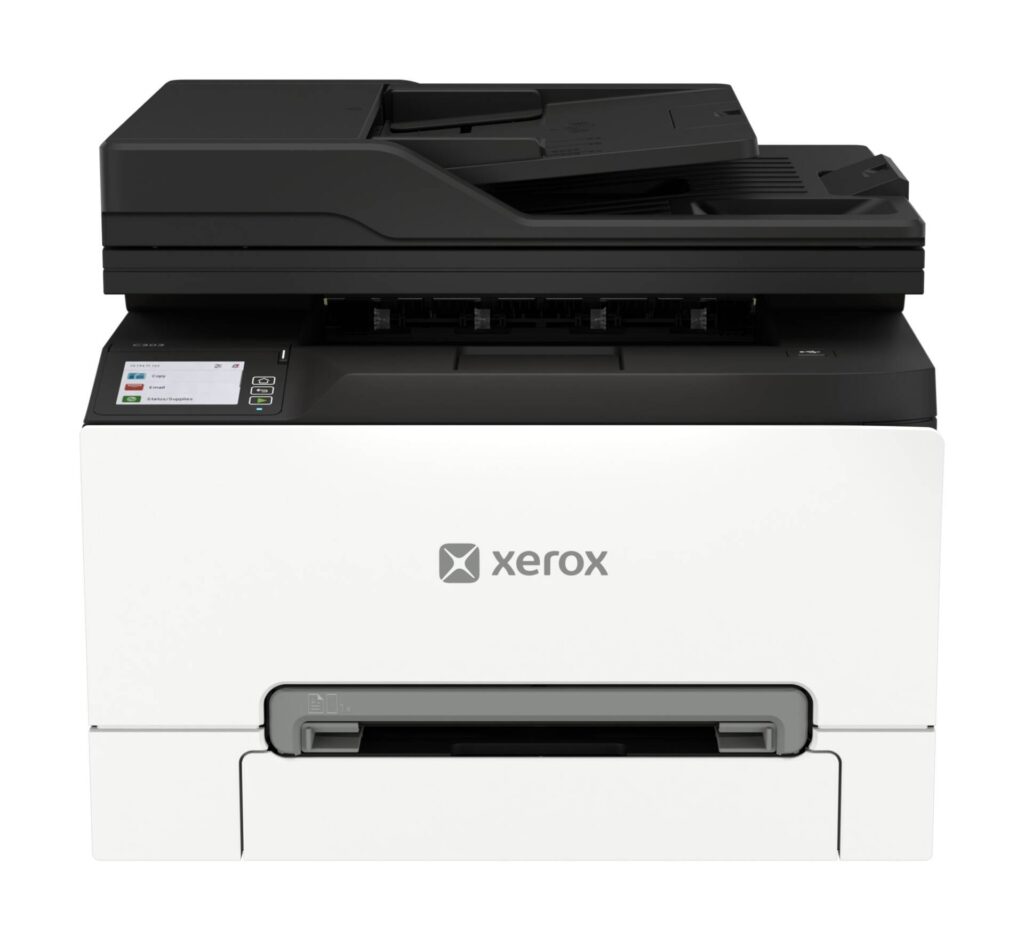
Xerox C303a: Specs, Features, Pros & Cons
Among a category page full of inkjets, this is a color laser, and almost none of the usual comparisons survive that difference. Resolution figures are not measured the same way. Cost per page is governed by toner cartridges, a drum, a transfer belt and a fuser, each with its own replacement interval, where an inkjet has a single ink price. Speed is quoted after the first page, while inkjet figures are an average that includes a printhead waking up. Ranking it against the ink machines above and below it using the same numbers produces a comparison that looks tidy and means very little.
What a laser offers is indifference to how often you use it. There is nothing to dry out, no cleaning cycle consuming supplies while the machine sits idle, no penalty for printing nothing for a month and then a hundred pages in an afternoon. That pattern (bursty, unpredictable, occasionally heavy) describes most small offices, and it is the strongest argument for the format.
The feature that earns its cost here is duplex scanning: the feeder captures both sides of a sheet in a single pass. Anyone who has digitized a stack of double-sided contracts knows the alternative involves scanning the pile twice and then interleaving the files afterwards. Wired gigabit networking sits in the same bracket of useful features, as against the wireless-first assumptions of the consumer machines nearby.
The real constraint is physical. This is office equipment in weight and footprint, and it wants a permanent surface rated to hold it, clearance above for the feeder lid, and somewhere to live that is not a desk a person also works at. Settling where it goes before ordering avoids the most common regret with hardware of this class, which is discovering after delivery that the only free surface cannot take it.
Category strengths
Where the Xerox C303a beats the median
- A much higher print speed (color) ?32 ppm vs 9 ppm (median)
- A much higher print speed (black) ?32 ppm vs 16 ppm (median)
- A much higher monthly duty cycle ?75,000 pages vs 10,000 pages (median)
- A much higher input tray capacity ?250 sheets vs 150 sheets (median)
- Has duplex scanning ?
- A higher ADF capacity ?50 sheets vs 35 sheets (median)
- Has fax ?
- A much higher output tray capacity ?100 sheets vs 67.5 sheets (median)
Where the Xerox C303a trails the median
- A much heavier build ?19.8 kg vs 7.98 kg (median)
- A much lower print resolution ?2,400 dpi vs 4,800 dpi (median)
How this VS Score was computed
Score 80: each known spec is measured against the median of all printers (65 products), then weighted; 50 means level with that median. In classes of six or more, a value beyond the class’s 10th–90th percentile range counts as that limit, so one extreme product cannot set the scale. 66% of the scoreable weight could be used; unknown values, features not applicable to this class and proxies (battery capacity where a rated life exists) add or remove nothing.
| Specification | This product | Cohort median | Score weight | Points moved |
|---|---|---|---|---|
| Print speed (black) | 32 | 16 | 2 | +100.0 |
| Print speed (color) | 32 — capped at the class’s upper range (27) | 9 | 1 | +50.0 |
| Automatic duplex printing | Yes | 73% of the class have it | 1 | +50.0 |
| Automatic document feeder | Yes | 55% of the class have it | 1 | +50.0 |
| Input tray capacity | 250 | 150 | 1 | +33.0 |
| Duplex scanning | Yes | 23% of the class have it | 0.5 | +25.0 |
| Ethernet | Yes | 54% of the class have it | 0.5 | +25.0 |
| Supertank / refillable ink | No | 30% of the class have it | 0.5 | −24.0 |
| Touchscreen display | No | 45% of the class have it | 0.5 | −24.0 |
| Monthly duty cycle | 75,000 — capped at the class’s upper range (50,000) | 10,000 | 0.3 | +15.0 |
| Print resolution | 2,400 | 4,800 | 0.5 | −12.5 |
| ADF capacity | 50 | 35 | 0.5 | +10.5 |
| Fax | Yes | 35% of the class have it | 0.2 | +10.0 |
| Weight | 19.8 — capped at the class’s upper range (19.5) | 7.98 | 0.3 | −9.0 |
| Output tray capacity | 100 | 67.5 | 0.3 | +7.2 |
Not scored: Color printing (standard for the class (88% have it)); All-in-one (standard for the class (85% have it)); Wi-Fi (standard for the class (97% have it)); Wi-Fi Direct (standard for the class (90% have it)); USB (standard for the class (100% have it)); Apple AirPrint (standard for the class (97% have it)); Mobile app printing (standard for the class (100% have it)).
Editor’s note
The C303a is the all-in-one that the print-only Xerox C240 is not. Same family of compact color laser, but this one adds a flatbed scanner, a 50-sheet duplexing document feeder, copying and a fax modem, and it runs faster: 32 pages per minute in color and black, against the C240's 26. If your office needs the scanner, this is the Xerox to look at. Without that need, you are paying for hardware you will not use.
The capacity numbers are small-office numbers. A 250-sheet main tray with a single-sheet manual slot, 100-sheet output, an optional second 250-sheet tray, and a 75,000-page monthly duty cycle with Xerox recommending up to 5,000 pages a month. Paper goes up to legal size. The document feeder scans both sides of a sheet automatically, which matters more than it sounds once you are digitizing double-sided contracts. Connectivity is gigabit Ethernet, Wi-Fi, Wi-Fi Direct and USB, with AirPrint, Mopria and Chromebook printing supported, so it fits a mixed-platform office without driver wrangling.
Two things to weigh. Print resolution is 2400 by 600 dpi with Xerox's 4800 color-quality enhancement mode, which is good for documents, charts and the occasional photo on plain paper, but this is not a photo printer. And at 19.8 kg it is a heavy desk device, so plan where it lives before it arrives. Xerox does not publish whether the control panel is a touchscreen, so I have left that field empty.
Xerox sells it with a rebate. For a small office that prints and scans color documents in volume, it is a sensible, well-specified choice. Households that print a few pages a week would be better served by something smaller and cheaper.
Specifications
Quality bars show where each figure sits between the lowest and highest of the 65 printers this VS Score is measured against.
Printing
Scanning & copying
Paper handling
Connectivity
Design
Sources and verification
Where the specifications come from
- Official product pagexerox.com
- Datasheet or manualoffice.xerox.com
- Retailer listing (cross-check)amazon.com
Verification
- First published
- Specifications last checked
- Sheet completeness
- 24 of 24 specifications verified; the rest show as Unknown and are never estimated or scored
- Page type
- Product specification page — Compiled from the manufacturer’s published specifications and the cited sources; this is not a hands-on test.
- Basis
- Research-based: specifications and editorial text were compiled from the documents listed here and the manufacturer’s published data. We have not tested this unit ourselves; where independent measurements are mentioned they belong to the linked publication.
Printers with similar specs to the Xerox C303a


Ratings & reviews
No reviews yet. Be the first to share your experience.
The bottom line
The Xerox C303a earns a VS Score of 80, above the median of the 65 printers it is measured against (a score of 50 is level with that median).
- Who it’s for
- Small offices that print and scan color documents in volume and want copy, fax and a duplexing document feeder in one compact box, with gigabit Ethernet and cross-platform mobile printing.
- Who should look elsewhere
- Households printing a few pages a week, because this is office hardware by weight and by footprint. Also not for photo printing: the native resolution is a document engine's.
- The trade-off that matters
- A complete small-office feature set (fast duplex print and scan, fax, a high monthly duty cycle) against a main tray you may want to expand, document-grade resolution, and real desk weight.
- The main alternative
- Xerox C240: the print-only sibling, for anyone who already owns a scanner. It is smaller, lighter and considerably cheaper because it drops the scanner, feeder, copier and fax entirely.
The VS Score is calculated from the weighted specifications above, each measured against the median of comparable printers — a shortlisting guide, not a substitute for your own priorities. See how we score.



