Review · Mice

Logitech G305 LIGHTSPEED Review: Is an AA Mouse Still the Budget Pick?

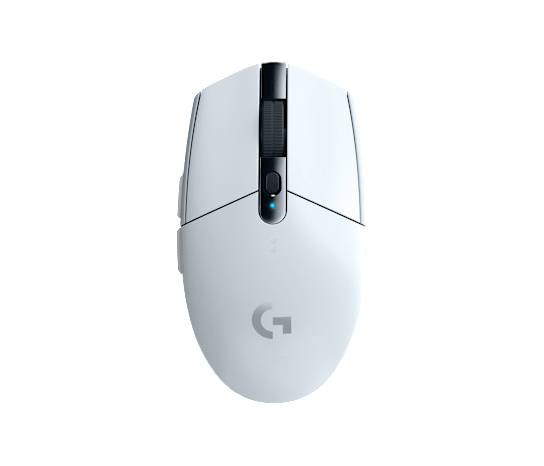
Logitech now sells two mice called G305. The original G305 LIGHTSPEED, on sale since 2018, takes one AA cell and talks to the computer only through its USB receiver. The G305 X SUPERLIGHT keeps the shape, charges over USB-C and adds Bluetooth.

This review works from Logitech's specifications, setup guide and power-mode help page, Energizer's battery datasheets and owner reports on iFixit. By Logitech's own figures, the G305 weighs more than the whole X SUPERLIGHT even with no battery inside it.
By Published Updated Research-based assessment

Affiliate disclosure: the price links on this page may earn us a commission at no extra cost to you. Retailers cannot pay for placement or influence the score. How we stay independent

Quick verdict

Logitech G305 LIGHTSPEED
Logitech G305 LIGHTSPEED specifications
—
Editorial ratingNot ratedNo section carries a score yet, so no overall rating is claimed.

One AA cell runs the G305 for close to three months of evening play at the full report rate, which keeps it the low-cost pick for a player who doesn't need a light mouse. The G305 X SUPERLIGHT is lighter and adds Bluetooth.

Strengths

  • Runs on any AA cell, with no built-in battery to wear out
  • Close to three months of evening play per AA cell, longer in Endurance mode
  • Receiver stows inside the mouse

Weaknesses

  • Heavier than the G305 X SUPERLIGHT even with the battery out, so a lithium cell can't close the gap
  • No Bluetooth or wired mode
  • Both side buttons on the left despite the symmetrical shape

Key specifications

Sensor
Logitech HERO, 200 to 12,000 DPI, 400 IPS, 40 G (Logitech)
Report rate
1,000 Hz in Performance mode, fixed 125 Hz in Endurance mode
Connection
LIGHTSPEED 2.4 GHz USB receiver only, no Bluetooth or wired mode
Battery
One AA cell, alkaline included, lithium supported
Battery rating
Up to 250 hours (Performance), up to 9 months (Endurance), Logitech ratings
Weight
75 g without battery, 99 g with alkaline AA (Logitech)
Size
4.6 x 2.5 x 1.5 in
Buttons
6 programmable, 1 onboard profile
Main button rating
10 million clicks
Wireless range
Up to 33 ft (Logitech)
Compatibility
Windows 7 or later, macOS 10.13 or later, ChromeOS (Logitech, at release)

Full specification sheet and comparisons →

How we reviewed it

Basis
Research-based: assessed from the manufacturer’s published specifications, documentation and the independent sources listed at the end. We have not tested this unit ourselves; any measurement quoted belongs to the cited source.
Method

Logitech's specification sheet, setup guide and power-mode help page give the rated weights, battery figures, receiver placement advice and button details used in every section. Energizer's datasheets give the cell weights for the weight arithmetic. The double-click reports are owners' posts on iFixit. Click latency and tracking are left unrated because no lab figure is available to cite.

Evidence

Logitech's documentation, Energizer's battery datasheets and owner reports on iFixit.

Limitations

No lab figure for click latency or sensor consistency is available to cite, so those stay unrated. Nobody has published a test of how long one cell lasts against Logitech's 250-hour rating, and the double-click reports are owner accounts, not a failure rate.

Where the 99 grams come from

5.0/10Mediocre
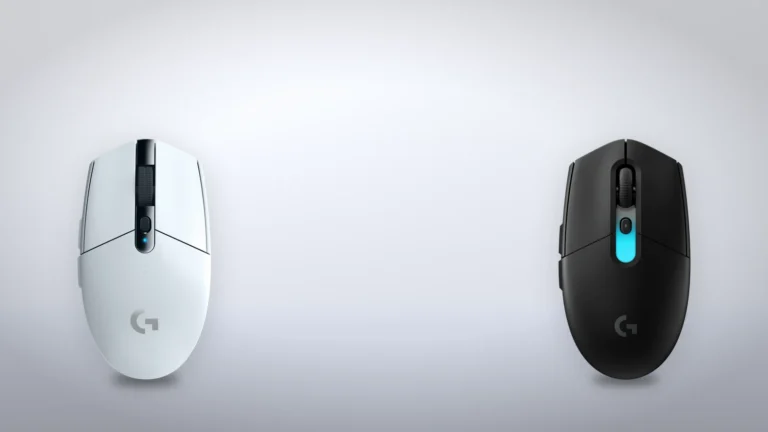
Top view of a white Logitech G305 LIGHTSPEED next to a black G305 X SUPERLIGHT, showing the shape the two mice share
Logitech renders of the G305 LIGHTSPEED (left) and the G305 X SUPERLIGHT (right), placed at similar size on a generated backdrop. Not to scale. Product illustration based on manufacturer imagery (Logitech renders)

Logitech's specification sheet lists the G305 at 75 grams without a battery and 99 grams with the alkaline AA that comes in the box. Logitech rates the G305 X SUPERLIGHT at 59 grams, so the old shell on its own is 16 grams heavier than the entire new mouse. The X SUPERLIGHT carries a built-in battery that Logitech rates at more than 130 hours a charge, about half the G305's rating per cell.

The setup guide suggests a lithium AA, sold separately, to make the mouse lighter. Energizer's datasheets give 15 grams for its Ultimate Lithium AA and 23 grams for its alkaline AA, and with a lithium cell inside, the G305 weighs about 90 grams. That recovers 9 of the 40 grams between the two G305s.

Sensor, report rate and one receiver

Unrated
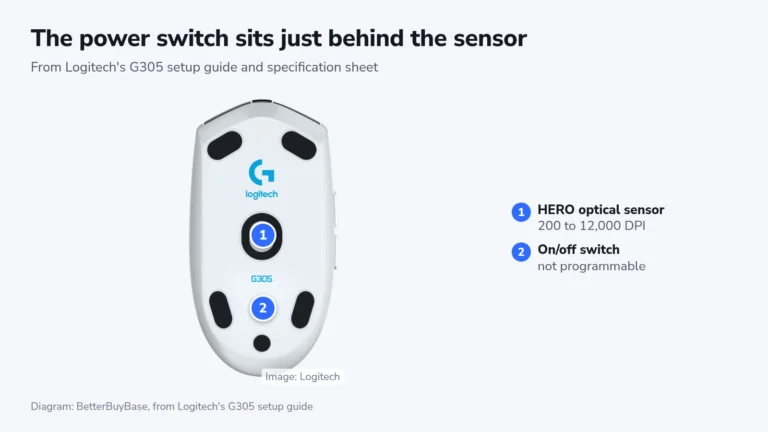
Underside of a white G305 with marker 1 on the optical sensor and marker 2 on the on/off switch just behind it
Logitech's underside render of the G305, with the sensor and the power switch numbered as Logitech's setup guide identifies them. Diagram: BetterBuyBase, from Logitech's G305 setup guide. Image: Logitech

Logitech rates the HERO sensor at 200 to 12,000 DPI, 400 IPS and 40 G, with a 1,000 Hz report rate in Performance mode. The X SUPERLIGHT lists 44,000 DPI. No lab figure for click latency or tracking is available to cite, so this section carries no score.

There is no Bluetooth and no cable mode, so the receiver needs a free USB-A port on every computer the mouse is used with. In a crowded wireless room, the setup guide asks for the receiver to be within about 8 inches of the mouse and at least 6.5 feet from the router. Logitech's US store lists only the mouse, the receiver and the documentation in the box, so an extension cable to bring the receiver closer is a separate purchase.

Months on one AA cell

8.2/10Excellent
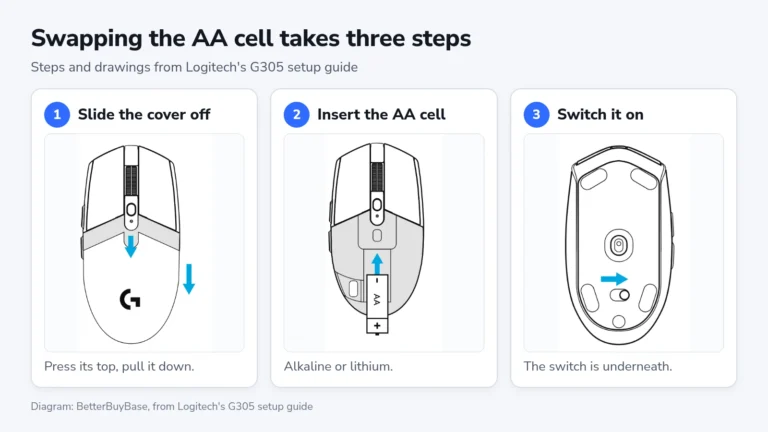
Three drawings of the G305 from Logitech's setup guide: sliding the rear cover down, inserting an AA cell, and sliding the power switch on the underside
Three drawings from Logitech's G305 setup guide: the cover slides off, the AA cell goes in, and the switch underneath turns the mouse on. Diagram: BetterBuyBase, drawings from Logitech's G305 setup guide

Logitech rates the G305 at up to 250 hours of non-stop play on one AA cell in Performance mode, which reports at 1,000 Hz. At three hours of gaming a day, that is about 83 days, close to three months per cell. Endurance mode, picked in G HUB, fixes the report rate at 125 Hz and stretches the rating to nine months of standard use, according to Logitech's help page on the power modes.

The cell lives under a cover that slides off the back of the shell, beside a slot that holds the receiver for travel. With a spare AA in a drawer, a dead mouse works again without waiting for a charge, and there is no built-in battery to lose capacity after a few years of charging. Razer's Basilisk V3 X HyperSpeed also runs on a single AA cell, and adds Bluetooth.

Shape, buttons and wear

6.4/10Fair
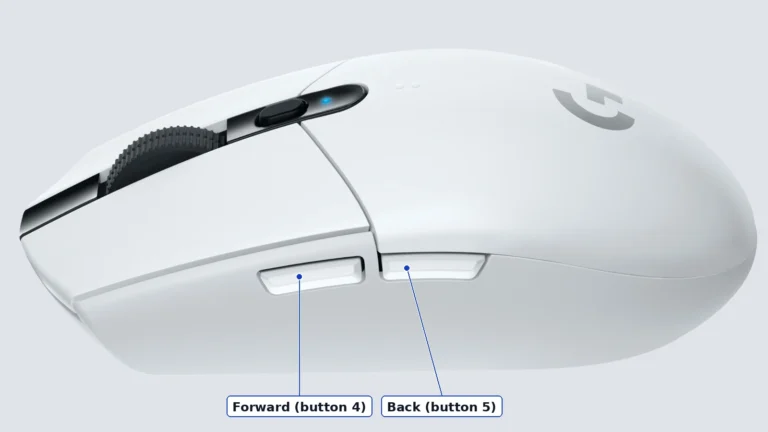
Left side of a white G305 LIGHTSPEED with the forward and back side buttons labeled
Left side of the G305, cropped from a Logitech render, with the two side buttons labeled as Logitech's setup guide numbers them. Logitech render, cropped

Logitech lists the G305 at 4.6 by 2.5 by 1.5 inches, a small egg shape that gives a large palm little to rest on. The body is symmetrical, but both side buttons are on the left, so it is a right-hander's mouse.

All six buttons can be remapped in G HUB and saved to one onboard profile.

Logitech rates the main buttons for 10 million clicks. On an iFixit Answers thread, several owners describe the left button double-clicking after about a year, and the accepted fix was opening the shell to solder in new switches.

Alternatives worth considering

Logitech G305 X SUPERLIGHT

The same shape at 59 grams, with a rechargeable battery, Bluetooth and a wired USB-C mode. It costs more, and Logitech's headline 8,000 Hz needs a receiver sold separately.

Keychron M3 Mini

Keychron M3 Mini

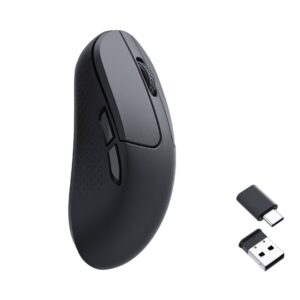
A lighter mouse with a rechargeable battery, at a higher price.

Where to buy

In-stock offers for this exact model, sorted by item price in USD. Shipping is not included unless a retailer supplies it. Not every retailer is listed. Prices last checked 48 minutes ago.

Retailer prices for the Logitech G305 LIGHTSPEED
RetailerItem priceShippingAvailabilityCheckedLink
Amazon.com$29.99 $49.99See retailerIn stockCheck price at Amazon.com

Prices and availability come from retailer feeds and change without notice; the retailer’s page is authoritative. We may earn a commission if you buy through these links.

Final verdict

Logitech G305 LIGHTSPEED
—Editorial ratingNot rated

Score breakdown

Scores run from 1.0 to 10.0: 9+ exceptional, 8–8.9 excellent, 7–7.9 good, 6–6.9 fair, 5–5.9 mediocre, below 5 poor. The overall score is the weighted average of the rated sections. Unrated sections do not count.

Pros

  • Runs on any AA cell, with no built-in battery to wear out
  • Close to three months of evening play per AA cell, longer in Endurance mode
  • Receiver stows inside the mouse

Cons

  • Heavier than the G305 X SUPERLIGHT even with the battery out, so a lithium cell can't close the gap
  • No Bluetooth or wired mode
  • Both side buttons on the left despite the symmetrical shape
  • Left button double-clicking after about a year in owner reports on iFixit

Conclusion

Eight years after launch, one AA cell still runs the G305 for months at the full report rate. Its weight lives in the shell as much as in the battery, so Logitech's lithium tip makes it lighter without bringing it near the X SUPERLIGHT. Logitech still sells it in five colors beside its replacement.

Andreea-Viviana Jitaru’s take

A mouse that runs on any AA cell from a kitchen drawer has nothing to charge before a trip and no battery to wear out, which is enough for me to keep one in a laptop bag despite the weight.

Best for
  • Players of strategy, MOBA and casual games who want wireless on a small budget
  • Anyone who keeps a spare mouse in a laptop bag or at a second desk, unused for weeks at a time
Consider an alternative if
  • You have large hands and use a palm grip
  • You mostly play fast shooters and want the lightest mouse you can find
  • Your setup includes a tablet or handheld that only connects over Bluetooth

Questions readers ask

Is the Logitech G305 the same mouse as the G304?

Logitech's US store lists a G304 in the G305's box contents, and G304 is the name the same mouse carries outside North America. Logitech's help page on power modes covers the G304SE and G305SE together. The serial number is printed inside the battery cage, where Logitech support can check it.

Does a lithium battery make the G305 lighter?

Logitech's setup guide suggests a lithium AA for exactly that, and by Energizer's datasheets a lithium AA weighs 8 grams less than an alkaline one. The mouse stays heavier than the G305 X SUPERLIGHT.

Does the G305 work over Bluetooth?

No. It connects only through its LIGHTSPEED USB receiver, which needs a USB-A port. The G305 X SUPERLIGHT adds Bluetooth and a wired USB-C mode.

About the reviewer

Editor

Andreea edits the written side of the site: the editor's note on each product page, the category buying guides and the blog. Her brief is to say what a specification table cannot: where a product is good, where it quietly compromises, and who should walk past it. A note that reads like marketing copy, or that praises a product without naming a drawback, does not go live.

This is a research-based assessment: the reviewer compiled it from published specifications, documentation and independent measurements rather than from testing the unit.

Profile and other work →

Sources

← Back to the blog