
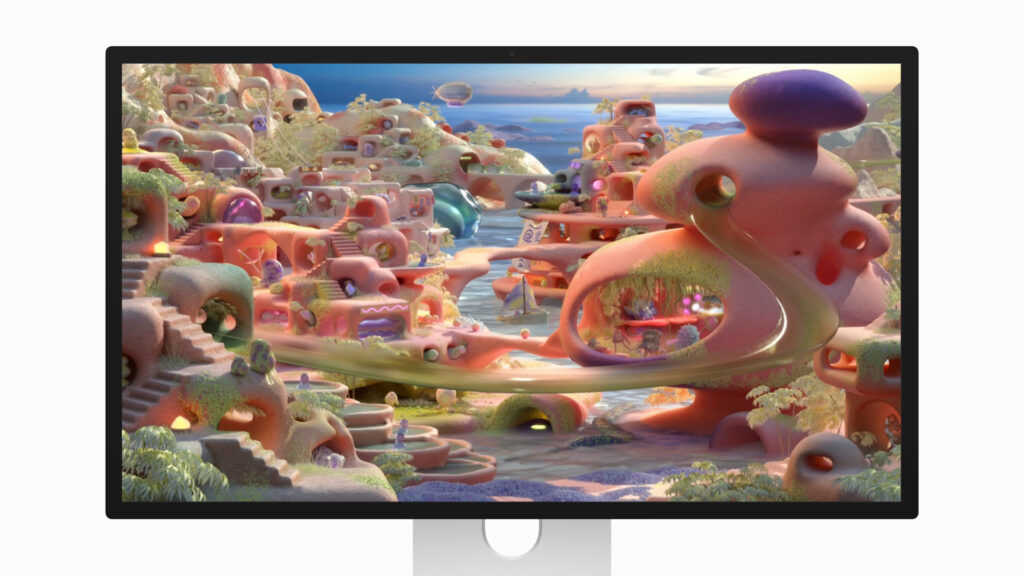
Apple Studio Display XDR: Specs, Features, Pros & Cons
Apple has used the XDR label for its high-brightness HDR screens for years, first on the Pro Display and then on the MacBook Pro, and this is the first Studio Display to carry it. The label means the same thing here: a mini-LED backlight divided into many zones, so a bright highlight and a dark background can sit in the same frame without the backlight washing one into the other.
That places it between two groups of buyers. For a MacBook Pro owner, it is the laptop's own screen character scaled up to desk size, at a 5K resolution that keeps macOS text as fine as on the built-in display. The camera, microphones and speakers are built in, so one cable turns the laptop into a desktop without a pile of accessories on the desk. For a color professional, it is a monitor whose calibrated modes for photo, video and print sit in the Mac's own display settings, where the rest of the color workflow already lives.
It is designed as one part of a Mac setup, and its extras make the most sense there. Buyers coming from a PC monitor should expect most of its settings to live in macOS.
The question for most buyers is whether they need the brightness at all. Someone on a Mac who writes, codes and browses gets most of the everyday benefit from the pixel density alone, which the original Studio Display already had, and pays for HDR headroom that ordinary work never touches. Grading video or checking HDR stills on a recent Mac is the work this backlight was built for, and the work most likely to use every zone of it.
Category strengths
Where the Apple Studio Display XDR beats the median
- A much higher contrast ratio ?1000000:1 vs 2500:1 (median)
- Much higher peak brightness ?2,000 nits vs 500 nits (median)
- Has local dimming ?
- Has built-in speakers ?
- Has webcam ?
- A higher pixel density ?218 ppi vs 163 ppi (median)
- Has microphone ?
- Faster USB-C charging ?140 W vs 118 W (median)
- A slightly higher refresh rate ?120 Hz vs 110 Hz (median)
Where the Apple Studio Display XDR trails the median
- No swivel adjustment ?
- No pivot adjustment ?
- No headphone output ?
- No picture-by-picture ?
- No KVM switch ?
How this VS Score was computed
Score 56: each known spec is measured against the median of IPS office monitors, 27 to 31 inches (8 products), then weighted; 50 means level with that median. In classes of six or more, a value beyond the class’s 10th–90th percentile range counts as that limit, so one extreme product cannot set the scale. 68% of the scoreable weight could be used; unknown values, features not applicable to this class and proxies (battery capacity where a rated life exists) add or remove nothing.
| Specification | This product | Cohort median | Score weight | Points moved |
|---|---|---|---|---|
| USB-C | Yes | 75% of the class have it | 0.5 | +25.0 |
| Resolution | 5K | 4K | 1.2 | +20.4 |
| USB hub | Yes | 75% of the class have it | 0.3 | +15.0 |
| Local dimming | Yes — held to half its range (fewer than six products in this class list it) | 33% of the class have it | 0.4 | +10.0 |
| Built-in speakers | Yes | 38% of the class have it | 0.2 | +10.0 |
| Webcam | Yes | 13% of the class have it | 0.2 | +10.0 |
| Swivel | No | 75% of the class have it | 0.2 | −9.6 |
| Pivot | No | 75% of the class have it | 0.2 | −9.6 |
| Headphone output | No | 57% of the class have it | 0.2 | −9.6 |
| KVM switch | No | 50% of the class have it | 0.2 | −9.6 |
| Ethernet | No | 38% of the class have it | 0.2 | −9.6 |
| Picture-by-picture | No | 86% of the class have it | 0.2 | −9.6 |
| HDR | HDR10 | DisplayHDR 400 | 0.5 | −8.5 |
| Pixel density | 218 | 163 | 0.5 | +8.5 |
| Peak brightness | 2,000 — capped at the class’s upper range (600) | 500 | 0.8 | +8.0 |
| Contrast ratio | 1,000,000 — capped at the class’s upper range (3,000) | 2,500 | 0.6 | +6.0 |
| Variable refresh rate | Yes | 75% of the class have it | 0.1 | +5.0 |
| Microphone | Yes | 14% of the class have it | 0.1 | +5.0 |
| Refresh rate | 120 | 110 | 0.6 | +3.0 |
| USB-C power delivery | 140 | 118 | 0.3 | +2.7 |
| Screen size | 27 | 27 | 1.2 | +0.0 |
| Panel type | IPS | IPS | 0.8 | +0.0 |
| Color depth | 10 | 10 | 0.3 | +0.0 |
| HDMI ports | 0 — capped at the class’s lower range (1) | 1 | 0.4 | +0.0 |
| DisplayPort inputs | 0 — capped at the class’s lower range (1) | 1 | 0.4 | +0.0 |
Not scored: Response time (unknown: not scored); DCI-P3 coverage (unknown: not scored); Local dimming zones (too few comparable peers (1, need 3)); Adaptive sync (unknown: not scored); Motion blur reduction (not scored for this class of product); Input lag (unknown: not scored); Height adjustment (standard for the class (88% have it)); Tilt (standard for the class (100% have it)).
Editor’s note
The Studio Display XDR is what people asked Apple for when the original Studio Display arrived: the same 27-inch 5K panel, but with the backlight and refresh rate to match its price. A mini-LED array with 2,304 local dimming zones drives 1000 nits sustained in SDR and 2000 nits peak in HDR, with a claimed 1,000,000:1 contrast ratio, and the panel now runs at 120 Hz with Adaptive Sync instead of a fixed 60.
At 5120×2880 across 27 inches you get 218 pixels per inch, which is the density macOS is designed around, so text renders the way it does on a MacBook Pro, without the scaling compromises of a 4K panel. The extras are unusually complete for a monitor: a 12MP Center Stage camera with Desk View, a six-speaker system with Spatial Audio, a three-microphone array, and a long list of built-in reference color modes for print, cinema and photography work.
The practical objections are real. It is expensive, and that is before you add the nano-texture glass or the VESA adapter, and the stand tilts and raises but does not swivel or rotate. Connectivity is Thunderbolt 5 and USB-C only. There is no HDMI and no DisplayPort, so a Windows desktop, a games console or anything without Thunderbolt is either awkward or incompatible. Macs on M1 through M3 silicon drive it at 60 Hz only.
Buy it if you work in color-critical photo, video or design on recent Apple silicon and the reference modes and 5K density save you real time. Skip it if you mix platforms, want a monitor that doubles for gaming or console use, or need a good large display. A 4K panel at a fifth of the price will serve most people better.
Specifications
Quality bars show where each figure sits between the lowest and highest of the 8 IPS office monitors, 27 to 31 inches this VS Score is measured against.
Picture
Gaming
Ergonomics & design
Connectivity
Features
Sources and verification
Where the specifications come from
- Official product pageapple.com
Verification
- First published
- Specifications last checked
- Sheet completeness
- 34 of 42 specifications verified; the rest show as Unknown and are never estimated or scored
- Page type
- Product specification page — Compiled from the manufacturer’s published specifications and the cited sources; this is not a hands-on test.
- Basis
- Research-based: specifications and editorial text were compiled from the documents listed here and the manufacturer’s published data. We have not tested this unit ourselves; where independent measurements are mentioned they belong to the linked publication.
Monitors with similar specs to the Apple Studio Display XDR

Ratings & reviews
No reviews yet. Be the first to share your experience.
The bottom line
The Apple Studio Display XDR earns a VS Score of 56, above the median of the 8 IPS office monitors, 27 to 31 inches it is measured against (a score of 50 is level with that median).
- Who it’s for
- A photo, video or design professional on recent Apple silicon who will use the reference modes and the Retina-class density every working day.
- Who should look elsewhere
- Windows desktops, consoles and mixed-platform desks. With Thunderbolt as the only way in, anything without it is awkward or shut out, and older Macs cap the refresh rate.
- The trade-off that matters
- It is built for one platform. Every strength pays back on a recent Mac, and on any other computer the same money buys a far more flexible screen.
- The main alternative
- LG 27GM950B-B: the same Retina-class density with a mini-LED backlight, ordinary PC inputs and gaming speed, for a desk that is not Mac-only.
The VS Score is calculated from the weighted specifications above, each measured against the median of comparable IPS office monitors, 27 to 31 inches — a shortlisting guide, not a substitute for your own priorities. See how we score.





