Dell SE2726HG: Specs, Price, Pros & Cons
Dell prints "HDMI 2.1" on the SE2726HG's spec sheet and then adds "(TMDS)" in brackets, which is the whole monitor in one line. The ports use the older signalling scheme, so they carry 1920 x 1080 at 240 Hz and nothing beyond it. That is not a defect – it is exactly what a panel of this resolution needs – but the 2.1 label buys you nothing you would not have had from an HDMI 2.0 socket, and it is worth knowing before the number does any persuading.
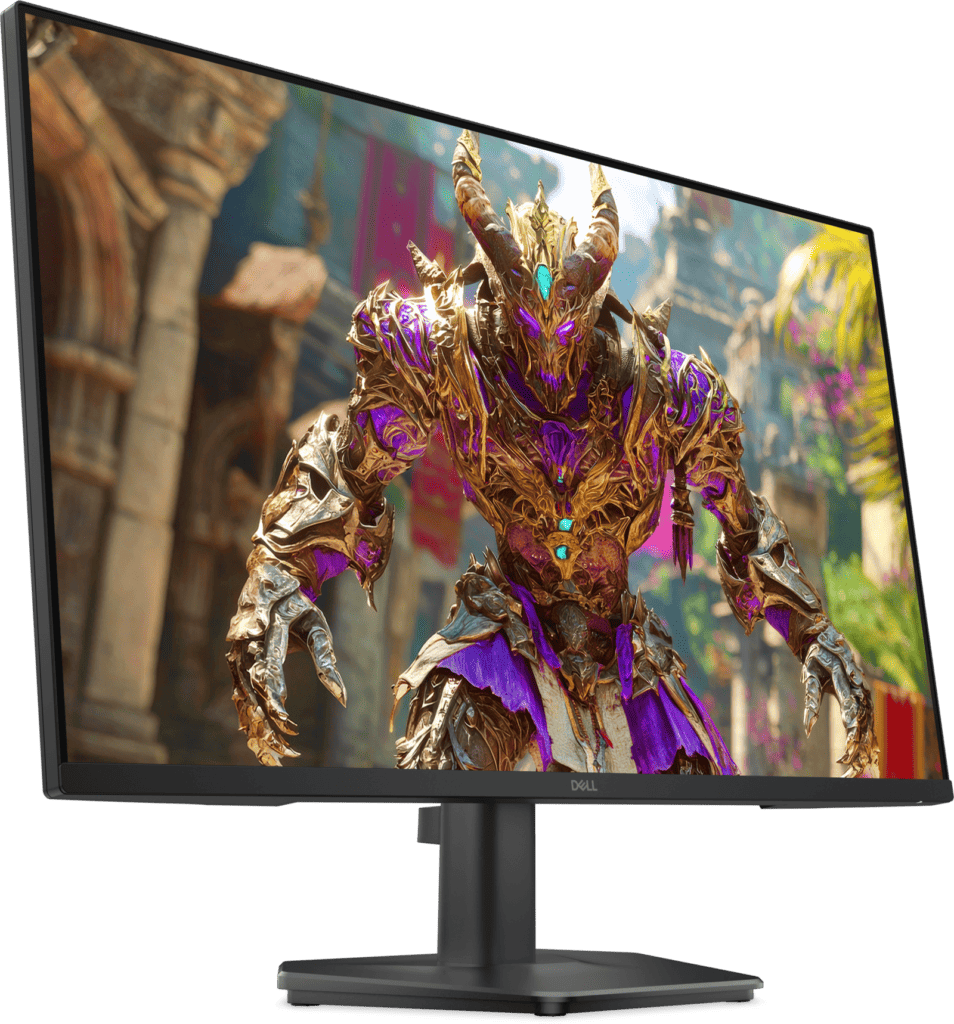
What you are actually buying is a 27-inch IPS panel running 1080p at 240 Hz for roughly what most brands charge for a 27-inch office screen. Dell has spent the budget on refresh rate and response and taken it out of everything else. The stand tilts and does nothing else. There is no USB hub, no speakers, and the colour coverage stops at sRGB. A 3.5 mm headphone jack is the only extra port, and it earns its place because the monitor has nowhere else to send audio.
The size decision is the one to think hardest about. Twenty-seven inches is a lot of surface for this resolution, and text and interface elements will look softer than they do on a 24-inch screen showing the same pixels. Competitive players sitting close often prefer that trade – a larger target area, higher frame rates, no scaling – while anyone who spends a working day in documents will notice the softness within minutes.
Dell also ships "Smart HDR" picture modes. The panel accepts an HDR signal, but there is no VESA DisplayHDR certification behind it, and the brightness and contrast figures in the table below explain why. Treat it as a tone-mapping preset rather than a feature you are paying for.
Category strengths
Where the Dell SE2726HG beats the average
- A much faster response time ?0.5 ms vs 1 ms (avg)
- A higher refresh rate ?240 Hz vs 180 Hz (avg)
Where the Dell SE2726HG trails the average
- No height adjustment ?
- Lower peak brightness ?300 nits vs 400 nits (avg)
- No swivel adjustment ?
- A lower pixel density ?82 ppi vs 109 ppi (avg)
- A lower color depth ?8 bit vs 10 bit (avg)
- No USB hub ?
- No pivot adjustment ?
How this VS Score was computed
Score 40: each known spec is measured against the median of IPS gaming monitors, 27 to 31 inches (32 products, medians winsorised to the 10th–90th percentile), then weighted. 69% of the scoreable weight could be used; unknown values, features not applicable to this class and proxies (battery capacity where a rated life exists) add or remove nothing.
| Specification | This product | Cohort median | Score weight | Points moved |
|---|---|---|---|---|
| Resolution | 0 | 1 | 1.2 | −48.0 |
| Response time | 0.5 | 1 | 0.8 | +40.0 |
| Adaptive sync | 1 | 2 | 0.6 | −24.0 |
| USB-C | 0 | 0 | 0.5 | −24.0 |
| Refresh rate | 240 | 180 | 1.2 | +20.4 |
| Local dimming | 0 | 0 | 0.4 | −19.2 |
| Height adjustment | 0 | 1 | 0.4 | −19.2 |
| Headphone output | 1 | 1 | 0.2 | +10.0 |
| Peak brightness | 300 | 400 | 0.8 | −9.6 |
| Swivel | 0 | 1 | 0.2 | −9.6 |
| Built-in speakers | 0 | 0 | 0.2 | −9.6 |
| Pixel density | 82 | 109 | 0.5 | −6.0 |
| Color depth | 8 | 10 | 0.3 | −3.0 |
| USB hub | 0 | 1 | 0.05 | −2.2 |
| Pivot | 0 | 1 | 0.02 | −1.0 |
| Screen size | 27 | 27 | 1.2 | +0.0 |
| Panel type | 2 | 2 | 0.8 | +0.0 |
| Contrast ratio | 1,000 | 1,000 | 0.6 | +0.0 |
| HDMI ports | 2 | 2 | 0.4 | +0.0 |
| DisplayPort inputs | 1 | 1 | 0.4 | +0.0 |
Not scored: DCI-P3 coverage (unknown: not scored); HDR (unknown: not scored); Local dimming zones (unknown: not scored); Variable refresh rate (standard for the class (100% have it)); Motion blur reduction (unknown: not scored); Input lag (unknown: not scored); Tilt (standard for the class (100% have it)); USB-C power delivery (unknown: not scored); KVM switch (not applicable: only 13% of this class have it); Webcam (not applicable: only 4% of this class have it); Microphone (not applicable: only 4% of this class have it); Ethernet (not applicable: only 13% of this class have it); Picture-by-picture (unknown: not scored).
Editor’s note
The question worth asking before buying this is whether you are a competitive player or someone who mostly wants a large second screen, because the answer flips the verdict completely.
For the first group it is close to the cheapest honest route into a fast IPS panel. The response figure Dell quotes is its Extreme overdrive mode, and every monitor's fastest mode carries some overshoot cost, so read it as a ceiling rather than the setting you will live on. The panel type matters more than the number anyway: at this price high refresh usually arrives on a TN panel with poor viewing angles, and Dell has not made you take that deal.
For the second group the pixel density is the problem, and it is not a small one. At 82 ppi you are looking at roughly the sharpness of a budget office monitor from a decade ago. Windows will look coarse, small text will look ragged, and no setting repairs it. If the screen will spend more hours on spreadsheets than on shooters, a sharper panel at a lower refresh rate is the better buy and rarely costs much more.
The rest of the sheet is priced honestly rather than generously. Peak brightness of 300 nits and a 1000:1 native contrast are ordinary numbers for this panel type – fine in a normally lit room, weak against a sunlit window, unremarkable in a dark one. Dell's accessory list tells the same story: a power cable and one video cable, and a stand whose only adjustment is tilt, so budget for an arm if your desk sits high.
What I would not do is buy this expecting it to double as a colour-accurate work display. It covers sRGB properly and stops there. Within its brief – fast, large, cheap – it is a sensible piece of hardware, and Dell has been unusually clear about what that brief is.
Specifications
Quality bars are generated automatically against 104 other monitors.
Picture
Gaming
Ergonomics & design
Connectivity
Features
Sources and verification
Where the specifications come from
- Official product pagedell.com
- Datasheet or manualdl.dell.com
Verification
- First published
- Specifications last checked
- Sheet completeness
- 34 of 42 specifications verified; the rest show as Unknown and are never estimated or scored
- Page type
- Product specification page — Compiled from the manufacturer’s published specifications and the cited sources; this is not a hands-on test.
- Basis
- Research-based: specifications and editorial text were compiled from the documents listed here and the manufacturer’s published data. We have not tested this unit ourselves; where independent measurements are mentioned they belong to the linked publication.
Where to buy
Prices and availability may change. Check the retailer before buying. We may earn a commission on purchases.
Price history
Monitors with similar specs to the Dell SE2726HG
Ratings & reviews
No reviews yet. Be the first to share your experience.
The bottom line
The Dell SE2726HG earns a VS Score of 40, trailing most of the 105 monitors we compare here, at least on the spec sheet.
- Who it’s for
- Someone who plays fast multiplayer games on a tight budget and wants the biggest high-refresh IPS panel they can get without moving up a resolution tier – a player who sits close, cares about motion, and is not going to notice how a spreadsheet looks.
- Who should look elsewhere
- Anyone whose monitor spends most of its life on text, code or photo work. The pixels are spread too thin at this size for comfortable reading, and there is no height adjustment, no USB hub and no colour coverage beyond sRGB to soften it. Look at a sharper panel instead.
- The trade-off that matters
- You buy refresh rate with screen sharpness. Dell delivered a large fast panel by keeping the resolution low, and that single decision follows you into every non-gaming hour in front of it.
- The main alternative
- AOC Q27G3XMN, which we also cover – a sharper panel with genuine local dimming, for anyone who would rather have image quality than the last slice of refresh rate.
The VS Score is calculated from the weighted specifications above, compared with every other monitor we track — a shortlisting guide, not a substitute for your own priorities. See how we score.