
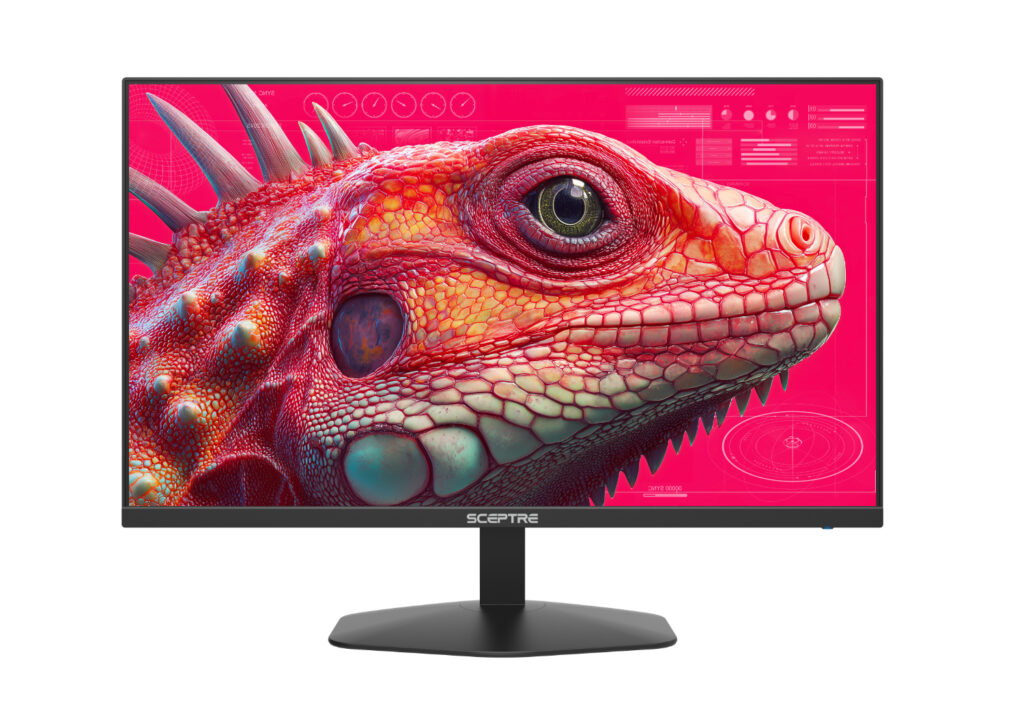
Sceptre E275B-FW180T: Specs, Price, Pros & Cons
Strip away the Amazon title, with its exclamation mark and its claim to be a 2027 model, and this is the Sceptre E275B-FW180T: the flat version of a budget high-refresh monitor we already cover in curved form as the Sceptre C275B-FW180T. Sceptre itself files it under mid-2026. The two share almost everything that matters, so the first decision a buyer makes is about whether they want a curve at all on a screen this size.
Sceptre's whole business is making big screens cheap, and the formula here is familiar. It pairs a VA panel, which trades some viewing-angle consistency for much deeper blacks than a typical IPS screen, with a fast refresh rate and a generous set of inputs. Two HDMI and two DisplayPort connections are unusual at this level, and they let a PC, a console and a laptop stay plugged in without swapping cables behind the stand.
What it gives up is sharpness and adjustability. Full HD stretched over a large panel makes text visibly softer than on a smaller screen or a 1440p model, which matters more for spreadsheets than for games. The stand only tilts, so getting the height right usually means a monitor arm or a stack of books, and the built-in speakers are the kind that exist to make sound, not to replace headphones.
It makes most sense for a first gaming setup, a console that wants a desk monitor, or a dark-room movie screen where the VA contrast does its best work. Anyone who spends the day in documents, or who games in a bright room where blacks matter less, will get more from a sharper panel at a similar price.
Category strengths
Where the Sceptre E275B-FW180T beats the median
- More DisplayPort inputs ?2 vs 1 (median)
- Has built-in speakers ?
- A higher contrast ratio ?4000:1 vs 3500:1 (median)
Where the Sceptre E275B-FW180T trails the median
- A much slower response time ?5 ms vs 1 ms (median)
- A lower pixel density ?82 ppi vs 93 ppi (median)
How this VS Score was computed
Score 37: each known spec is measured against the median of VA gaming monitors, 27 to 31 inches (11 products), then weighted; 50 means level with that median. In classes of six or more, a value beyond the class’s 10th–90th percentile range counts as that limit, so one extreme product cannot set the scale. 60% of the scoreable weight could be used; unknown values, features not applicable to this class and proxies (battery capacity where a rated life exists) add or remove nothing.
| Specification | This product | Cohort median | Score weight | Points moved |
|---|---|---|---|---|
| Resolution | 1080p | 1440p | 1.2 | −57.6 |
| Response time | 5 | 1 | 0.8 | −32.0 |
| DisplayPort inputs | 2 | 1 | 0.4 | +20.0 |
| Local dimming | No | 29% of the class have it | 0.4 | −19.2 |
| Height adjustment | No | 45% of the class have it | 0.4 | −19.2 |
| Built-in speakers | Yes | 27% of the class have it | 0.2 | +10.0 |
| Swivel | No | 36% of the class have it | 0.2 | −9.6 |
| Picture-by-picture | No | 29% of the class have it | 0.2 | −9.6 |
| Contrast ratio | 4,000 | 3,500 | 0.6 | +4.2 |
| Pixel density | 82 | 93 | 0.5 | −3.0 |
| Pivot | No | 36% of the class have it | 0.02 | −1.0 |
| Screen size | 27 | 27 | 1.2 | +0.0 |
| Panel type | VA | VA | 0.8 | +0.0 |
| Refresh rate | 180 | 180 | 1.2 | +0.0 |
| Peak brightness | 300 | 300 | 0.8 | +0.0 |
| HDMI ports | 2 | 2 | 0.4 | +0.0 |
Not scored: Color depth (unknown: not scored); DCI-P3 coverage (unknown: not scored); HDR (unknown: not scored); Local dimming zones (unknown: not scored); Adaptive sync (unknown: not scored); Variable refresh rate (standard for the class (100% have it)); Motion blur reduction (standard for the class (80% have it)); Input lag (unknown: not scored); Tilt (standard for the class (100% have it)); USB-C (not applicable: only 0% of this class have it); USB-C power delivery (unknown: not scored); USB hub (not applicable: only 20% of this class have it); Headphone output (standard for the class (91% have it)); KVM switch (not applicable: only 0% of this class have it); Webcam (not applicable: only 0% of this class have it); Microphone (not applicable: only 0% of this class have it); Ethernet (not applicable: only 0% of this class have it).
Editor’s note
I think this monitor is best understood as a contrast buy. Sceptre rates the VA panel at 4,000:1 static contrast, several times what budget IPS screens usually manage, and in a dim room that is the difference between dark scenes that look black and ones that look gray. If you mostly play or watch in the evening, that matters more than any figure about speed.
Speed is where the sheet needs reading carefully. The 180 Hz refresh rate is real and a clear step up from 144 Hz and 165 Hz screens in smoothness. The 1 ms response figure is not what it seems: Sceptre only reaches it with Blur Reduction switched on, which usually dims the picture and does not combine well with variable refresh, and its own gray-to-gray number with overdrive is 5 ms. VA panels are also prone to some dark-level smearing in fast motion, so competitive players who care about that should favor a fast IPS.
Sceptre also describes its variable refresh only as Adaptive Sync, without naming FreeSync or G-Sync certification. It should work with modern graphics cards and consoles, but there is no certification behind it.
The practical annoyances are the ones you would expect at this price: a tilt-only stand, a slightly soft image at 82 ppi, and a pair of 2 W speakers that are fine for notifications and little else. Sceptre's one-year warranty is also shorter than the three years some rivals offer.
Against the curved C275B-FW180T, I would pick this flat one for a desk shared with work or a console, and the curve only if the screen sits close and is used mainly for games. If the budget can stretch, a sharper IPS monitor with more pixels is the better long-term screen.
Specifications
Quality bars show where each figure sits between the lowest and highest of the 11 VA gaming monitors, 27 to 31 inches this VS Score is measured against.
Picture
Gaming
Ergonomics & design
Connectivity
Features
Sources and verification
Where the specifications come from
- Official product pagesceptre.com
- Retailer listing (cross-check)amazon.com
Verification
- First published
- Specifications last checked
- Sheet completeness
- 33 of 42 specifications verified; the rest show as Unknown and are never estimated or scored
- Page type
- Product specification page — Compiled from the manufacturer’s published specifications and the cited sources; this is not a hands-on test.
- Basis
- Research-based: specifications and editorial text were compiled from the documents listed here and the manufacturer’s published data. We have not tested this unit ourselves; where independent measurements are mentioned they belong to the linked publication.
Where to buy
Prices and availability may change. Check the retailer before buying. We may earn a commission on purchases.
Price history
Monitors with similar specs to the Sceptre E275B-FW180T
Ratings & reviews
No reviews yet. Be the first to share your experience.
The bottom line
The Sceptre E275B-FW180T earns a VS Score of 37, below the median of the 11 VA gaming monitors, 27 to 31 inches it is measured against (a score of 50 is level with that median).
- Who it’s for
- A first gaming desk or a console setup on a tight budget, especially in a dim room where the VA panel's deep blacks do the most good and several devices need their own input.
- Who should look elsewhere
- Anyone reading documents or spreadsheets all day, competitive players sensitive to motion smearing, and buyers who need a height-adjustable stand without adding an arm.
- The trade-off that matters
- It gives you contrast and speed for very little money by settling for Full HD on a large panel, so everything that is not a game or a film looks noticeably softer than on a higher-resolution screen.
- The main alternative
- Sceptre C275B-FW180T: the curved twin of this monitor, worth choosing only if you sit close and use it mostly for games.
The VS Score is calculated from the weighted specifications above, each measured against the median of comparable VA gaming monitors, 27 to 31 inches — a shortlisting guide, not a substitute for your own priorities. See how we score.




